
MNN 15.6-inch FHD Monitor
4.3Editor score
Full HD IPS display
Single-cable USB-C connection
Portable smart-cover stand
Multiple display orientations
A portable monitor can turn a Surface Pro into a more capable workstation by adding screen space for documents, messages, calls, and reference material. The right model should also be easy to carry, connect reliably, and remain comfortable to view in changing environments rather than simply offering a large panel.
This guide compares ten portable monitors for Surface Pro users by examining resolution, panel technology, refresh rate, color coverage, port selection, power delivery, viewing angle, weight, stands, and mounting options. It includes budget models, premium high-resolution screens, touch-enabled displays, and larger screens for users who prioritize different combinations of portability, productivity, and entertainment.
Each review explains the strongest reasons to consider the monitor alongside its practical limitations. The Top Picks highlight the most balanced, affordable, and premium choices, while the comparison table provides a quick view of the entire field. Product details and availability can change, so readers should confirm current specifications, accessories, and pricing before purchasing.
4.3Editor score

4.8Editor score

4.8Editor score
As an Amazon Associate we earn from qualifying purchases.
The comparison below covers every monitor in the guide, emphasizing the factors most likely to affect daily use with a Surface Pro: screen quality, connection method, refresh rate, portability, and physical setup options.






The cocopar 15.6-inch FHD combines a familiar Full HD canvas with a slim, travel-conscious design and a strong 4.8 customer rating. Its 1920 by 1080 IPS-style presentation is well suited to the Surface Pro because it offers enough room for side-by-side documents, browser windows, chat panels, and remote-meeting controls without asking the user to wrestle with a dense 4K workspace.
We may earn a commission when you buy through this link, at no additional cost to you.
The standout feature is its connection arrangement. Two full-featured USB-C ports and one HDMI port give users more ways to attach the screen, while a single USB-C cable can carry both display data and power when the Surface Pro exposes a compatible Thunderbolt or DisplayPort Alt Mode port. Power pass-through and reverse charging are useful because they can help keep a compatible laptop powered while the portable display handles the visual workload.
The visual specification is balanced rather than extravagant. A 60Hz refresh rate suits office tasks and general entertainment, and 85% sRGB coverage provides more color range than a basic office panel without approaching the color performance of the best models in the list. HDR, low-blue-light features, and a stated 178-degree viewing angle add flexibility for different working positions, although the display is not aimed at demanding color-critical work.
Its physical design is genuinely portable at a stated 1.5 pounds without the magnetic cover, and the cover protects the panel while folding into a stand. VESA holes are another meaningful detail for anyone who wants to use an arm rather than depend on the included cover. It is therefore a strong recommendation for travelers, students, hybrid workers, and Surface Pro owners seeking a dependable second screen without stepping into premium specifications.
A compatible USB-C connection can carry power and video through one cable, reducing desk clutter during meetings or travel. Users should confirm that the chosen Surface Pro port supports Thunderbolt 3 or 4 or USB-C DisplayPort Alt Mode before relying on that arrangement.
The slim magnetic cover offers storage protection and doubles as a practical stand, while the VESA mounting pattern opens the door to an external arm or tabletop mount. That makes the monitor easy to adapt to different desks rather than locking it into one viewing position.
We may earn a commission when you buy through this link, at no additional cost to you.
The MNN 15.6-inch FHD is a value-oriented portable monitor whose 4.3 rating reflects its role as an accessible extension screen rather than a premium display. It gives Surface Pro users a conventional 1920 by 1080 IPS panel at 60Hz, a format that is easy to scale and suitable for productivity, media viewing, presentations, and casual gaming.
We may earn a commission when you buy through this link, at no additional cost to you.
Its most important feature is the inclusion of two full-featured Type-C ports and the ability to use one USB-C cable for both power and display transmission on compatible devices. The listed compatibility includes laptops, PCs, phones, MacBooks, and several game consoles. As with the other USB-C-focused models in this guide, the Surface Pro must support Thunderbolt 3 or USB 3.1 Type-C DisplayPort Alt Mode for the full one-cable experience.
The monitor also supports copy, extended, second-screen, and portrait modes, which allows users to tailor the display to a meeting, editing layout, or vertical document. Its glossy IPS panel is described as offering a 178-degree viewing angle, HDR support, and low-blue-light and flicker-reduction features. The scratch-resistant PU leather smart cover protects the display and provides a stand for landscape or portrait use.
Although the product does not offer the stated brightness, color-gamut, or refresh-rate figures found on some premium competitors, it covers the essential needs of a portable monitor well. It is a practical pick for students, travelers, office workers, and casual users who want to expand a Surface Pro display at a lower entry point without giving up USB-C convenience or a protective folding stand.
Copy, extension, and portrait modes make it possible to present, reference information, or arrange long documents without changing the device. Windows users can generally set these modes through display settings, while macOS also provides its own arrangement controls.
The PU leather smart cover does more than protect the panel; it folds into a support for both landscape and portrait use. That dual role is particularly helpful when a user wants to carry one screen to several workspaces without packing a separate stand.
We may earn a commission when you buy through this link, at no additional cost to you.
The cocopar 16-inch 2.5K is the most advanced productivity-focused display in this guide, combining a 2560 by 1600 resolution with a 144Hz refresh rate. Its 4.8 rating reflects a feature set aimed at professionals, creators, and gamers who want more usable workspace than a standard 15.6-inch Full HD portable monitor can provide.
We may earn a commission when you buy through this link, at no additional cost to you.
The 16:10 aspect ratio creates a roomier canvas for text, timelines, spreadsheets, and side-by-side application windows. The supplied 110% sRGB coverage, 470-nit brightness, HDR support, and 1200:1 contrast ratio also make it more compelling for media and creative work. Motion appears fluid at 144Hz through USB-C, while the product information lists up to 120Hz over HDMI.
Despite its larger panel, the monitor weighs a stated 1.5 pounds and measures only 0.2 inches at its slimmest point. A metal chassis, an integrated adjustable stand with a stated 0- to 90-degree range, dual VESA holes, and built-in 1.5-watt speakers give it a desktop-like sense of flexibility. The screen can therefore move between a travel case, a compact temporary desk, and a more permanent multi-screen arrangement.
This is the strongest choice for a Surface Pro user who works with detailed documents, edits video, values high refresh rates, or wants a noticeably sharper canvas. The trade-off is size: a 16-inch portable monitor occupies more room in a bag than the 15.6-inch models, and its advanced specifications make it less likely to appeal to buyers whose main goal is the lowest possible cost.
A 2560 by 1600 panel provides materially more room for small interface text, application toolbars, and image previews. The 16:10 format also offers a taller desktop than the common 16:9 shape, which can reduce the need to keep secondary windows collapsed.
The adjustable metal kickstand provides a more deliberate range of viewing positions than a simple folding cover, and the VESA pattern adds another mounting route. A protective fabric sleeve is included for transport, helping protect the larger panel between uses.
We may earn a commission when you buy through this link, at no additional cost to you.
The Upperizon 15.6-inch FHD combines a strong 4.8 rating with one of the most useful accessory bundles in the category. Its Full HD IPS panel, HDR support, 60Hz refresh rate, and stated 87% sRGB coverage make it a conventional but capable extension display for a Surface Pro.
We may earn a commission when you buy through this link, at no additional cost to you.
A stated brightness of 300 nits makes the screen more practical for bright rooms, airports, and cafes than a very dim portable panel. The 1200:1 contrast ratio, 178-degree viewing angle, FreeSync support, and low-blue-light features broaden its appeal for general office work and media viewing. It is not a color-grading monitor, but it offers a clearer image than the most basic portable alternatives.
The physical package is particularly well considered. It includes an HDMI cable, USB-C-to-USB-C display cable, USB-C-to-USB-A power cable, power adapter, and sleeve case. Two full-featured USB-C ports and one HDMI port support different device arrangements, and the USB-C path can deliver display, power, and pass-through charging when the connected device supports the required protocol.
The monitor weighs 1.54 pounds and has an aluminum body that is easy to carry between home, office, and travel. It supports duplicate and extend modes, works in landscape or portrait orientation, and includes VESA mounting holes. It is a particularly good recommendation for users who want a complete, ready-to-use kit rather than a bare panel that requires extra cable shopping.
The supplied HDMI, USB-C display, USB-A power, and adapter cables cover several common connection paths. Users can unpack the monitor and begin configuring it with a Surface Pro without first assembling a collection of additional accessories.
The stated 300-nit brightness and wide viewing angle support comfortable use in locations where lighting changes frequently. HDR support adds visual impact for compatible content, although the 87% sRGB coverage remains more appropriate for general productivity than professional color work.
We may earn a commission when you buy through this link, at no additional cost to you.
The InnoView 15.6-inch FHD is a practical portable display for users who value simple setup, a protective cover, and flexible screen positioning. Its 4.4 rating places it among the well-regarded options in the group, while the 1920 by 1080 IPS-style panel gives a Surface Pro familiar Full HD scaling.
We may earn a commission when you buy through this link, at no additional cost to you.
Two full-function Type-C ports and an HDMI port allow the screen to work with a wide range of devices. On compatible systems, one USB-C cable handles the display connection and power, with reverse charging available for the attached device. The product information specifically notes that Thunderbolt 3 or 4, or USB 3.1 Type-C DisplayPort Alt Mode, is required for that one-cable route.
Its most distinctive physical feature is the scratch-resistant PU leather smart cover. Two grooves adjust the angle and keep the display stable, while the same cover protects it during transport. The monitor can also rotate to portrait orientation, which helps with long documents, messaging, and vertically oriented creative workflows.
One caveat is worth noting: when a device lacks the necessary USB-C display support, the listed fallback requires an HDMI connection plus a power cable, and the power cable is not included in the package. Users should also recognize that power output varies among source devices, which can cause flicker or restarts when the monitor is not powered independently. With that in mind, it remains a useful choice for mobile productivity and flexible cover-based positioning.
The grooves in the smart cover let a user alter the screen angle without adding a separate desktop stand. Once work is finished, the cover folds over the display, reducing the amount of space the monitor occupies in a bag.
The streamlined USB-C path works best when the Surface Pro supplies both display and power over the selected cable. If it does not, the HDMI fallback is available, but users should confirm that a suitable power cable is already on hand.
We may earn a commission when you buy through this link, at no additional cost to you.
The cocopar 15.6-inch Touchscreen stands apart from the other models because it adds native touch input to the familiar Full HD portable format. With a 4.8 rating, it is a strong choice for Surface Pro users who want to draw, navigate, pinch, zoom, or drag items directly on the second display.
We may earn a commission when you buy through this link, at no additional cost to you.
The touch layer supports gestures across Windows and macOS, including single-finger movement, pinch-to-zoom, and drag-and-drop operations. A high-hardness tempered glass surface offers a more solid feel and is easier to wipe clean than a conventional plastic-film touchscreen. One compatible USB-C connection can handle power, video, and touch signals, provided the computer supports Thunderbolt 3, 4, or 5 or USB-C DisplayPort Alt Mode.
Image quality is handled by a 1920 by 1080 A-grade IPS panel with 90% sRGB coverage, 270-nit brightness, and 178-degree viewing angles. These specifications are suitable for office tasks, media, and general creative work. The display can also serve as a non-touch gaming or office screen through HDMI or USB-C when touch is unnecessary.
The metal frame and adjustable integrated kickstand make the unit more permanent-looking than a cover-based design, and VESA mounting holes add another setup option. The package includes a protective sleeve, power adapter, and HDMI and USB-C cables. The main drawback is the obvious one: touch capability increases the complexity and cost of the package for a task that many users will not perform every day.
A touchscreen can make annotation tools, diagram apps, and interface navigation feel more direct than mouse-driven operation. It is particularly attractive for users who already work with a Surface Pro's native touch capabilities and want the same interaction style on the external screen.
The metal frame, integrated adjustable kickstand, and VESA holes create several placement choices. A sleeve is included for storage, while the stand allows the monitor to remain assembled on a desk between work sessions.
We may earn a commission when you buy through this link, at no additional cost to you.
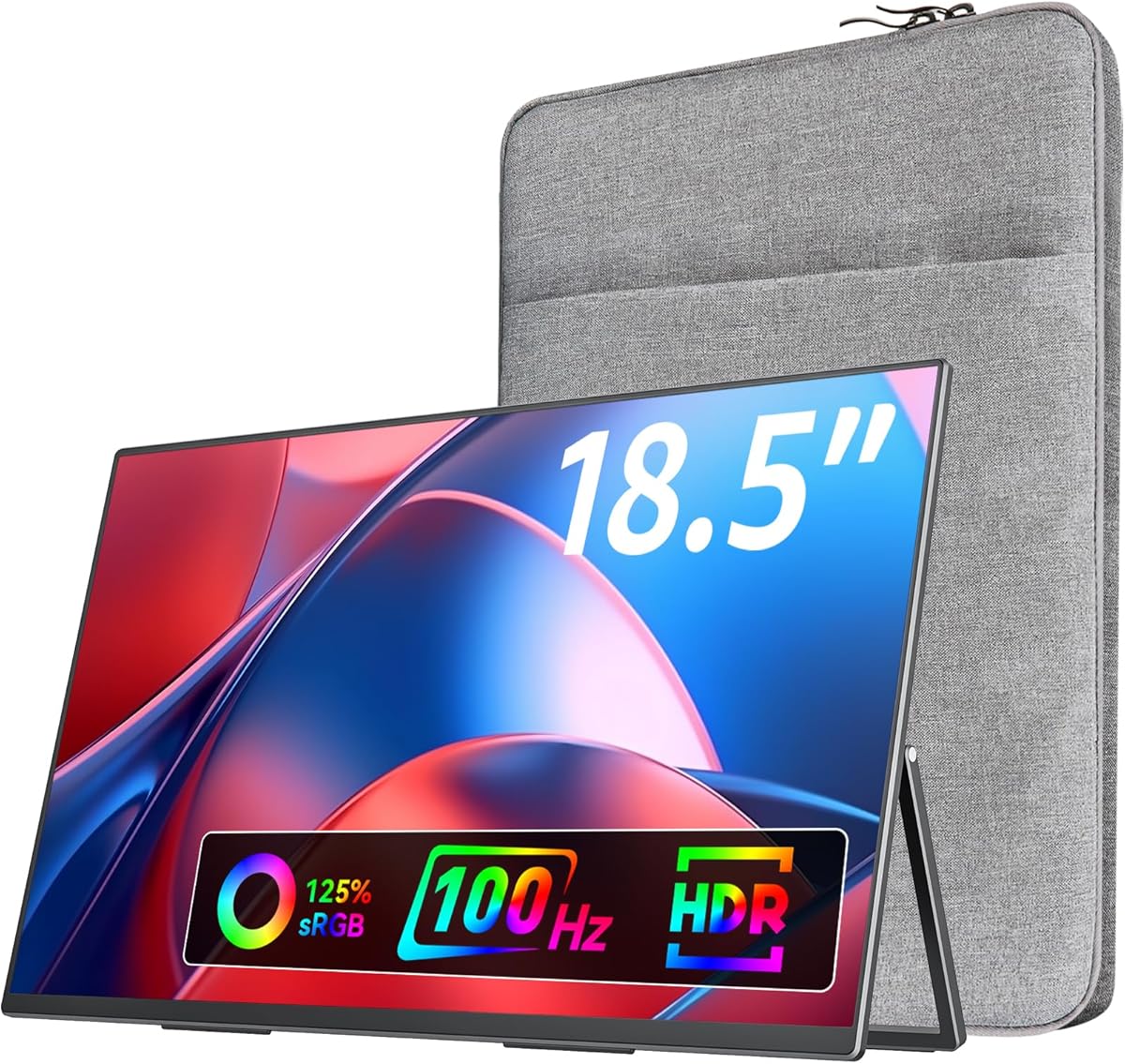
The VisionOwl 18.5-inch FHD maximizes usable screen area, making it attractive for Surface Pro owners who regularly work with multiple open windows or want a large presentation and media display. Its 4.8 rating reflects a generous 18.5-inch panel, smooth 100Hz refresh rate, and strong color specification.
We may earn a commission when you buy through this link, at no additional cost to you.
The IPS panel supports 125% sRGB coverage, 8-bit color depth, and 16.7 million colors. That makes it more colorful than many 15.6-inch Full HD alternatives and suitable for general creative work, browsing, video, and casual gaming. Its 100Hz rate provides noticeably smoother motion than the standard 60Hz panels used by most portable monitors in the guide.
Port selection includes two USB-C ports and an upgraded HDMI port. Compatible Thunderbolt 3, 4, or 5 and full-featured USB-C devices can use one USB-C-to-USB-C cable for a straightforward connection. Built-in speakers add convenience for streaming or presentations when external audio is not available.
The trade-off is portability. At a stated 2.7 pounds and with a maximum thickness of 0.55 inches, the VisionOwl is heavier and bulkier than the 1.5-pound alternatives. It also retains Full HD resolution rather than offering the sharper 2.5K canvas found in the premium cocopar model. It is best for users who value size and smoothness more than minimal weight or maximum text density.
The 18.5-inch panel offers more physical room for browser tabs, messaging, reference documents, and media. This can be useful during travel, where a larger visual workspace may replace the need to move between applications as frequently.
The 100Hz refresh rate and 125% sRGB specification give the display an advantage for motion-heavy entertainment and visually rich content. It remains a Full HD panel, so users who need extremely fine text detail should consider whether a higher-resolution 16-inch model is preferable.
We may earn a commission when you buy through this link, at no additional cost to you.
The ASUS ZenScreen MB16AHV is a refined 15.6-inch Full HD portable monitor aimed at mobile professionals. Its 4.4 rating, anti-glare IPS panel, slim 10mm body, and 0.9-kilogram weight make it a natural companion to a Surface Pro used in cafes, shared workspaces, hotels, and airports.
We may earn a commission when you buy through this link, at no additional cost to you.
The anti-glare surface is especially useful in environments where reflections could interfere with readability. ASUS Eye Care technology includes flicker-free and low-blue-light features intended to make long work sessions more comfortable. The panel's standard Full HD resolution provides a familiar and manageable workspace for documents, messaging, browsers, and presentations.
Connection options include dual USB-C and mini-HDMI, with up to 15W power delivery over USB-C. DisplayWidget software adds automatic orientation changes, allowing the display to move between portrait and landscape modes as its physical orientation changes. A fold-out kickstand and tripod socket provide two ways to position the monitor, which is helpful when a Surface Pro user wants a stable second screen without a full monitor arm.
An embedded ionic silver treatment is listed as inhibiting 99.9% of bacteria, adding a hygiene-oriented feature for shared environments. The product also carries a three-year warranty with advanced replacement and repair service. Its limitations are less about core function than ambition: it does not advertise a high refresh rate, wide color gamut, or touch input, so it is more compelling as a polished productivity accessory than as an entertainment-focused display.
The anti-glare finish helps maintain readability under overhead lighting and near windows. Combined with flicker-free and low-blue-light features, it creates a practical visual package for users who spend much of the day working away from a controlled home office.
DisplayWidget's auto-rotation feature can switch the picture when the monitor is turned, supporting fast transitions between horizontal multitasking and vertical reading. The kickstand and tripod socket make it possible to choose an angle that suits the Surface Pro's position on the desk.
We may earn a commission when you buy through this link, at no additional cost to you.
The ASUS ZenScreen MB16ACE is a well-regarded classic portable monitor with a 4.6 rating and a straightforward 15.6-inch Full HD design. Its anti-glare IPS display is intended for portable productivity, and the thin profile makes it easier to carry than a conventional desktop monitor.
We may earn a commission when you buy through this link, at no additional cost to you.
Its hybrid-signal solution is the main technical distinction. It supports power and video transmission and is designed to work with laptops that use either USB Type-C or USB Type-A, making it a flexible option for users who may switch between devices. Auto-rotation allows the image to follow the screen's physical orientation, which is helpful for reading long documents in portrait orientation.
The included Lite Smart Case folds into a stand and supports the display in either landscape or portrait. ASUS Eye Care technology adds TÜV Rheinland-certified flicker-free and low-blue-light features, while the anti-glare surface improves usability in bright travel locations. Together, these features make the monitor more focused on comfortable, flexible use than high-end entertainment.
Its main limitation is that the specification reflects an earlier generation of portable displays: Full HD resolution and no advertised high refresh rate. Buyers seeking a more vivid gaming experience, larger color gamut, or 2.5K text density should look to newer models. Even so, the MB16ACE remains a sensible pick for users who value the established ASUS design, broad device compatibility, and a protective folding case.
Hybrid-signal support reduces the need to match the monitor to one specific port style. A Surface Pro owner can use the most appropriate available connection, while people moving among several computers benefit from the monitor's broader compatibility.
Automatic rotation and the folding Lite Smart Case make portrait use straightforward. Long articles, chat threads, and narrow interface panels can be shown vertically without forcing the user to turn the entire monitor manually.
We may earn a commission when you buy through this link, at no additional cost to you.
The Acer PM161Q Bbmiuux is a slim 15.6-inch portable monitor designed around a straightforward Full HD IPS specification. Its 4.3 rating and 1920 by 1080 resolution place it among the conventional productivity options in this guide rather than among the high-resolution or high-refresh alternatives.
We may earn a commission when you buy through this link, at no additional cost to you.
A stated 4ms G-to-G response time supports reasonably prompt transitions, and AMD FreeSync compatibility can help synchronize compatible graphics output with the display. At 60Hz, however, it is primarily intended for documents, browsing, video, classroom use, and meetings rather than competitive gaming at high frame rates.
The monitor's ultra-slim portable design suits students and professionals who move between locations. Its ergonomic tilt range of 45 to 60 degrees provides a reasonable degree of adjustment for different desk heights, and VESA mounting compliance opens up additional placement options. Compatibility as an external monitor for laptops, PCs, and Mac devices makes it broadly usable with a Surface Pro.
The supplied product information is more concise than for several competing models and does not state a color-gamut value, brightness, included accessories, or detailed port arrangement. Buyers should therefore verify the exact connector layout and package contents before ordering. As a general-purpose, slim portable display with responsive timing and flexible placement, the Acer remains a viable choice for users who value a traditional Full HD format and understated design.
The listed 4ms G-to-G response time helps content change cleanly, which is useful in presentations and everyday application switching. Users should pair those specifications with their actual Surface Pro model and graphics workload rather than expecting console-level performance from a 60Hz display.
A 45- to 60-degree tilt range helps match the screen to varied desk positions, while VESA compliance allows alternative mounting solutions. These physical options make the monitor easier to integrate into a temporary or semi-permanent workstation.
We may earn a commission when you buy through this link, at no additional cost to you.
Choosing the most suitable portable monitor requires balancing image quality, connectivity, portability, and physical design against the way you travel and work. The following factors are more useful than comparing isolated specification numbers because they determine whether the display remains convenient beyond the first setup.
Confirm the required protocol before buying, and keep an HDMI and power solution in mind for older or less capable devices.
Choose Full HD for familiar scaling and 2.5K when maximum workspace density justifies adjusting the interface.
For mobile productivity, prioritize IPS quality and usable brightness; for professional color work, verify calibration and gamut details before buying.
Prioritize higher refresh rates for animation and gaming, but focus on clarity and scaling for office productivity.
For frequent carry-on travel, favor the lightest option that still provides the workspace you need; for desk-based mobile use, a larger panel may be worth the extra bulk.
Confirm the included stand, sleeve, cables, and power adapter before ordering to avoid discovering missing essentials after delivery.
Add touch or speakers only when they support a regular task; otherwise, spend the budget on resolution, brightness, or a better stand.
Choose the lightest screen that meets your workspace needs, or the most capable panel when the monitor will function mainly as a compact desktop display.
Before connecting the monitor, inspect the included cables and confirm that the Surface Pro model has a compatible USB-C port for display output. Connect the appropriate cable, power the monitor if the package includes an adapter, and then use the Windows display settings to choose Extend, Duplicate, or the desired orientation. For the cleanest arrangement, a full-featured USB-C port can carry video and power at the same time, while HDMI may require a separate power connection.
To arrange the workspace, open the display settings and choose Extend so the Surface Pro screen and portable monitor function as separate desktops. Windows users can then drag windows between the built-in display and the external panel, resize applications, and select the portable monitor as the primary display when desired. The included stand, smart cover, kickstand, or VESA mount should be positioned so the external screen sits close to eye level and does not force the user to twist toward it.
Care for the panel by keeping it in its sleeve or cover during transport and avoiding pressure against the display surface. Clean it with a soft, lint-free cloth and avoid placing liquids directly on the screen. When connecting to a different device, unplug the cable gently, avoid leaving power pass-through connected to unfamiliar equipment, and check the monitor's input selection if the image does not appear immediately.
Most models will work when the Surface Pro has a compatible video output, but the connection method matters. USB-C one-cable operation generally requires Thunderbolt 3 or 4, or USB-C DisplayPort Alt Mode. Users should verify the port on their specific Surface Pro model, while HDMI can provide an alternative when supported. Drivers are generally not required, but the device and operating system must be able to output to an external display.
No. A 15.6-inch Full HD panel is usually sufficient for documents, messaging, browsing, and presentations, especially when Windows scaling is left at familiar settings. A 2560 by 1600 model offers more workspace and finer text, which can help users running several demanding applications. The trade-off is greater physical size and the possible need to increase interface scaling for comfortable reading.
Yes, provided the Surface Pro can output an appropriate signal through USB-C or HDMI and the selected monitor supports the desired resolution and refresh rate. The cocopar 16-inch model offers a stated 144Hz refresh rate through USB-C, while the VisionOwl offers 100Hz and several 15.6-inch models operate at 60Hz. Game performance also depends on the applications and graphics capabilities of the Surface Pro itself.
An external display consumes additional power, and a Surface Pro may supply some or all of that energy through USB-C when the monitor supports power pass-through. Reversing the power flow can also help charge a compatible device from the portable monitor's connection. Exact behavior depends on the monitor, the Surface Pro model, and the selected cable, so users should check the specifications for both devices.
A touch display can be highly useful for drawing, signing, pinching, zooming, and direct interface control, especially for users accustomed to the Surface Pro's native touchscreen. The cocopar 15.6-inch Touchscreen supports multi-touch gestures on Windows and macOS and can carry touch over a compatible USB-C connection. However, touch adds complexity and generally costs more, so it is unnecessary for users who only need a conventional extended display.
It depends on the travel pattern. Smart covers are compact, protect the panel, and fold into a basic stand, making them convenient for people who frequently pack and unpack the monitor. Adjustable kickstands provide more viewing-angle control and feel better suited to a fixed temporary desk. VESA holes offer the greatest placement flexibility, but they require a compatible mount.
Yes, particularly in airports, cafés, and rooms with strong ambient light. Brightness helps preserve contrast and readability, while an anti-glare surface can reduce distracting reflections. The Upperizon lists 300 nits, the cocopar 16-inch lists 470 nits, and the touch model lists 270 nits. Users should also consider how the screen is positioned because no brightness setting can completely overcome severe glare from a direct light source.
A complete kit normally includes the monitor, a suitable video cable, a power solution, and a protective cover or sleeve. Some models also provide HDMI and USB-C cables, a power adapter, and a VESA-compatible setup. The exact contents vary, so buyers should review the package list carefully, especially if their Surface Pro cannot use one-cable USB-C operation or if they plan to use HDMI.
The Upperizon 15.6-inch FHD is the most balanced overall choice because it combines a bright IPS panel, broad viewing angles, useful VESA support, a complete accessory set, and an easy 1.54-pound aluminum design. The MNN 15.6-inch FHD is the best budget-oriented option for users who mainly need a straightforward Full HD screen and a protective folding cover.
For a user ready to invest in a more capable display, the cocopar 16-inch 2.5K provides the strongest combination of sharp resolution, 144Hz refresh rate, wide color coverage, adjustable metal stand, and VESA support. Users seeking touch input should consider the cocopar touchscreen, while the VisionOwl is preferable when a larger physical canvas and 100Hz motion are more important than minimum weight. Whichever model is chosen, compatibility with the specific Surface Pro port and the user's real workspace needs should come first.
Specifications, included accessories, ratings, and pricing can change over time, and retailer listings may change as new versions appear. Before ordering, buyers should confirm the current connector details, native resolution, refresh rate, power requirements, stand design, and return policy. Those checks help ensure that the chosen portable monitor integrates smoothly with the Surface Pro and remains convenient in the places where it will actually be used.