
Acrylic Floating Wall Mount
4.7Editor score
Purpose-built Lenovo compatibility
Floating frameless presentation
Includes metal standoffs
Supports portrait or landscape
Suitable for display applications
A Lenovo Tab One wall mount can turn a tablet into a convenient fixed display for recipes, video calls, work dashboards, retail information, or shared access to media. The right holder should fit the device securely, provide useful viewing angles, and mount cleanly without obstructing charging cables, buttons, speakers, or camera access.
This guide compares ten wall-mount options through their compatibility, construction, adjustment range, installation method, security features, and suitability for home or commercial use. It covers one model designed specifically for supported Lenovo tablets as well as universal mounts that can accommodate many tablet sizes, provided the dimensions and port placement are checked first.
Each pick highlights a different practical advantage, from a minimalist floating display to adjustable arms, anti-theft enclosures, and adhesive mounting. Product ratings, specifications, and availability can change, so readers should confirm the latest dimensions, included hardware, and current listing details before making a purchase.
4.7Editor score

5.0Editor score

4.7Editor score
As an Amazon Associate we earn from qualifying purchases.
The table below compares all ten mounts by device fit, mounting style, adjustability, construction, and the environments they are best suited to, making it easier to identify a Lenovo-compatible option.


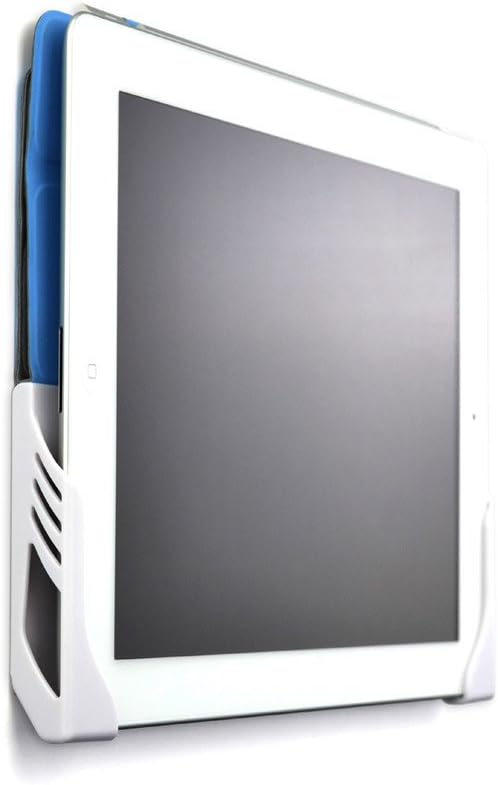


This floating acrylic wall mount is the most purpose-built option in the guide, with explicit compatibility for the Lenovo TAB M11, K11, and Idea TAB 11. Its 4.7 rating reflects a strong response from buyers, while the frameless presentation gives a supported Lenovo tablet the appearance of a floating display. It is especially appropriate when visual presentation matters as much as function.
We may earn a commission when you buy through this link, at no additional cost to you.
The holder uses eight-millimeter acrylic with chrome-finished standoff hardware and includes screws plus a 90-degree USB-C adapter. Those details make it useful in situations where a conventional clamp would be visually intrusive, such as a kitchen command center, lobby information panel, product demonstration, point-of-sale display, trade-show exhibit, or store display. The included adapter can also make cable routing more practical when the tablet is installed close to a wall.
The primary limitation is model specificity. Buyers should not assume that every Lenovo tablet will fit merely because it carries the Lenovo name; the listing specifically identifies the M11, K11, and Idea TAB 11. The product is also described in a color range of black, white, and clear, so the selected finish may influence its suitability for a particular room. Installation quality and wall construction remain important even when a visually polished product is used.
This is the recommendation for a buyer who owns one of the listed Lenovo models and wants a refined, display-focused installation rather than a generic tablet cradle. It is particularly compelling for wall-mounted dashboards, digital signage, recipe displays, and shared information screens. For other Lenovo models, the adjustable universal option in the third position offers a more broadly applicable design.
The floating design keeps the tablet visually separated from the wall and avoids the bulk of a conventional enclosure. It suits modern interiors, retail areas, and client-facing installations where presentation is important.
Metal standoffs and the included 90-degree USB-C adapter support practical display use. The mount can serve as a picture-frame-style information panel, time clock, point-of-sale display, kiosk, or trade-show screen.
We may earn a commission when you buy through this link, at no additional cost to you.
This aluminum swivel holder offers one of the broadest size ranges in the guide, accommodating mobile phones and tablets from 4.7 to 13 inches. Its 4.5 rating indicates generally positive buyer feedback, and the combination of a metal arm, 360-degree ballhead, and adjustable wall angle makes it a practical choice for users who frequently change between portrait and landscape viewing.
We may earn a commission when you buy through this link, at no additional cost to you.
The base and arm use high-strength aluminum alloy, while the bracket clamp is made from ABS material. The listing advises using the supplied hexagonal screws to lock its three shafts, an important detail for maintaining stability after the viewing angle is set. Two packs of screws, expansion screws, and a small wrench are included, although basic drilling tools must be prepared separately.
As a universal holder, it should not be assumed to fit every Lenovo Tab. The product data lists iPad, Samsung Galaxy, Surface, Amazon Fire, Kindle, Switch, and other device families rather than naming a particular Lenovo model. Before buying, a Lenovo owner should compare the tablet's width, height, and thickness with the bracket opening and verify that the case and connectors will not interfere with the clamp.
This holder suits video calls, kitchen references, office dashboards, classroom instruction, and shared media screens where frequent angle changes are valuable. It is less suitable for a minimalist floating installation or a high-security public kiosk, but it offers an effective balance of adjustability, strength, and broad compatibility for a compatible Lenovo tablet.
The 360-degree metal ballhead allows the tablet to move between portrait and landscape orientations. The arm can also be angled from side to side or up and down, making the mount useful in rooms with varied seating and viewing positions.
Aluminum alloy components add rigidity to the larger mount. Securing all three shafts with the supplied hexagonal fasteners helps reduce unwanted movement after the desired angle has been set.
We may earn a commission when you buy through this link, at no additional cost to you.
This universal wall mount earns the Editor's Choice designation because it combines explicit Lenovo Tab compatibility with a broad 7-to-13-inch fitting range. Its 5.0 rating is the highest numerical rating in the group, although ratings should be considered alongside fit, installation requirements, and how the mount will be used. It is the most practical recommendation for many Lenovo owners who want a slim, dependable bracket.
We may earn a commission when you buy through this link, at no additional cost to you.
The mount adjusts from 177 to 317 millimeters and supports devices up to 2.1 centimeters thick, including Lenovo tablets. That case allowance is useful because many owners keep a protective folio or shell on their tablet. High-strength metal construction is intended to resist bending, while the slim profile keeps the installation compact in kitchens, offices, bedrooms, and other space-conscious rooms.
The listing includes all necessary screws, a manual, and a straightforward installation process that does not require professional tools. Its limitations are relatively minor but worth noting. The case must remain within the stated thickness allowance, and the fixed wall-bracket design does not provide the same free-swiveling movement as a ballhead or articulating arm. Buyers who need constant repositioning should consider one of the rotating options instead.
This mount is recommended for a compatible Lenovo tablet that will remain in a fixed location while still allowing some choice of position. It works well for wall dashboards, recipe screens, learning displays, and status boards. It is also a sensible general-purpose option for households or offices that may replace the tablet with another supported device later.
The 177-to-317-millimeter adjustment range accommodates a meaningful span of supported devices. This flexibility is especially helpful for Lenovo owners comparing different tablet generations rather than shopping for one tightly specified model.
With a maximum supported thickness of 2.1 centimeters, the bracket can accommodate many everyday protective cases. Measuring the complete tablet-and-case assembly prevents the frustration of a fit that is too tight.
We may earn a commission when you buy through this link, at no additional cost to you.
This lockable Mount-It enclosure is designed for tablets that remain on display in busy or public-facing environments. Its 4.3 rating reflects a practical feature set centered on theft deterrence, flexible positioning, and durable construction. The supported 7.9-to-11-inch range may include a supported Lenovo Tab, but buyers must confirm their specific model's dimensions before ordering.
We may earn a commission when you buy through this link, at no additional cost to you.
The adjustable clamps allow different tablet sizes to sit securely, while the full-motion arm supports up to 15 degrees of tilt, 90 degrees of swivel, 180-degree rotation, and an extension range of 3.5 to 16.1 inches. Portrait and landscape positioning makes the enclosure useful for digital signage, point-of-sale systems, hotel information displays, office interfaces, and trade-show presentations.
Cold-rolled steel provides the primary structure, and the lockable design adds a level of control that ordinary open cradles cannot offer. Installation is designed for a single wood stud or a solid concrete or brick wall, with hardware, tools, and a step-by-step guide included. On unsupported wall surfaces, installers should use appropriate additional anchoring rather than assuming ordinary drywall anchors will be sufficient.
This is a strong choice for a Lenovo Tab used in a lobby, hotel, retail store, service counter, or other area where removal by an unauthorized person is a concern. It may be unnecessary for a private home display, and its arm and locking enclosure create a larger visual footprint than a slim fixed bracket. Security and motion are its defining advantages.
The lockable enclosure helps protect a mounted tablet in retail stores, offices, hotels, and trade shows. That makes it more suitable for unattended information screens than a simple holder that can be lifted away by anyone.
Tilt, swivel, rotation, and extension give the mount more movement than a fixed bracket. These adjustments help operators set up a screen for signage, interactive use, or a mixture of both.
We may earn a commission when you buy through this link, at no additional cost to you.
The AboveTEK mount is built as a commercial-style wall kiosk for 9.7-to-13-inch tablets. Its 4.3 rating aligns with a product designed around secure retention, broad movement, and mixed-material durability. Although Lenovo is not named directly in the supplied compatibility list, a supported Lenovo model may fit if its width, height, and total thickness fall within the stated limits.
We may earn a commission when you buy through this link, at no additional cost to you.
Security comes from a tamper-resistant screw system rather than a conventional key, and a wrench is included. The enclosure can be adjusted to fit devices up to 12 millimeters thick. Its faceplate is aluminum, while the base is reinforced steel, creating a rigid structure intended for schools, restaurants, showrooms, lobbies, and other locations where a tablet is used as a permanent information or point-of-sale display.
The mount supports 360-degree rotation for portrait and landscape use, along with movement from minus 30 to plus 30 degrees of tilt and swivel. A standard 100-by-100-millimeter VESA pattern supports wall attachment, and protective anti-scratch pads help reduce contact damage. The included hardware simplifies installation, though the wall still needs to be suitable for supporting the enclosure and tablet.
This is the pick for a business owner who views the Lenovo tablet as shared infrastructure rather than a removable household device. The locking design and substantial construction offer more protection than a basic swivel cradle. The main caution is verifying the exact thickness and footprint of the Lenovo model, particularly when a protective case is attached.
The tamper-resistant screw system is designed to discourage quick removal in high-traffic settings. It is useful for unattended displays where an open cradle would expose the tablet to accidental or unauthorized detachment.
An aluminum faceplate and reinforced steel base create a rigid support for continuous shared use. The VESA 100×100 base and included hardware make the mount appropriate for professional display planning.
We may earn a commission when you buy through this link, at no additional cost to you.
This compact rotating holder is the budget-focused recommendation because it combines a broad 4.7-to-12.9-inch range with useful movement in a simple bracket design. Its 4.7 rating is among the stronger results in the guide. The supported device list names several iPad and Samsung families rather than a specific Lenovo model, so compatibility must be confirmed using dimensions.
We may earn a commission when you buy through this link, at no additional cost to you.
A 360-degree swiveling bracket lets the tablet move between portrait and landscape orientations, while 30-degree horizontal and vertical tilt helps reduce glare and align the screen with the viewer. These movements make the mount useful for video calls, recipe viewing, information displays, classroom material, and other situations where the optimal angle is not fixed.
The stated use cases include homes, offices, classrooms, kitchens, and gyms, and the description emphasizes a straightforward installation process. The holder is designed to keep the device stable while allowing position changes. It does not include a locking anti-theft mechanism, so it is better suited to supervised or semi-private spaces than an unattended public area where theft prevention is essential.
This mount makes the most sense for a Lenovo owner who wants dependable adjustment without a large articulated arm or enclosure. Measure the tablet and any case, verify that charging cables and buttons remain accessible, and check the wall type before installation. Within those limits, it offers an uncomplicated, space-efficient way to create a dedicated tablet screen.
The swiveling bracket rotates the full 360 degrees, while the tilting section handles changes in viewing height. Together, these adjustments make the holder useful for both active and passive screen use.
The compact format can support recipes in a kitchen, lessons in a classroom, status information in an office, or entertainment in a gym. Its broad size range makes it adaptable to several household or workplace roles.
We may earn a commission when you buy through this link, at no additional cost to you.
The Dockem Koala is the easiest installation route in the guide because it uses included 3M Command adhesive strips rather than screws or wall holes. Its 4.4 rating reflects a convenient alternative for renters and homeowners who do not want to drill. The design supports Android and Windows tablets as well as many iPads and smartphones, making it potentially suitable for a Lenovo Tab if the size and port layout are compatible.
We may earn a commission when you buy through this link, at no additional cost to you.
Two separate brackets can be positioned at different distances to accommodate different device widths. Devices up to 11 millimeters thick can be docked, including some devices with protective cases left in place. Portrait and landscape docking are both supported, and built-in cord clips help keep charging cables organized. Users can undock the device without removing the entire adhesive installation.
The adhesive approach has clear limitations. Command strips are intended for smooth, flat surfaces and may not perform well on textured walls or some wallpaper. They are also not intended for high heat or moisture, and they cannot be reused after removal. The listing recommends a strength test before relying on the mount in a critical location. Port or button obstruction can also occur on smaller devices depending on orientation.
This mount is best for a compatible Lenovo Tab used in a smooth-surface room, especially when drilling is undesirable. It works well for temporary displays, home dashboards, and light kitchen or office use. For a permanent installation, heavy tablet, textured wall, or public environment, a screwed or locking mount offers greater security and more predictable long-term support.
Included Command adhesive strips can create a secure connection on a smooth, flat wall in less than two minutes. This is a major convenience for renters, temporary rooms, and locations where drilling is undesirable.
The two brackets can be separated to match the width of the device, and the tablet can sit in either orientation. Built-in cord clips help maintain a tidier appearance around the mounted screen.
We may earn a commission when you buy through this link, at no additional cost to you.
The GSRUAN mount combines a 7-to-13-inch size range with three-axis movement, making it a versatile general-purpose holder. Its 4.4 rating suggests solid buyer satisfaction, and the adjustable clamp, height, and viewing angle make it more flexible than a basic fixed bracket. A compatible Lenovo Tab may fit, subject to the stated orientation and dimensional rules.
We may earn a commission when you buy through this link, at no additional cost to you.
The metal base and aluminum alloy bracket are designed to resist shaking, while two sponge pads provide cushioning and a firm grip. The complete package includes the holder, an adjustment wrench, four caps, four screws, four washers, and two sponge pads. It can be installed on flat walls, wooden cabinets, and other suitable surfaces, and the product data also mentions compatible ordinary cars, light trucks, and minivans.
The three-axis system allows 360-degree rotation, with portrait and landscape modes available. However, the supplied details explain that 7-to-10-inch tablets can be fixed in both orientations, while 10-to-13-inch tablets may only be fixed vertically. That distinction can be significant for a larger Lenovo model intended for a horizontal dashboard. The bracket also lacks a lock for public installations.
This is a practical recommendation for a Lenovo owner who values adjustability, a complete accessory package, and the option to mount on furniture as well as walls. It suits dashboards, instructional displays, and fixed media screens. Buyers who require a larger tablet in landscape orientation, free arm movement, or theft deterrence should choose a more specialized mount.
The rotating system can be positioned in portrait or landscape mode, while the holder also adjusts in height and angle. This gives the user more control than a single-piece wall plate.
Screws, washers, caps, an adjustment wrench, and two sponge pads are included. The padding cushions the device while the metal components provide a stable base for routine use.
We may earn a commission when you buy through this link, at no additional cost to you.
This swivel mount stands out for its unusually broad 4.7-to-17.3-inch compatibility range. Its 4.6 rating is among the strongest in the group, and the simple combination of an aluminum base, ABS clip, and 360-degree rotation ball makes it a flexible option for many tablet sizes. A Lenovo Tab may fit comfortably, but the product listing does not explicitly identify a supported Lenovo model.
We may earn a commission when you buy through this link, at no additional cost to you.
The four-hole base attaches with screws to walls, cabinets, glass, or other flat surfaces. Two sets of screws are included, although a drill tool is not. Anti-slip rubber pads help protect against scratches and reduce sliding, while the rotating ball allows the display to be turned to a comfortable orientation. The larger upper size allowance gives the holder more flexibility than mounts limited to compact screens.
Material choices should be considered by location. Aluminum provides rigidity for the base, while the ABS clip offers a practical gripping surface, but neither arrangement is a security enclosure. The mount is therefore better for a Lenovo tablet in a home, office, kitchen, gym, or conference room than for a tablet left unattended in a high-traffic public location.
This recommendation makes sense for users who want one mount to cover many devices or want a wide margin of dimensional flexibility. The install process is straightforward if the chosen surface can be drilled. Confirm the Lenovo tablet's dimensions, check the available space behind the device for cables, and make sure the anti-slip pads contact a solid portion of the tablet.
The 4.7-to-17.3-inch range is the broadest in the guide. It can accommodate smaller tablets and phones as well as larger displays, making the mount useful for changing device needs.
The four-hole aluminum base can be attached to walls, cabinets, glass, or other flat surfaces. That flexibility allows the tablet to be positioned beside a workstation, above a counter, or in a shared room.
We may earn a commission when you buy through this link, at no additional cost to you.
The Mippko mount adds two-stage extension and a fold-away design, giving it a distinct advantage in rooms where a permanent protruding arm would be inconvenient. Its 4.7 rating is among the top results in the guide. Although the product data lists several tablet families without naming Lenovo directly, the 7-to-12.9-inch range may accommodate a supported Lenovo model.
We may earn a commission when you buy through this link, at no additional cost to you.
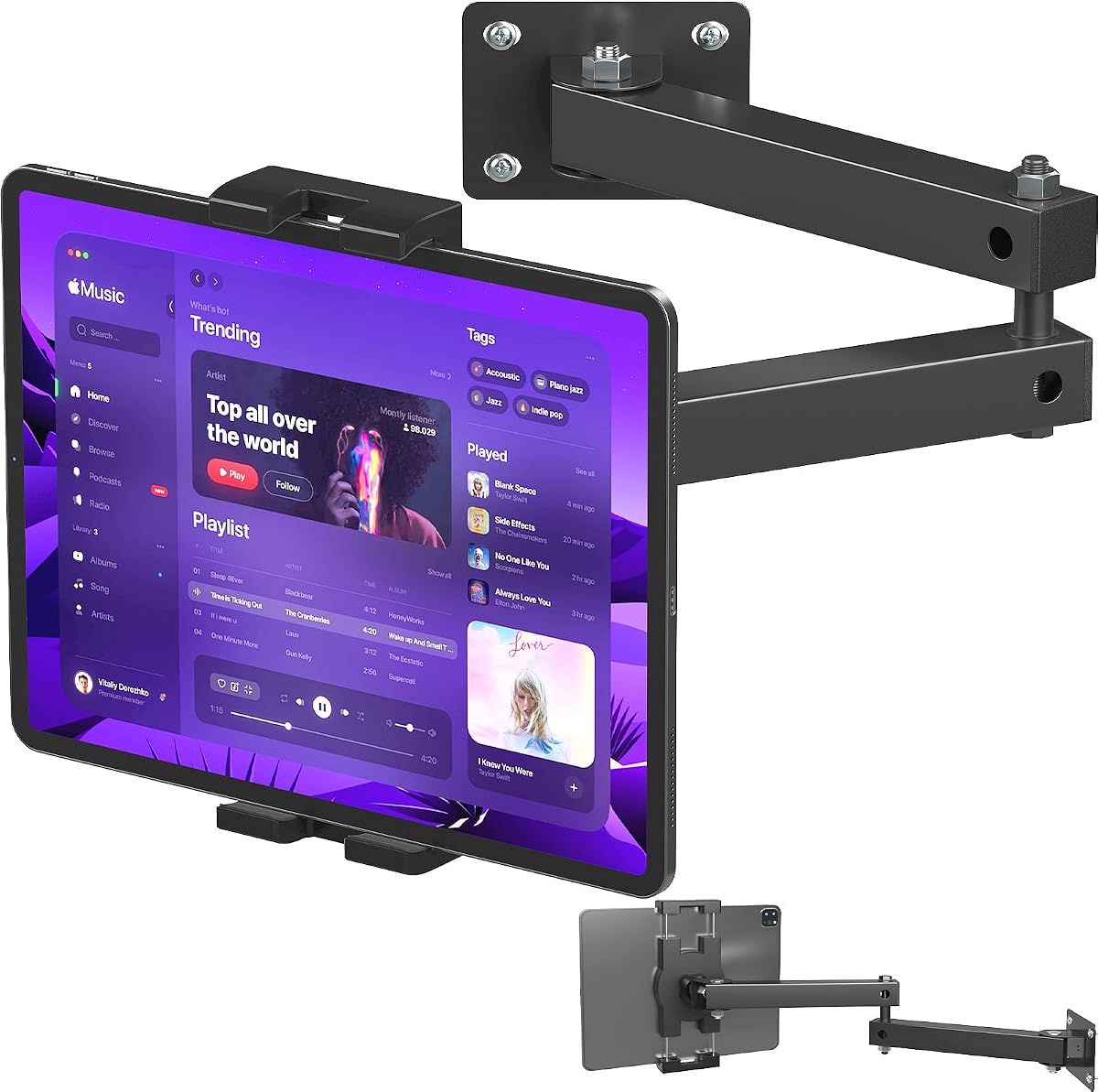
Both arms can fold to save space when the tablet is not being viewed, while the articulating structure can be extended in different directions. The first arm rotates 180 degrees horizontally, the second offers 360-degree rotation, and the ball head supporting the tablet clamp also rotates 360 degrees. These multiple joints make the holder useful for video calls, presentations, work references, and interactive screens.
The arms and ball head use aluminum alloy for strength and resistance to rust and corrosion. The stated load capacity is 1.5 kilograms, and the listed case-thickness limit is 1.5 centimeters. That means a thick folio may not fit even if the bare tablet dimensions are within range. The four-hole base, screws, screw tubes, and screwdriver are included, simplifying a permanent installation.
This is a strong choice for a Lenovo Tab used in a classroom, conference room, healthcare facility, office, restaurant, studio, or home where the display needs to move and then disappear from view. Buyers who need a larger display, greater load capacity, or a lock for public deployment should choose a more specialized mount. For compatible devices, the folding articulation adds genuine everyday flexibility.
The two-stage arms can stretch toward the user for a closer view and fold against the wall afterward. This is especially useful in small rooms where a permanently extended holder would occupy valuable space.
Rotation at the first arm, second arm, and ball head allows the tablet to be moved into portrait, landscape, or angled positions. The result is a more interactive installation than a fixed bracket.
We may earn a commission when you buy through this link, at no additional cost to you.
The most important factors are exact device fit, mounting surface, security needs, adjustment range, cable access, and the role the tablet will serve. A mount that looks suitable in a listing can still create problems if its bracket covers a charging port, cannot support the intended orientation, or is attached to an unsuitable wall.
Lenovo tablets vary in dimensions, camera placement, speaker positions, port locations, and case thickness. A mount explicitly naming the Lenovo TAB M11, K11, or Idea TAB 11 is the safest choice for those models. Universal holders can work with other Lenovo devices, but only after comparing the tablet's width, height, and thickness with the bracket's stated limits. The complete measurement should include any protective case because a case can change both the grip and the clearance around ports.
Fixed mounts suit screens that remain in one position, while swivel, tilt, ballhead, and articulating mounts are better when users approach the screen from different positions. Portrait and landscape support is especially useful for dashboards, video calls, recipes, and presentations. An articulating arm offers the greatest movement but projects farther from the wall, while a compact swivel bracket is easier to conceal and less likely to be struck accidentally.
Screwed mounts are the most consistent option for permanent installations, but the wall must be suitable for the fasteners. The Mount-It model specifies a single wood stud or solid concrete or brick wall. Other products may support different surfaces, so the instructions and wall construction should be checked before drilling. Adhesive mounts avoid holes and can be convenient on smooth surfaces, although heat, moisture, texture, and wallpaper can reduce their reliability.
A secure clamp should not block charging, audio, buttons, microphones, speakers, or the camera. The Dockem Koala specifically notes that its supports can obstruct ports or buttons on some smaller devices in landscape mode. Other brackets may fit the tablet's width and still interfere with a centered charging port. Orientation is also important: a mount that works in portrait may cover a different set of features when turned sideways.
A home dashboard in a private room rarely needs the same protection as a shared tablet in a hotel lobby or retail store. Lockable and tamper-resistant enclosures are valuable in public areas because they discourage quick removal. For supervised spaces, a standard clamp may be sufficient. Consider also whether the tablet needs to be frequently docked and undocked, since a more secure enclosure can make everyday use less convenient.
Some mounts are designed to retain a tablet with its protective case installed, while others fit only the bare device. The adjustable-length model supports a maximum thickness of 2.1 centimeters, the AboveTEK model supports up to 12 millimeters, the Koala supports 11 millimeters, and the Mippko supports 1.5 centimeters. Measuring the assembled device prevents pressure on the screen, an incomplete grip, or accidental activation of a covered button.
Acrylic and aluminum suits a polished, minimalist display, while steel is valuable for commercial enclosures and articulated arms. The floating Lenovo-specific mount uses acrylic and metal standoffs, while the locking AboveTEK model combines an aluminum faceplate with a reinforced steel base. Anti-slip pads or sponge padding help reduce scratches, and these are particularly valuable if the mount will be adjusted frequently.
A wall-mounted tablet generally needs a reliable power connection for sustained use. Check whether the holder includes a 90-degree USB-C adapter, whether the tablet charges through the visible side, and whether the mount leaves room for a cable. The purpose-built floating mount includes a 90-degree adapter, while the Koala includes built-in cord clips. If the charging port is blocked, a wireless charging solution may be necessary, provided it supports the exact tablet.
Begin by identifying the wall type, locating a suitable mounting area, and checking the tablet's final height. Hold the bracket or template in position before drilling, and confirm that the screen will not conflict with cabinets, doors, outlets, appliances, or frequently used wall space. For adhesive installation, clean the chosen smooth surface and follow the adhesive manufacturer's preparation and waiting instructions.
Install the wall plate using appropriate anchors, attach the arm or floating standoffs, and then secure the tablet. Keep protective material on the screen during assembly, tighten fasteners gradually, and avoid forcing the device into the bracket. After the final angle is set, lock or secure any shafts, screws, or ball joints that the manufacturer has designed to tighten. Connect the charging cable without forcing it against the mount or tablet screen.
For routine care, inspect the fasteners and tablet grip periodically, particularly in public or high-traffic locations. Dust the mount with a soft, dry cloth and avoid solvents that could damage acrylic, rubber pads, or coatings. Adhesive strips should not be reused after removal, and screws should be retightened only as needed. Locking systems should be checked whenever the tablet is repositioned or removed.
It can, provided the tablet and any case fall within the mount's stated size and thickness limits. Measure the device's width, height, and total depth, then compare them with the bracket dimensions. Also verify that the clamp does not cover the charging port, speakers, buttons, camera, or microphone in the intended orientation.
The acrylic floating wall mount is the most purpose-built choice, with explicit compatibility for the Lenovo TAB M11, K11, and Idea TAB 11. The adjustable universal steel mount also lists Lenovo Tab compatibility. For any other Lenovo model, buyers should rely on measured dimensions rather than the brand name alone.
It can work in a dry, smooth, temperature-stable area, provided the adhesive is rated for the surface and weight. The included Command strips are not intended for high heat or moisture and may perform poorly on textured walls or some wallpaper. A screw-mounted option is generally more predictable for a permanent kitchen installation.
Usually not, especially if the tablet is in a private room and supervised while mounted. A lockable enclosure is more valuable in hotels, retail stores, lobbies, classrooms, restaurants, and other public areas where an unauthorized person could remove the device quickly.
Several models allow for a case, but the allowance differs by product. The adjustable-length mount supports up to 2.1 centimeters, the Mippko supports 1.5 centimeters, the Koala supports 11 millimeters, and the AboveTEK supports 12 millimeters. Measure the case and confirm both thickness and clearance around ports.
A fixed bracket is simpler, more compact, and suitable for a permanent dashboard or information screen. An articulating arm is better when users need to move the display, bring it closer, switch orientation, or fold it away. The more flexible designs also project farther from the wall and may be easier to knock or mishandle.
Leave enough room for the holder, ventilation, cable connections, and any charging adapter. A floating mount requires only the depth of its standoffs, while an articulating arm needs clearance to extend and fold. Check the mount's depth and the tablet's charging arrangement before drilling.
They can if the holder covers openings or traps sound against the wall. Check product photos and compatibility notes, then inspect every side of the tablet. If the mount blocks audio, choose another bracket with wider gaps or relocate the installation to give the speaker openings more open space.
The acrylic floating wall mount is the most attractive purpose-built option for the explicitly supported Lenovo M11, K11, and Idea TAB 11, while the adjustable-length universal mount is the strongest all-around recommendation for compatible Lenovo tablets. The compact 360-degree rotating holder offers a lower-cost path to a simple wall-mounted display for buyers who verify fit and installation conditions.
Prioritize exact model dimensions, case thickness, port clearance, and the intended location before focusing on appearance. A public or unattended tablet benefits from a locking enclosure and durable construction, while a private household screen can use a simpler universal or adhesive mount. Adjustment should match how often the device will be moved rather than simply adding more motion than necessary.
Ratings, included accessories, product details, and availability can change, so check the current listing and manufacturer instructions before ordering. Confirm the supported Lenovo model, wall requirements, included hardware, and charging arrangement, and then compare the latest product listing with the practical needs of the installation.