
BENFEI USB C Hub 5-in-1 with 4K HDMI, 100W Power Delivery, 3 USB-A, Silicone Cable, Aluminum Case
4.6Editor score
4K HDMI at 30Hz
Up to 90W pass-through charging
10Gbps USB-A transfer
This Power Delivery Hub guide compares ten USB-C hubs for charging, 4K video, 10Gbps data, portability, compatibility, and everyday productivity needs.
A power delivery hub turns one USB-C connection into a more capable workstation, combining charging, display output, data transfer, and peripheral connections in a compact adapter. The best model depends on your laptop, display, peripherals, and need for a genuinely portable setup.
We compared ten power delivery hubs using the specifications and feature details provided for each product. The list covers powered and bus-powered designs, HDMI options, USB-C and USB-A expansion, 5Gbps and 10Gbps transfer speeds, and compatibility considerations for everyday work and travel.
Each review identifies the strongest use case, important limitations, and the types of users most likely to benefit. Ratings reflect the supplied customer feedback, while specifications can vary by device, and prices and availability change over time.
4.6Editor score

4.4Editor score

4.5Editor score
The following comparison highlights charging capacity, video output, transfer speed, port mix, and key portability or compatibility details across all ten power delivery hubs, helping you narrow the field before choosing the right adapter for your setup.



The UGREEN Revodok Pro is a six-port USB-C hub built for users who need a single cable to handle charging, an external display, and several high-speed peripherals. Its 4.4 rating reflects a strong overall reception, while the combination of 4K 60Hz HDMI, 10Gbps data connections, and 100W pass-through charging gives it unusually broad utility for a compact adapter.
We may earn a commission when you buy through this link, at no additional cost to you.
Its most impressive feature is the balanced port selection. Two 10Gbps USB-C 3.2 Gen 2 ports and two matching 10Gbps USB-A ports provide flexibility for modern storage, wired peripherals, and other accessories. The HDMI output supports 4K at 60Hz, while the dedicated USB-C power delivery path can provide up to 85W of pass-through power when connected to a suitable 100W source. Multiple ports can operate at the same time according to the product information.
There are trade-offs. The hub depends on the host device and source for display and charging capabilities, and users should verify that their computer supports the required USB-C, DisplayPort Alt Mode, or Thunderbolt functionality. There is also no dedicated memory-card reader, so photographers or editors who rely on SD or microSD cards would still need a separate adapter.
This is the strongest all-purpose recommendation for a power delivery hub because it reduces daily cable clutter without requiring a large desk dock. It suits laptop users, hybrid workers, and creative professionals who need 4K display support alongside fast data transfer. The combination of charging, video, and mixed USB expansion makes it more versatile than a basic travel adapter.
The 4K 60Hz HDMI output is the key productivity feature for users connecting a laptop to a larger monitor or television. It is more demanding than a basic 4K 30Hz adapter, making the Revodok Pro a stronger fit for desk setups where sharper motion, text, and visuals are desirable.
Four 10Gbps ports give you room to connect storage and accessories without falling back to slower USB-A connections. The two USB-C and two USB-A arrangement also reduces adapter juggling when your equipment mix changes from day to day.
We may earn a commission when you buy through this link, at no additional cost to you.
The UGREEN USB C Hub 4 Ports is designed for portable expansion rather than desktop docking. It has a 4.3 rating and a compact 4.1 by 1.5 by 0.5 inch aluminum body weighing 50 grams. Its central feature is a dedicated power delivery path that can deliver up to 95W to a compatible host while maintaining access to four USB-C data ports.
We may earn a commission when you buy through this link, at no additional cost to you.
All four data ports use USB 3.2 and support transfer speeds up to 10Gbps. That makes the hub useful for external SSDs, flash drives, card readers, and other modern peripherals. The product information specifically notes that the data ports do not support video transfer or power delivery to peripherals, so it should be viewed as a focused data hub with host charging rather than a display adapter.
The main limitation is the complete absence of USB-A ports. Users with older mice, keyboards, adapters, or inexpensive accessories may need to carry a separate converter. Another consideration is that a charger and charging cable are not included; the host device must also support the required USB-C power delivery profile for the advertised charging performance.
This hub is an excellent choice for modern all-USB-C users who want a lightweight way to add storage and peripherals. It works particularly well for frequent travelers, students, and anyone building a minimalist desk. If your accessory collection still depends heavily on USB-A, one of the mixed-port models will be a more practical alternative.
At only 50 grams and with dimensions of 4.1 by 1.5 by 0.5 inches, the hub is easy to carry between a home office, meeting room, and travel bag. Its aluminum shell also gives it a more durable feel than a basic plastic adapter.
The four USB-C data ports are ideal for users who have already moved beyond legacy USB-A accessories. With transfer speeds reaching 10Gbps, the hub can support demanding storage tasks when the connected host, drive, and file format allow it.
We may earn a commission when you buy through this link, at no additional cost to you.
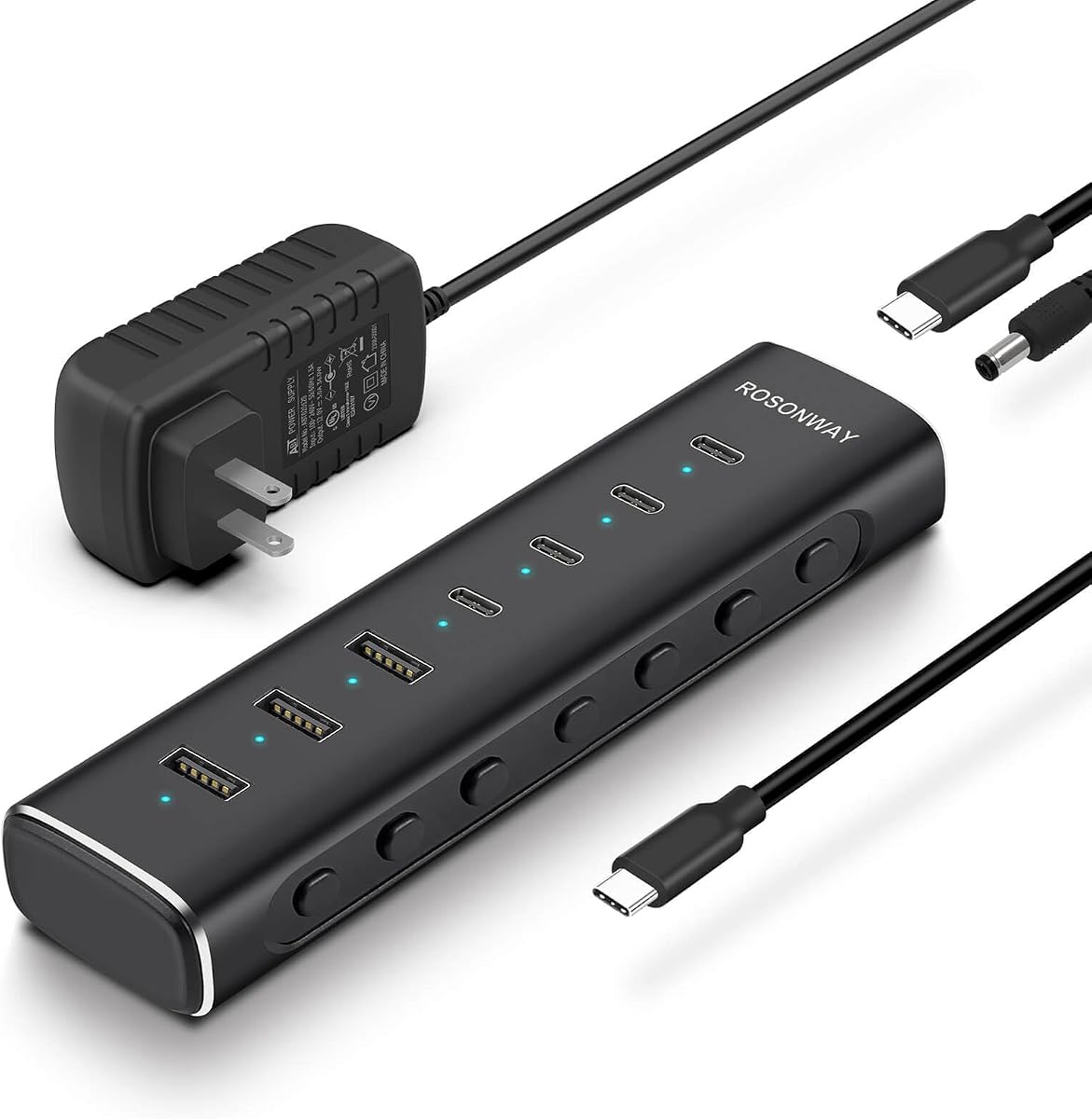
The Rosonway RSH-H7C4 is a powered seven-port hub for users who need more expansion than a typical compact adapter can provide. It combines four USB-C 3.2 ports with three USB-A 3.2 ports, and every data port supports speeds up to 10Gbps according to the supplied specifications. Its 4.4 rating places it among the strongest-rated options in this guide.
We may earn a commission when you buy through this link, at no additional cost to you.
External power is a notable strength. The included 36W 12V/3A adapter supplies stable power to multiple connected devices, while built-in surge, over-voltage, and over-current protection add reassurance for a hub that may remain connected throughout the day. Each port also has an independent electronic switch and a blue status indicator, allowing individual devices to be turned on or off without unplugging everything.
The hub is focused entirely on data expansion. Its USB-C ports support data transfer and standard 1.5A charging, but they do not provide DisplayPort Alt Mode, video output, or full Power Delivery. The detachable 3.3-foot USB-C host cable is useful for positioning, although it makes the overall package larger than an integrated-cable travel hub.
Choose the Rosonway when device count, independent port control, and stable powered operation matter more than HDMI output. It is well suited to a permanent desk with numerous storage drives, controllers, keyboards, or other accessories. Users who need to charge a laptop through the hub or mirror a display to a monitor should choose a different model with explicit PD and video support.
Seven high-speed ports give you considerable room to connect multiple devices at once. Individual electronic switches are especially useful in a permanent workstation where you want to isolate a drive, controller, or other accessory without disrupting the rest of the setup.
The included 36W power adapter helps maintain operation when several demanding peripherals are connected. Surge, over-voltage, and over-current protections add another layer of system awareness, although it should still be used with a reliable and compatible power source.
We may earn a commission when you buy through this link, at no additional cost to you.
The Satechi 4-in-1 USB-C Hub is a compact, polished option for users who value a tidy design and simple modern expansion. Its 4.1 rating is solid, and the product combines a durable aluminum enclosure, chamfered edges, a braided cable with a reinforced neck, and a profile measuring 2.36 inches on both length and width.
We may earn a commission when you buy through this link, at no additional cost to you.
The hub provides four USB-C 3.2 Gen 2 data ports with transfer speeds up to 10Gbps. It also supports up to 100W of power delivery for demanding peripherals and professional devices. This makes it useful for adding storage, input devices, or other USB-C accessories while keeping the host's charging path available, subject to the connected charger and device requirements.
Its limitations are easy to identify. There is no HDMI or other display output, so it cannot serve as a display adapter, and the lack of USB-A ports makes it less convenient for legacy accessories. The 100W figure also should not be treated as independent charging output for every attached peripheral; the host, source, hub, and connected equipment must negotiate compatible power delivery.
This Satechi model is best for a minimalist workspace built around USB-C accessories, particularly if appearance and enclosure quality are important. It also suits buyers who want a two-year limited warranty against defects under normal use. For display support or a mixed USB-A setup, a different category of hub will be more valuable.
The chamfered aluminum enclosure, reinforced braided cable, and small footprint make this a good match for polished desks and travel bags. It provides a refined appearance without claiming to be a full docking station.
The combination of 100W power delivery and four 10Gbps USB-C ports is useful for a streamlined modern setup. It reduces the need to carry separate data adapters when your peripherals are predominantly USB-C.
We may earn a commission when you buy through this link, at no additional cost to you.
The Belkin 100W 10Gbps Multiport USB-C Hub is a straightforward expansion adapter for laptops, tablets, and PCs with USB-C connectivity. Its 4.2 rating reflects a generally positive reception, while the core configuration is easy to understand: four USB-C 3.2 Gen 2 data ports, transfer speeds up to 10Gbps, and pass-through charging of up to 100W.
We may earn a commission when you buy through this link, at no additional cost to you.
The four identical USB-C ports are aimed at modern peripherals such as external storage, webcams, capture cards, and other USB-C accessories. Audio equipment can also be connected through compatible adapters. Fast Role Swap is a thoughtful feature because it is designed to reduce data loss or interruption when a USB power source is added or removed during operation.
What the hub does not offer is equally important. There is no HDMI or DisplayPort output, so it cannot extend a display directly. It also lacks USB-A connectors, making it less versatile for mixed-accessory setups. As with other high-power designs, actual charging output depends on the host, charger, and connected device.
The Belkin is a good fit for users building an all-USB-C productivity setup around fast data and host charging. It may be especially relevant to content creators using compatible cameras, capture interfaces, or storage devices. If a separate monitor is part of your intended workspace, choose a hub with explicit video output rather than adding a separate display adapter later.
Identical 10Gbps USB-C ports keep the design consistent and make it straightforward to connect several contemporary peripherals. This clean approach works well for users who want one standardized hub rather than a mixed collection of legacy and modern connectors.
Fast Role Swap is intended to prevent data loss and interruption when the power source changes. That makes the hub more convenient for active workspaces where a cable or charger may be connected or disconnected during a session.
We may earn a commission when you buy through this link, at no additional cost to you.
The SABRENT 7-Port USB-C Hub is a powered expansion box designed to connect more accessories to a Mac, PC, Steam Deck, or ROG Ally. It has a 4.1 rating and combines three USB-A with four USB-C ports. All seven operate at up to 5Gbps using USB 3.2 Gen 1×1, making it versatile but not the fastest option in this roundup.
We may earn a commission when you buy through this link, at no additional cost to you.
Each port has an independent on/off switch and a white LED indicator. This level of control is useful for a permanent desk or shared entertainment setup because users can disconnect individual devices without cycling the entire hub. The included 48W power adapter supports stable operation, while the aluminum alloy housing is designed to dissipate heat under load.
Charging is more limited than the headline seven-port count might suggest. Three USB-C ports deliver 5V and 900mA, while the fourth supports up to 20W PD for compatible accessories or smaller devices. It does not advertise laptop-level pass-through charging, and there is no video output, so it should not be selected as a monitor dock.
The SABRENT makes the most sense for users who value port variety, external power, and individual switching more than maximum transfer speed. Older USB-A peripherals remain easy to connect, and the mix of USB-C and USB-A reduces adapter requirements. It is especially practical for gaming devices and mixed workspaces, while 10Gbps-focused users should look elsewhere.
Three USB-A and four USB-C ports cover a broad range of accessories without forcing users to commit to one connector style. That makes the hub convenient for older and newer equipment sharing the same desktop.
Dedicated switches let you turn individual connections off while leaving others running. The white indicators provide a quick visual indication of each port's state, which is particularly helpful in a fixed workstation.
We may earn a commission when you buy through this link, at no additional cost to you.
The Gitfos C1 is a large, powered 15-in-1 hub built for complex desktop configurations. It has a 4.4 rating and a broad port assortment: one 100W USB-C PD input, two USB-C charging ports, two 10Gbps USB-C data ports, one 10Gbps USB-A data port, and multiple 5Gbps USB-A data or charging connections.
We may earn a commission when you buy through this link, at no additional cost to you.
The included 65W DC power adapter enables the hub to operate as intended and provides stable power for its connected devices. The 100W host path is intended for laptop charging, and the two additional USB-C charging ports can supply up to 45W individually or 20W each when both are used, according to the product details. Several data ports reach 10Gbps, supporting fast storage and file-transfer workflows.
This is not a portable mini-hub in the usual sense, and the requirement to connect the 65W power adapter is critical; the product is specified not to work without it. It also provides no video output, making it unsuitable for a direct monitor setup. The product guidance advises using the original laptop adapter for the 100W charging connection and warns against using the lower-wattage USB-C charging ports for high-power computers.
The Gitfos C1 is ideal for IT professionals, photographers, editors, and power users who need many simultaneous connections in one powered unit. Its angled aluminum chassis, non-slip feet, and extensive port selection are better suited to a permanent desk than a pocket. Choose it when breadth of expansion is the priority and add a separate display adapter if video is also required.
Fifteen connections are far more than most laptop users need, but that scale can eliminate a stack of individual adapters. The mix of charging, high-speed data, and standard USB-A connections allows the hub to serve many kinds of equipment from one host port.
The 65W adapter supports the hub's broad connection set, while separate charging paths manage host, peripheral, and data needs. Correct adapter use is especially important because the hub must remain connected to its DC supply to work as specified.
We may earn a commission when you buy through this link, at no additional cost to you.
The UGREEN USB C Hub 5 in 1 is a compact adapter that prioritizes the most common travel and desk needs: external display output, laptop charging, and a small collection of USB-A peripherals. Its 4.6 rating is the second-highest among the products in this guide, giving it a strong basis for consideration even though its feature set is intentionally focused.
We may earn a commission when you buy through this link, at no additional cost to you.
Its four-port structure includes a 4K HDMI output, a 100W USB-C power delivery port, one 5Gbps USB-A data port, and two 480Mbps USB-A ports. This is a sensible arrangement for a keyboard, mouse, flash drive, and external display. The faster USB-A port handles storage or other higher-bandwidth accessories, while the slower ports are appropriate for basic input devices.
The principal limitation is the absence of a USB-C data port. Users with a USB-C SSD, modern card reader, or other USB-C peripheral will need an additional adapter. The HDMI specification also stops short of stating a refresh rate, so buyers who require 4K 60Hz should not assume that capability. Host-device support for display output and compatible power delivery remains essential.
This hub is a good option for a traveler or office worker whose routine needs are simple: charge the laptop, connect a monitor, and attach a few traditional USB-A accessories. It is less appropriate for power users who need multiple 10Gbps storage connections. Its strongest advantages are compactness, 100W charging support, and a 4K display option.
Adding 4K HDMI output to a laptop can avoid carrying a full docking station. The adapter is particularly useful when the computer supports USB-C display output and the display can be connected with a single HDMI cable.
One 5Gbps port supports higher-speed storage, while two 480Mbps ports cover common accessories such as a mouse and keyboard. This tiered approach gives each peripheral a sensible connection without bloating the adapter with unnecessary ports.
We may earn a commission when you buy through this link, at no additional cost to you.
The BENFEI USB C Hub 5-in-1 delivers a practical mix of charging, display, and data features at a budget-focused level of complexity. Its 4.6 rating is tied for the highest in this roundup. The hub includes one HDMI port, one USB-C charging port, and three USB-A ports, all in an aluminum housing with a short silicone woven cable.
We may earn a commission when you buy through this link, at no additional cost to you.
Power delivery supports up to 90W pass-through charging to the host, with 10W reserved for operating the hub's other interfaces. The HDMI output is certified for resolutions up to 4K at 30Hz, making it well suited to office documents, web pages, spreadsheets, and general media. The host USB-C port must support display output for the HDMI function to operate.
Data performance is mixed by design. One USB-A 3.2 port supports transfer speeds up to 10Gbps, while the other two operate at 480Mbps. That makes the faster port appropriate for an external SSD or flash drive, and the slower ones suitable for keyboards, mice, and low-bandwidth accessories. The 20-centimeter silicone cable is soft and knot-resistant, although it is shorter than many desk-oriented hub cables.
The BENFEI is an excellent value pick for students, travelers, and office users who need to connect a laptop to a display while retaining a few USB-A accessories. Its 4.6 rating and generous feature mix make it a compelling choice, provided that 30Hz video and 90W charging meet your needs. High-refresh gaming or demanding laptop charging may require a more specialized model.
Certified 4K output at 30Hz provides a sharp workspace for productivity and everyday media use. It is a sensible alternative to higher-refresh 4K options when the main goal is extending a laptop to a secondary display rather than gaming.
Up to 90W pass-through power is sufficient for many mainstream laptops, though the exact result depends on the computer and charger. The 10W reserved for hub operation illustrates why a capable power adapter and compatible device are essential to the design.
We may earn a commission when you buy through this link, at no additional cost to you.
The Belkin 5-Port USB-C Hub is a polished all-in-one adapter for users who want smooth 4K display output, host charging, and fast data connections. Its 4.5 rating is among the strongest here. The hub provides five total ports, including HDMI 2.0 output, USB-C power and data functionality, and a set of expansion connections for peripherals.
We may earn a commission when you buy through this link, at no additional cost to you.
HDMI 2.0 supports resolutions up to 4K at 60Hz, making this model more suitable for motion-rich content and demanding desktop work than basic 30Hz adapters. The host can receive up to 100W through the dedicated power delivery path, while a separate 2-in-1 USB-C port handles charging and data simultaneously, with 12W shared among the USB-C ports.
Data transfers reach 10Gbps, which is useful for external media, backups, and large files. The safety system covers overload, overcurrent, over-temperature, and short-circuit conditions, while the housing uses 75% post-consumer recycled materials. A two-year coverage period adds reassurance. The trade-off is that the shared 12W USB-C output is not intended for charging multiple demanding devices at once.
This is the premium choice for a compact desk or travel setup that needs a noticeably better display experience than a basic HDMI adapter. It is well matched to MacBook, iPad, and laptop users who want one compact accessory to handle 4K 60Hz video, 100W charging, and fast data. Its balanced feature set and safety-focused design justify selecting it when display quality and refined construction are priorities.
The HDMI 2.0 connection supports 4K at 60Hz, making the hub a strong option for larger workspaces and smoother visual movement. Display support still depends on the host's USB-C video capabilities, the operating system, and the connected monitor.
Protection against overload, overcurrent, excessive heat, and short circuits provides a more comprehensive safety framework. The recycled-material housing and two-year coverage also make this a considered option for buyers who want longevity alongside performance.
We may earn a commission when you buy through this link, at no additional cost to you.
Choosing a power delivery hub involves balancing host charging, display needs, port count, transfer speed, portability, and compatibility. The most capable specification on paper is not always the most useful option for your particular devices and working style.
Power delivery is one of the most important features to verify because a hub's advertised wattage may describe input capacity, host pass-through output, or the maximum available to a separate charging port. A 100W USB-C path can be useful for demanding laptops, while 90W or 95W may cover many mainstream systems. Actual charging depends on the laptop, charger, cable, hub, and negotiated power profile. Check the included or required adapter and confirm that your computer supports the same protocol.
HDMI support is essential for a monitor, television, or projector, but the details matter. 4K at 30Hz is suitable for many office tasks, while 4K at 60Hz provides smoother movement and a more capable desktop experience. Also verify that the host computer's USB-C port supports DisplayPort Alt Mode or the required Thunderbolt video function. Some of the highest-speed data hubs intentionally provide no display output, so check this feature before considering port count.
The difference between 5Gbps and 10Gbps can be meaningful when working with large media files, external SSDs, backups, and memory cards. 10Gbps is the better target for fast storage, while 5Gbps may be entirely adequate for keyboards, mice, and general accessories. The speed of the connected drive, cable, host interface, and file format can also limit real-world transfers, so a hub's headline number is the maximum rather than a guaranteed result.
A larger port count is useful only when you have devices that need those connections. Mixed USB-C and USB-A hubs offer broader immediate compatibility, while all-USB-C designs create a cleaner setup for modern accessories. Seven-port and 15-port hubs are aimed at permanent workstations, whereas five-port models are easier to carry. Look at your current equipment and likely future purchases rather than choosing the largest available configuration.
Travel-friendly hubs are small, light, and easy to pack, often using a short integrated cable. Powered desktop hubs are larger and require an external adapter, but they can support more ports and offer steadier power under heavier loads. Consider how often you will travel, how much desk space is available, and whether the included cable and power supply are convenient. A compact hub that is difficult to operate may be less useful than a larger one that suits your permanent setup.
Many modern hubs are plug-and-play across Windows, macOS, Linux, iPadOS, and Android, but not every feature behaves identically across systems. Display extension, audio, power delivery, and USB-C peripheral support can depend on the host operating system and device model. Older Mac systems with USB-A only, Thunderbolt 2, or operating systems below the hub's stated requirements are not viable. Check the full device list and select a model that explicitly supports your equipment.
Independent switches and status indicators become valuable in a fixed workstation with several hard drives, controllers, or charging accessories. They make it possible to isolate one device without unplugging everything else. For occasional travel use, the added controls may not justify a larger enclosure. This is a workflow feature rather than a universal necessity, so consider how many devices you routinely connect and how often you need to manage them individually.
Aluminum housings are common because they dissipate heat effectively and feel durable, but material alone does not guarantee long-term reliability. Look for documented protections against surge, over-voltage, overcurrent, overheating, overload, and short circuits. A warranty or coverage period can also provide useful recourse if defects occur under normal use. Good thermal design and reliable power delivery matter most when several high-bandwidth devices are connected at once.
Begin by confirming that your computer has a compatible USB-C port that supports the functions you intend to use, especially display output and host charging. Connect the hub directly to the computer when possible, then attach the appropriate power source if the model includes a DC adapter. Install the host's power adapter first or promptly afterward, depending on the model's instructions, and use a charger and cable capable of delivering the required wattage.
Add the display and data accessories next, using the highest-speed port appropriate for each device. The HDMI connection requires the host to support video output, while external storage needs a fast enough host, cable, and drive to benefit from 10Gbps. If the hub has individual switches, use them to turn unused or idle devices off rather than repeatedly unplugging the entire setup. Update the computer's operating system and any hub management software if the manufacturer provides it.
For care, keep the enclosure away from liquids, excessive heat, and heavy impact. Do not force connectors into ports, and avoid leaving a high-power setup unattended on a surface that blocks ventilation. When traveling, wrap the hub and any power adapter separately, and do not bend the host cable tightly around the body. If data transfer slows, a display fails to appear, or charging becomes unstable, test the setup with fewer accessories and verify compatibility before assuming the hub has failed.
A power delivery hub is a USB-C hub that also provides a compatible USB-C power delivery path. It may charge a connected laptop while passing data through other ports, but the exact output depends on the hub, charger, cable, and host device. Some models also include separate charging ports for phones, tablets, or accessories.
Yes, if the specific hub supports both functions and the host computer has a compatible USB-C port. The computer must also support DisplayPort Alt Mode or an appropriate Thunderbolt video feature. A suitable power adapter must provide enough input power, and the hub's supported charging and display modes must not conflict.
No. The wattage is the maximum available through the relevant connection, not a guaranteed result for every computer. The laptop's supported input protocol, battery design, charger, cable, and the hub's own power requirements all affect the final charging rate. Check both device specifications before purchasing.
The maximum theoretical transfer rate is twice as high at 10Gbps, but real-world performance also depends on the storage device, file format, host controller, cable, and operating system. For ordinary keyboards and mice, either speed is usually sufficient. For SSDs, large media files, and backups, 10Gbps provides more headroom.
A powered hub uses its external adapter to supply enough electricity for the hub and connected peripherals. Some models will not operate at all without the specified DC supply, while others may provide reduced functionality. Always use the supplied or explicitly compatible power adapter rather than a random lower-watt source.
That depends on the hub and computer rather than being guaranteed by the hub category. A single-HDMI model cannot drive two separate displays through that port, though operating-system features such as mirroring may still be possible. Multi-display use generally requires multiple supported video outputs and a host with matching capabilities.
Many compatible models support these devices, but the useful functions vary. Data and standard charging are more widely supported than laptop-style pass-through charging or display output, and some mobile devices require USB-C OTG support. Check the product's compatibility list and the specific features your device supports.
The most common causes are an unsupported display mode, an inadequate host connection, missing drivers, or a display resolution and refresh-rate combination the hub cannot handle. Start by testing the display directly with the computer, then reconnect the hub and check its compatibility notes. Also verify that you are using the designated HDMI or video port rather than a data-only USB-C port.
The UGREEN Revodok Pro stands out as the most balanced all-purpose choice, combining 4K 60Hz HDMI, four 10Gbps data ports, and 100W-class pass-through charging. The BENFEI 5-in-1 provides the most budget-friendly mix of display, charging, and fast USB-A expansion, while the Belkin 5-Port hub delivers a premium combination of 4K 60Hz output, 100W charging, 10Gbps data, and extensive safety features.
Prioritize the functions you actually use rather than the largest port count. Frequent travelers may prefer the compact UGREEN, Belkin, or BENFEI options, while users with many devices can benefit from the Rosonway, SABRENT, or Gitfos powered hubs. Always confirm host charging, display mode, connector format, operating system, and power-supply requirements before making a final selection.
Prices, ratings, availability, and product configurations can change, so review the current listing and specifications at the time of purchase. The linked product pages are the best places to confirm included accessories, compatibility details, and any updated warranty or coverage information.