
Jadebones HDMI Adapter Converter for Original Xbox Console
4.4Editor score
Direct Xbox YPbPr conversion
External power not required
HDMI cable not included
Our Original Xbox Upscaler guide compares ten adapters for signal conversion, 1080p output, 4K scaling, easy setup, and modern display use and reliability.
An Original Xbox upscaler connects the console’s legacy video output to a modern television, monitor, or projector through HDMI. The right adapter should preserve the console’s native signal, provide synchronized audio and video, and offer useful resolution options without introducing unnecessary delay or complicated setup.
We compared the ten products supplied for this guide by examining their Xbox compatibility, supported input and output resolutions, signal path, power requirements, included cables, installation method, and stated image-processing features. The list covers dedicated Xbox adapters, general component converters, composite converters, and a more advanced open-source scan converter.
Each review explains what the product is best suited to do, where its specification sheet sets practical limits, and which setup details deserve attention before purchase. Ratings and product details can change over time, as can availability, so shoppers should verify the current listing and accessories before ordering.
4.4Editor score
4.1Editor score

This side-by-side comparison highlights each adapter’s Xbox fit, maximum stated output, power arrangement, and practical connection method, helping distinguish simple converters from more advanced scaling devices.


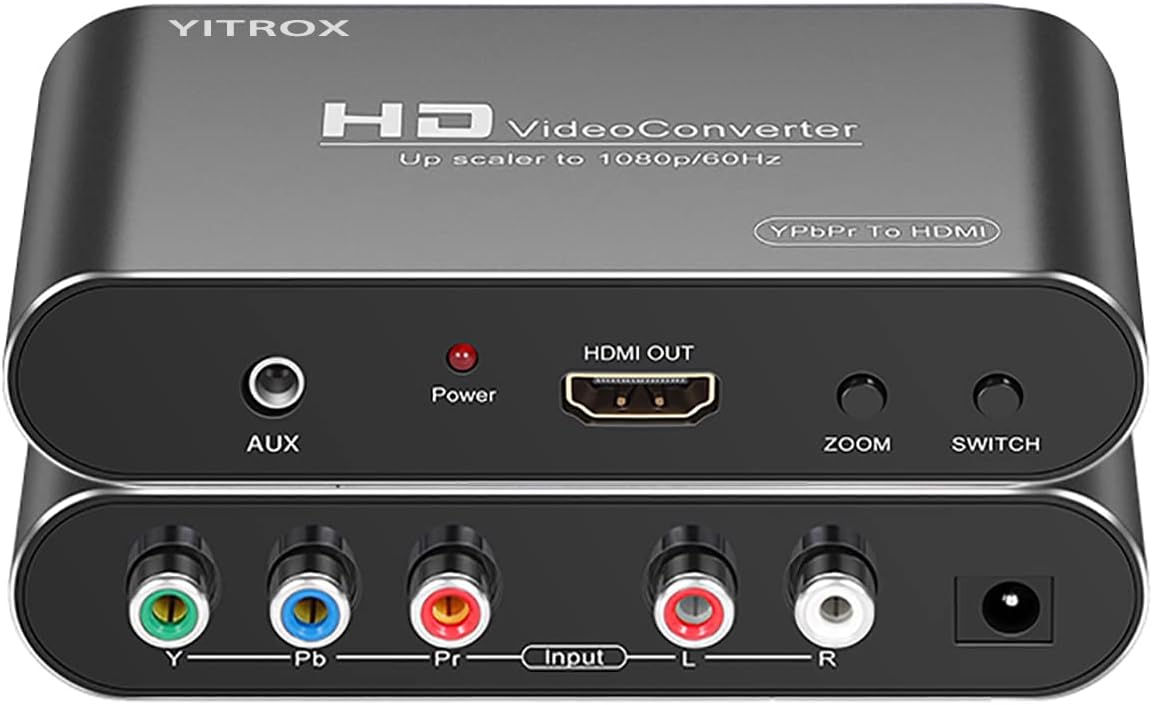
This general-purpose YPbPr-to-HDMI converter has a 4.1 rating and stands out for giving users more control than a basic plug-and-play adapter. It is intended for component-equipped devices such as the Xbox 360, PlayStation 2, PlayStation 3, and Wii rather than the original Xbox, so it is not a direct match for every reader seeking an Original Xbox upscaler.
We may earn a commission when you buy through this link, at no additional cost to you.
Its principal strength is the menu-driven image system. Five output resolutions are available, including 800×600, 1024×768, 1280×720, 1280×1024, and 1920×1080. Seven zoom options provide different enlargement, reduction, and automatic adaptation choices. That makes the converter useful when a television or projector has an unusual screen size or when the native signal needs adjustment to fill the frame more effectively.
The device also accepts a wide range of component input modes, covering 480i, 480p, 576i, 576p, 720p, and 1080i or 1080p where available. Its chip-based processing is described as compensating for motion, color, contrast, and digital noise. An auxiliary audio port and synchronized audio-video output improve compatibility with display equipment that does not accept the converted audio through another route.
This is a strong option for a mixed retro-gaming setup, particularly for an Xbox 360 owner who wants more output choices. It is not the most natural choice for an original Xbox because the original console lacks the component output this converter expects. A buyer using this selection should confirm the console and cable arrangement before purchasing and use a genuine component connection rather than an S-Video lead.
The combination of multiple output resolutions and zoom modes makes this converter especially useful for displays that do not handle the incoming signal cleanly. Automatic adaptation can provide a convenient starting point, after which manual scaling can fine-tune the image.
Rather than serving one console family, the converter supports several classic systems with component output. That versatility makes it appealing to households that want one shared solution for Xbox 360, PlayStation, and Wii gaming.
We may earn a commission when you buy through this link, at no additional cost to you.
The Jadebones adapter has a 4.4 rating, the highest numeric rating among the products with published scores, and is explicitly designed for the original Xbox. It converts the console’s YPbPr component signal into HDMI, allowing the system to connect to a contemporary HD television or monitor without relying on a legacy analog input.
We may earn a commission when you buy through this link, at no additional cost to you.
This focused design makes the adapter appealing to Original Xbox owners who want a straightforward conversion path. The supplied information says it needs no external power; setup consists of joining the adapter and an HDMI cable, followed by connecting the console to the adapter. Its no-delay signal path also keeps the experience suitably direct for fast action and multiplayer games.
The adapter transfers the Xbox’s component output rather than creating detail that was not present in the original game signal. As the product description explicitly notes, it preserves colors and details but cannot improve the underlying video quality. That limitation is normal for a converter and should not be confused with a dedicated 4K upscaler that performs computational enlargement.
This is the most focused recommendation for someone whose main goal is connecting an original Xbox to an HDMI display. It offers a simple, powered-through connection, strong user feedback, and a dedicated fit for the console. Buyers must remember that an HDMI cable is not included and should therefore check whether one is already available before completing the purchase.
A dedicated adapter reduces uncertainty about console compatibility. Its component-to-HDMI path is specifically described for the original Xbox, making it a clearer choice for that system than a general converter designed around different input standards.
Because external power is not required, installation should be quick. The only likely additional item is a suitable HDMI cable, and the absence of a power connection also reduces cable clutter around the console.
We may earn a commission when you buy through this link, at no additional cost to you.
This 4K gaming upscaler is the most advanced processing option in the group, although no numeric customer rating is supplied. It is built to take a 1080p source, perform upscaling and image enhancement, and send a 4K at 60fps signal to a compatible display. Original Xbox is explicitly included among the supported classic consoles.
We may earn a commission when you buy through this link, at no additional cost to you.
The product claims zero-delay conversion without dropped frames, along with precise sharpening, color tuning, and enhanced depth of field. These processing features distinguish it from simple signal converters, which merely change the connector format. Compatibility also extends beyond the Xbox to the Nintendo Switch, GameCube, Dreamcast, PlayStation family, Wii, Wii U, and Xbox 360, as well as some dedicated retro adapters.
Its requirements are strict. Input must be 1080p, the display must support 4K at 60Hz, and the connection should use an HDMI 2.0a-or-newer cable rather than the original HDMI 1.4 standard. The product also notes that 4K at 30fps and 1440p displays are unsupported, which can result in a black screen. Its built-in HDMI extension cable should be used where specified.
This is the most compelling option for a gamer who already has a 4K 60Hz display and wants a shared high-resolution path for multiple retro consoles. It is less suitable for someone with an older television or an original Xbox limited to its native lower-resolution output. Confirm the console’s actual signal, display capabilities, and cable specifications before relying on the 4K pathway.
Unlike a passive converter, this unit actively enlarges a 1080p signal and applies sharpening and color adjustments. The result is not new source detail, but it can create a more suitable output for a modern high-resolution television.
Support for many classic console families makes the device useful beyond a single original Xbox setup. Owners with several retro systems can potentially standardize their connections through one compatible 1080p-to-4K device.
We may earn a commission when you buy through this link, at no additional cost to you.
This retro console converter is built specifically around the original Xbox and provides an HDMI path from the console’s component output. No numeric rating is listed, but the supplied specification covers the four principal native Xbox modes: 480i, 480p, 720p, and 1080i.
We may earn a commission when you buy through this link, at no additional cost to you.
The adapter converts the analog component signal to digital HDMI output, allowing the original console to work with a modern television through a simpler connection. Audio and video travel without requiring separate converters, and the product needs no additional external power. Those characteristics make it a convenient alternative for users who do not want a box and power lead beside the console.
It is worth distinguishing this device from a modern 4K processor. The supported list ends at 1080i, and its core role is connection compatibility rather than computational upscaling. The converter is therefore most useful when the goal is a tidy HDMI setup and a dependable digital signal, not the maximum available display resolution.
The product suits an original Xbox owner with a modern HDTV or monitor who values simple installation. It is less appropriate for buyers specifically seeking 4K enhancement, 60fps output, or extensive image controls. Confirm that the display accepts the converter’s output and that the required original Xbox component connection is available.
Support across 480i, 480p, 720p, and 1080i gives users access to several of the original Xbox’s standard video modes. This makes the adapter more versatile than one restricted to a single fixed output setting.
Combining audio and video over HDMI avoids the need for separate analog connections to a modern screen. With no external power requirement, the setup also keeps the console area relatively uncluttered.
We may earn a commission when you buy through this link, at no additional cost to you.
The HD Link Cable for Original Xbox System has a 4.1 rating and belongs to the cable-based adapter category commonly used to bring the original console into an HDTV setup. Unlike products with detailed descriptions of scaling menus or processing, this listing supplies no further feature information, so its appeal must be evaluated from its product type, intended console, and available rating.
We may earn a commission when you buy through this link, at no additional cost to you.
Cable-based solutions are attractive to original Xbox owners who want a direct route to HDMI without introducing a separate power brick. The physical format generally concentrates the connection at the console end and allows the display side to use a standard HDMI cable, depending on the exact adapter construction.
Because the supplied data does not state supported output resolutions, latency behavior, audio support, or whether an HDMI cable is included, those details should be confirmed with the seller. A nominal HD Link name alone does not prove support for 1080p, 4K conversion, or active image enhancement, and buyers should not assume features advertised by other products in this category.
This option is most suitable for a buyer who recognizes the established HD Link format and wants a simple, console-specific solution rather than a multi-system processor. Its 4.1 rating supports its general appeal, but checking the current product page and package contents is especially important. It is not the strongest choice for a shopper whose priority is confirmed 4K scaling or extensive resolution adjustment.
The HD Link format is aimed at owners who value a familiar cable-based connection. That simplicity can make the adapter less intimidating than a separate converter with menus, multiple leads, and external power.
The absence of detailed specifications means compatibility should be checked carefully. In particular, confirm supported Xbox modes, output resolution, audio behavior, and included accessories against the seller’s current listing.
We may earn a commission when you buy through this link, at no additional cost to you.
The Hyperkin Panorama HD Cable has a 3.8 rating and is explicitly officially licensed by Xbox. It is compatible with HDTVs and all original Xbox models, making it a recognizable accessory for collectors and players who prefer a console-specific solution supported by an established accessory brand.
We may earn a commission when you buy through this link, at no additional cost to you.
Its headline output capability is up to 1080i, subject to the compatibility of the individual game. The seven-foot cable length offers more placement flexibility than a very short adapter lead, which can be useful when the console sits on a shelf while the television is against a wall. The stated goal is a clear picture and crisp audio delivered to a modern display.
This is a conversion and connection accessory rather than a sophisticated image processor. It does not offer the 4K workflow, selectable scaling menus, or sharpening controls found in more specialized options in this guide. The 3.8 rating indicates respectable user satisfaction, though it trails the dedicated Jadebones adapter’s 4.4 score.
The Panorama HD Cable is a good fit for an original Xbox owner who values official licensing, broad model compatibility, and a conventional cable design. It is a more restrained choice for anyone hoping to convert 1080i into true 4K output. Players should check the game-specific compatibility statement and confirm that their display offers the required HDMI input.
Official Xbox licensing is a meaningful differentiator for a console accessory. It provides reassurance that the product was designed with the original hardware in mind rather than presented as a generic adapter.
The seven-foot lead offers enough reach for many living-room entertainment arrangements. This can improve placement flexibility and reduce the need for an extension or awkwardly angled connector.
We may earn a commission when you buy through this link, at no additional cost to you.
The Y.D.F Cable for Original Xbox has a 3.9 rating and is restricted to the original console. Its stated purpose is to carry the Xbox’s native YPbPr component signal and convert it for connection to an HDTV, monitor, or projector, with particular attention to accurate signal processing.
We may earn a commission when you buy through this link, at no additional cost to you.
Five display modes are supported: 480i, 576i, 480p, 720p, and 1080i. This gives the adapter a useful range of standard and high-definition outputs without suggesting that it performs 4K conversion. A power-off position is included so the device can be switched off when not in use, and installation is described as plug-and-play.
Like the other genuine converters in this category, the product does not manufacture additional game detail. It carries the console’s highest available picture quality to the display rather than improving the source. That distinction is important for expectations: a cleaner HDMI connection and a sharper-looking image are not the same as higher native game resolution.
This adapter is a sensible choice for a single original Xbox installed in a room with a modern HD television. Its dedicated compatibility, useful mode selection, and power switch make it straightforward. Those wanting 4K scaling, broad multi-console support, or composite-video conversion should look elsewhere, while dedicated Xbox users may still need an appropriate component connection and display-side HDMI cable.
The focus on YPbPr signal transport means the adapter is designed around the original Xbox’s strongest video path. It aims to preserve the console’s output rather than substitute a lower-quality connection method.
Support for five common video modes allows compatibility with different games and displays. Players can select an appropriate output rather than relying on a single fixed conversion setting.
We may earn a commission when you buy through this link, at no additional cost to you.
The COMeap Xbox AV Cable has a 3.8 rating and offers a complete connection package for an original Microsoft Xbox. It combines a six-foot composite AV cable, an RCA-to-HDMI converter, a six-foot 4K-capable HDMI cable, and a USB power lead in a single accessory set.
We may earn a commission when you buy through this link, at no additional cost to you.
The converter accepts the original Xbox’s red, yellow, and white RCA connections and produces HDMI output for a television or monitor. The description states support for 720p and 1080p conversion, along with PAL and NTSC compatibility. The included HDMI cable supports 4K at 60Hz and is described as backward compatible with HDMI 1.4 and 2.0 devices.
Unlike component-based adapters, this solution begins with composite video, which is the Xbox’s most basic analog output. The conversion can create a modern HDMI connection, but it cannot recover the detail available through the console’s higher-quality YPbPr path. For the best source fidelity, a component-capable adapter is generally the more technically appropriate choice.
The USB power lead is required, and the product explicitly does not support the Xbox 360 or Xbox One. It is best suited to an owner who wants a bundled, guided installation and who does not already have a suitable component cable. The included accessories and three-step process make it approachable, while the 3.8 rating reflects a functional solution with some limitations.
The included AV lead, converter, HDMI cable, and USB power lead remove much of the guesswork from buying a first original Xbox HDMI setup. A new user can identify each part by its role and complete the chain in a few steps.
The converter’s broad compatibility does not change the fundamental limits of composite source video. Owners seeking maximum fidelity should use the original Xbox’s component output, while composite is better viewed as a convenient alternative.
We may earn a commission when you buy through this link, at no additional cost to you.
The Mcbazel OSSC SCART Component VGA to HDMI Open Source Scan Converter v1.6 carries a 4.1 rating and represents a different approach from the Xbox-specific adapters. It is a dedicated retro-gaming scan converter designed around high-quality RGB input, making it relevant to serious console collections rather than a straightforward Original Xbox purchase.
We may earn a commission when you buy through this link, at no additional cost to you.
The product supports retro systems including Spectrum, Amiga, Super Nintendo, PAL GameCube, Saturn, Mega Drive, and PlayStation. The package includes the scan converter, remote control, US-plug power supply, and user manual. Remote batteries and a suitable high-quality SCART cable are not included, so the core accessory still needs to be sourced separately.
Its input requirements are strict. The device works with RGB signals and does not support converted or split-cable arrangements. A JP21 adapter is required for JP21 RGB cables. It is not compatible with the Nintendo 64, a non-RGB-modified Nintendo NES, an NTSC GameCube, or the sfcJR. The listing also asks buyers to understand the product’s function before ordering.
This converter is the strongest option in the guide for an enthusiast who already uses SCART-equipped retro hardware and values a high-end, flexible display pipeline. It is not a practical original Xbox adapter because the original Xbox lacks the required SCART RGB input. A shopper searching specifically for an Xbox HDMI solution should treat this as a separate high-end retro-conversion choice.
The OSSC is built to accept proper RGB video rather than composite or S-Video. For correctly equipped retro consoles, that provides a high-quality basis for producing sharp images on modern displays.
Remote control, multiple retro-platform support, and open-source scan conversion make the device appealing to enthusiasts. The trade-off is a specialized setup that demands knowledge of RGB, SCART wiring, and console-specific limitations.
We may earn a commission when you buy through this link, at no additional cost to you.
The HD Link HDMI Cable for Original Xbox has a 3.6 rating, the lowest numeric score among the rated products, but it offers a clear combination of features for a specific type of buyer. Its integrated cable converts the original console’s signal for an HDTV or monitor and provides a button-controlled choice between 720p and 1080p output.
We may earn a commission when you buy through this link, at no additional cost to you.
The package includes the Xbox-to-HDMI cable and a micro USB power cable, but a USB power adapter is not included. This detail is important because the device must be powered before use. Its one-meter, or 3.2-foot, length is compact enough for a nearby television but may be restrictive if the original Xbox is positioned several feet away.
The adapter is designed for a delay-free connection and carries both video and audio through the HDMI pathway. It does not need a separate HDMI cable, which simplifies the display-side connection, although the short fixed length reduces placement flexibility compared with a conventional box converter and a longer cable.
This product is most appropriate for a straightforward original Xbox setup with a close television position and a convenient USB power source. It may be less attractive for users seeking a highly rated product, a longer lead, 4K processing, or a broad multi-console platform. Confirm the available power solution and measure the intended cable route before ordering.
The male-to-male HDMI design connects directly to a compatible display, avoiding the need to purchase a separate HDMI cable. That can make the setup more compact and reduce the number of connections around the console.
A button selects between 720p and 1080p, but there is no stated 4K processing. The compact one-meter length also means the television should be close enough for the included lead to reach comfortably.
We may earn a commission when you buy through this link, at no additional cost to you.
The right choice depends less on marketing language than on signal compatibility, output resolution, included accessories, and the display being used. These factors determine whether an adapter works with an original Xbox and whether it improves the setup in a meaningful way.
A product marketed for the Xbox 360, PlayStation 3, or another component-equipped console may not support the original Xbox at all. The original Xbox’s standard AV connection is composite, while its higher-quality YPbPr component output requires a suitably wired source cable. Always verify that the converter is explicitly compatible with the original console and understand which input method it expects.
Choose only a converter that accepts the Xbox output you actually have, then confirm that any required cable is included or compatible.
Component video generally provides a better starting signal than composite because it separates color information into dedicated channels. Composite combines those elements into one lower-detail signal. Although a composite converter can make the console usable on an HDMI display, it cannot recreate detail that was never captured. Original Xbox owners prioritizing fidelity should look for a genuine YPbPr-to-HDMI path.
Favor component input when possible, and treat composite adapters as a convenience-focused alternative.
Original Xbox games commonly use several standard and high-definition modes, including 480i, 480p, 720p, and 1080i depending on the title and settings. A useful adapter should support the modes needed by the games in your collection. Outputs above the console’s native capability may involve scaling, and a 4K label should not be interpreted as native 4K rendering by the Xbox.
Match the converter’s output list to your display, then check whether higher modes are genuine source modes or processed enlargements.
A dedicated 4K upscaler is different from a basic converter. It can take a 1080p signal, enlarge it computationally, sharpen the result, and send a 4K image to a compatible television. This process can look better on a large modern screen, but it does not add authentic game detail. Such devices also commonly require 4K at 60Hz displays, 1080p input, and modern HDMI cables.
Choose 4K processing when your display meets every stated requirement and you actively want an enlarged image for classic games.
Some adapters run directly from the console, while others require a USB power connection. The package may also omit an HDMI cable, a power adapter, or a proprietary source lead. These omissions do not make a product defective, but they affect the total setup and convenience. Pay particular attention to fixed cable lengths, especially when the console sits on a media shelf.
List every needed component before ordering so the installation does not stop for a missing cable or power source.
Competitive and action-oriented games benefit from an adapter that introduces little or no perceptible delay. The product details in this guide include explicit no-delay claims for several choices, while synchronization is also an important concern when audio and video travel through different conversion stages. A basic converter that transfers the source signal is not necessarily doing the same work as a processor that enlarges and sharpens every frame.
Prioritize products that clearly address latency, and ensure the display and television receive audio and video together through a compatible route.
An adapter’s output is only useful when the television or monitor supports the same format and refresh rate. Some 4K upscalers are limited to 60Hz displays and may show a black screen at 30Hz or 1440p. Older HDMI 1.4 cables may also be insufficient for a 4K 60Hz pathway. Check the connector version, bandwidth, resolution, and refresh-rate requirements as a single compatibility system.
Verify the display, source, converter, and cable together rather than assuming every HDMI connection supports the advertised mode.
Some original Xbox owners want a clean, accurately converted signal and nothing more, making a simple dedicated adapter the best choice. Others may value selectable scaling, zoom controls, sharpening, color tuning, or automatic adaptation on a large television. Advanced processors can help with older software, but overly aggressive settings may introduce artifacts or change the intended look of a game.
Choose processing features according to your display size and preferences, not simply because a product advertises more conversion options.
Begin by identifying the original Xbox’s available video output and the input type required by the converter. If the adapter uses YPbPr component video, connect a compatible component source cable to the console. If it accepts composite RCA video, use the matching red, yellow, and white leads. Connect the converter to the display with a suitable HDMI cable, respecting any length restrictions included with the product.
Power the adapter according to its instructions. Some units draw power from the console, while others require a USB lead or another power source. Turn on the television, select the correct HDMI input, and then start the console. If the screen is blank, test the supported display mode, verify every cable, and make sure the display is receiving a compatible refresh rate. The console’s original video settings may also need adjustment.
For a smoother picture, begin with automatic scaling or the converter’s recommended mode, then make small adjustments to picture size, zoom, sharpness, and color. Avoid over-processing unless a game’s original graphics appear too small on the display. Keep the converter ventilated, do not leave powered components unattended, and handle connected cables by their plugs rather than pulling on the conductors.
No. The original Xbox predates native 4K output, so a 4K upscaler can only enlarge its available signal and perform processing. The result may look useful on a modern 4K television, but it does not contain authentic 4K game detail. For the closest representation of the console’s highest-quality output, use a good YPbPr component-to-HDMI connection.
It depends on the adapter. Component-based models require a proper YPbPr output and a compatible component source cable, which may not be included. Composite-based converters use the familiar red, yellow, and white RCA connection instead. Check the converter’s input specification before deciding which console cable your setup requires.
A simple converter primarily changes the connection format and carries the existing signal to an HDMI display. It cannot restore missing original detail. Active 4K processors may sharpen or enlarge the image, which can improve its appearance on a large screen, but that is processing rather than the Xbox generating higher-resolution graphics.
Start with the power supply, cable connections, television input, and selected video mode. Some upscalers require a USB power connection, while some 4K models only accept 1080p input and 60Hz displays. If the adapter supports multiple resolutions, try another listed mode. Also confirm that the output cable meets the required HDMI specification.
Usually not. These adapters are generally designed around the original console’s connector and signal requirements. The Xbox 360 uses a different generation of video hardware and can be connected through its own component, composite, or HDMI options. Always verify the specific console models named in a product’s specification.
That depends on the product. Some adapters include a complete cable set, while others expressly exclude the HDMI cable. A few include an integrated male-to-male HDMI lead, and powered units may include a USB cable without a wall adapter. Check the package list carefully so every necessary connection is on hand.
Usually not. The high-end OSSC model reviewed here requires proper RGB input through a suitable SCART connection, which the original Xbox does not provide natively. It is better suited to retro systems such as Saturn, SNES, Mega Drive, and PlayStation. An original Xbox owner should choose a converter explicitly designed for its YPbPr or composite output.
Start with the highest mode the game provides and the converter supports, then adjust if the picture is too small, too large, or unstable. A dedicated display at 720p or 1080p is usually straightforward, while 4K upscalers need a compatible 4K 60Hz screen. The goal is a stable image at the console’s native resolution, not necessarily a higher labeled number.
The Jadebones adapter is the strongest dedicated choice for a straightforward original Xbox-to-HDMI connection because it is purpose-built, requires no external power, and has the highest listed numeric rating. The Component to HDMI Converter offers the most flexible resolution and zoom controls, while the 4K Gaming Upscaler serves enthusiasts with compatible 1080p sources and a 4K 60Hz display.
Prioritize compatibility with the original Xbox, the quality of the source path, and the exact output requirements of your television. Component input generally makes the best foundation, while a simple converter is enough when the goal is reliable HDMI access. A more advanced processor is worthwhile only when its scaling controls, display requirements, and source limitations align with your setup.
Before ordering, recheck the current listing, package contents, supported modes, power requirements, and accessories. Product information and availability can change, and the included details may determine whether the adapter works immediately or needs an extra cable. Taking those final compatibility checks seriously helps avoid a disappointing setup.