
ASUS Vivobook 15 Core 7
5.0Editor score
15.6-inch FHD touchscreen
16GB DDR5 memory
Windows 11 Pro
A Touchscreen ASUS Laptop can combine the portability of a conventional notebook with a more interactive display for browsing, drawing, presenting, and everyday productivity. The best model depends on screen quality, processor performance, memory, battery capacity, connectivity, and whether you value a compact chassis, a large workspace, or convertible flexibility.
This guide compares ten ASUS touchscreen laptops spanning Zenbook and Vivobook families, standard clamshell designs, 360-degree convertible systems, and dual-screen models. We evaluated the supplied specifications, considering display resolution and refresh rate, processor capability, RAM, storage, ports, security features, portability, included accessories, and the intended productivity experience.
Each review explains the strongest reasons to consider a particular notebook while acknowledging meaningful limitations. The list includes everyday Vivobook options, premium OLED Zenbooks, and highly specialized Duo designs. Product listings and pricing change over time, so readers should confirm current specifications, configuration details, and availability before making a purchase.
5.0Editor score

5.0Editor score

4.5Editor score
As an Amazon Associate we earn from qualifying purchases.
The following comparison highlights the principal differences among all ten ASUS touchscreen notebooks, including display format, processor platform, memory, storage, portability, connectivity, and distinctive features such as convertible modes or a second OLED screen.



The ASUS Zenbook-14 OLED Touchscreen Laptop stands out as the most balanced model in this guide. It carries a 5.0 rating and pairs a 1920 x 1200 OLED touch panel with a portable chassis weighing approximately 2.82 pounds and measuring 0.6 inch thick. The result is a notebook that feels appropriate for commuting, office work, remote collaboration, school, and travel without asking users to compromise on display quality or everyday connectivity.
We may earn a commission when you buy through this link, at no additional cost to you.
Its AMD Ryzen AI 9 465 processor provides 10 cores, 20 threads, speeds up to 5.0 GHz, and an NPU capable of up to 50 TOPS for supported AI workflows. Integrated Radeon 880M graphics should handle general productivity, media, and lighter creative tasks, although they do not make this a dedicated-GPU gaming machine. The 16GB of LPDDR5X memory is well suited to browser-heavy sessions, office applications, video meetings, and several active projects, while the 1TB SSD provides generous room for files and applications.
The display specifications are particularly persuasive. Peak HDR brightness of 500 nits and 100% DCI-P3 color coverage make the screen well suited to documents, presentations, media, and creative review, while the 16:10 aspect ratio provides more vertical space than a conventional 16:9 panel. The touch function adds a direct way to navigate large interfaces, annotate information, or control presentations. Connectivity is also stronger than many similarly compact laptops, with Wi-Fi 6E, Bluetooth 5.4, USB4, another USB-C port, USB-A, HDMI 2.1, and an IR camera with a privacy shutter.
Windows 11 Pro adds capabilities such as BitLocker and Remote Desktop, which can be useful for work and study, though it may provide more than a home user needs. A 75Wh battery, backlit keyboard, and supplied sleeve, stylus, cleaning cloth, and USB flash drive create a particularly complete package. This is the recommendation for buyers who want the strongest blend of premium screen quality, portability, performance, accessories, and connectivity without moving into the specialized dual-screen category.
The 2K OLED display, HDR capability, wide color coverage, and 16:10 proportions create an unusually refined visual experience for a notebook that weighs less than three pounds. It is particularly attractive for users who regularly read documents, edit photographs, watch HDR content, or present visual material.
The Ryzen AI 9 465, 16GB of memory, and 1TB storage provide ample capacity for mainstream professional use. USB4, USB-C, USB-A, HDMI 2.1, Wi-Fi 6E, and an IR privacy camera reduce the likelihood that mobile users will need to carry multiple adapters.
We may earn a commission when you buy through this link, at no additional cost to you.
This Zenbook 14 configuration offers the same broad appeal as a premium OLED ultraportable at a comparatively approachable tier. Its 5.0 rating reflects a strong overall proposition: a 14-inch 2K AMOLED touchscreen, a Ryzen AI 9 465 processor, 16GB of memory, and a 1TB SSD inside a chassis that weighs 2.8 pounds and is approximately 0.6 inch thick. It is a strong option for students, commuters, and professionals who want a refined display without moving to a large-screen or dual-screen design.
We may earn a commission when you buy through this link, at no additional cost to you.
The Ryzen platform supplies 10 cores and 20 threads, with AI capability stated at up to 50 TOPS. That makes it well equipped for multitasking, office applications, content consumption, and compatible AI-assisted features. The 16GB memory and 1TB SSD form a useful everyday combination: enough capacity for numerous browser tabs, documents, communications, and active files, plus storage for installed software and a personal media library. The display delivers vivid colors, deep blacks, crisp detail, and the responsiveness expected from a modern interactive panel.
Portability is a major strength. At 2.8 pounds, the machine is easy to move between a home office, campus, meeting room, and airplane, while its approximately 0.6-inch profile preserves a slim appearance. The listing also highlights MIL-STD 810H durability, offering reassurance for frequent commuting. Wi-Fi 6E, Bluetooth support, three USB ports, a backlit keyboard, and Windows 11 Pro round out a practical travel and productivity package.
The most obvious limitation is that integrated graphics are not intended to replace a dedicated gaming or professional 3D system. The listed USB selection is also more restrained than that of the first Zenbook in this guide. Even so, this model balances a high-resolution OLED touchscreen, capable processor, sufficient memory, and strong portability. It is the best choice for buyers who want premium visual qualities and a light footprint but can live with a smaller set of physical ports.
The 2K AMOLED touchscreen gives this compact notebook a distinctly premium character. Its deep blacks and vivid color are well suited to streaming, general creative work, presentations, and extended reading, while touch input provides an alternative to the trackpad.
The 2.8-pound weight, 0.6-inch thickness, backlit keyboard, and Wi-Fi 6E support a highly mobile working style. MIL-STD 810H durability adds a useful layer of confidence for buyers who regularly carry their computer between locations.
We may earn a commission when you buy through this link, at no additional cost to you.
The 16GB configuration of the ASUS Vivobook 15 is a highly practical touchscreen laptop for work, study, and home use. It has a 5.0 rating and pairs an Intel Core 7 150U processor with a 15.6-inch FHD NanoEdge touchscreen, 16GB of DDR5 memory, and a 1TB SSD. Rather than pursuing an exotic display or unconventional form factor, this model focuses on the features that can make a conventional notebook easier to use every day.
We may earn a commission when you buy through this link, at no additional cost to you.
The Core 7 150U is described as capable of reaching 5.4 GHz, providing solid performance for office applications, browsing, video calls, data entry, and multitasking. Windows 11 Pro adds management and security tools for professional environments. Biometric login is handled through a fingerprint reader, and a physical webcam privacy shield helps prevent unwanted camera visibility. These are useful details for anyone working in an office, attending online classes, or handling sensitive material in shared spaces.
The touchscreen's 1920 x 1080 resolution provides a familiar full HD workspace, and the 180-degree lay-flat hinge makes it simpler to share information with people seated nearby. A dedicated numeric keypad supports spreadsheets, accounting, inventory work, and other data-entry tasks, while the non-RGB backlit keyboard is helpful in dim settings. Connectivity includes one USB-C and three USB-A ports, and the package adds a PCO cooler intended to help maintain cooling during intensive workloads.
This configuration was professionally upgraded, according to the supplied information, with one year of coverage on the upgraded RAM and SSD from PCOnline US, while remaining components retain the original one-year manufacturer coverage. Compared with the 14-inch Zenbooks, it is bulkier and its FHD panel does not offer OLED contrast or 2K detail. Those trade-offs are reasonable for buyers who prioritize screen area, numeric keypad access, and straightforward professional functionality.
The large 15.6-inch touchscreen offers room for spreadsheets, browser pages, and side-by-side documents. A numeric keypad adds value for repetitive number entry, while the 180-degree hinge provides a simple way to share the display during collaborative work.
Windows 11 Pro, a fingerprint reader, and a webcam privacy shutter support everyday business use. The included PCO cooler adds another practical element for buyers who may run demanding applications for extended periods.
We may earn a commission when you buy through this link, at no additional cost to you.
This 24GB version of the ASUS Vivobook 15 is designed for buyers who want more working memory than a typical mainstream configuration. It retains the 5.0-rated model's 15.6-inch FHD NanoEdge touchscreen, Intel Core 7 150U processor, 1TB SSD, fingerprint reader, privacy shield, backlit keyboard, Windows 11 Pro, and PCO cooler, but raises the DDR5 memory allocation to 24GB. That difference is most relevant to heavy multitaskers and users who keep many applications open throughout the day.
We may earn a commission when you buy through this link, at no additional cost to you.
Additional memory can reduce the likelihood of memory-related slowdown when combining large spreadsheets, numerous browser tabs, communication tools, video calls, and active documents. The 1TB SSD supplies ample local storage for applications and project files, while the Core 7 150U is listed as reaching 5.4 GHz. This combination is appropriate for office productivity, school assignments, customer-service workflows, and general business applications, though it remains a conventional notebook rather than a workstation.
The 15.6-inch touchscreen offers 1920 x 1080 resolution and a 180-degree lay-flat hinge, giving users a broad interactive area and an easy way to present content. A non-RGB backlit keyboard and dedicated numeric keypad improve comfort and efficiency, particularly for spreadsheet-heavy users. Connectivity includes one USB-C and three USB-A ports, while a fingerprint reader, Windows 11 Pro, and a physical webcam privacy cover add a professional security layer.
Its 4.7 rating is still strong and reflects a capable, well-equipped general-purpose system. The trade-off is that 24GB may exceed the needs of many students and home users, while the standard 15.6-inch FHD screen is less visually advanced than the 2K OLED panels in the Zenbook range. This model makes the most sense for a buyer who values memory capacity, familiar dimensions, and business features more than premium display resolution or maximum portability.
The 24GB DDR5 configuration provides additional room for intensive multitasking and large working sets. It is particularly relevant for users who keep several browser-based business tools, spreadsheets, and communication applications active at the same time.
A full HD 15.6-inch touch display, full-size keyboard, and numeric keypad create a familiar workstation-style layout. The lay-flat hinge, fingerprint reader, webcam shield, and Windows 11 Pro make the notebook practical for professional routines.
We may earn a commission when you buy through this link, at no additional cost to you.
The ASUS Vivobook 16 OLED Flip is a standout premium choice for buyers who want a touchscreen laptop that can change form. Its 5.0 rating is supported by a vivid 16-inch OLED touch display with a 120Hz refresh rate, an Intel Core Ultra 7 258V processor, 32GB of LPDDR5X memory, a 1TB SSD, and a 360-degree hinge. The same machine can function as a conventional notebook, a media-oriented tent setup, a stand, or a tablet.
We may earn a commission when you buy through this link, at no additional cost to you.
The convertible design is more than a visual feature. In laptop mode, it supports conventional typing and trackpad navigation; in tent or stand mode, it can be useful for touch-driven tasks, demonstrations, or viewing content; and in tablet mode, it places the display directly in the user's hands. The 120Hz OLED panel should make scrolling and interaction feel fluid, while the large format offers ample room for streaming, presentations, and creative work.
Its Intel Evo platform, 32GB of memory, and 1TB SSD create a strong foundation for demanding productivity. Thunderbolt 4 provides modern connectivity for high-speed storage, displays, and compatible accessories, while Wi-Fi 7 supports the newest available wireless standard. Face login through the built-in camera improves convenience, and the physical webcam shield adds a straightforward privacy control. The supplied description also highlights a high-capacity battery intended to support work and entertainment away from an outlet.
The principal compromises relate to size and format. A 16-inch convertible notebook cannot be as discreet in a bag as a compact 14-inch Zenbook, and its larger chassis may be less comfortable for prolonged handheld tablet use. Users should also protect the OLED surface carefully. Even so, this model is the strongest conventional convertible in the lineup because it combines a high-refresh OLED touchscreen, abundant memory, current connectivity, biometric security, and genuinely flexible modes in one system.
The 360-degree hinge allows the Vivobook to move smoothly among laptop, tent, stand, and tablet positions. That flexibility makes it useful for presentations, media viewing, touch interaction, and collaborative work without requiring a separate tablet or display.
A 16-inch OLED touchscreen with 120Hz refresh rate offers vivid visuals and fluid movement. Core Ultra 7 258V, 32GB LPDDR5X, Thunderbolt 4, Wi-Fi 7, and a 1TB SSD form a modern foundation for advanced productivity.
We may earn a commission when you buy through this link, at no additional cost to you.
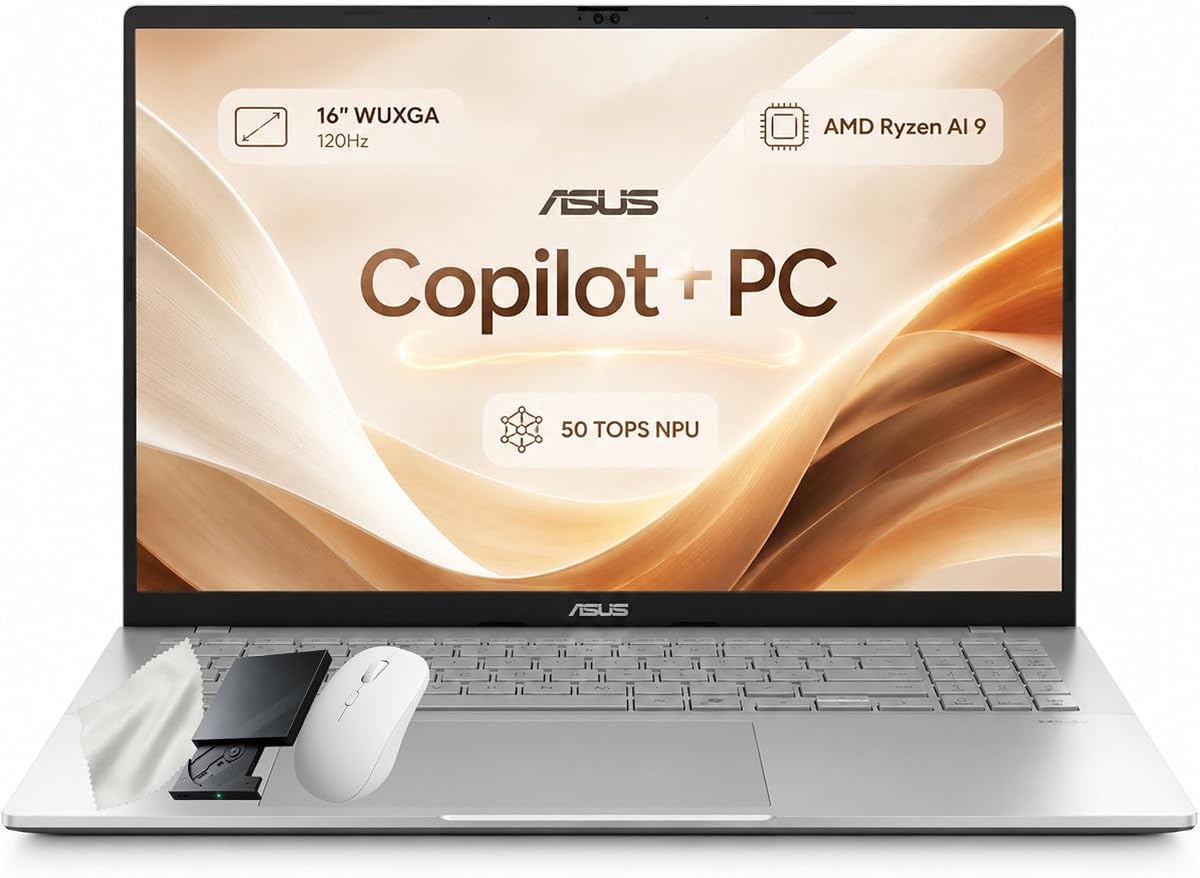
The ASUS Vivobook S16 targets buyers who want a large touchscreen workspace and high-end memory without moving to a convertible or dual-screen design. It has a 5.0 rating and combines a 16-inch WUXGA touch display, AMD Ryzen AI 9 465 processor, 32GB of DDR5 memory, and a 1TB PCIe Gen4 SSD. The screen's 16:10 aspect ratio and 120Hz refresh rate make it especially suitable for documents, spreadsheets, streaming, and simultaneous project windows.
We may earn a commission when you buy through this link, at no additional cost to you.
The Ryzen AI 9 465 supplies 10 cores, 20 threads, speeds up to 5.0 GHz, 34MB of cache, and an AMD XDNA NPU stated at up to 50 TOPS. Integrated Radeon graphics support everyday visuals without turning the notebook into a dedicated gaming system. With 32GB of memory, users can comfortably retain many applications, browser tabs, and files, and the PCIe Gen4 SSD provides quick access to working data and a full terabyte of capacity.
Windows 11 Pro adds professional management and security capabilities. A 1080p IR camera supports Windows Hello facial sign-in and includes a privacy shutter, while the backlit chiclet keyboard and numeric keypad improve productivity in low-light environments or during data-heavy work. The interface is complemented by generous connectivity: two USB-A ports, two USB-C ports with display and power delivery, HDMI 2.1, and a 3.5mm audio connection.
At 3.75 pounds with a 70Wh battery, the S16 remains portable enough for office work, commuting, or classroom use, but it is clearly less compact than the 14-inch Zenbook alternatives. Its large display, full-size keyboard, and numeric keypad can also make it less convenient for cramped workspaces. Overall, it is a well-balanced choice for users who want premium memory, a smooth 120Hz touch panel, modern Ryzen AI performance, and a conventional but highly capable large-screen format.
The 16-inch 16:10 screen provides more usable space for documents, spreadsheets, browser content, and project windows than a compact display. A 120Hz refresh rate adds smoothness to scrolling and direct touch interaction.
With 32GB of DDR5 memory and a 1TB PCIe Gen4 SSD, this laptop is well equipped for intensive multitasking. Dual USB-A, dual USB-C, HDMI 2.1, Wi-Fi 6, and Bluetooth 5.4 offer useful flexibility for peripherals and external displays.
We may earn a commission when you buy through this link, at no additional cost to you.
The 2026 ASUS Zenbook Duo is the most specialized touchscreen laptop in the guide and the most ambitious interpretation of what a touch display can accomplish. It carries a 4.5 rating and features two 14-inch Lumina OLED touchscreens, each supporting 3K resolution, a 144Hz refresh rate, 100% DCI-P3 color, and up to 1000 nits of HDR peak brightness. Rather than simply adding a second panel, it creates a portable multi-screen workspace that can adapt to different tasks.
We may earn a commission when you buy through this link, at no additional cost to you.
Its hardware is correspondingly advanced. A 16-core Intel Core Ultra 9 386H processor handles demanding multitasking and enhanced graphics workloads, while 32GB of RAM and 1TB of storage provide ample capacity for large working sets. The AI platform is stated at up to 50 TOPS and supports features such as file retrieval, summaries, and searches. Intel graphics complement the processor for general visual performance, although this system is not presented as a dedicated gaming solution.
The magnetic keyboard and integrated kickstand allow users to move among dual-screen productivity, laptop, and sharing modes. The anti-reflection coating and E Reading mode may improve comfort during long sessions, while six speakers with Dolby Atmos add a multimedia dimension that is unusual for a portable touchscreen device. Connectivity includes two Thunderbolt 4 ports, USB 3.2 Gen 2, HDMI 2.1 FRL, Wi-Fi 7, and Bluetooth 5.4.
A 99Wh battery and fast charging that reaches 60% in 49 minutes support mobile use, although operating two OLED panels still places understandable demands on battery life. The included ASUS Pen 3.0 supports precise control and wireless charging, and a protective sleeve improves transport. This Duo is ideal for a buyer who values maximum screen real estate, stylus input, and flexible layouts, but its unusual design and higher resource demands make it less suitable for routine travel or budget-conscious use.
Two 3K 144Hz OLED panels create a surprisingly complete desktop-like canvas in a unified device. The magnetic keyboard and kickstand let users shift between independent screens, stacked layouts, laptop mode, and sharing mode according to the task.
Up to 1000-nit HDR brightness, 100% DCI-P3 color, six Dolby Atmos speakers, and an included stylus create a strong media and creative foundation. The 99Wh battery, fast charging, sleeve, and robust port selection support use away from a desk.
We may earn a commission when you buy through this link, at no additional cost to you.
The stylus-equipped ASUS Zenbook 14 OLED is an attractive option for users who want a high-resolution touch surface for drawing, annotation, or detailed on-screen interaction. Its rating is not currently available, so the supplied specifications offer the clearest basis for evaluation. The configuration combines a 14-inch 1920 x 1200 OLED touchscreen, AMD Ryzen AI 9 465 processor, 16GB of 7500 MHz DDR5 memory, and a 512GB SSD in a gray Zenbook chassis.
We may earn a commission when you buy through this link, at no additional cost to you.
The screen includes 500-nit brightness, 100% DCI-P3 color coverage, and a 16:10 aspect ratio. Those characteristics make it well suited to visual editing, media consumption, reading, and precise stylus work. The included pen is the defining accessory because it allows users to annotate documents, sketch, navigate interfaces, and interact with creative applications without relying exclusively on the keyboard or touchpad.
The Ryzen AI 9 465 provides 10 cores, 20 threads, up to 5.0 GHz, and an NPU stated to deliver up to 50 trillion operations per second for supported AI workflows. Integrated Radeon graphics support general productivity, while 16GB of high-speed memory is suitable for multitasking. A 512GB SSD supports fast boot and file access, although it provides less capacity than the 1TB configurations elsewhere in this guide.
Other premium details include a backlit keyboard, Wi-Fi 6E, Bluetooth 5.4, a 1080p IR webcam with privacy shutter, Thunderbolt 4, and Dolby Atmos with Smart Amp Technology. The machine runs Windows 11 Home rather than Pro, so buyers who require BitLocker, Remote Desktop, or advanced management features may need a different configuration. Overall, it is a compelling creative and productivity choice when stylus use and OLED quality are the leading priorities.
The included stylus makes this Zenbook especially appealing for sketching, annotation, and visual navigation. A 2K OLED panel provides enough detail and color coverage to support those creative tasks with a high-quality display.
Ryzen AI 9 465 hardware, 16GB of high-speed DDR5 memory, Wi-Fi 6E, and Thunderbolt 4 provide a capable modern platform. The 512GB SSD is the primary limitation for users with extensive media or project libraries.
We may earn a commission when you buy through this link, at no additional cost to you.
The ASUS Vivobook 16 is a compelling alternative for buyers who want most of the benefits of a large-screen modern laptop without choosing a convertible or dual-screen specialty design. It has a 5.0 rating and combines the Ryzen AI 9 465 processor, 32GB of DDR5 memory, a 1TB SSD, and a 16-inch WUXGA touchscreen in a 3.75-pound chassis. The configuration feels especially balanced for students, office professionals, and creative users who need space but still want to move between locations.
We may earn a commission when you buy through this link, at no additional cost to you.
Its 1920 x 1200 touchscreen has a 16:10 aspect ratio, 400 nits of brightness, and a smooth 120Hz refresh rate. These specifications make it suitable for coding, complex spreadsheets, document work, video meetings, and managing several project windows at once. The processor's integrated NPU supports compatible AI workflows such as video editing enhancements, conferencing noise reduction, and smart multitasking, while 32GB of memory gives heavy applications plenty of room to remain open.
Connectivity is one of the model's strongest features. It includes two USB-A ports, two USB-C ports with display output and power delivery, HDMI 2.1, and a 3.5mm audio jack. These options make it feasible to connect multiple monitors, external storage, and professional audio equipment with fewer adapters. A full HD IR camera with manual privacy shutter supports Windows Hello, and the backlit keyboard includes a numeric keypad for data entry.
The 70Wh four-cell battery provides a conventional mobile power configuration, and the included 68W USB-C adapter supports recharging. At 3.75 pounds, the device is portable for its 16-inch size but not as easy to carry as a premium 14-inch Zenbook. Its integrated graphics also mean it should not be viewed as a serious gaming machine. Even with those limitations, the strong memory, smooth touchscreen, broad port selection, and moderate weight make it one of the most versatile options in the guide.
The 16:10 panel provides more vertical room than a standard 16:9 screen, while 120Hz refresh improves the feel of scrolling and touch navigation. Its 400-nit brightness is suitable for regular indoor productivity and media use.
The Ryzen AI 9 465, 32GB of memory, and 1TB SSD support demanding multitasking while the 3.75-pound chassis remains manageable. USB-C power delivery, USB-A, HDMI 2.1, and an audio jack make the notebook easy to integrate into a desk setup.
We may earn a commission when you buy through this link, at no additional cost to you.
The ASUS Zenbook Duo offers a more established version of the dual-screen concept, combining two 14-inch Lumina OLED touch displays with a detachable keyboard and built-in kickstand. It has a 4.4 rating, a 3.64-pound weight, and a thickness of approximately 0.57 inches. Buyers who routinely work with many windows, reference materials, or communication tools can use one display for primary work and the other for supporting content.
We may earn a commission when you buy through this link, at no additional cost to you.
Both screens have 2880 x 1800 resolution, a 16:10 aspect ratio, 500-nit HDR peak brightness, a 120Hz refresh rate, Pantone validation, and 100% DCI-P3 color accuracy. The device can shift among Dual Screen, Desktop, Sharing, and standard Laptop modes. The detachable Bluetooth keyboard allows the screens to be repositioned, while the kickstand supports desktop-style use. For creative tasks, the included ASUS Pen 2.0 SA203H adds precise input with MPP 2.0 support.
Internally, the Intel Core Ultra 9 285H processor and Intel AI Boost NPU provide AI-ready performance, while Intel Arc graphics support enhanced visual workloads. The system includes 32GB of LPDDR5X memory and a 1TB SSD, which is a generous capacity for an advanced productivity machine. Two Thunderbolt 4 ports, USB 3.2 Gen 1 Type-A, HDMI 2.1, a combo audio jack, Wi-Fi 7, and Bluetooth 5.4 provide a full complement of connections.
The 75Wh battery is quoted for up to 16 hours of video playback in Laptop mode and nine hours in Dual Screen mode, so using both OLED screens necessarily changes the power equation. The device also meets US MIL-STD 810H durability standards. Its strongest audience is mobile professionals and creators who value a large, adaptable digital canvas; those wanting a straightforward single-screen notebook will find it unnecessarily elaborate.
The dual 3K OLED panels can act as a wide combined canvas, separate productivity spaces, a shared presentation surface, or a single screen with the keyboard reattached. This flexibility is the Zenbook Duo's defining advantage.
A thin 0.57-inch profile, 3.64-pound weight, 75Wh battery, and fast charging make the design more mobile than its dual-screen concept might suggest. Thunderbolt 4, HDMI 2.1, USB-A, Wi-Fi 7, and Bluetooth 5.4 support a broad range of accessories.
We may earn a commission when you buy through this link, at no additional cost to you.
Choosing a touchscreen ASUS laptop requires balancing panel quality, physical format, processing power, memory, storage, battery, connectivity, and operating-system features. The most suitable model is the one that supports your daily workflow without adding unnecessary size, complexity, or expense.
A Full HD 1920 x 1080 panel is a practical starting point for document work, browsing, and ordinary office use. The Vivobook models in this guide use this resolution on 15.6-inch screens, providing a familiar amount of working space. For sharper text, more detailed media, and better color presentation, a 2K 1920 x 1200 OLED panel offers a higher pixel density, while the Zenbook Duo models go further with dual 3K displays. OLED screens can deliver deep blacks and vivid colors, but they are not automatically the right choice for every user. Consider brightness, color coverage, aspect ratio, reflections, viewing environment, and how often you will use the device outdoors or in bright rooms.
A 14-inch notebook is easier to carry and usually pairs well with a compact keyboard and touchpad. The Zenbook 14 models weigh approximately 2.8 pounds and remain less than three pounds, making them compelling for commuters and frequent travelers. A 15.6-inch Vivobook provides more visible workspace and a numeric keypad but will generally be bulkier. A 16-inch model makes sense when spreadsheets, code, media, or several simultaneous windows are central to the work. The dual-screen Zenbook Duo is portable for its complexity, but its two large panels still create a substantially wider footprint. Always consider the entire system rather than judging portability from screen size alone.
The AMD Ryzen AI 9 465 configurations use 10 cores and 20 threads with speeds up to 5.0 GHz, while the Intel Core 7 150U option is listed as reaching 5.4 GHz. The Core Ultra 7 258V and Core Ultra 9 processors in the premium systems add current platform capabilities, with AI Boost or dedicated NPU hardware supporting selected AI workflows. These processors are appropriate for productivity, communication, content consumption, and light creative work. Buyers should not confuse a Copilot+ PC label or an NPU benchmark with dedicated gaming graphics. Integrated graphics can handle mainstream tasks, but professional 3D rendering and modern gaming generally require a separate GPU. The right processor depends on the applications, workload, battery priorities, and compatibility needs that matter to you.
Memory determines how much data can remain active without relying on slower storage, making it especially important for heavy browser use, large spreadsheets, communications, and creative applications. The lineup includes 16GB configurations for typical productivity, 24GB for more demanding multitasking, and 32GB for users who retain extensive working sets or operate multiple complex applications. Storage ranges from 512GB to 1TB. A 1TB drive is the safer choice for large project libraries, photographs, software, or local media, while 512GB can work when cloud storage and external drives are available. Consider both capacity and whether memory can be upgraded. The supplied Vivobook information explicitly identifies some configurations as professionally upgraded and outlines separate coverage terms.
A conventional clamshell is usually the simplest way to work, but a 360-degree hinge can improve media viewing, touch interaction, and presentations. The Vivobook 16 OLED Flip supports laptop, tent, stand, and tablet modes, giving buyers a single device that can adapt to different tasks. The Zenbook Duo takes a more specialized approach with two independent OLED panels and a detachable keyboard. Dual-screen designs can be excellent for research, editing, monitoring, and multitasking, but they introduce a more complex layout, consume additional power in multi-screen mode, and take longer to become comfortable for some users. A touchscreen alone is enough for many buyers; convertibility and a second screen are worth prioritizing only when they solve a recurring problem.
Battery capacity alone does not determine real-world runtime because display technology, processor load, screen brightness, network use, and operating mode all matter. The compact Zenbook 14 includes a 75Wh battery, the 16-inch Vivobook models use a 70Wh configuration, and the Zenbook Duo systems use 75Wh or 99Wh batteries. The latter Duo can be fast-charged to 60% in 49 minutes, while the other Duo includes a 65W USB-C charger. A larger OLED screen or dual-panel operation may increase consumption. For frequent travel, look for USB-C charging, a compact charger, and a battery suited to the display. For desk-based use, charging speed and power delivery may matter more than all-day mobility.
Modern connectivity can determine how many adapters you need to carry. Wi-Fi 6E and Wi-Fi 7 provide current wireless support, while Bluetooth 5.4 covers peripherals. Thunderbolt 4 appears on the premium systems and supports a broad range of docks, displays, storage, and accessories. The Vivobook 15 offers one USB-C and three USB-A ports, while the larger Vivobook and Duo models provide two USB-C connections, USB-A, HDMI 2.1, and audio. For security, look for a fingerprint reader, IR camera with Windows Hello, and physical webcam shutter. The 1080p IR camera on the Zenbook 14 and 16-inch Vivobook models adds useful facial-login functionality without compromising physical privacy controls.
Windows 11 Pro appears on most models in the guide and adds business-oriented features such as BitLocker, Remote Desktop, and advanced management capabilities. Windows 11 Home may be sufficient for personal use and can suit buyers who do not need those functions. Accessories can materially improve the experience: the first Zenbook 14 includes a stylus, sleeve, cleaning cloth, and 128GB USB flash drive; the 2026 Zenbook Duo includes a sleeve and ASUS Pen 3.0; and the earlier Duo includes a sleeve and ASUS Pen 2.0. The Vivobook 15 listings include a PCO cooler. Always verify the exact bundle because configurations and included items can vary between listings.
Begin by configuring Windows, signing into your preferred account, and updating the operating system and applications before moving important files. Adjust display scaling, screen brightness, touch sensitivity, and power settings to suit your environment. If a stylus is included, pair it with the system and test palm rejection in the applications where you plan to write or draw. For a convertible or dual-screen model, also install any required utilities for keyboard, display, audio, and camera behavior.
Use a soft, lint-free cloth to clean the screen, and avoid pressing hard on the panel while wiping. Do not use harsh chemicals or abrasive materials, particularly on OLED surfaces and anti-reflection coatings. Keep liquids away from the keyboard and ports, use a ventilated surface, and do not place fabric or other soft material over the intake area while the system is running. Update software regularly and keep adequate free storage on the internal SSD so that applications and system functions remain responsive.
For a touch-focused workflow, take advantage of gestures, on-screen navigation, and a stylus where precision matters. External displays or docking stations can expand an already capable Vivobook workspace, but the dual-screen Zenbook Duo may need deliberate window placement to avoid an overly crowded desktop. Check battery behavior in each mode, adjust screen brightness before leaving an outlet, and use the supplied charger or a compatible USB-C power adapter. Protective sleeves help during transport, while a case with adequate padding is advisable for the larger and dual-screen systems.
An OLED screen generally offers deeper blacks, stronger contrast, vivid color, and higher-end visual appeal than a standard LCD panel. A Full HD screen can still be entirely adequate for documents, browsing, office work, and video calls. The right choice depends on display resolution, viewing environment, battery priorities, and the premium you are comfortable adding for a higher-end visual experience.
The Zenbook 14 OLED models are the strongest travel choices in this guide because they weigh approximately 2.8 pounds and remain close to 0.6 inches thick. Both provide 2K OLED touch displays, modern Ryzen AI processors, 16GB of memory, and 1TB storage on the highest-ranked configuration. The first model also lists a sleeve, stylus, and USB flash drive in its bundle.
No. Sixteen gigabytes is generally sufficient for mainstream office work, browsing, education, communication, and video calls. Twenty-four or 32 gigabytes becomes more useful for heavy multitasking, large spreadsheets, extensive browser sessions, and demanding creative applications. Choosing more memory makes sense when the software workflow requires it, rather than as a substitute for a capable processor or suitable storage.
A convertible laptop uses a hinged display that can rotate into tent, stand, or tablet positions while relying on one screen. A dual-screen laptop provides two separate displays and can offer different layouts, such as a wide combined canvas or a laptop-like arrangement using a detachable keyboard. Convertibles prioritize flexibility, while dual-screen systems prioritize persistent extra workspace.
Yes, provided the display and operating system support pen input. The stylus-equipped Zenbook 14 and both Zenbook Duo configurations are particularly well suited to drawing, annotation, and precise navigation. Buyers should verify stylus compatibility with their preferred creative application and check palm rejection, pressure sensitivity, and latency features within that software.
Windows 11 Pro is not essential for every home user, but it can be valuable for BitLocker, Remote Desktop, device management, and workplace policies. Windows 11 Home is sufficient for many personal, educational, and general productivity uses. If an employer manages your device or requires remote access to it, Pro may be the more appropriate choice.
They can, particularly when the display is large, bright, or based on power-hungry OLED technology. Operating two screens will generally consume more energy than using one. Battery performance also depends on the processor, system mode, workload, brightness, and wireless activity, so the listed watt-hour figures should be considered alongside the specific display configuration.
Confirm the exact screen size and resolution, processor, memory, storage, operating system, weight, battery details, and included accessories. Also inspect the port selection for your monitors and peripherals, confirm whether a stylus is included, and understand the intended screen modes. Finally, verify the current listing because similar ASUS models can use nearly identical names with different configurations.
The ASUS Zenbook 14 OLED with Ryzen AI 9 465, 16GB of memory, and 1TB storage is the strongest all-around recommendation because it combines a polished 2K OLED touch display, strong portability, modern AI hardware, complete connectivity, and useful accessories. The 16GB Vivobook 15 is the most straightforward value-oriented choice, while the 2026 Zenbook Duo represents the premium option for buyers who want two exceptionally detailed touch displays and flexible multi-screen workflows.
Prioritize the use case rather than choosing solely on screen size or processor branding. A 14-inch Zenbook is easier to carry, a 15.6-inch Vivobook offers a familiar large workspace and numeric keypad, and a 16-inch Vivobook provides more room for complex work. Convertible users should evaluate the 120Hz OLED Vivobook, while creative professionals and serious multitaskers may gain the most from either Zenbook Duo model and its included stylus.
Before purchasing, compare the current configuration against your exact needs for memory, storage, operating system, ports, accessories, and portability. Product configurations and prices can change, so the final listing should be checked for the precise display, processor, included pen or sleeve, warranty coverage, and current availability. This verification helps ensure that the selected ASUS touchscreen laptop remains a good fit as the market evolves.