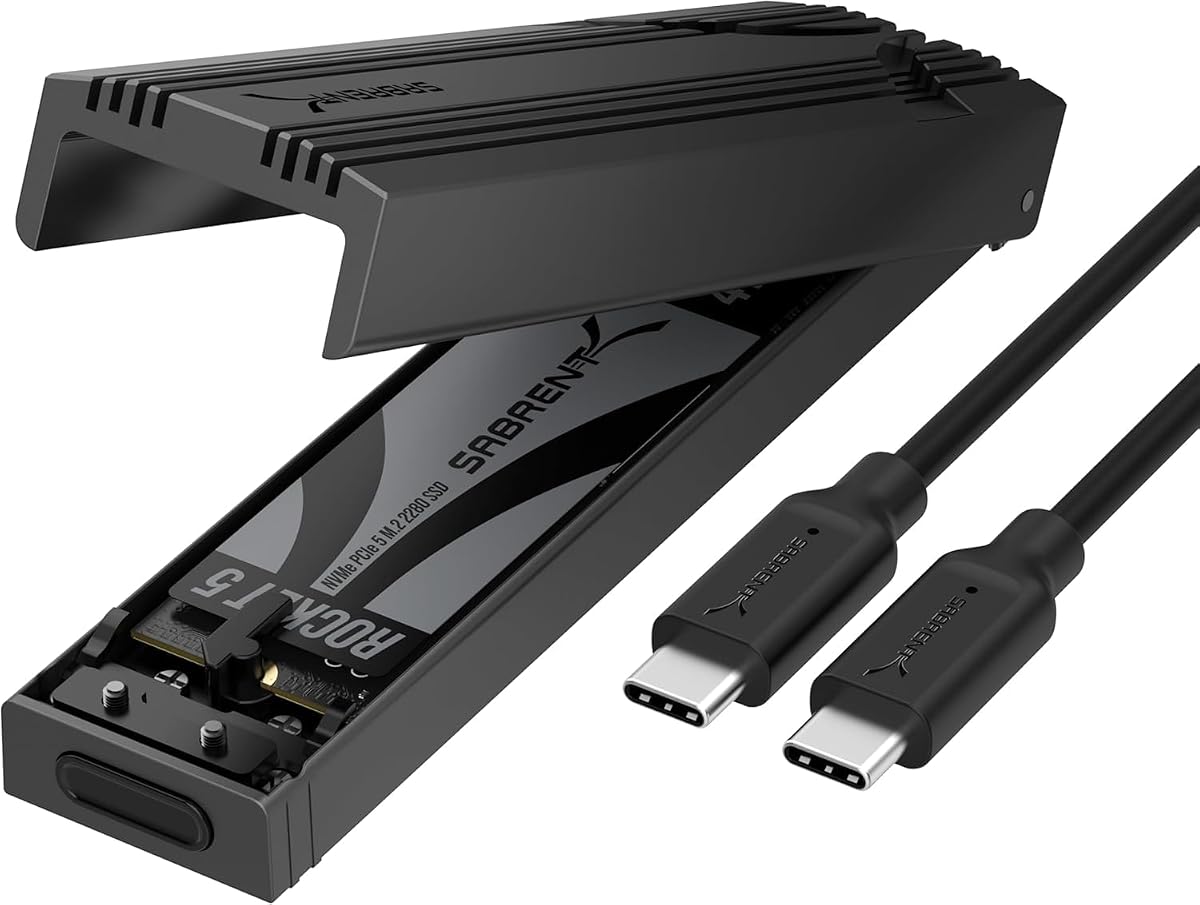
SABRENT EC-PNVO
4.5Editor score
10Gbps USB-C interface
Tool-free flip-open design
Four supported NVMe sizes
Direct thermal pad contact
Portable reinforced aluminum build
This rugged NVMe enclosure guide compares 10 USB-C models, examining NVMe and SATA compatibility, transfer speed, protection, portability, and ease of use.
A rugged NVMe enclosure should protect a fast SSD from impacts, moisture, dust, heat, and frequent transport without making installation unnecessarily difficult. The best models combine a durable shell, secure drive retention, effective thermal management, and a USB-C connection that works across laptops, desktops, cameras, and other compatible devices.
This guide compares ten enclosures based on the supplied specifications, including supported drive protocols, maximum interface speed, physical protection, installation method, size, and device compatibility. It covers models designed specifically for M.2 NVMe drives as well as dual-protocol enclosures that also accept selected M.2 SATA SSDs, with an emphasis on real-world portability.
Each pick highlights a different reason to consider a rugged enclosure, including exceptional rugged certification, tool-free access, write protection, broad drive compatibility, or distinctive lighting. Ratings reflect the information available for each product, and purchasing conditions can change over time, so readers should confirm current specifications and compatibility before ordering.
4.5Editor score

4.5Editor score
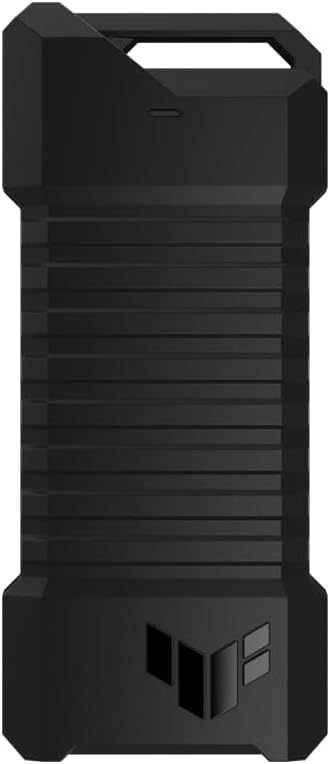
4.6Editor score
The table below compares all ten enclosures by interface speed, supported M.2 protocols, drive sizes, physical design, and standout protective features, making it easier to identify the model that matches your SSD and intended use.




The ASUS TUF Gaming A2 combines one of the fastest interfaces in this guide with unusually strong physical protection. Its 4.5 rating reflects a favorable buyer response, while the listed MIL-STD-810H and IP68 testing make it a compelling option for people who routinely move storage between work, travel, and demanding environments.
We may earn a commission when you buy through this link, at no additional cost to you.
Its USB-C 3.2 Gen 2×2 interface supports speeds up to 20Gbps, providing a higher theoretical ceiling than the 10Gbps designs elsewhere in the list. The enclosure accepts both M.2 NVMe PCIe and M.2 SATA drives in 2242, 2260, and 2280 sizes, reducing the chance that an existing spare drive will be unusable.
A Q-Latch mechanism allows the drive to be changed without a screwdriver, which is particularly useful for cloning, troubleshooting, or moving between multiple SSDs. The aluminum alloy chassis and thermal pad are also important because sustained transfers can generate enough heat to reduce performance or affect long-running work.
The main qualification is that a 20Gbps host and compatible cable are required to realize the full interface rate. Buyers should also confirm that their drive uses one of the listed sizes. Even so, the combination of speed, environmental resistance, thermal provisions, and tool-free maintenance makes the A2 the strongest all-around option here.
The 20Gbps USB-C interface gives the A2 an advantage for large media libraries, backups, and working sets that benefit from faster throughput. The host computer, port, and cable must all support the appropriate USB-C mode, so a 10Gbps computer will still operate but at a lower rate.
MIL-STD-810H testing, IP68 sealing, and a protective silicone-rubber exterior suit users who carry storage into locations where drops, dust, and moisture are plausible. These protections reduce risk without changing the basic USB-C form factor.
We may earn a commission when you buy through this link, at no additional cost to you.
The SABRENT EC-PNVO delivers the core features many buyers need without an advanced rugged specification or premium styling. It carries a 4.5 rating and supports 10Gbps transfer speeds, tool-free installation, and four common M.2 NVMe sizes, making it a practical budget selection.
We may earn a commission when you buy through this link, at no additional cost to you.
Its flip-open design lets the cover be opened, the SSD inserted, and the drive locked into place without reaching for a screwdriver. That simplicity is useful for quick cloning, diagnostics, and work with multiple drives. The aluminum enclosure presses a thermal pad directly against the SSD to improve heat transfer and sustain faster performance during longer transfers.
Compatibility is limited to M.2 NVMe drives in 2230, 2242, 2260, and 2280 formats, with stated support up to at least 8TB. M.2 SATA drives are not supported, and a bare SSD is needed because the product is an enclosure and reader rather than a complete storage system.
The slim, lightweight design and USB-C plug-and-play connection make this a strong choice for a laptop bag, field kit, or shared workstation. Users who need more extreme environmental certification may prefer a model with a stated IP rating, but for portable NVMe performance and convenient access, the EC-PNVO offers an especially balanced feature set.
Opening the lid, securing the drive, and closing the enclosure is all that is required to install an SSD. This reduces friction when cloning a system, moving a working drive between devices, or performing troubleshooting tasks.
The direct thermal pad contact helps move heat away from the NVMe drive, while the 10Gbps interface offers a practical ceiling for everyday transfers. A compatible USB 3.2 Gen 2 connection is needed to achieve the stated maximum rate.
We may earn a commission when you buy through this link, at no additional cost to you.
The ASUS TUF Gaming A1 combines a 4.6 rating, 10Gbps performance, and strong environmental credentials. MIL-STD-810H drop resistance and IP68 water and dust protection distinguish it from many compact enclosures, while the gaming-oriented design broadens its appeal beyond conventional office storage.
We may earn a commission when you buy through this link, at no additional cost to you.
This model supports both M.2 NVMe PCIe and M.2 SATA SSDs in 2242, 2260, and 2280 sizes. Its Q-Latch design permits screw-free installation, making it easy to switch an SSD between a laptop, desktop, mobile device, PS5, or Xbox when the host and drive arrangements are compatible.
The enclosure uses a USB-C 3.2 Gen 2×1 interface for transfer speeds up to 10Gbps. That is still ample for routine file movement, but it does not match the theoretical 20Gbps ceiling of the TUF Gaming A2. Buyers prioritizing the highest possible interface rate may favor that newer model instead.
The A1 is a compelling premium choice for users who value rugged certification, console support, and a refined installation experience. Its protection specifications are especially relevant for travel and field use, and its broad protocol support reduces the chance of buying an enclosure that cannot accept an existing M.2 drive.
MIL-STD-810H drop resistance and IP68 water and dust protection offer clearly defined rugged credentials. The enclosure is better suited to unpredictable travel conditions than a basic aluminum adapter with no stated environmental rating.
A bundled USB-C cable and broad device compatibility make the A1 convenient for PCs, laptops, mobile devices, and current-generation gaming consoles. The included cable also removes uncertainty about whether a suitable connection cable is supplied.
We may earn a commission when you buy through this link, at no additional cost to you.
The Ineo C2597-NVMe stands apart through its physical write-protection switch, a feature that can be valuable when inspecting files on a public or shared computer. It has a 4.2 rating and uses a solid metal case with a rugged, militarized Picatinny rail style.
We may earn a commission when you buy through this link, at no additional cost to you.
Moving the switch to its lock position places the drive and its files into read-only mode. This helps prevent accidental modification or exposure to unwanted changes while the enclosure is connected to an unfamiliar system. It is a different approach from software permissions because the protection is built into the enclosure.
The USB-C interface supports transfer rates up to 10Gbps and accommodates M.2 NVMe PCIe drives with an M key in 2230, 2242, 2260, and 2280 sizes. A bundled silicone thermal pad helps manage heat during sustained transfers, while the aluminum cover supports physical protection.
This is not a universal enclosure because M.2 SATA and NGFF drives are explicitly unsupported. It is, however, a compelling option for field technicians, investigators, travelers, or anyone who regularly connects an SSD to computers outside personal control. Confirm the switch position and device behavior before relying on it for critical operations.
The write-protection switch reduces the chance that an unfamiliar system will alter files during an inspection. Because the control is part of the enclosure, it remains available even when the operating system does not support standard write-blocking protocols.
The solid metal cover and compact rail-style housing suit mobile and tactical-looking setups. A thermal pad helps manage sustained transfer heat, although buyers should not confuse durable construction with a stated formal environmental rating.
We may earn a commission when you buy through this link, at no additional cost to you.
The Zinc Alloy M.2 NVMe & SATA to USB-C Enclosure is built for buyers who may use more than one kind of M.2 drive. Its 4.4 rating reflects solid buyer feedback, while support for both NVMe PCIe and SATA NGFF formats makes it more flexible than enclosures limited to a single protocol.
We may earn a commission when you buy through this link, at no additional cost to you.
The RTL9210B controller supports up to 10Gbps for compatible NVMe PCIe Gen 3 drives and 6Gbps for M.2 SATA III drives. Drives in 2230, 2242, 2260, and 2280 sizes are supported, and compatibility extends across Windows, macOS, Linux, and Android as well as numerous host device categories.
Its zinc-alloy housing, silicone-wrapped edges, and included thermal pad are intended to improve durability, grip, and heat dissipation. The package includes a USB-C cable, screwdriver, and manual, so users have the basic installation equipment needed to mount a bare drive.
There are two important limitations. M.2 SATA AHCI B-key drives are not supported, and SSDs with factory-installed heatsinks will not fit without removing those heatsinks. Within those boundaries, this enclosure is a useful general-purpose adapter for both office and outdoor use.
Supporting both NVMe PCIe and SATA NGFF drives allows the enclosure to work with a wider collection of storage. Check the connector layout carefully, because M.2 SATA B-key drives remain outside the supported group.
The included cable, screwdriver, manual, and thermal pad create a more self-contained package than many competing enclosures. The 122 by 46 by 15 millimeter size also makes it straightforward to carry alongside a laptop or camera kit.
We may earn a commission when you buy through this link, at no additional cost to you.
The Ineo C2594-NVMe combines a rugged-oriented housing with integrated RGB lighting, giving it a more distinctive appearance than a standard utility enclosure. It has a 4.4 rating and offers 10Gbps USB 3.1 performance for compatible M.2 NVMe drives.
We may earn a commission when you buy through this link, at no additional cost to you.
Its aluminum cover and silicone frame are designed to protect the SSD, while the product description also identifies the enclosure as waterproof and shockproof. Four NVMe sizes are supported: 2230, 2242, 2260, and 2280. A silicone thermal pad is included to assist with heat management during high-speed transfers.
The RGB gaming design makes this enclosure a better fit for a visible desktop setup or enthusiast's portable kit than for a subdued professional bag. That appearance does not alter the core function, but buyers should decide whether they want lighting before choosing it over a visually simpler alternative.
M.2 SATA and NGFF drives are not supported, so it is less versatile than dual-protocol models. It also does not list a formal IP or military test standard, meaning the waterproof and shockproof claims should be considered separately from independently defined certification levels.
The aluminum cover, silicone frame, and compact dimensions create a protective shell that remains visually distinct. Integrated lighting adds personality for gaming setups and makes the enclosure easier to identify among carried accessories.
Supporting four NVMe sizes covers most common M.2 form factors without the complexity of a dual-protocol controller. M.2 SATA drives will not work, so confirm the protocol printed on the SSD before purchasing.
We may earn a commission when you buy through this link, at no additional cost to you.
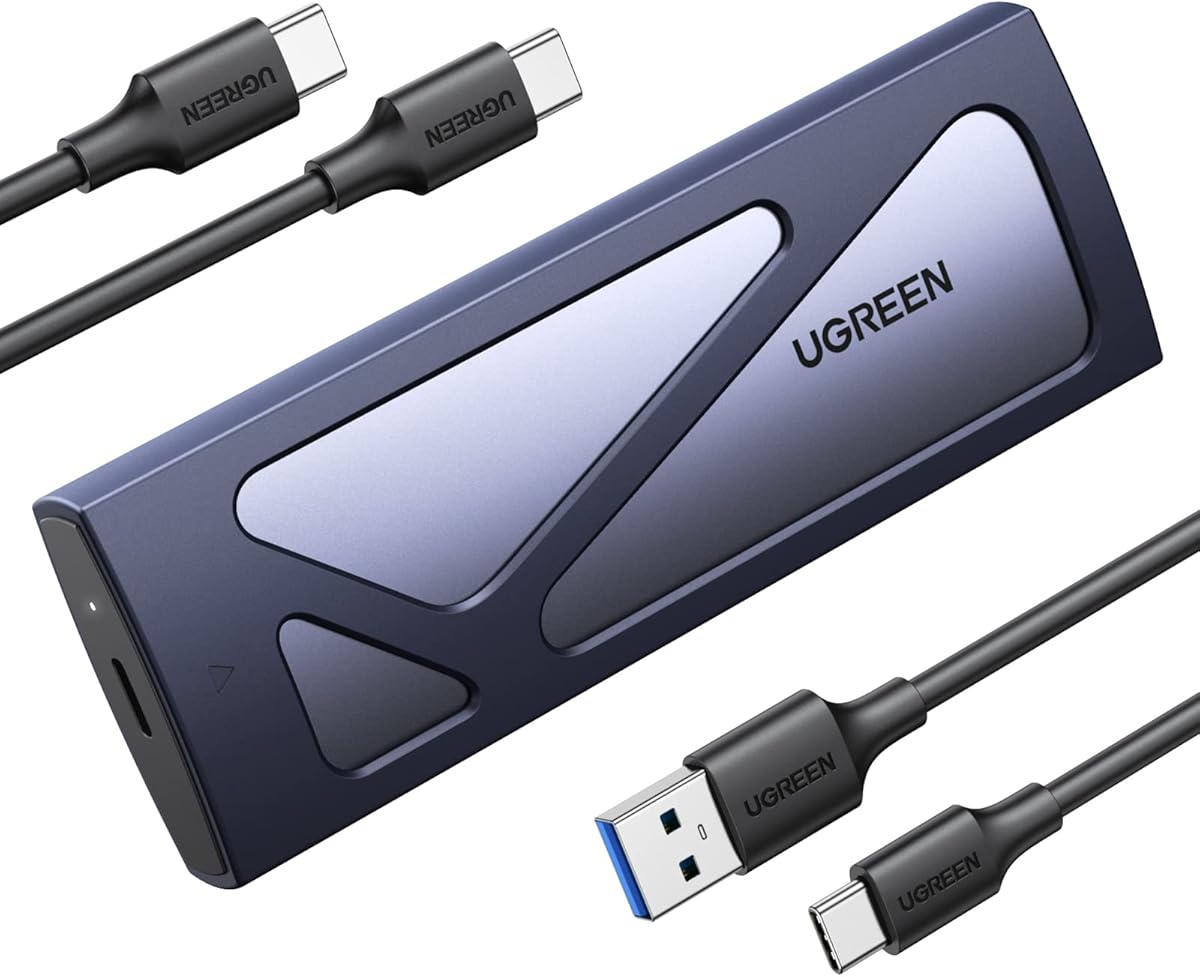
The UGREEN 10Gbps Enclosure is a straightforward portable adapter for users who want fast NVMe performance without a large or complicated housing. Its 4.4 rating, slim aluminum shell, and extra silicone case suit everyday travel, laptop bags, and compact work kits.
We may earn a commission when you buy through this link, at no additional cost to you.
A USB 3.2 Gen 2 interface provides transfer rates up to 10Gbps when paired with a matching data cable. The RTL9210 controller includes short-circuit, over-current, and other protections, while UASP and Trim support can improve real-world transfer behavior and drive maintenance.
Installation requires no tools. A buckle design secures the SSD, and the enclosure supports M.2 NVMe drives with M or B-and-M keys in 2230, 2242, 2260, and 2280 sizes, with stated capacity support up to 8TB. It works across Windows, macOS, Linux, Android, and iOS systems.
M.2 SATA and mSATA drives are not compatible. Buyers should also note that reaching 10Gbps depends on the computer, its port, and the cable rather than on the enclosure alone. For a thin, easy-to-use travel accessory, this is one of the most practical choices in the guide.
The slim aluminum enclosure and added silicone layer make it easy to carry without the bulk of a larger gaming device. Protection features are useful for routine travel, although it does not advertise a formal IP rating.
Plug-and-play operation removes the need to install software before using the enclosure. The included controller supports UASP and Trim, helping the drive handle transfers efficiently while remaining compatible with widely used operating systems.
We may earn a commission when you buy through this link, at no additional cost to you.
The ICY BOX Dual-Protocol Enclosure is aimed at mobile professionals who want a protective metal case that can accept more than one M.2 SSD type. It earns a 4.3 rating and supports both NVMe and SATA drives in 2230 through 2280 sizes.
We may earn a commission when you buy through this link, at no additional cost to you.
Its USB 3.2 Gen 2 Type-C interface provides up to 10Gbps transfer speeds and works with Windows, macOS, Linux, and Android. The full metal housing and included thermal pad assist with heat dissipation during large transfers, while stated dust and shock resistance reinforces its field-oriented positioning.
The included lanyard is a small but useful distinction. It can attach the enclosure to a camera bag, equipment loop, or other gear point, reducing the chance that a compact drive container will be left behind. Photographers and videographers may find that detail more useful than a purely desktop-focused feature.
Stated capacity support reaches 4TB, which is below the 8TB figure offered by some NVMe-only competitors. Installation is not described as tool-free, and buyers should expect to secure the drive with the enclosure's normal retention mechanism. Overall, it balances rugged travel design, flexible drive support, and practical accessories.
The included lanyard provides a simple way to keep the enclosure attached to a bag or equipment loop. That makes the product easier to manage in active shooting, fieldwork, or travel situations where small accessories can otherwise be misplaced.
A full metal shell serves as both a protective structure and a pathway for heat dissipation. The supplied thermal pad helps move heat away from the SSD during large transfers or extended use.
We may earn a commission when you buy through this link, at no additional cost to you.
The SABRENT EC-SNVE combines a 4.5 rating with the practical benefits of tool-free installation and support for both NVMe and SATA M.2 SSDs. Its slim aluminum body is designed for frequent carrying, while the USB 3.2 Type-C interface supports up to 10Gbps transfers.
We may earn a commission when you buy through this link, at no additional cost to you.
The enclosure accepts M.2 PCIe NVMe and M.2 SATA drives in 2242, 2260, and 2280 lengths. A tool-free mechanism allows the drive to be installed or removed in seconds, eliminating the need to retain a tiny screwdriver and making drive swaps more convenient.
Its slim aluminum case is paired with an ABS frame and thermal pad. Bus-powered operation means the enclosure does not need a separate power supply, and it is compatible with Windows 7 or later, macOS 10.5 or later, and Linux. The package includes an eight-inch Type-C to Type-C cable and a manual.
The drive must be bare: a factory-installed heatsink will not fit, and 2230 SSDs are outside the listed sizes. M.2 SATA support is a meaningful advantage, but buyers should still check the physical dimensions of an unusual drive. For frequent drive changes, this model offers one of the cleanest workflows in the guide.
The 100% tool-free design makes the enclosure particularly useful for technicians, content creators, and system builders who frequently move between SSDs. It avoids the inconvenience and loss risk associated with tiny screws.
The enclosure supports both major M.2 protocols and major desktop operating systems, while bus power keeps setup simple. The included cable and manual complete a practical package for immediate use.
We may earn a commission when you buy through this link, at no additional cost to you.
The ASUS ROG Strix Arion is the most visually oriented enclosure in this guide, combining an aluminum alloy housing with ASUS Aura Sync RGB lighting. It carries the highest listed rating at 4.7 and offers 10Gbps performance for compatible M.2 NVMe SSDs.
We may earn a commission when you buy through this link, at no additional cost to you.
Thermal pads pull heat away from the drive, which is important when a fast SSD operates inside a compact metal enclosure. The case supports PCIe NVMe drives in all four common sizes: 2230, 2242, 2260, and 2280. No SSD is included, so buyers must supply their own compatible drive.
Two cables are provided, one USB-C to USB-C and one USB-C to USB-A. This broadens connection options and reduces the need to locate a separate cable. The enclosure's most unusual feature is Aura Sync, which allows the lighting to coordinate with other compatible ASUS hardware.
Its rugged qualities come mainly from the aluminum alloy case and thermal design rather than a stated MIL-STD or IP certification. It also accepts NVMe drives only. As a result, the Arion is ideal for a gaming desktop builder who values coordinated lighting and convenient cables, while the TUF models offer stronger formal environmental credentials.
Aura Sync allows the enclosure's lighting to join an existing ASUS RGB ecosystem. That makes the Arion more than a concealed utility adapter and gives it a clear advantage within a visible gaming setup.
Thermal pads help move heat away from the M.2 drive, while the aluminum case provides a rigid exterior. Including both USB-C and USB-A cables makes it easier to connect the enclosure to modern and legacy-style ports.
We may earn a commission when you buy through this link, at no additional cost to you.
The right enclosure depends on your SSD protocol, physical size, host ports, and exposure to impact, moisture, dust, and heat. Compare the following factors before making a final choice, because a protective shell alone cannot compensate for an incompatible drive or an undersized USB connection.
M.2 describes a physical shape, not a single storage protocol. Many fast NVMe PCIe drives use an M key, while some SATA M.2 drives use B-and-M or other key arrangements. An NVMe-only enclosure may be ideal if you know your drive is PCIe, but a dual-protocol model gives you more flexibility when transferring older or secondary SSDs.
Choose the protocol first, then check the exact key and physical size. Do not assume every enclosure labeled for M.2 SATA accepts every SATA M.2 form factor.
The most common M.2 lengths are 2280 and 2260, while 2242 and 2230 are less common but appear in compact computers and specialist devices. The enclosure must support both the drive length and any factory-installed heat spreader. Some products accept 2230 through 2280, while others begin at 2242.
Capacity limits matter as well. Listed support ranges from 4TB to 8TB depending on the enclosure, so verify the capacity of the SSD you intend to use before ordering.
Most enclosures in this guide use USB 3.2 Gen 2 and advertise up to 10Gbps. The ASUS TUF Gaming A2 uses USB 3.2 Gen 2×2 for up to 20Gbps. The host computer, USB-C port, cable, and enclosure must all support the desired mode for the full stated transfer rate.
Choose 20Gbps when working with large media libraries or high-capacity backups and the computer can support it. For typical file transfers, 10Gbps remains a practical and widely compatible ceiling.
A metal shell and silicone covering are useful, but formal standards communicate more precisely. MIL-STD-810H indicates testing against specified environmental conditions, while IP68 identifies substantial protection against dust and water ingress under the standard's defined test conditions.
Prioritize formal ratings for field work, travel, or construction sites. If an enclosure merely states that it is waterproof or shockproof without a standard, treat that claim more cautiously and keep the device away from standing water or severe exposure.
NVMe SSDs transfer quickly and can become warm inside a compact enclosure. Aluminum housings help conduct heat away from the drive, while properly positioned thermal pads transfer heat from the SSD to that housing. Better thermal management can help prevent throttling during sustained transfers.
Look for a metal chassis and an included or integrated thermal pad. Avoid blocking the enclosure with fabric or placing it in a closed, poorly ventilated compartment during lengthy file operations.
Tool-free and screw-free mechanisms make routine drive changes faster and reduce the chance of losing tiny hardware. The ASUS TUF models use a Q-Latch, the SABRENT EC-PNVO uses a flip-open design, and the SABRENT EC-SNVE is also tool-free. Other products may use conventional retained screws.
Choose tool-free access if you swap drives regularly. If your SSD includes a tall factory heatsink, check whether the enclosure allows removal of that heatsink and whether doing so affects the drive's thermal protection.
For public or shared computers, write protection can be particularly valuable. The Ineo C2597-NVMe includes a physical switch that places the enclosure into read-only mode, reducing the possibility of accidental changes. Software permissions and trusted working practices still remain important.
Look for a hardware write-protection switch when your primary use involves forensic inspection, troubleshooting unknown systems, or sharing files from a location where you do not control the computer.
A slim enclosure is easier to carry than a bulky one, but features such as a lanyard can make a small device more convenient in the field. The ICY BOX includes a lanyard, while the ROG Strix Arion includes both USB-C-to-C and USB-C-to-A cables. Some packages also include thermal pads, screws, a screwdriver, or a manual.
Consider how the enclosure will travel and what accessories are already available. A compact case with a secure closure and a supplied cable can be more useful than a smaller model that leaves important connection hardware to the user.
Before installing an SSD, confirm that its protocol, length, key layout, and capacity are supported by the enclosure. Remove the enclosure from the host, ground yourself if working inside a desktop computer, and attach the drive according to the retention method specified by the manufacturer. Screw-based models should be tightened without forcing the enclosure.
Connect the enclosure with a USB-C data cable to a compatible port and allow the host to recognize the drive. Use the included or recommended controller and operating-system support as a guide, and avoid moving the enclosure while a transfer is in progress. Before unplugging, use the operating system's safe-ejection process to reduce the risk of file corruption.
For long-term care, keep the enclosure dry and avoid exposing it to dust, standing water, excessive heat, or impact beyond its stated rating. Let it cool before changing drives, clean the exterior with a soft dry cloth, and periodically confirm that the retention mechanism remains secure. Preserve the original cables, pads, and fasteners so that a future drive change does not require improvised parts.
A rugged enclosure emphasizes stronger materials, environmental protection, secure retention, and sometimes formal testing against drops, water, and dust. A regular M.2 adapter may focus primarily on converting the drive's interface for use with a computer. A rugged model is worth the extra consideration when storage travels frequently or may be used in difficult conditions.
Some models support both protocols, while others are designed exclusively for M.2 NVMe drives. The listed dual-protocol enclosures generally accept NVMe PCIe and compatible M.2 SATA drives, but they may exclude B-key SATA formats. Always check the exact key, protocol, length, and capacity before buying.
No. The enclosure's maximum rate is also limited by the SSD itself, the computer, the USB-C port, the cable, and the file-transfer software. Host ports that support only USB 3.0 or 3.1 will operate at lower rates, so matching the computer and cable to the enclosure is essential.
A 20Gbps enclosure can be worthwhile for large backups, media workflows, and SSDs that can sustain high throughput, but only when the host and cable also support that mode. Otherwise, its practical advantage is limited. For ordinary document transfers and less demanding storage tasks, 10Gbps is generally sufficient.
A physical write-protection switch is most useful with the enclosure specifically designed to provide it, such as the Ineo C2597-NVMe. It helps prevent writes through the enclosure, but it does not replace caution, updated software, or good security practices when connecting storage to an untrusted computer.
A thermal pad is beneficial during sustained high-speed transfers because it helps move heat away from the SSD. A metal housing can further improve heat dissipation. Even with good thermal provisions, leaving airflow around the enclosure and avoiding unusually warm environments helps maintain stable performance.
It depends on the enclosure's height and drive-retention design. Several products are intended for bare SSDs, and the dual-protocol Zinc Alloy model explicitly says that drive heatsinks must be removed. Removing a heatsink may affect cooling, so use an enclosure designed for the drive's physical configuration whenever possible.
No. IP68 is a specific ingress-protection classification with defined test conditions, but it should not be treated as permission for routine swimming, shower use, or prolonged submersion. Follow the enclosure manufacturer's instructions and avoid exposing any electronic storage device to water beyond its recommended use.
The ASUS TUF Gaming A2 is the leading all-around choice because it combines a 20Gbps interface, dual M.2 protocol support, formal environmental testing, Q-Latch access, and thermal-conscious construction. The SABRENT EC-PNVO stands out as a budget-friendly tool-free option, while the ASUS TUF Gaming A1 offers a more formally rugged, console-friendly design with premium protection.
Prioritize compatibility before appearance: verify the SSD protocol, key, length, capacity, and heatsink arrangement, then make sure the host computer and cable support the desired transfer rate. After that, choose the level of protection and convenience that matches your work, whether that means IP-rated construction, a write-protection switch, a lanyard, RGB lighting, or fast tool-free drive changes.
Purchasing conditions and product availability can change, so readers should check the current listing details and included accessories before ordering. With the right match between enclosure, SSD, and host system, a rugged NVMe enclosure can provide a convenient and dependable way to carry, access, and protect high-speed storage.