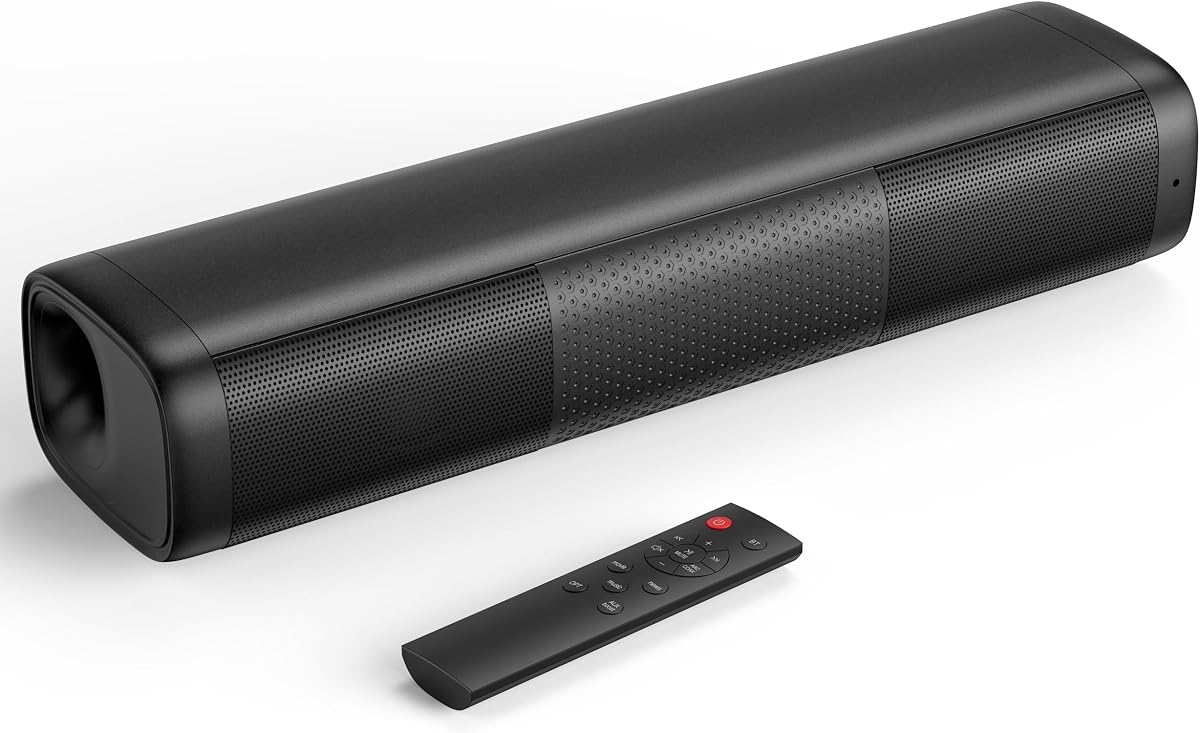
Saiyin 11.7-inch Sound Bar
4.2Editor score
48W peak power
3.5mm auxiliary input
Dedicated subwoofer output
Compact 11.7-inch design
Our best Soundbar with Aux Input guide compares ten models for connectivity, sound quality, dialogue clarity, bass, setup ease, and overall value.
A soundbar with aux input can give an older television, computer, projector, or other audio source a cleaner and more capable sound system without requiring the latest smart-TV features. The right model balances wired versatility, wireless convenience, dialogue clarity, bass, and a practical footprint for your room.
This guide compares ten soundbars using the specifications and features supplied for each model, including connection options, speaker configurations, power, subwoofer design, remote functions, and room-calibration features. The list covers compact single-bar models, all-in-one systems, and larger setups with wireless or wired subwoofers.
Each pick reveals which buyer it best suits, from a small system with a dedicated 3.5mm input to premium home-theater options. Ratings and features may change as manufacturers update products, and prices fluctuate, so readers should confirm the current listing and compatibility before purchasing.
4.2Editor score

4.6Editor score
4.4Editor score
The table below compares the ten shortlisted soundbars by their physical design, core audio hardware, stated connectivity, and distinguishing features, making it easier to identify the model that fits a particular television or room.


The Bose TV Speaker is a compact all-in-one soundbar with a 4.3 rating, two angled full-range drivers, and a direct aux input. It is designed primarily to make television speech easier to understand while adding noticeably wider sound than a typical built-in TV speaker. Its understated footprint and included remote make it especially approachable for bedrooms, apartments, and modest living rooms.
We may earn a commission when you buy through this link, at no additional cost to you.
A major strength is the range of wired and wireless options. The system accepts audio through aux, optical, and HDMI, while Bluetooth allows phones, tablets, and other compatible devices to stream music or podcasts. The supplied description also notes that the first powered-on device connects automatically, reducing the need to cycle through inputs. Angled drivers help create a more spacious presentation, while the remote adds dialogue mode and a bass boost without requiring complicated on-screen menus.
There are limitations to consider. The Bose Bass Module 500 or 700 is not included, and connecting one requires the appropriate Bose module connection cable or a separately sold standard 3.5mm cable. Wall mounting is also optional rather than built in, with brackets sold separately. The optical cable is included, but an HDMI cable is not. These trade-offs are reasonable for a compact model whose primary strengths are clarity, straightforward operation, and wired-source flexibility.
This is an excellent choice for someone who wants an uncomplicated Bose system with a confirmed aux input and a small footprint. It may be less suitable for a large room or a buyer seeking immediate deep bass and rear-channel effects. Overall, it is a strong general recommendation for viewers who place clarity and convenient connections ahead of a full home-theater specification.
The remote's dialogue mode is particularly useful when speech is difficult to follow, while the bass boost provides more depth when a program has limited low-frequency output. Together, these controls make the bar useful beyond a single fixed sound mode.
At just over two inches tall, the speaker can sit in front of many televisions without blocking the screen. It can also be wall-mounted with separate brackets, giving buyers flexibility in rooms where shelf space is limited.
We may earn a commission when you buy through this link, at no additional cost to you.
This 4-in-1 detachable soundbar offers an 80W output, four drivers, Bluetooth 5.0, and aux, ARC, and optical connections. Its 4.1 rating reflects a broad feature set rather than a single standout specification. The ability to place the system horizontally, vertically, on a tabletop, or in a wall-mounted configuration gives it unusual flexibility for a budget-oriented home audio upgrade.
We may earn a commission when you buy through this link, at no additional cost to you.
Automatic volume boost is designed to make quiet dialogue and subtle effects easier to perceive. Three equalizer modes—movie, music, and news—allow the listener to tailor the presentation without navigating a complicated equalizer. In ARC mode, the soundbar can be controlled with a television remote using the included guidance, while the other wired connections make it suitable for PCs, projectors, gaming setups, and conventional televisions.
The 2-in-1 detachable arrangement is not explained in detail by the supplied specifications, so prospective buyers should verify what separates and how the components are meant to be positioned. There is also no stated included subwoofer or explicit surround-speaker package. The four-driver design may therefore prioritize broad placement flexibility and volume over the dedicated low-frequency extension found in complete 2.1-channel systems.
Buyers who need many source options but do not want to focus on a large subwoofer should give this model serious consideration. It is especially useful for renters, dorm rooms, and temporary setups where repositioning the speaker is likely. Those seeking the deepest bass or a more fully specified home-theater package should compare it with the included-subwoofer alternatives in this guide.
Horizontal placement supports a conventional soundbar appearance, while vertical or tabletop arrangements can adapt the output to a particular shelf or wall. This flexibility is useful when a television cabinet or mounting position constrains where the system can go.
Movie, music, and news presets reduce the need to make repeated manual adjustments. The automatic loudness feature is also useful for content whose original mix varies considerably in perceived volume.
We may earn a commission when you buy through this link, at no additional cost to you.
The Saiyin 11.7-inch Sound Bar is a compact 48W-peak-power system designed for televisions, computers, smartphones, and other standard-audio sources. Its 4.2 rating, dedicated 3.5mm auxiliary connection, and unusually small dimensions make it a practical choice for users upgrading a modest screen or building a compact entertainment station.
We may earn a commission when you buy through this link, at no additional cost to you.
The supplied information highlights balanced bass and treble, Bluetooth, optical, and 3.5mm connections, along with a dedicated subwoofer output. That output gives buyers a useful upgrade path without requiring a larger floor-standing subwoofer. A remote, power adapter, 3.5mm audio cable, optical cable, wall-mounting hardware, and setup documentation are included, reducing the chance of needing extra accessories for a basic installation.
Compatibility requires care. The manufacturer recommends a PCM, stereo, or non-surround source and specifically advises changing a television's audio output to optical when using the digital connection. Feeding an incompatible surround or encoded signal into an unsuitable output can result in cracking noise or no sound. Also, 48W peak power is not directly equivalent to continuous or RMS wattage, so comparisons with other models should focus on design, features, and fit rather than treating peak figures as identical measures.
This soundbar is well suited to bedrooms, dorm rooms, small offices, and compact living rooms where a full-sized system would be excessive. It is a compelling choice for someone who explicitly wants a 3.5mm aux input and room to add a powered subwoofer later. Buyers should simply ensure that their television or source device can provide the recommended stereo signal.
The dedicated subwoofer output lets the system start with a small footprint and expand when deeper bass is wanted. A compatible powered subwoofer can improve movie effects and music without changing the main soundbar.
The 11.7-inch-wide housing fits beneath many screens and on narrow shelves. Subtle indicators and a red standby light help with basic status awareness without turning the system into a distracting visual element.
We may earn a commission when you buy through this link, at no additional cost to you.
The Samsung HW B400F is a 2.0-channel soundbar with a built-in woofer, surround sound expansion, and a voice-enhance mode. Its 4.0 rating makes it a straightforward option for buyers who want more body and dialogue clarity than a television's built-in speakers but do not want a separate subwoofer on the floor.
We may earn a commission when you buy through this link, at no additional cost to you.
Its most attractive feature is control integration. A Samsung television remote can operate key functions such as power, volume, and sound effects, reducing the number of remotes on the coffee table. Automatic dialogue amplification is designed to clarify voices, while a nighttime mode lowers volume and minimizes bass. That combination is particularly helpful for shared walls, light sleepers, or households that watch television after other family members have gone to bed.
The supplied information describes seamless wireless TV pairing but does not explicitly identify an aux input. Buyers whose priority is a physical 3.5mm connection should therefore confirm the exact rear-panel ports on the current model before ordering. The specification also does not state the total power output, supported file formats, wall-mounting hardware, or whether every listed function is available through the television remote under all connection methods.
The HW B400F makes the most sense for a Samsung television owner who values one-remote operation, compact 2.0-channel simplicity, and integrated bass. It is less appropriate for a setup centered on legacy analog audio or for buyers seeking a fully specified 2.1-channel package with a separate subwoofer. Its integrated design keeps the floor clear, however, and may be the more convenient choice in a smaller room.
Controlling key soundbar functions with the television remote creates a streamlined setup. It is especially appealing for users who already depend on Samsung's connected television ecosystem and want fewer accessories to manage.
The built-in woofer adds weight without a separate enclosure, while the reduced-bass mode makes it easier to watch without creating excessive low-frequency disturbance.
We may earn a commission when you buy through this link, at no additional cost to you.
The TCL S55H is a 2.1-channel soundbar and wireless subwoofer system rated 4.4, with stated performance of up to 220W. It supports Dolby Atmos, DTS Virtual:X, Bluetooth, HDMI eARC or ARC, optical, and aux connections. That combination makes it one of the most versatile models here for modern television use alongside computers, projectors, and other audio sources.
We may earn a commission when you buy through this link, at no additional cost to you.
The wireless subwoofer is intended to provide deep, room-filling bass while leaving the bar responsible for dialogue and midrange detail. Its low-profile main unit measures 31.89 inches wide and only 2.36 inches tall, making it better suited to a larger television cabinet than the Saiyin and Bose compact options. AI Sonic Auto Room Calibration adjusts the output to the room and listening position through a one-time TCL app setup.
The most significant trade-off is physical footprint. The 7.68-inch-wide subwoofer needs somewhere to stand, and buyers should leave clearance for ports and reflections. Power ratings across soundbar categories are not always directly comparable, so the stated 220W figure should not be treated as a guarantee of a particular listening level. The system also has more features than some buyers may need, and app-based calibration introduces one more piece of setup software.
This is a strong recommendation for a medium-sized living room or bedroom where a television lacks bass and the buyer wants both aux compatibility and advanced surround processing. It is especially compelling for people who want the included subwoofer, wireless placement freedom, and automatic tuning without moving to a full 5.1-channel speaker package.
AI Sonic Auto Room Calibration adjusts the system's output to its surroundings and the listener's position. The process can improve consistency in rooms with unusual furniture, walls, or furniture placement that would otherwise unbalance the speakers.
The main bar handles crisp dialogue and midrange content, while the wireless subwoofer handles low-frequency effects. Its cable-free subwoofer connection also simplifies placement compared with a wired design.
We may earn a commission when you buy through this link, at no additional cost to you.
This 120W soundbar and subwoofer system has a 4.6 rating, the highest among the ten products listed. It includes a wired subwoofer and supports Bluetooth 5.3, ARC, optical, and aux. Those features make it a versatile home-theater option for televisions, PCs, projectors, smartphones, and tablets without requiring separate speakers.
We may earn a commission when you buy through this link, at no additional cost to you.
The included subwoofer is designed to strengthen explosions, music beats, and cinematic effects while keeping audio synchronized with the picture through a wired link. The main bar is rated at 120W and is said to produce clear dialogue, detailed highs, and impactful bass. A remote handles volume, input, and playback settings, and mounting hardware is included for a wall installation.
The primary compromise is placement. A wired subwoofer generally needs to remain near the main unit, unlike a wireless model that can be moved behind a sofa or into a corner. The supplied information also does not define the number or orientation of the main bar's drivers, nor does it detail surround-sound processing. As a result, the system's appeal rests more on a complete package, strong bass, and input flexibility than on a clearly documented height-channel configuration.
For a buyer seeking a confirmed aux input, a supplied subwoofer, and a high stated rating, this is a particularly persuasive option. It works well for everyday television viewing, gaming, music, and mixed-media rooms. Choose it over a wireless system when consistent subwoofer synchronization and simpler included cabling matter more than unrestricted placement.
A physical connection between the subwoofer and bar avoids wireless latency or interference. It also makes the system straightforward to configure, although the subwoofer must remain within reach of the supplied cable.
Bluetooth 5.3 handles compatible phones and tablets, while ARC, optical, and aux cover televisions, projectors, and computers. The included remote reduces dependence on controls buried in television menus.
We may earn a commission when you buy through this link, at no additional cost to you.
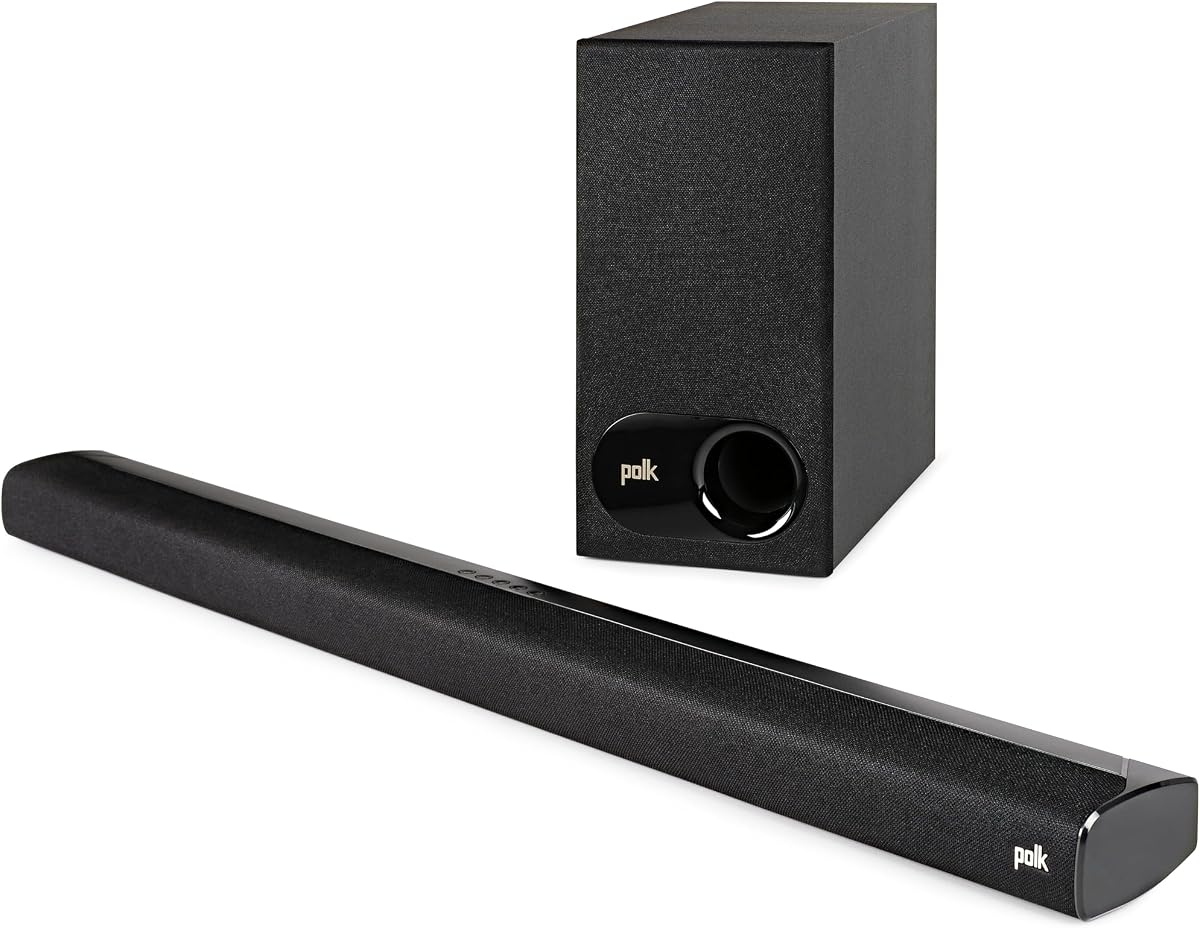
The Polk Audio Signa S2 combines an ultra-slim soundbar with a wireless subwoofer and a 4.4 rating. Five full-range drivers, Dolby Digital decoding, and Polk's VoiceAdjust technology form the core of a design aimed at improving clarity while delivering more substantial bass than a typical compact bar.
We may earn a commission when you buy through this link, at no additional cost to you.
Its most relevant feature for this roundup is the clearly listed aux connection, alongside HDMI, ARC optical input, and Bluetooth. That makes it useful with newer televisions, older source components, computers, and streaming devices. A wireless subwoofer adds low-end output without forcing a visible cable across the room, while VoiceAdjust is intended to make dialogue easier to hear and reduce perceived voice delays.
The product is exceptionally slim at just over two inches tall, so it can sit in front of a television without hiding the lower edge of the screen or the television's infrared sensor. Wall mounting is also possible. However, the supplied data does not identify upward-firing drivers, a full surround-speaker package, advanced room calibration, or a formal height-channel configuration. It is therefore better viewed as a refined 2.1-style system than a full spatial-audio array.
This is an excellent premium pick for a buyer who values a confirmed aux input, a discreet bar, and a wireless subwoofer. It works particularly well in a living room where design and placement matter as much as raw output. Buyers wanting overhead Dolby Atmos effects or rear-channel speakers should look to the TCL S65K or Samsung S60D instead.
VoiceAdjust is intended to improve the balance between voices and other program elements. For viewers who routinely struggle with dialogue, this dedicated function is more useful than relying exclusively on general equalizer presets.
The included wireless subwoofer can be moved away from the main bar for better low-frequency distribution. This makes it easier to place the system around furniture without leaving a subwoofer cable in view.
We may earn a commission when you buy through this link, at no additional cost to you.
The TCL S65K is a 5.1-channel system with a soundbar, wireless subwoofer, and wireless surround speakers. Its 4.4 rating reflects a feature set aimed at cinematic immersion, including Dolby Atmos, DTS:X, Ray Danz technology, a built-in center channel, and AI Sonic Auto Room Calibration. It represents a substantial upgrade over a single-bar system.
We may earn a commission when you buy through this link, at no additional cost to you.
The main bar includes a center tweeter and dedicated center channel for dialogue, while the separate surrounds expand the soundstage around the listening area. The subwoofer uses a 6.5-inch driver and Bass Boost technology for deeper output. AI Sonic calibration adjusts the system's performance to the room, and a single HDMI cable is presented as the simplest way to connect the system to a compatible television.
Its size and complexity are meaningful trade-offs. Three powered or connected audio components require more placement planning, and the supplied product information does not explicitly list an aux input. That means the S65K is not the safest selection for a buyer whose primary requirement is a confirmed 3.5mm analog connection. Bluetooth music streaming is supported, but it is a different use case from wired aux compatibility.
The S65K is ideal for a dedicated entertainment room, larger television, and viewers who want rear sound without running surround-speaker cables throughout the room. It is less appropriate for a small desk or a system where simple placement and legacy wired connectivity matter most. The included surround equipment makes it a more complete home-theater solution than the 2.1-channel models in this guide.
Dolby Atmos and DTS:X are designed to place sound elements above or behind the listener, while Ray Danz expands the perceived soundstage. The format support depends on the source mix and television or source-device output.
The built-in center channel and tweeter give voices a defined home within the mix. This is valuable during action scenes when a wide soundstage could otherwise make dialogue harder to distinguish.
We may earn a commission when you buy through this link, at no additional cost to you.
The Samsung S60D is a compact 5.0-channel all-in-one soundbar with a 4.4 rating, built-in subwoofers, and wireless Dolby Atmos. Instead of requiring a floor-standing subwoofer, it directs some sound upward to create a height effect. Its integrated architecture can make a substantial home-theater upgrade easier to place than a multi-box system.
We may earn a commission when you buy through this link, at no additional cost to you.
The soundbar includes up-firing speakers, an acoustic beam, and strong woofers. SpaceFit Sound Pro analyzes the room and adjusts output, while Adaptive Sound identifies content types and emphasizes important audio. Active Voice Analyzer separates voices from background noise, and Game Mode Pro creates a more dimensional gaming presentation when synchronized with a compatible Samsung television.
Smart integration extends beyond sound. Built-in Alexa, Chromecast, and AirPlay 2 support provide voice and wireless-streaming options, while Q-Symphony lets a Samsung television and soundbar work together as a unified system. The supplied data does not explicitly identify an aux input, however, so buyers should verify the physical ports. Several advanced features also work best within a compatible Samsung ecosystem or with source content formatted for spatial audio.
The S60D is best for someone who wants a polished, feature-rich system with convincing height effects and minimal visual clutter. It may suit a Samsung television owner particularly well. Those whose must-have feature is a confirmed 3.5mm aux connection should favor the Bose TV Speaker, Polk Signa S2, or another model with that input explicitly listed.
Upward-firing drivers create height cues in compatible content, while built-in woofers provide low-frequency output. The result is a relatively compact system capable of a wider presentation than a basic single-bar design.
Adaptive Sound examines scene content and adjusts emphasis, while Active Voice Analyzer helps keep dialogue audible. Game Mode Pro adds game-specific spatial processing and can activate in coordination with a compatible Samsung television.
We may earn a commission when you buy through this link, at no additional cost to you.
The Bose Smart Dolby Atmos Soundbar combines a compact five-transducer design with Dolby Atmos, TrueSpace processing, AI Dialogue Mode, and extensive smart-device integration. Its 4.1 rating and rich feature list position it as a premium lifestyle and home-cinema product for viewers who prioritize room-filling sound from a relatively compact enclosure.
We may earn a commission when you buy through this link, at no additional cost to you.
Two of the five transducers fire upward to produce height effects, while Bose TrueSpace analyzes stereo and 5.1 signals and upmixes them into a more immersive multichannel presentation. A.I. Dialogue Mode balances voices against the surrounding sound field. The system can stream through Bluetooth, Apple AirPlay 2, Spotify Connect, or built-in Chromecast, and it includes Amazon Alexa plus Bose Voice4Video for compatible television and cable or satellite control.
The primary caveat is that the supplied data does not explicitly list an aux input, despite the product being included in an aux-focused comparison. Prospective buyers should inspect the current specification page and rear panel. Another limitation is that no external subwoofer is included. The system can be paired with Bose Ultra Open Earbuds for rear-surround effects, but that optional arrangement is not equivalent to a conventional included subwoofer package.
This soundbar is a strong choice for a buyer who values Bose processing, smart controls, streaming convenience, and compact Dolby Atmos presentation. It is best suited to a modern entertainment setup where wireless ecosystem integration and voice control are priorities. Confirm analog connectivity before ordering, and consider a 2.1-channel system if a confirmed aux port and immediately included deep-bass hardware are non-negotiable.
Two upward-directed transducers help create overhead cues when playing compatible Dolby Atmos material. Their compact placement makes the system easier to position in front of a television than a full surround-speaker package.
Bluetooth, AirPlay 2, Spotify Connect, and Chromecast cover several common ways to play music. Built-in Alexa and Bose Voice4Video extend that convenience into television control when the necessary services and equipment are compatible.
We may earn a commission when you buy through this link, at no additional cost to you.
The right soundbar with aux input depends on source compatibility, room size, desired bass, and how much control you want. Reviewing these factors before shopping helps prevent an attractive feature set from masking a basic connection or placement problem.
An aux connection may refer to a 3.5mm analog socket, a paired RCA connector, or a proprietary port, so the label should not be treated as a complete technical specification. Check the product listing and rear-panel diagram for the exact input format. A soundbar intended for a television with a headphone output may require an adapter or a separate cable, and some televisions do not include a compatible analog output at all.
Choose only a model whose supplied information explicitly confirms a 3.5mm aux input if legacy wired connectivity is essential. In this list, the Bose TV Speaker, 4-in-1 Detachable Soundbar, Saiyin, TCL S55H, 120W system, and Polk Audio Signa S2 all have a clearly stated aux connection. The remaining products should be treated as wireless or digital alternatives until their physical ports are verified.
A soundbar that sounds convincing in a compact bedroom may struggle to fill a large living room, while a large system with a separate subwoofer can overwhelm a desk or apartment. Consider the television size, room dimensions, nearby walls, furniture placement, and whether other people share the space. The main bar should fit beneath the screen without blocking it, and the subwoofer should have enough clearance to operate without being tucked into a closed cavity.
As a general rule, prioritize a compact bar for smaller rooms and a complete 2.1-channel or 5.1-channel package for a larger entertainment zone. Placement flexibility matters as much as headline power, so check whether the subwoofer is wired or wireless and whether wall-mounting hardware is included.
A 2.0-channel soundbar uses left and right channels without a dedicated low-frequency output. A 2.1 system adds a subwoofer, while a 5.1 package adds surround speakers. Models using upward-firing drivers can simulate height effects, and all-in-one designs place multiple drivers in one cabinet. These labels indicate the physical approach, but they do not guarantee identical audio quality, driver quality, or room-filling performance.
Look for stated drivers, subwoofer inclusion, sound effects, and dialogue tools. The Polk Signa S2 uses five full-range drivers, the Bose Smart Soundbar uses five transducers with upward-firing units, and the TCL S65K includes separate wireless surrounds. A simple 2.0 bar may be entirely adequate when dialogue clarity matters more than cinematic effects.
Many people buy a soundbar because television speech becomes difficult to hear, particularly at lower volume or with mixed surround soundtracks. Useful tools include dialogue modes, voice enhancement, Active Voice Analyzer, adjustable center channels, and automatic loudness controls. These features are most useful for news, documentaries, films, and programs with quiet conversations.
Check whether the feature can be called from the included remote or television remote. Automatic dialogue amplification should supplement, not replace, sensible speaker placement. Positioning the bar below or near the screen and keeping the subwoofer from overwhelming the center channel can improve intelligibility without making every program excessively loud.
Built-in subwoofers keep setups tidy, while external subwoofers usually provide more extension and impact. Wired subwoofers are straightforward and maintain a stable link, but they must stay within reach of the cable. Wireless subwoofers offer more placement options, although pairing and power management should be tested during setup. Some compact bars include a subwoofer output without including the subwoofer itself.
The Saiyin is an example of the latter approach. The 120W system includes a wired subwoofer, while the TCL S55H, Polk Signa S2, and TCL S65K include wireless units. Choose based on space and reliability rather than maximum bass alone, and avoid pushing a compact subwoofer beyond what its amplifier and enclosure can support.
A modern soundbar may support HDMI ARC or eARC, optical digital audio, Bluetooth, and aux, but the best connection depends on the television. HDMI ARC enables television-remote control in many setups, eARC can support higher-bandwidth formats, optical audio is broadly useful with older televisions, and Bluetooth is ideal for casual music streaming. AUX remains valuable for computers, projectors, game consoles, and legacy source equipment.
Think about the complete signal chain. For example, a PC may connect by aux, a streaming device by HDMI, and a phone by Bluetooth. Confirm the cables included in the box, especially optical or HDMI cables, and verify whether the supplied remote can control the soundbar while the television remote controls the television.
Voice assistants, apps, automatic room calibration, wireless streaming, and game modes can make a soundbar easier to tailor, but they are not universal requirements. Some advanced features depend on a particular television brand, source format, mobile device, network configuration, or paid service. Automatic calibration can be useful in irregular rooms, while a simple remote and direct inputs may be preferable for straightforward setups.
Review the practical support behind each feature. Look for a usable app, clear setup instructions, and compatible control options. A large feature list should not outweigh an uncertain aux connector or a subwoofer placement problem.
Soundbar width should complement the television rather than look undersized beneath it, although a compact bar can still provide a major upgrade. Check height, depth, weight, grille design, indicator lighting, and remote design. Some systems include wall-mounting kits, while others require separate brackets. The supplied information also reveals whether status lights are subtle or may distract during dark viewing.
Do not equate physical size with sound quality. A carefully designed small system may outperform a much larger model for dialogue, while a multi-component package can sound expansive but occupy more space. Choose the form factor that fits the television cabinet and the household's aesthetic.
Begin by identifying the source and choosing the correct connection. For a television, HDMI ARC or optical audio is generally the simplest route when those inputs are available. Use the 3.5mm aux input for a computer, projector, game console, or other source with an analog output. If a television has only a headphone jack, verify that the output carries an audio signal and obtain a suitable adapter. Once connected, select the matching input on the soundbar and set the television or source device to output sound through the external speaker.
For digital connections, set the source to a compatible PCM, stereo, or non-surround format when the soundbar does not support the television's encoded output. Begin with a moderate volume, then adjust the soundbar's equalizer, dialogue, bass, or room-calibration settings. Placement is just as important as menu settings: keep the bar unobstructed, allow space around a subwoofer, and avoid placing either component inside a closed cabinet unless the manufacturer specifically permits it. If the system includes wall-mounting hardware, use it and verify that the remote signal is not blocked.
Care for the system by dusting the grille gently with a soft, dry cloth and keeping liquids away from the openings. Do not use harsh cleaners, spray liquid directly into the speaker, or place the bar where it can be knocked off a stand. Route the subwoofer cable so it cannot create a trip hazard. Review the input and audio-format settings after television or streaming-service updates, and periodically test Bluetooth reconnection as well as the aux connection to ensure every source remains available.
An aux input is typically an analog connection, often using a 3.5mm mini-jack, while an optical input carries digital audio through light. A compatible aux source can often connect directly to a soundbar, whereas a television may need its digital output changed to PCM or another format the soundbar supports. Optical generally avoids analog cable hum, but both can provide high-quality television audio.
Only if the television or another source device provides a compatible analog audio output. Modern televisions often emphasize HDMI and optical audio, while some older sets include a 3.5mm headphone jack or RCA output. Check the television's manual and confirm the output carries audio, then purchase the right cable or adapter.
Usually not. A standard 3.5mm aux connection carries a simple stereo or multichannel analog signal, depending on the source and equipment. It does not automatically create the height or surround effects associated with formats such as Dolby Atmos. Any simulated surround processing must be performed by the soundbar itself.
Use HDMI ARC when your television supports it and you want the best chance of controlling the soundbar with the television remote. Optical is a dependable digital alternative and may be necessary with older television models. Use aux for computers, projectors, legacy equipment, or any source without a convenient digital audio output.
The source format may not match what the soundbar can decode, or the television may be sending audio to another output. For optical use, select the optical output in the television menu and try PCM or stereo settings, following the soundbar manufacturer's guidance. Check the cable, selected input, and volume controls before changing other equipment.
A built-in subwoofer usually offers a cleaner setup and takes up less space, while a separate unit may provide stronger and deeper bass. The best choice depends on room size, cabinet space, and the quality of the drivers. A compact built-in design can still be a major upgrade over television speakers, especially when dialogue clarity is the main goal.
Room calibration is useful but not essential for every setup. It can help balance levels and account for reflections, furniture, and speaker placement in an irregular room. It is most valuable in systems with several speakers or a separate subwoofer. For a simple soundbar, careful placement and sensible equalizer settings may provide most of the practical benefit.
Connect the source directly, use the correct input, and avoid adapters that introduce obvious loss or unwanted noise. Set the television or source to a compatible output, keep the volume moderate during setup, and then adjust the soundbar's presets. Position the bar where it is not blocked, and make sure the optional subwoofer has enough space around it.
The strongest general option in this guide is the Bose TV Speaker because it explicitly supports aux input in a compact, polished design with dialogue and bass controls. The 4-in-1 Detachable Soundbar stands out for flexible placement and several source options, while the Saiyin 11.7-inch model is a compelling compact choice with a dedicated subwoofer output. For buyers who want a complete conventional package, the 120W soundbar with wired subwoofer offers aux, digital inputs, and strong stated output.
Prioritize the features your source equipment actually needs. Confirm a physical 3.5mm port rather than assuming a wireless or HDMI-focused model includes one, then decide whether built-in, external, or upgrade-only bass is acceptable. Consider room size, dialogue tools, television-remote compatibility, and subwoofer placement before paying attention to a headline wattage figure. Larger systems such as the TCL S65K and Samsung S60D make more sense when immersive height or surround effects are central to the experience.
Finally, check the current product page, included cables, supported audio formats, and latest price before ordering. Specifications and promotions can change over time, and retailer availability also varies. The best soundbar with aux input is the one that combines the correct connector, an appropriate soundbar for the room, and a bass arrangement that fits the available space.
