
CORSAIR HX1500i (2025)
4.5Editor score
ATX 3.1 compliant
Fully modular cabling
140mm FDB cooling fan
This 1500W PSU guide compares efficiency, connectivity, noise, transient response, and build compatibility across ten premium power supplies.
A 1500W PSU is built for demanding gaming PCs, creator workstations, and multi-GPU systems that need more power than conventional mid-range units can provide. The best choice depends on GPU transient demands, connector availability, case clearance, efficiency, fan behavior, and whether you value software controls or a completely hands-off design.
We compared ten high-capacity power supplies using only their published specifications and listed features. The list covers ATX 3.1 and PCIe 5.1 models, native 12V-2×6 connections, modular cabling, platinum or titanium efficiency, zero-RPM modes, digital monitoring, and options suited to workstations or compact enthusiast builds.
Each review identifies the power delivery, acoustic, and installation details that distinguish the model. Our top selections recognize the strongest overall fit, the most refined premium option, and the most capable budget-oriented choice. Availability and prices change frequently, so confirm current specifications and case clearance before purchasing.
4.5Editor score

4.7Editor score

4.7Editor score
This side-by-side comparison highlights each unit's rated power, platform generation, efficiency, cooling approach, and principal installation consideration for high-performance desktop builders.


The CORSAIR HX1500i (2025) is a 1500W ATX 3.1 and PCIe 5.1-ready power supply that combines current platform support with useful monitoring and a refined acoustic design. Its 4.5 rating reflects a well-rounded option for demanding PCs that need substantial headroom without moving into every premium feature offered by higher-end models.
We may earn a commission when you buy through this link, at no additional cost to you.
Its most important advantage is the combination of full modularity, a 140mm fluid dynamic bearing fan, and a zero-RPM mode that stops the fan at low and medium loads. CORSAIR iCUE adds custom fan curves, power monitoring, and on-the-fly switching between single-rail and multi-rail overcurrent protection, giving enthusiasts meaningful control without making the unit difficult to understand.
The tradeoff is efficiency. This model is not presented as a titanium-rated design, and some alternatives in the list carry stronger efficiency credentials. The visual and software ecosystem also centers on iCUE, which may be unnecessary for buyers who want a conventional power supply that requires no software. Nevertheless, the core electrical platform and modular layout make it a sensible high-power choice.
This is the strongest budget-conscious selection in the group for a new ATX 3.1 build. Choose it when you value current transient handling, clean cable management, quiet idle operation, and monitoring over titanium certification. Confirm that your case accepts a 1500W unit and use the native high-current GPU connection supported by the platform.
ATX 3.1 certification is particularly relevant for systems using the latest high-performance graphics cards. It supports PCIe 5.1 platforms and is designed to resist transient power spikes that can occur outside steady-state load testing.
Through CORSAIR iCUE, builders can monitor power settings, establish custom fan behavior, and change overcurrent protection modes. These features make the unit easier to tailor to different workloads while keeping the visual monitoring experience consistent with other CORSAIR components.
We may earn a commission when you buy through this link, at no additional cost to you.
The ASRock PG 1600G is a 1600W ATX 3.1 and PCIe 5.1 power supply built around dual native 12V-2×6 connections and temperature-aware cable termination. Its 4.4 rating and extensive feature list make it especially interesting for multi-GPU, extreme overclocking, and professional workstation configurations that need more than a conventional 1500W design.
We may earn a commission when you buy through this link, at no additional cost to you.
The dual 12V-2×6 cables use TempGuard technology to monitor temperature at the terminal point, while the dual-color connector design provides visual confirmation of a secure fit. The unit can handle power excursions up to 220% of its rated total, and its +12V rail is rated at 133.3A, offering 1600W of continuous power for unusually demanding hardware combinations.
Efficiency is a strong point despite the long product name: the model carries 80 PLUS Gold and Cybenetics Platinum certification, reaches up to 90% efficiency, and has a Cybenetics Lambda A noise rating. The main practical concern is physical size. Its stated dimensions of 180mm deep by 150mm wide and 86mm high may prevent it from fitting in many cases designed around more compact power supplies.
Buyers should choose the PG 1600G when connector count, power excursions, and sustained 12V capacity matter more than a compact footprint or titanium-level efficiency. Check the chassis PSU bay carefully, verify your graphics cards support native 12V-2×6 connections, and use the supplied TempGuard-compatible cables as intended.
Two native 12V-2×6 connectors reduce dependence on legacy GPU power arrangements. The TempGuard system adds a temperature-monitoring layer at the terminal, while the dual-color design helps installers confirm that each plug is properly seated.
With 1600W of continuous output, a 133.3A +12V rail, and support for substantial power excursions, the PG 1600G is tailored to multi-GPU systems and heavily overclocked platforms. Its cable inventory includes EPS, PCIe, peripheral, and SATA connections for broad workstation support.
We may earn a commission when you buy through this link, at no additional cost to you.
The NZXT C1500 Platinum is a fully modular 1500W gaming power supply with ATX 3.1 and PCIe 5.1 support, two native 12V-2×6 cables, and a 140mm magnetic levitation fan. Its listed 4.1 rating is the lowest among these ten options, but the underlying design remains well suited to high-power gaming systems.
We may earn a commission when you buy through this link, at no additional cost to you.
A major strength is efficiency. The unit exceeds 80 PLUS Platinum standards and carries a Cybenetics Titanium efficiency rating, with stated efficiency reaching 94%. Lower conversion losses can reduce heat and support quieter cooling, while the digital power design provides precise voltage regulation and lower ripple noise for sensitive high-performance components.
The cooling solution uses an air-suspended magnetic levitation fan intended to provide low noise, strong airflow, and long service life. The product also has a zero-fan mode for quieter operation. However, the comparatively modest 4.1 rating is the main reason it does not lead the roundup, and buyers should not treat efficiency certification as a substitute for considering the unit's own acoustic behavior.
The C1500 Platinum is a good match for gamers who want a clean, modern power supply with native high-current GPU cables, high efficiency, and digital regulation. It is less compelling for a buyer who prioritizes the highest customer rating or extensive software-based monitoring. Verify connector requirements and case clearance before ordering.
The stated 94% efficiency and Cybenetics Titanium certification are especially appealing for systems that operate near typical desktop loads. Less energy becomes waste heat inside the chassis, which can make the overall cooling system easier to manage.
The two PCIe 5.1 16-pin cables are each specified to deliver more than 600 watts to compatible graphics cards. Native connections reduce adapter complexity and provide a direct route to powering current high-end GPUs.
We may earn a commission when you buy through this link, at no additional cost to you.
The Seasonic Prime TX-1600 Noctua Edition is a 1600W power supply built for users who treat acoustic performance as a core requirement. Its 4.7 rating, ATX 3.1 certification, titanium efficiency, and Noctua cooling package make it one of the most refined high-capacity options in the roundup.
We may earn a commission when you buy through this link, at no additional cost to you.
The defining feature is the renowned NF-A12x25 fan paired with a custom, highly optimized grill. Seasonic states that this edition is approximately 8–10dB(A) quieter than the regular PRIME TX-1600, while Cybenetics Lambda A++ certification supports its reputation for extremely low noise. Semi-passive operation keeps the fan stopped until 50% load at an ambient temperature of up to 25°C.
The electrical design is equally serious. It is ATX 3.1 and PCIe 5.1 compliant, includes a 12V-2×6 connector for high-end graphics cards, and remains compatible with ATX 3.0 and PCIe 5.0 platforms. The unit is certified for 80 PLUS Titanium and Cybenetics ETA Titanium, with 94% efficiency at 50% load.
The main limitation is connector quantity. Only one native 12V-2×6 connection is listed, so a multi-GPU build may need additional PCIe arrangements. This is nevertheless the premium choice for a single high-end GPU workstation where quiet operation, voltage regulation, efficiency, and established cooling hardware outweigh having several native GPU cables.
The Noctua edition goes beyond simply fitting a quiet fan into a large power supply. Its custom grill and semi-passive strategy are designed to reduce noise across normal desktop operation, which matters because a high-output PSU can otherwise become one of the loudest components in a quiet PC.
Seasonic emphasizes steady power delivery and ultra-tight voltage regulation. Titanium efficiency further reduces waste heat, making this model particularly appropriate for workstations and enthusiast systems where the enclosure itself is designed to be acoustically excellent.
We may earn a commission when you buy through this link, at no additional cost to you.
The be quiet! Dark Power Pro 13 is a 1600W titanium-efficiency power supply that emphasizes digital control, stable signaling, and flexible output configuration. With a 4.3 rating and support for PCIe 5.0 GPUs, it remains a compelling choice for builders who prioritize efficiency and rail flexibility over having the newest platform label.
We may earn a commission when you buy through this link, at no additional cost to you.
Its full bridge LLC topology and fully digital control are intended to provide consistent signal behavior. A physical overclocking key lets users switch between six separate 12V rails and one large 12V rail, giving multi-GPU and workstation builders more options for distributing power without changing the overall PSU.
Efficiency reaches up to 94.5% under the stated 80 PLUS Titanium specification. The front panel uses a full mesh with a funnel-shaped air inlet to help the cooling system draw air through the unit. The product information identifies ATX 3.0 while also noting full support for PCIe 5.0 GPUs and GPUs with 6+2-pin connectors.
This model makes the most sense for builders who want a quiet-oriented, efficient 1600W unit and value selectable rail behavior. Its ATX 3.0 designation should be checked against the specific motherboard and GPU ecosystem you own. It is also less immediately compelling when ATX 3.1 native connections are a non-negotiable requirement.
The overclocking key provides a practical reason to consider this model beyond its wattage. Builders can choose between one large 12V rail or six individual rails, allowing the PSU to accommodate demanding multi-GPU arrangements in a more tailored way.
A funnel-shaped full mesh front panel supports unrestricted airflow into the chassis. Combined with titanium efficiency, which reduces internal heat generation, the design aligns well with the brand's quieter-system philosophy.
We may earn a commission when you buy through this link, at no additional cost to you.
The Corsair HX1500i is arguably the most balanced power supply in this guide. It combines ATX 3.1 and PCIe 5.1 compliance, 80 PLUS Platinum efficiency, fully modular cabling, a 140mm fluid dynamic bearing fan, and CORSAIR iCUE monitoring. Its 4.7 rating places it among the strongest customer-rated options listed.
We may earn a commission when you buy through this link, at no additional cost to you.
The power platform is designed to support the PCIe Gen 5.1 generation and resist transient power spikes, which makes it appropriate for current high-end graphics platforms. Platinum efficiency reduces waste heat and supports the stated low-noise objective, while the 140mm FDB fan offers a durable cooling solution with a zero-RPM mode at low and medium loads.
For builders who already use CORSAIR components, iCUE is a meaningful advantage. Custom fan curves, power monitoring, and selectable overcurrent protection modes can all be managed from the same software. The tradeoff is that this control layer is not necessary for basic operation, and titanium-certified alternatives can achieve even greater efficiency when the workload regularly sits around the unit's most efficient range.
This is our Editor's Choice because it succeeds across the categories that matter most in real high-power builds: current standards, modular convenience, useful monitoring, quiet behavior, and strong customer feedback. Choose it for a gaming PC or creator system that needs dependable headroom and a mature software ecosystem rather than the absolute highest efficiency certification.
ATX 3.1 certification and PCIe 5.1 support position the HX1500i for modern graphics hardware while preserving a conventional power-supply experience. The platform focuses on current transient demands and dependable delivery without requiring a workstation-oriented design.
The zero-RPM mode switches the 140mm FDB fan off at low and medium loads. This means a powerful PC does not need to run its cooling fan continuously during lighter tasks, while the fan remains available for increased thermal demand.
We may earn a commission when you buy through this link, at no additional cost to you.
The Corsair HX1500i HXi Series is a 1500W digital power supply distinguished by three EPS12V connectors and the familiar HXi feature set. Its 4.6 rating is strong, and the additional CPU power connections make it especially relevant to high-end motherboards that use more than two EPS sockets.
We may earn a commission when you buy through this link, at no additional cost to you.
The design includes fully modular cabling, a 140mm fluid dynamic bearing fan, zero-RPM operation, and iCUE support for monitoring and custom fan curves. The single-rail or multi-rail overcurrent protection switching also carries over from CORSAIR's broader HXi platform, giving experienced builders greater control over how protection is allocated.
The key caveat is that the supplied product information does not explicitly identify this listing as ATX 3.1 or PCIe 5.1 compliant. That distinction matters when pairing it with the newest graphics cards, so buyers should verify the exact specification sheet and connector requirements rather than assuming it shares every feature of the newer HX1500i listing.
Choose the HXi model when multiple EPS connectors, digital monitoring, and a proven modular platform are priorities. It is a strong fit for elaborate motherboards and enthusiast builds, but the more explicitly current CORSAIR HX1500i may be a safer choice when future-facing ATX 3.1 compliance is the priority.
Three EPS12V connectors are uncommon in consumer power supplies and give builders flexibility with high-end boards. They can reduce the need to split EPS cable assemblies between adjacent sockets, although each connector should still be connected correctly and safely.
The HXi series pairs digital power delivery with iCUE monitoring, adjustable fan curves, and selectable overcurrent protection modes. For users who want control without replacing the PSU whenever system requirements change, this remains one of the platform's most useful features.
We may earn a commission when you buy through this link, at no additional cost to you.
The Seasonic Prime TX-1600 is a 1600W ATX 3.1 and PCIe 5.1-ready unit aimed especially at AI workstations and other power-hungry professional systems. Its 4.5 rating, dual native 12V-2×6 connectors, and Titanium A certification give it a compelling combination of current support and efficient delivery.
We may earn a commission when you buy through this link, at no additional cost to you.
The native 12V-2×6 connectors allow compatible graphics accelerators to receive direct high-current power without relying on older multi-connector arrangements. A 135mm fluid dynamic bearing fan uses hybrid control to balance cooling and noise, while Japanese capacitors form part of the platform's emphasis on long-term electrical stability.
Compared with the Noctua Edition of the same family, this version does not list the specialized low-noise fan package or semi-passive threshold. It also does not advertise software monitoring in the supplied information. That means it is better viewed as a straightforward, efficient workstation platform rather than the most feature-rich or acoustically tuned variant available.
This Seasonic model is a strong fit for an AI workstation, multi-GPU system, or professional build that benefits from 1600W of headroom and native high-current connectivity. Its efficiency certification can reduce heat and operating cost over time, while the modular layout supports clean installation. It is especially attractive when a quiet workstation matters less than robust, efficient power delivery.
The stated ideal use for AI workstations reflects the unit's high wattage and ATX 3.1 platform. Two native 12V-2×6 connections are particularly useful when accelerator hardware requires direct, high-current GPU power delivery.
80 PLUS and Cybenetics Titanium A certification indicate that the design prioritizes conversion efficiency. Lower waste heat is beneficial in dense workstation enclosures where multiple powerful accelerators can already create a substantial thermal load.
We may earn a commission when you buy through this link, at no additional cost to you.
The EVGA SuperNOVA 1600 T2 is a long-running 1600W design with 80 PLUS Titanium efficiency, full modularity, ECO mode, and a comprehensive set of protection circuits. Its 4.6 rating is among the strongest in this list, giving buyers confidence in an established model built for demanding multi-GPU and workstation applications.
We may earn a commission when you buy through this link, at no additional cost to you.
The stated efficiency reaches 94% with 115V AC input and 96% with 220–240V AC under typical loads. A 140mm double-ball-bearing fan provides cooling, while protection includes overvoltage, undervoltage, overcurrent, overpower, short-circuit, and overtemperature protection. Those safeguards form a broad defensive layer for sustained high-load operation.
The central drawback is age. Although the product is positioned for SLI and Crossfire and includes modern-looking modular construction, the supplied information does not highlight ATX 3.1 certification or native PCIe 5.1 12V-2×6 connectors. Those omissions can be decisive when building around the latest graphics cards rather than an established multi-GPU platform.
The SuperNOVA 1600 T2 remains a credible high-capacity option for compatible systems that value proven capacity, titanium efficiency, and extensive protections. For a brand-new enthusiast build, confirm native connector support and current transient specifications first. It is best suited to users who already know the associated GPU and motherboard cabling requirements.
Titanium certification and the stated 96% efficiency at 220–240V AC make this model attractive for systems that draw heavy power for extended periods. Efficient conversion limits waste heat, supporting both component longevity and the PSU's cooling system.
Protection for voltage, current, power, short circuits, and temperature covers several common failure conditions. This comprehensive approach is well suited to expensive multi-GPU systems where component protection and dependable operation are especially important.
We may earn a commission when you buy through this link, at no additional cost to you.
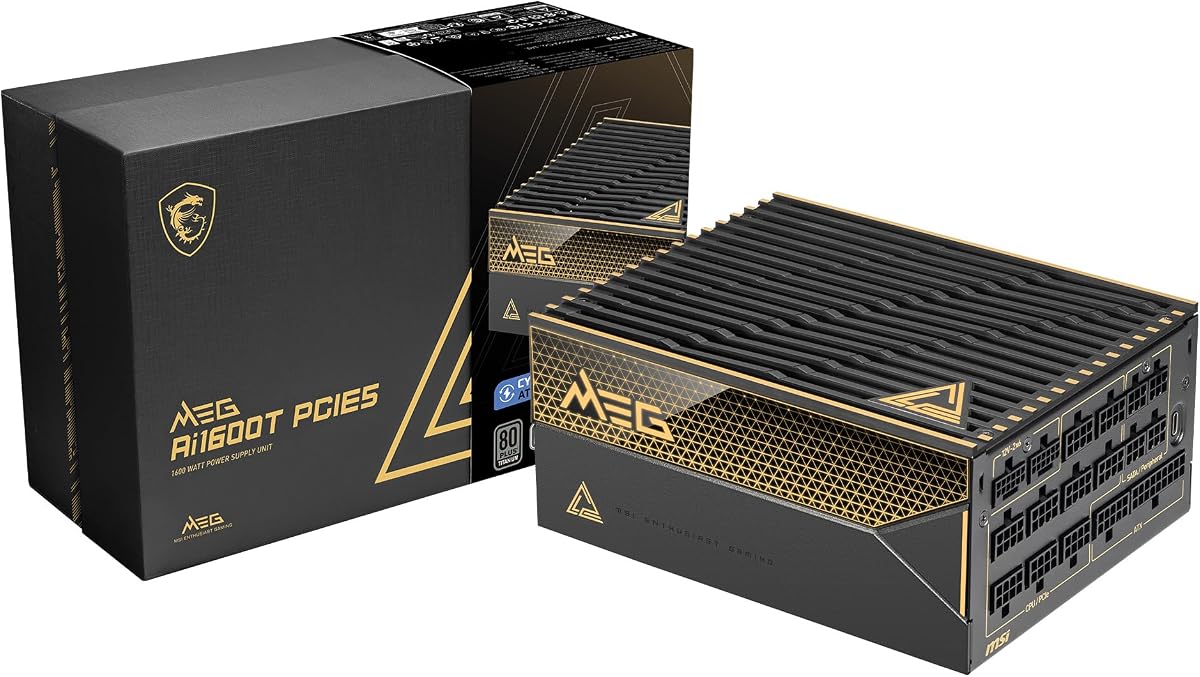
The MSI MEG Ai1600T PCIE5 is a 1600W, fully modular power supply for gaming systems that need contemporary connectivity, strong efficiency, and a long warranty. Its 4.5 rating is complemented by ATX 3.1 and PCIe 5.1 readiness, dual-native 12V-2×6 cables, and a 12-year warranty.
We may earn a commission when you buy through this link, at no additional cost to you.
Efficiency is a major selling point because the unit carries tri-certification from 80 PLUS, Cybenetics, and PPLP. It uses Japanese 105°C-rated capacitors and braided cabling, while a broad industrial protection package includes overcurrent, overtemperature, overpower, short-circuit, overvoltage, undervoltage, surge, and no-load operation protections.
The dual native GPU connectors make the PSU well suited to high-end graphics configurations, while 1600W of capacity leaves more headroom than many single-GPU systems require. That headroom is useful for ambitious processors, expansion cards, memory, storage, and accessories, but it also means some compact or moderate builds may never approach the unit's full output.
This MSI model is a strong all-around choice when warranty duration is a major consideration. It combines current standards with excellent efficiency credentials and a comprehensive protection specification. Buyers should still confirm the physical PSU bay, inspect the bundled cable inventory, and use only cables supplied or explicitly approved for the PSU and graphics card.
A 12-year warranty gives this model a distinct advantage for builders planning to keep a high-output system for many years. Long ownership periods make component quality, efficiency, and protection especially relevant considerations.
Japanese 105°C capacitors are specified alongside extensive electrical safeguards. Together, these details support the unit's suitability for high-power gaming builds where prolonged heat and demanding operating conditions are expected.
We may earn a commission when you buy through this link, at no additional cost to you.
Choosing a 1500W PSU requires more than comparing advertised wattage. The right model depends on GPU power connectors, transient handling, efficiency, acoustics, physical clearance, cable quality, monitoring, and the level of headroom your actual components require.
Prioritize ATX 3.1 for a new build, especially when using a current high-end GPU. For older platforms, confirm the motherboard, CPU, and graphics card requirements before deciding that the newest standard is essential.
Choose the number of native GPU cables your hardware needs. Never assume a visually similar third-party cable is fully compatible or equally safe.
Estimate peak system demand, leave reasonable upgrade room, and verify that the PSU bay can accommodate the chosen model before ordering.
Platinum offers an excellent balance, while titanium is worth considering for premium, heavily loaded, or efficiency-focused builds. Efficiency should complement, not replace, sound electrical and thermal design.
For a silent build, prioritize documented semi-passive behavior and a reputable fan. For a hot workstation, pay closer attention to sustained airflow and thermal design.
Measure the case before ordering and confirm the complete connector inventory. Modular construction is most useful when every planned cable can be omitted when not needed.
Prioritize robust hardware protection first. Add monitoring and software control when it will actually be used rather than paying for features that remain ignored.
Look for meaningful warranties and reputable component specifications, but also maintain good airflow and use a surge-protected outlet where appropriate.
Install the power supply in a properly ventilated PSU bay, with the fan oriented to draw air from the correct intake side. Connect only the cables required by the motherboard, graphics card, storage devices, and accessories. Route modular leads behind the motherboard tray where possible, and avoid sharply bending power connectors or placing excess cable strain on the connection.
Use the native 12V-2×6 connection when the graphics card and PSU support it, and ensure every plug is fully seated. CPU EPS power often benefits from using all available connectors on supported motherboards, but follow the motherboard manual to determine whether separate cables or a single harness is required. Never mix modular cable sets from different power-supply models, even when the connectors appear identical.
After installation, check that the system powers on normally and that the fan behavior matches the selected operating mode. If the PSU includes software, configure monitoring and the fan curve under realistic workloads. Keep the intake grille clear of dust, inspect cables occasionally, and never open the power supply. Electrical components inside can retain dangerous voltage even after the system is switched off.
It can be, depending on the graphics card, processor, and planned upgrades. A high-end GPU with a power-hungry CPU may benefit from substantial headroom, while a midrange system can run comfortably on a smaller unit. Consider the combined peak demand of every component and leave room for future hardware rather than selecting solely by GPU label.
The difference is usually less important than platform support, efficiency, connectors, and build quality. A 1600W model can be useful for multi-GPU systems or heavy workstations, while a quality 1500W unit may already provide adequate headroom for one high-end GPU. Compare sustained capacity and the number of native high-current GPU connections your hardware needs.
ATX 3.1 is strongly preferable for a new build using the latest high-performance graphics hardware because it addresses modern transient behavior and PCIe 5.1 requirements. Older standards can still work in compatible systems, but buyers should verify the exact connector and power specifications rather than assuming backward compatibility covers every new feature.
Adapters can be necessary in older or mixed cable systems, but native 12V-2×6 cables are generally simpler and avoid an additional high-current connection point. Safety and fit depend on correct seating, adequate clearance, and manufacturer approval. Use only cables or adapters explicitly supported for the PSU and graphics card, and never combine incompatible modular cable sets.
No, although titanium efficiency reduces conversion losses and internal heat. A well-designed platinum unit may still be the better overall purchase if it offers stronger transient handling, superior fan behavior, better protection, or a more appropriate connector configuration. Efficiency is one part of PSU quality, not a substitute for reliability and compatibility.
That depends on the case's maximum PSU length and the physical dimensions of the selected unit. High-capacity models can be substantially longer than standard power supplies, especially 1600W designs. Check the case specification, allow space for cable bends, and confirm that a front fan or drive cage will not obstruct the power supply.
No. It means the cooling fan is stopped during specified low or medium load conditions because the unit can manage its temperature without active airflow. The fan should start when heat or load rises beyond the defined threshold. Operating temperature, airflow direction, and the reliability of the fan-speed control all remain important.
No, but it can make a long-term enthusiast build easier to tune. Digital monitoring may reveal real-time consumption, custom fan curves can reduce noise, and selectable protection modes can offer useful flexibility. A PSU with comprehensive hardware protections is still essential, and software should be viewed as an added convenience rather than a substitute for sound electrical design.
The CORSAIR HX1500i (2025) stands out as the best value-oriented modern option, combining ATX 3.1 support, modular cables, iCUE monitoring, and zero-RPM cooling. The standard Corsair HX1500i is the Editor's Choice for its balanced feature set and strong 4.7 rating, while the Seasonic Prime TX-1600 Noctua Edition is the premium choice for buyers who prioritize exceptional quiet operation and refined efficiency.
Before choosing, prioritize the graphics card's native power requirements, ATX 3.1 support, efficiency, fan behavior, and physical PSU clearance. Dual 12V-2×6 designs are particularly useful for multi-GPU and workstation systems, while premium fan treatments can matter more in silent gaming and creator environments. Do not buy on wattage alone; the quality of the platform and the fit of the installation are equally important.
Finally, check the current specifications, warranty terms, cable inventory, and price before purchasing. Inventory and pricing can change, and a compelling unit may periodically become available through different sellers. Use the comparison above to identify the best architecture for your hardware, then verify that it fits the case and includes every native cable required for a safe, clean installation.