
LAFVIN Basic Starter Kit for ESP32 ESP-32S WiFi IoT Development Board
4.5Editor score
Beginner-focused ESP32 foundation
Tutorials with sample code
WiFi and IoT learning
Discover the best microcontroller kit for beginners, comparing tutorials, components, programming options, connectivity, and project variety.
A microcontroller kit for beginners should make the jump from theory to working circuits feel clear, organized, and achievable. The best bundles pair a capable development board with useful components, understandable instructions, and projects that progress from simple inputs and outputs to interactive, connected creations.
We compared the ten featured kits by examining their included boards, sensors, displays, motors, learning materials, programming environments, project breadth, and practical appeal for new learners. The list covers Arduino-compatible, ESP32, Raspberry Pi Pico, and soldering-focused systems, from compact introductory sets to extensive camera-based kits.
Each review highlights who the kit suits, which skills it develops, and where its setup may demand more patience. Ratings reflect the supplied customer feedback, while features and projects come from the listed product information. Availability and prices change, so confirm the current listing before purchasing.
4.5Editor score

4.7Editor score

5.0Editor score
This side-by-side comparison highlights each kit's core platform, learning resources, included hardware, and main specialty, helping beginners choose the path that best matches their interests and experience.


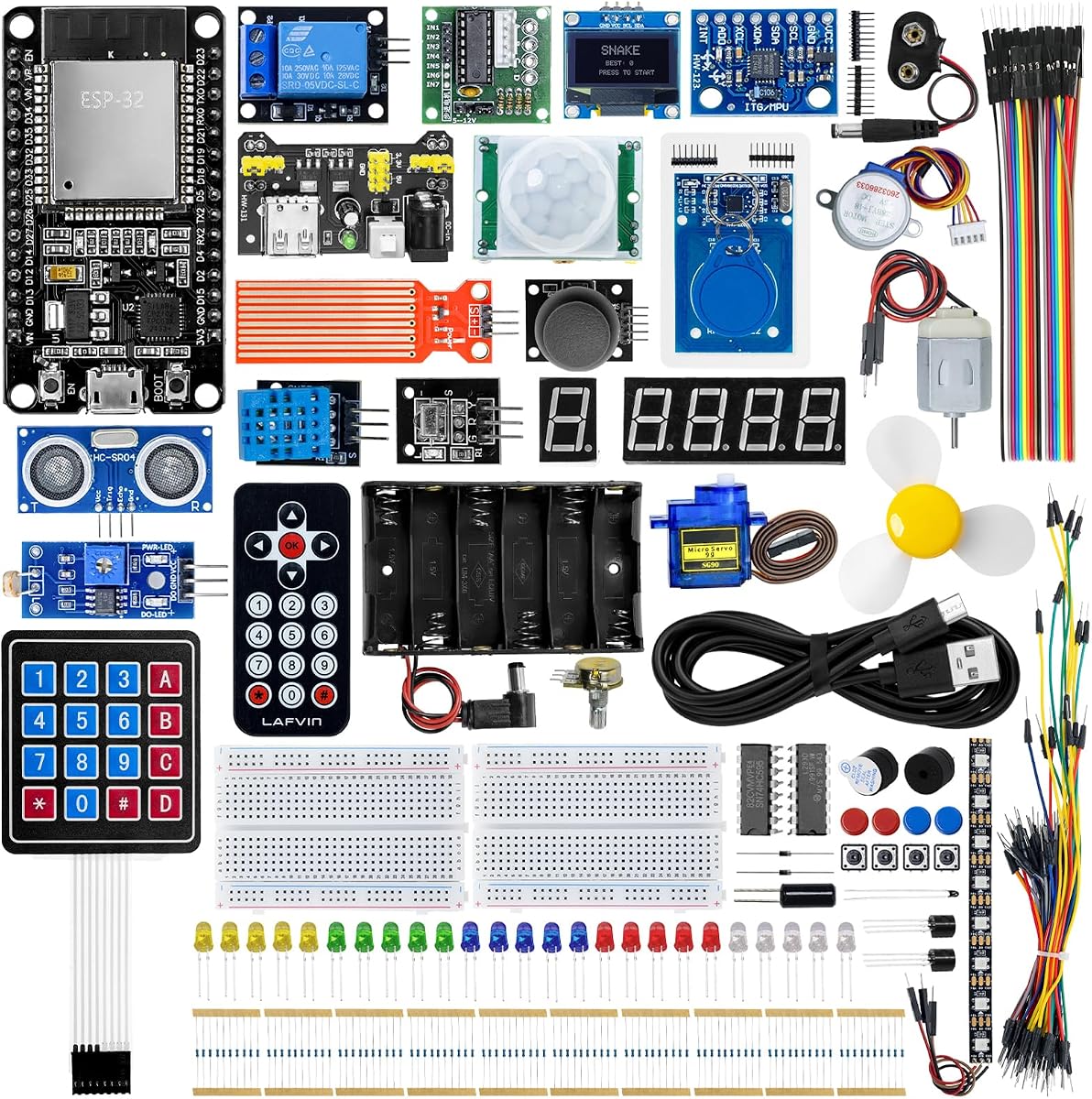


The LAFVIN Basic Starter Kit for ESP32 ESP-32S is a focused introduction to microcontroller learning built around the ESP32 development board. Its 4.5 rating reflects generally favorable customer feedback, and its greatest strength is clarity: the product is aimed at users who want to learn introductory programming while exploring electronics and connected projects without beginning with an oversized collection of components.
We may earn a commission when you buy through this link, at no additional cost to you.
The kit teaches through a downloadable tutorial that includes lessons and code, while the listed modules support lessons involving items such as LEDs, the DHT11, and an OLED display. Arduino IDE compatibility reduces the conceptual distance between the physical circuit and the code controlling it. The ESP32 foundation also gives learners a direct route into WiFi and IoT, making it possible to progress beyond a simple blinking-light exercise once the basic wiring principles are understood.
This is not the most expansive package in the list, and that is its central trade-off. A beginner who eventually wants advanced sensors, motor systems, elaborate displays, or many interconnected projects may need to add hardware later. In exchange, the more focused bundle can make the first stage of learning less confusing. The relevant question is not which kit contains the most hardware, but whether a learner will feel comfortable completing the early lessons and form good habits.
Choose this kit if you want an economical, well-defined way to learn ESP32 programming, basic electronics, and Arduino-compatible development. It is especially suitable for self-learners who value a tutorial and coding examples over an enormous parts inventory. Verify the current component list before ordering, and be prepared to organize the included modules as you move from introductory exercises to independent projects.
The ESP32 gives learners direct access to WiFi-enabled experimentation without requiring a separate wireless module. That makes lessons involving connected controls or remotely displayed sensor information a natural extension of the basic kit.
Assembly instructions, lessons, and sample code reduce the amount of initial troubleshooting. Working through those materials in sequence can help beginners connect each physical component with the corresponding programming concept.
We may earn a commission when you buy through this link, at no additional cost to you.
The REXQualis Super Starter Kit based on the Arduino UNO R3 combines one of the most familiar entry boards with a substantial collection of components and structured learning materials. Its 4.7 rating makes it one of the strongest customer-rated options in this guide. For a beginner seeking a broad foundation rather than a single-platform specialty, the combination of a recognizable board, practical accessories, and downloadable documentation is especially persuasive.
We may earn a commission when you buy through this link, at no additional cost to you.
The base board is compatible with Arduino IDE and supports sensors, servos, motors, LCDs, and other standard beginner components. The package includes a 9V 1A power adapter as an alternative to a 9V battery, while the LCD1602 module arrives with a pin header, eliminating one early soldering task. A free PDF tutorial and datasheets provide reference material, and the individually packaged, labeled components make it easier to inventory and reuse parts.
The breadth can also make the initial experience feel less tidy than a small introductory bundle. Beginners may need to study the base board carefully, identify component pinouts, and follow the tutorial closely before improvising. The included motor and driver ecosystem also opens doors to more advanced robotics and control work, but those projects can be demanding for someone who has never handled a breadboard or interpreted a schematic. The reward is a kit that can grow with the learner rather than ending after a handful of lessons.
This is the strongest general recommendation for most beginners because it balances a well-known development environment, a broad component selection, and practical conveniences such as labeled storage and preinstalled headers. Choose it if you want to learn electronics alongside programming and expect to build progressively more ambitious circuits. It is less suitable for someone seeking a minimal, guided-only kit or a no-solder introduction, although the base-board approach keeps early assembly manageable.
Sensors, LCDs, servos, motors, and driver hardware allow a learner to move between input sensing, visual feedback, precise movement, and powered outputs. This variety makes the kit useful for both guided exercises and self-directed experiments.
Individual packaging, clear labels, and a roomy storage box improve the experience of sorting parts. The LCD1602 header and included power adapter also remove two common sources of early setup friction.
We may earn a commission when you buy through this link, at no additional cost to you.
The amomii Testudo Soldering Practice Kit is a distinctive choice for beginners who want to learn not only microcontroller programming but also the physical craft of assembling electronics. It has a 4.7 rating and centers on a reusable USB-C microcontroller connected to modular shields. Rather than presenting only a collection of loose parts, the kit turns assembly into a sequence of tangible products.
We may earn a commission when you buy through this link, at no additional cost to you.
Learners can build a Digital Piano, an Infrared Remote, and an Arcade Console, then switch the shield hardware to access more than ten software functions. The custom controller is described as handling four times the power of standard boards, while its interchangeable design allows the same central unit to serve multiple builds. A soldering fundamentals course covers joint anatomy, temperature, tip selection, circuit-board reading, and troubleshooting common faults.
A soldering iron and basic tools are not included, and this is the most significant commitment required by the kit. New learners should budget time for instruction, safe handling, and correcting imperfect joints. Small parts also make it unsuitable for unsupervised use by children under 14. On the other hand, learners who want to understand how circuits are physically assembled gain something that many breadboard-based starter kits do not provide.
Choose Testudo for a beginner who is excited by soldering, reusable hardware, and finished gadgets rather than only software exercises. The amomii Link browser tool provides a no-coding entry point, while an optional coding masterclass supports a later move into manual Arduino programming. It is less convenient than a preassembled kit, but for the right learner, that hands-on process is the central educational benefit rather than an inconvenience.
Interchangeable shields let learners reuse one controller across distinct devices. This design teaches component relationships and circuit assembly while making each build feel like a complete product rather than a disposable breadboard exercise.
Browser-based activation allows a new user to operate projects immediately, while the optional coding fundamentals material introduces manual code uploads. That creates a gradual route from functional exploration to deeper programming control.
We may earn a commission when you buy through this link, at no additional cost to you.
The Horizon Uno Electronics Starter Kit is built around an Arduino-compatible board and a course designed to teach electronics, coding, and circuit design. Its 4.7 rating indicates strong customer reception, while the included lifetime access to step-by-step video lessons distinguishes it from kits that primarily provide written tutorials. It is a particularly approachable option for learners who benefit from seeing physical connections and code changes demonstrated.
We may earn a commission when you buy through this link, at no additional cost to you.
Each kit includes a unique access code for an online course created by robotics engineers. The curriculum is described as containing lectures, laboratories, projects, and problem sets, while the component collection covers LEDs, sensors, resistors, jumper wires, and specialty parts. Servos expand the possibilities beyond simple digital exercises. The structure is intended to support students, educators, STEM programs, and self-learners who want a guided path through foundational concepts.
The reliance on online materials is the main practical limitation. Lessons and access may depend on an external website, and a stable internet connection is needed for video content. As with any broad electronics set, the number of possible experiments can feel intimidating if a learner skips the sequence and starts with an ambitious project. The course's labs and problem sets are therefore best treated as the backbone of the experience, not optional extras.
Choose this kit if you want structured instruction with both demonstrations and practice. It may be especially helpful for younger learners, classroom groups, and anyone who finds a dense PDF less engaging than guided video. Before buying, confirm that the current course access process works for you. For self-directed students who already understand breadboards and Arduino basics, a kit with more hardware might offer greater long-term flexibility.
Watching a connection or code sequence in motion can make circuit assembly easier to understand than consulting a diagram alone. The course structure also gives learners a clear order for progressing through new concepts.
Lectures, labs, projects, and problem sets provide several ways to practice. That makes the kit adaptable to guided classroom use as well as a learner following a course independently at home.
We may earn a commission when you buy through this link, at no additional cost to you.
The LAFVIN Basic Starter Kit for Raspberry Pi Pico provides a flexible introduction to embedded development through the RP2040 platform. Its 4.5 rating reflects solid customer feedback, and its strongest differentiator is the choice of programming methods. A beginner can move among MicroPython, C/C++, and Piper Make graphical programming, allowing learning to follow whichever style best fits their confidence and goals.
We may earn a commission when you buy through this link, at no additional cost to you.
The included hardware is broad for a starter set. An LCD1602 display supports visible output, an SG90 servo introduces controlled movement, a human-body sensing module creates an interactive input, and the WS2812 RGB LED strip introduces programmable color effects. A buzzer and buttons cover additional basic input and output tasks. Detailed tutorials, sample code, connection guidance, and verification steps help users move from wiring to working demonstrations.
The main complication is that multiple programming approaches can create decision fatigue for someone completely new. Although the Pico itself is accessible, a learner may need guidance on when to use graphical programming, when MicroPython is appropriate, and how the C/C++ workflow differs. The kit is also oriented toward learners comfortable with the Raspberry Pi ecosystem, but the included documentation is designed to make the required steps more accessible.
Choose this kit if you want to learn MicroPython on a well-known microcontroller platform or if you appreciate the option to begin graphically and later move toward text-based code. It also works well for learners interested in RGB lighting, servo movement, and tangible inputs. For someone who wants one familiar Arduino workflow, a dedicated UNO or ESP32 kit will offer a more linear introduction.
Piper Make gives visual learners a gentler starting point, while MicroPython offers a readable text environment. C/C++ support provides a path toward lower-level control for learners ready to expand their skills.
A display, RGB strip, servo, buzzer, buttons, and sensing module give beginners several visible and interactive outputs. Demonstrations can therefore make abstract instructions more concrete from the earliest exercises.
We may earn a commission when you buy through this link, at no additional cost to you.
The LAFVIN ESP32 Ultimate Starter Kit is a broad STEM learning package built around wireless microcontroller development. Its 4.3 rating is still favorable, though it sits below several other products in this roundup. The kit's appeal comes from its large selection of modules and its focus on using the ESP32's WiFi capabilities for interactive controls, environmental monitoring, and browser-based sensor displays.
We may earn a commission when you buy through this link, at no additional cost to you.
Detailed tutorials, wiring diagrams, sample code, and project courses are included, giving learners a structured path into open-source ESP32 development. The hardware includes ultrasonic and PIR sensors, RFID, servo motors, an MPU6050 angle sensor, OLED display, and temperature and humidity sensors, alongside many other modules. These parts support more than twenty listed project types, including access-control demonstrations, environmental monitors, motion alarms, a Snake game, and smart-home prototypes.
The size of the collection is both an advantage and a complication. Beginners can select engaging projects, but the sheer variety may encourage experimentation before foundational wiring and coding habits are established. It is also important to distinguish a wireless demo from a production-ready connected system: browser control and local WiFi examples are educational, while secure deployment requires additional understanding beyond the initial lessons.
Choose this kit when wireless connectivity is central to your interest in microcontrollers. It is a strong fit for students who want to explore IoT, environmental monitoring, access control, and responsive automation. A learner should begin with the introductory sequence, inventory the included modules, and avoid judging the kit solely by the number of modules. The instruction structure makes that focused approach worthwhile.
The ability to create browser interfaces, remotely control outputs, and view sensor readings gives the ESP32 a strong role in the curriculum. These features make connected behavior easier for a beginner to understand and demonstrate.
Ultrasonic, motion, environmental, orientation, RFID, and display modules cover distinct forms of input and output. Servos add movement, enabling projects that are more interactive than simple LED demonstrations.
We may earn a commission when you buy through this link, at no additional cost to you.
The GeeekPi Micro Python Programming Kit is a focused learning system for Raspberry Pi Pico enthusiasts and software developers who want to explore embedded applications through MicroPython. Its 4.4 rating indicates generally positive customer feedback. Rather than trying to cover many processor platforms, the package concentrates on Python-based embedded learning with a Pico development board, breadboard, and I2C 1602 LCD module.
We may earn a commission when you buy through this link, at no additional cost to you.
The display provides a natural way to practice sending output to a connected peripheral, while the breadboard supports temporary circuit assembly without permanent soldering. Demo code is supplied, and each experiment is presented as a starting point with room for modification. A detailed manual is included, with additional tutorials available through the referenced wiki or customer support. This makes the kit approachable for someone who wants to learn embedded concepts using a familiar high-level language.
Its narrow focus is the main limitation. A learner whose goal is to use the Arduino ecosystem or explore a C/C++ toolchain may find the Pico-centered approach less versatile. The hardware also concentrates on the display and breadboard experience, so it does not offer the same sensor and actuator variety as several larger kits. The breadboard is convenient, although repeated component changes can make some projects physically less stable than a soldered or base-board arrangement.
Choose this kit if MicroPython is your preferred entry into microcontroller programming or if you are a Python user seeking a physical electronics project. The included display and documented experiments make it especially convenient for learning communication with an I2C peripheral. For broader component exploration, consider what future projects you want and verify that the kit includes the sensors or actuators they require.
MicroPython lets learners write concise, readable code while still controlling physical hardware. That can be an effective bridge for programmers who already understand Python but are new to electronics.
The included breadboard makes temporary wiring straightforward and allows circuits to be rearranged as concepts change. The LCD adds a visible output that helps confirm communication between code and hardware.
We may earn a commission when you buy through this link, at no additional cost to you.
The Yakomon ESP-32 Super Starter Kit pairs a USB-C ESP32 development board with more than 35 modules and components, creating one of the strongest premium options in this guide. Its 5.0 rating is the highest listed among the ten products. The board uses a dual-core microcontroller with built-in WiFi and Bluetooth 4.2, giving beginners room to develop conventional input-and-output projects alongside connected experiments.
We may earn a commission when you buy through this link, at no additional cost to you.
The hardware includes sensors, displays, motors, buttons, LEDs, an OLED screen, a servo, and a keypad. Online learning materials reportedly cover more than 25 projects with circuit diagrams, code, and explanations, progressing toward weather stations, smart-home controllers, remote-control devices, and interactive gadgets. The CP2102 interface and Arduino IDE compatibility provide a recognizable development workflow, while the USB-C connector reflects a more current connection approach.
There is one important documentation caveat. A printing error means the QR code on the instruction manual does not lead to the correct learning-resource page. Buyers are instructed to contact the seller through Amazon buyer-seller messaging for tutorials and sample codes. This is manageable, but it adds an early setup step and makes prompt access to support relevant. The large number of components also calls for careful inventory and storage.
Choose this kit for a beginner who wants a capable connected platform and a wide project canvas. It is a strong premium recommendation for students and makers interested in moving from simple circuits to WiFi and Bluetooth experiments. Purchase it with a willingness to organize the collection and contact the seller for the corrected learning materials. Those small setup requirements are outweighed by the board, project range, and customer rating.
USB-C, a CP2102 interface, and Arduino IDE support create a practical setup for coding. Built-in WiFi and Bluetooth provide a direct path toward connected-device projects once basic electronics are understood.
The project library ranges from simple circuits to sophisticated devices, creating a visible progression path. Diagrams and ready-to-use code can shorten the time required to understand each build.
We may earn a commission when you buy through this link, at no additional cost to you.
The Freenove ESP32-S3 Camera Board Ultimate Starter Kit is designed for learners who want to work with an advanced connected board and visual projects. Its 4.6 rating reflects strong customer feedback, and the platform combines a dual-core 32-bit processor, 8 MB flash, 8 MB PSRAM, 2.4 GHz WiFi, Bluetooth 5 LE, USB-OTG, a camera, and a memory-card slot. The included 1 GB card and reader make the imaging system ready for experimentation.
We may earn a commission when you buy through this link, at no additional cost to you.
Three code collections support MicroPython, C, and Processing, with Processing handling computer-based graphical interfaces. The downloadable English tutorial totals 828 pages and provides 121 projects with schematics, wiring diagrams, complete code, and detailed explanations. The component inventory contains 243 items across common modules, sensors, wires, and other accessories. It is one of the most complete learning packages represented here.
That scale is the defining issue. A 121-project curriculum and hundreds of parts can overwhelm a person who wants a simple introduction, and the camera board is more specialized than a conventional UNO or entry Pico. Learners must also be willing to download a large tutorial and work through it systematically. The no-paper-tutorial format may be convenient for digital learning, but it can be less convenient for users who prefer a physical reference.
Choose this kit if camera-based and advanced connected projects excite you more than the simplest possible first circuit. It is particularly appropriate for a motivated beginner who understands basic wiring, enjoys following a detailed curriculum, and plans to explore vision, wireless communication, and advanced ESP32 capabilities. For a smaller first step, a compact ESP32 or Arduino kit will feel more approachable.
The integrated camera, memory storage, and ESP32-S3 capabilities support visual sensing and connected image experiments. This makes the kit relevant to learners interested in intelligent-camera and edge-processing concepts.
An 828-page tutorial with 121 projects provides a substantial learning path. Schematics, wiring diagrams, code, and explanations make the progression usable for learners willing to work through each stage systematically.
We may earn a commission when you buy through this link, at no additional cost to you.
The Freenove ESP32 Camera Board Ultimate Starter Kit provides one of the broadest complete learning systems in the guide. Its 4.6 rating places it among the stronger customer-reviewed options, while its 240-item inventory and 122 documented projects offer enormous potential for experimentation. The central board is built around a dual-core 32-bit ESP32 processor with 4 MB flash, 8 MB PSRAM, WiFi, Bluetooth 4.2 LE, USB code uploading, a camera, and memory-card storage.
We may earn a commission when you buy through this link, at no additional cost to you.
The package supports MicroPython, C, and Processing code, allowing learners to approach projects in different programming environments. A 795-page downloadable tutorial includes 122 projects progressing from simple tasks to more complex ones. Schematics, wiring diagrams, complete code, and detailed explanations support that progression, while the included card and reader make the camera-centered hardware ready for use. The board is therefore more than a basic blinking-LED package; it is a sustained electronics curriculum.
For a complete beginner, the sheer scale requires deliberate pacing. A new learner may need several sessions just to understand the board, organize parts, and navigate the digital manual. Starting with the earliest projects is important because later camera and wireless builds depend on an understanding of sensor handling, communication, and code organization. Because the tutorial is digital rather than included on paper, users should also have suitable hardware and a comfortable download setup.
Choose this kit if you want a long-term ESP32 learning platform and are motivated to work through a deep curriculum. It is a better fit for a curious beginner with a specific interest in cameras, wireless projects, or embedded systems than for someone seeking only a small first kit. Review the included components against the projects you want to build, and expect the learning curve to reward consistent, methodical work.
MicroPython makes rapid experimentation approachable, C supports lower-level control, and Processing connects hardware experiments with graphical computer interfaces. The choice of language can evolve with the learner's confidence.
With 122 projects and 240 included items, the kit offers a long progression of challenges. Its value depends on using the materials as a structured course rather than treating the package as a one-time collection of components.
We may earn a commission when you buy through this link, at no additional cost to you.
The right starter kit depends on your preferred programming language, the projects that motivate you, and how much guidance you need. Consider the board, bundled components, teaching structure, expansion potential, and assembly requirements before choosing.
In short, choose the ecosystem that matches your existing experience and the projects you want to build.
In short, select components that serve real projects and avoid paying for hardware you will never use.
In short, choose instruction you will actually follow, and confirm that access instructions are clear and current.
In short, prioritize a learning path that matches your current coding confidence and your preferred long-term language.
In short, choose a construction method that matches your patience, safety comfort, and available tools.
In short, start simple and progress toward complexity; a structured sequence makes troubleshooting far easier.
In short, favor organized packaging and labeled parts, especially when the kit contains dozens of components.
In short, select a platform with room to grow and an ecosystem that will keep supporting your next project.
Begin by confirming the exact contents against the product listing, reading the quick-start instructions, and identifying the board, power method, data connection, and numbered components. Work in a clean, well-lit area with the microcontroller disconnected from power while wiring. Follow the first tutorial in sequence, verify each connection, and avoid attaching every module at once. Learning comes from testing one concept at a time and recording which component or code change produced each result.
Store parts in labeled containers, keep static-sensitive boards in their protective packaging until needed, and use anti-static precautions when handling exposed chips. Inspect jumper wires and power connections for loose contacts, avoid shorting supply rails, and use the voltage and current guidance supplied for the board and modules. For soldered projects, unplug power before changing a circuit, use suitable ventilation, and store the iron safely while it is hot.
Protect the kit from moisture, dust, excessive heat, and impact. Update the development environment and board drivers as needed, but save working sketches before experimenting, and copy project code into organized folders with notes about wiring and component behavior. Periodically verify the board, display, sensors, motors, and cables, replacing damaged parts rather than troubleshooting a circuit indefinitely. This maintenance routine keeps later projects reliable and makes each build easier to document.
The REXQualis Arduino UNO R3 kit is the most balanced general choice because it combines a familiar platform, a broad component selection, downloadable tutorials, and beginner-friendly details such as labeled storage and an LCD1602 module with its pin header already installed. A learner who wants an even smaller introduction may prefer the basic LAFVIN ESP32 kit. The easiest choice ultimately depends on which board and language feel most approachable to the individual.
Arduino is often the most straightforward route into general microcontroller electronics, especially when written tutorials and broad example libraries are priorities. ESP32 is better when wireless connectivity is central to your interests, while Raspberry Pi Pico is attractive for Python-oriented learners. Compare the required software, your existing programming experience, and the projects you want to build rather than choosing solely by board popularity.
Not necessarily. Breadboard-based kits can be assembled without soldering, although a basic soldering iron may still be needed for a few specific components. The amomii Testudo explicitly requires soldering tools and is better suited to someone who wants to learn assembly. Always check whether tools and consumables are included, and never assume a small component can be safely attached without the appropriate equipment.
A basic understanding of electricity, voltage, polarity, and short circuits is useful but not essential for the first guided lesson. It helps to recognize the difference between input and output devices, understand why common ground connections matter, and know how to disconnect power safely. Programming knowledge is less important because most kits provide sample code, although familiarity with the selected language can accelerate progress.
No. A large inventory can create more opportunities, but it can also make the first projects harder to understand. Focused kits are often better for a first session because each component has a clear purpose and the tutorials can establish basic habits. A larger kit becomes more valuable after the learner knows how to organize parts, verify wiring, and understand the relationship between code and hardware.
The LAFVIN ESP32 Ultimate Starter Kit is especially focused on WiFi-based control and monitoring, with web interfaces, real-time sensor information, and numerous connected-project tutorials. The Yakomon ESP-32 Super Starter Kit and both Freenove camera kits also support advanced wireless development. Choose based on project type: general IoT, broader sensor experimentation, or camera-based connected systems.
Yes, if the kit includes suitable motors, a driver, sensors, and sufficient power support. The REXQualis Arduino UNO R3 kit lists motors, a ULN2003 driver board, servos, and sensors, making it relevant for basic robotics. Other kits with servos and ultrasonic or motion sensors can also support responsive mechanisms. Check motor voltage, driver requirements, and current demands before purchasing.
Start by disconnecting power and checking the board, supply connection, ground, component orientation, and every jumper. Then run the simplest possible program, such as a single LED blink, before restoring the rest of the circuit. Confirm pin assignments, sensor thresholds, and library settings, and compare your wiring with the tutorial diagram. If the problem persists, test components individually and consult the kit's support resources with a clear description of the symptoms.
The REXQualis Arduino UNO R3 kit is the strongest all-around recommendation because it combines an approachable board, a broad collection of useful components, and downloadable learning materials. The LAFVIN Basic ESP32 kit is a focused budget option for learning wireless microcontroller development, while the Yakomon ESP-32 Super Starter Kit stands out as a premium connected kit with a large project library and the highest listed customer rating.
Before buying, prioritize the learning experience you will actually use. Choose a platform connected to your preferred language, select components that support motivating projects, and confirm that the tutorial format is accessible. Pay attention to whether a kit requires soldering, whether materials are physical or digital, and whether component organization will make ongoing work easier. The most comprehensive kit is not automatically the most suitable one for your first session.
Finally, check the current product listing, included parts, customer feedback, and price before ordering. Kit contents and support resources can change, and current availability may affect which option is most practical. Comparing the latest listing with the strengths identified in this guide will help you choose a microcontroller kit for beginners that supports steady learning, enjoyable projects, and long-term confidence.