
Nulea M501
4.4Editor score
Three-device wireless connectivity
Four adjustable DPI levels
Rechargeable built-in battery
Discover the best ergonomic trackball mice, comparing comfort, tilt, controls, connectivity, battery life, hand fit, precision, and cleaning to help you choose.
Ergonomic trackball mice are designed to reduce the repeated hand and arm movement associated with conventional pointing devices. Instead of pushing a mouse across the desk, you rotate a ball with your thumb, making these devices especially useful for long workdays, compact desks, shared workspaces, and users seeking an alternative to a flat mouse.
This guide compares ten trackball options based on the supplied specifications, ratings, design features, connectivity, power options, control layouts, and ergonomic benefits. It includes wireless models for everyday productivity, business-focused options, rechargeable designs, and premium choices with adjustable tracking modes, programmable controls, and more pronounced wrist-friendly angles.
Each selection highlights a different reason to consider a trackball, from quiet operation and multi-device switching to infinite scrolling, adjustable cursor sensitivity, and removable balls for cleaning. Ratings and product details reflect the supplied listings, while availability and prices can change, so readers should confirm current specifications and offers before purchasing.
4.4Editor score
4.5Editor score

4.4Editor score
The following comparison brings together all ten trackball mice, focusing on their physical design, power source, connectivity, control features, and the types of users most likely to benefit from each model.




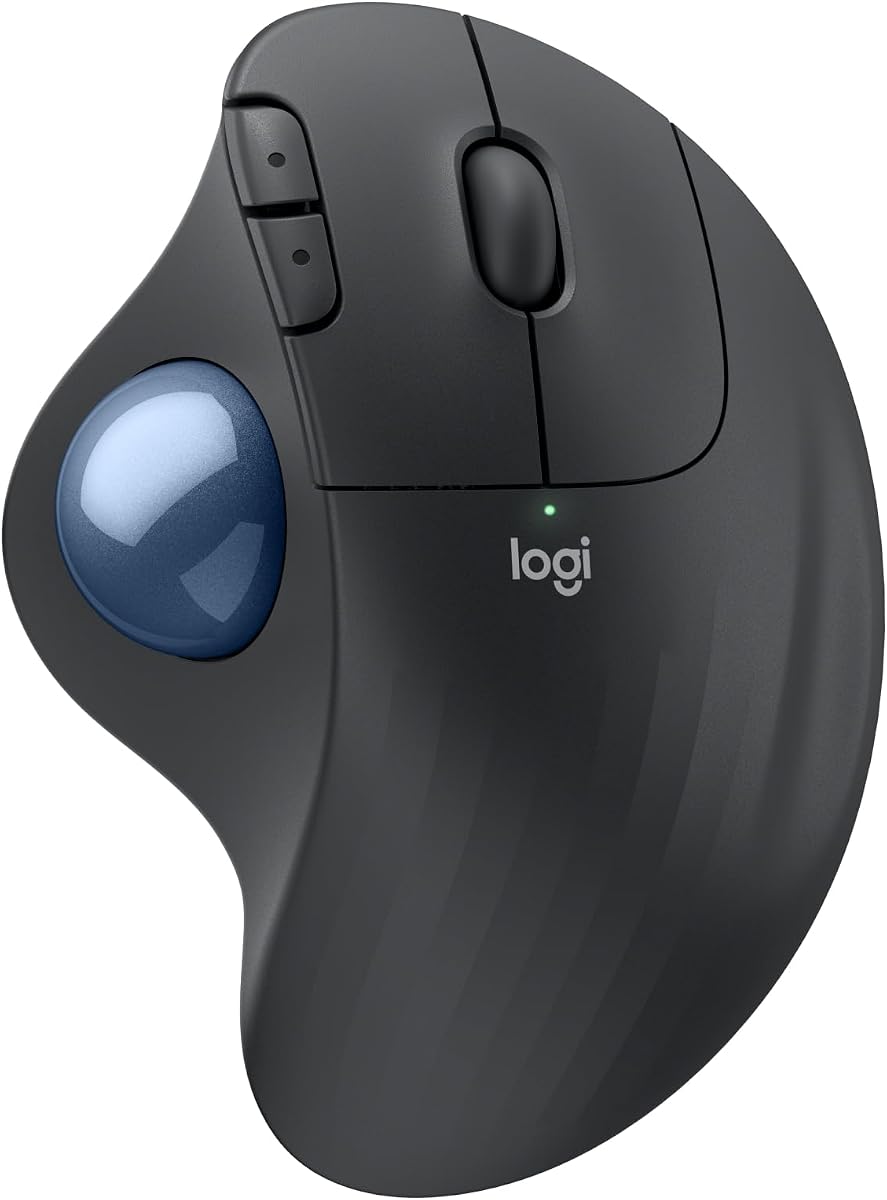
The Logitech Ergo M575S combines a sculpted trackball body with thumb-operated cursor movement, making it a strong all-around choice for office work and extended computer use. It carries a supplied rating of 4.5, and its most compelling features include quiet clicks, a shape developed with ergonomics specialists, customizable controls, and freedom from a conventional mouse's need for a clear movement surface.
We may earn a commission when you buy through this link, at no additional cost to you.
Its physical design is the main attraction. Rather than forcing the forearm into a flatter, more extended position, the M575S supports the hand and is intended to improve forearm posture. The ball is controlled with the thumb, so the hand can remain comparatively still while the user moves the pointer. This arrangement also saves desk space because the device itself does not travel across the work surface.
The M575S offers three customizable buttons, time-saving shortcuts, Smart Actions, and cursor-speed adjustment through the Logi Options+ app. Connectivity includes Bluetooth and an included Logi Bolt receiver, and the listed battery life reaches up to 18 months with an included AA battery. These features make it adaptable for a laptop, desktop, or multi-computer workflow without requiring a frequent charging routine.
Its main limitations are modest. It has fewer customizable controls than the MX Ergo S, and its replaceable battery cannot be recharged. Some users may also find the shape less suitable if they strongly prefer a steep vertical mouse. Overall, however, it balances recognizable Logitech ergonomics, quiet operation, flexible connectivity, and dependable everyday functionality exceptionally well.
The sculpted shell and thumb-controlled ball let the hand remain in place while the pointer travels. That reduced movement is particularly useful on crowded desks and can help users avoid repeatedly extending the wrist and forearm across a work surface.
Three programmable buttons, adjustable cursor speed, shortcuts, and Smart Actions add value for routine office work. Bluetooth and the included Logi Bolt receiver make it easier to move between different computers while retaining a wireless desk setup.
We may earn a commission when you buy through this link, at no additional cost to you.
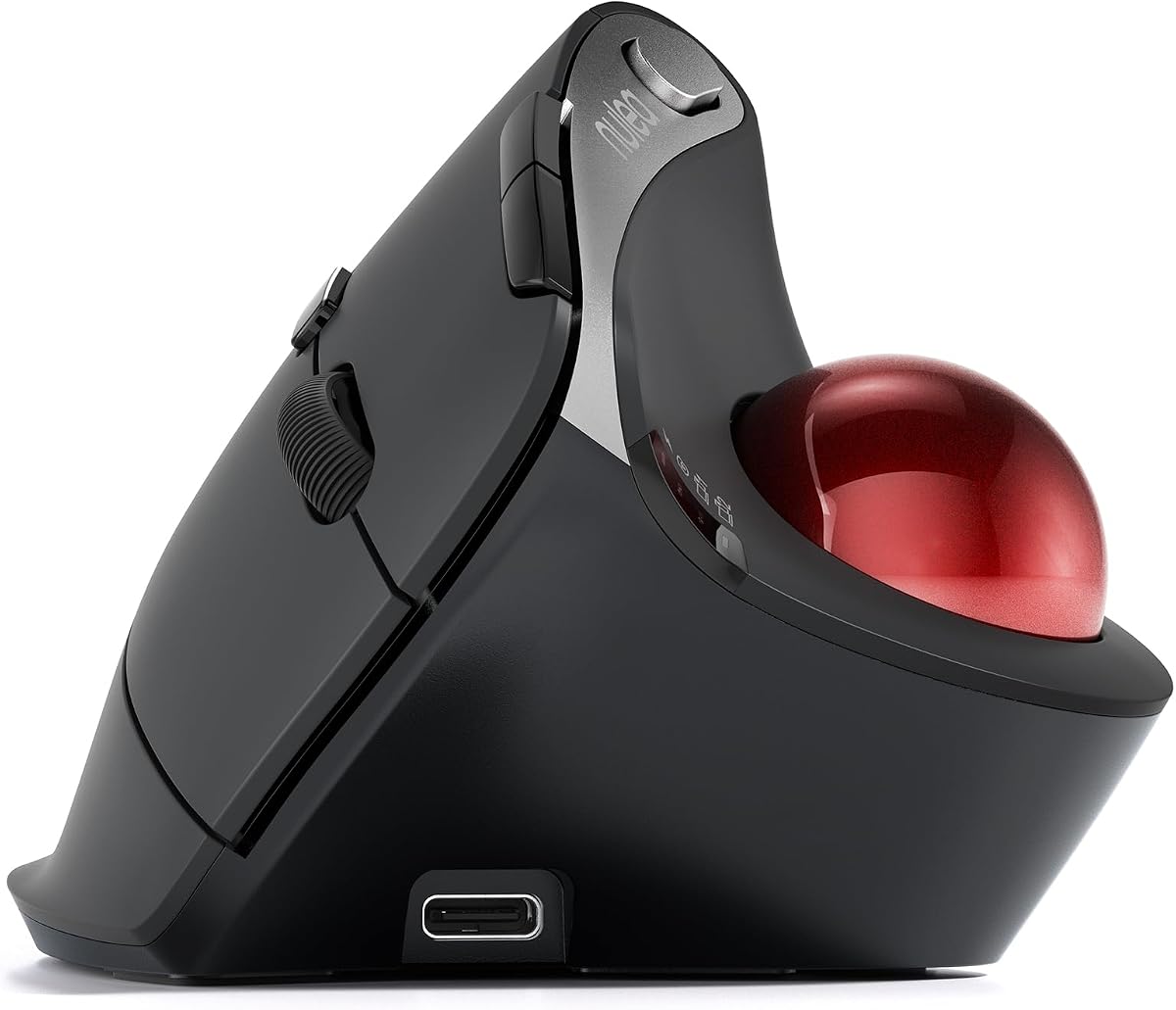
The Nulea M501 is a practical entry into the trackball category, combining thumb control, adjustable cursor sensitivity, and a compact wireless design. Its supplied rating of 4.4 reflects a well-received general-purpose product, and the listing emphasizes natural palm positioning, reduced wrist movement, and the ability to operate on almost any surface.
We may earn a commission when you buy through this link, at no additional cost to you.
One of the M501's most useful qualities is its flexible device management. It can connect to three devices using Bluetooth or its USB receiver, then switch between them from a control on the underside. That makes it suitable for people who alternate between a desktop, laptop, tablet, or other supported device without repeatedly reconnecting the mouse.
The trackball offers four DPI levels for balancing precision and movement speed. It also has six physical buttons, including forward and backward controls, although the product information explicitly notes that the buttons are not programmable. A built-in rechargeable battery avoids disposable-cell replacement, and the supplied charging cable should be used rather than a fast charger.
The compromises are most noticeable for users who want extensive button remapping or a pronounced vertical shape. It may also require a short adjustment period because moving a pointer by rotating a ball feels different from moving a traditional mouse. Even so, the M501 covers the essential ergonomic trackball needs at a budget-oriented level: wireless freedom, adjustable sensitivity, compact size, and low hand movement.
Because the pointer is moved by rotating the ball rather than pushing the device around, the M501 needs much less desk space. It can therefore suit a compact office, couch-side workspace, shared table, or any environment where a conventional mouse would require more movement.
Support for two Bluetooth connections and one USB receiver provides practical switching across up to three devices. The rechargeable power source and four sensitivity levels add flexibility without introducing a permanently connected cable.
We may earn a commission when you buy through this link, at no additional cost to you.
This Logitech Ergo M575S variant stands out with a supplied rating of 4.6, the highest rating in this comparison. The listing identifies improved forearm posture, straightforward wireless connection, long battery life, and space-saving thumb control as its defining attributes. It shares the well-known M575S platform, making it relevant for quiet offices and users who favor a familiar sculpted trackball shape.
We may earn a commission when you buy through this link, at no additional cost to you.
Thumb control is the central ergonomic benefit. Moving the pointer by rotating the ball reduces the need to slide the hand and forearm across the desk, while the body is designed to remain more supportive during extended sessions. Its compact footprint also makes it easier to use on a crowded workstation, laptop table, or shared office surface.
The M575S is positioned as a no-fuss daily device. Wireless operation removes cable clutter, and the stated long battery life reduces charging interruptions. The quiet-oriented design is especially relevant for offices, libraries, shared workspaces, and home environments where conventional clicking can become distracting.
Compared with the MX Ergo S, this option offers fewer advanced productivity features. The supplied listing does not emphasize adjustable speed modes, six customizable buttons, or USB-C charging, so buyers seeking extensive programmability may prefer the premium model. Even so, its strong supplied rating, recognizable ergonomics, quiet operation, and minimal desk footprint make it an appealing choice for the core audience.
The M575S avoids the exaggerated vertical profile seen on some trackballs. Its sculpted construction offers a more conventional-looking alternative while retaining the space and movement advantages of thumb-based cursor control.
Long battery life and wireless connectivity suit continuous office use. The result is a tidy setup that does not require the pointer device to move across the available surface.
We may earn a commission when you buy through this link, at no additional cost to you.
The Logitech MX Ergo S is the most feature-rich premium trackball in this group, with a supplied rating of 4.4. It combines a sculpted ergonomic form, a 20-degree tilt, a soft rubber grip, switchable precision tracking, six customizable buttons, and USB-C charging. The result is aimed particularly at productivity-focused users who want more control than a standard office mouse offers.
We may earn a commission when you buy through this link, at no additional cost to you.
Its 20-degree angle is designed to improve forearm posture, and the soft grip and sculpted shape are intended for medium to large hands. The tracking system can switch between speed and high precision with a button, which is valuable when moving between broad document navigation and detail-oriented editing. A 27% muscle-strain reduction claim is included in the supplied product information.
Productivity features are particularly strong. The Logi Options+ app supports six customizable buttons, shortcuts, and Smart Actions. Bluetooth and an included Logi Bolt receiver provide dual wireless connectivity and Easy-Switch functionality. USB-C charging can deliver up to 24 hours of use from a one-minute charge or up to 120 days on a full charge, according to the listing.
The main drawback is that the complete feature set places it in a higher product tier. The USB-C cable is not included, and users who need the steepest possible vertical posture may prefer the Nulea models with 54- or 65-degree angles. Even with those considerations, the MX Ergo S is the strongest choice here for detailed customization, fast charging, balanced ergonomics, and advanced tracking control.
The speed and precision toggle makes it possible to adapt cursor behavior without changing hardware. This is particularly useful for graphic design, photo editing, spreadsheet work, and other tasks where a consistent relationship between hand movement and pointer movement is important.
Six customizable buttons, Smart Actions, and app-based shortcuts let users adapt the device to complex workflows. The combination of multiple wireless channels and Easy-Switch makes the mouse a natural fit for multi-computer professionals.
We may earn a commission when you buy through this link, at no additional cost to you.
The TECKNET Wireless Trackball is designed with medium-to-large hands in mind and has a supplied rating of 4.5. Its defining physical feature is a 16-degree vertical angle, intended to promote a more natural palm position and reduce forearm strain. The dimensions of 5.5 by 4.1 by 2 inches provide a relatively substantial body without adopting the steep profile of a fully vertical mouse.
We may earn a commission when you buy through this link, at no additional cost to you.
The product information claims up to 50% less strain because of the 16-degree angle, although individual comfort can depend on hand size, desk height, work habits, and adaptation time. The listing specifically recommends spending one to two weeks getting familiar with the device, which is sensible because trackball movement requires a different motor pattern from conventional mouse movement.
Connectivity is versatile. It supports two Bluetooth channels and a 2.4 GHz USB connection, allowing the user to pair and switch among up to three devices. The stated signal range extends to 34 feet, and a dedicated button changes among devices. Five DPI levels ranging from 100 to 1200 offer noticeable control over cursor speed.
The 500mAh rechargeable battery is another practical feature, with the listing stating that 15 minutes of charging can power a full day. The trade-off is that the advertised endurance is not as long as that of some AA-powered trackballs, and the less pronounced 16-degree angle may not satisfy someone seeking a strongly vertical design. Even so, it is a balanced, accessible option for users who want a larger trackball and flexible sensitivity.
The roomier 5.5-inch length and 4.1-inch width give the palm and fingers more space than many compact trackballs. That makes the model more approachable for users who feel cramped by smaller devices or prefer a fuller grip.
Five sensitivity levels support everything from careful document work to quicker pointer movement. Two Bluetooth channels and one USB connection allow a three-device workflow, while the stated long-range wireless signal gives the setup more flexibility.
We may earn a commission when you buy through this link, at no additional cost to you.
The Nulea M506 combines a 54-degree vertical structure with a detachable trackball and has a supplied rating of 4.7, the highest in this roundup. It is a compelling choice for users who strongly prefer a mouse-like vertical orientation and want a device designed to keep the wrist and forearm in a more relaxed position.
We may earn a commission when you buy through this link, at no additional cost to you.
Unlike a low-profile sculpted trackball, the M506 places the body at a substantial angle. Its contoured shell and textured palm area are designed to support the hand while the thumb operates the ball. The most frequently used navigation keys, scroll wheel, and function controls are positioned for fingertip access, reducing the need to reposition the hand during common tasks.
The removable ball is an important maintenance feature. It can be detached without tools so accumulated dust and dirt can be removed, helping the ball continue rolling smoothly. Connectivity includes two Bluetooth channels and one USB receiver, allowing users to switch among PC, Mac, laptop, and tablet devices with a single button.
A built-in rechargeable battery is stated to run for up to 21 days after a full charge. Four DPI settings of 400, 800, 1200, and 1600 cover general office tasks through more exacting editing. The steeper angle may take time to learn, and users who require extremely slow cursor movement may find the lowest setting too fast. Overall, the M506 is a well-rated, cleanable, strongly vertical option with versatile connectivity.
The 54-degree body reduces the amount of extension associated with a flat mouse and gives the forearm a straighter orientation. Users interested in vertical ergonomics should give the shape a fair trial because the learning period is as important as the advertised angle.
The detachable ball makes routine maintenance more approachable than on a design that keeps the ball permanently captured. Cleaning the tracking surface can help preserve smooth movement and reduce the friction that can build up during extended use.
We may earn a commission when you buy through this link, at no additional cost to you.
The Nulea Wireless Ergonomic Vertical Trackball distinguishes itself with a 65-degree body, fully silent controls, and an infinite scroll wheel. Its supplied rating of 4.3 is the lowest in the group, but the product's specific feature set is especially relevant to quiet offices, shared spaces, and users who prefer a pronounced vertical mouse posture.
We may earn a commission when you buy through this link, at no additional cost to you.
At 65 degrees, this is among the most upright designs listed. The sculpting and wave-textured surface are intended to fit the palm while keeping the wrist and arm naturally relaxed. The thumb-controlled ball minimizes broad hand and arm movement, which can make the device appealing to users who want to limit repetitive motion during long work periods.
Its standout interaction is the infinite scroll wheel. According to the product data, the wheel changes between precise and fast scrolling according to scrolling speed and supports smooth four-way movement. Users can make a small movement for controlled scrolling or a stronger spin for rapid travel through long documents. The trackball, scroll wheel, and buttons are advertised as completely noise-free.
Bluetooth and an included USB receiver support up to three connected devices, with one-button switching among PC, Mac, laptop, tablet, and phone systems. The steep angle is the principal drawback because it can feel unfamiliar and may not suit users who want a conventional trackball profile. Some buyers may also want more explicit information about programmability. For those who prioritize silence and scrolling efficiency, however, this model delivers a distinctive package.
The infinite wheel responds to the force and speed of the user's input. This gives fine adjustment for normal navigation and rapid movement through long pages without requiring a separate mode switch, making the feature useful for research, document review, and web browsing.
Silence extends beyond ordinary click suppression to include the trackball and scroll wheel. That makes the device suitable for offices, libraries, late-night work areas, and shared households where noise can disrupt concentration.
We may earn a commission when you buy through this link, at no additional cost to you.
The Nulea Tilt Stand Trackball offers a middle path between a flat sculpted mouse and a fully vertical ergonomic model. Its supplied rating is 4.4, and the defining feature is a removable 21.7-degree tilt stand designed to position the palm more naturally. The base still works as a conventional trackball, so users can experiment with the raised position rather than committing permanently to it.
We may earn a commission when you buy through this link, at no additional cost to you.
The elevated angle can reduce wrist extension and make the thumb-operated ball easier to reach when the device is placed on a standard desk. Because the stand is removable, the mouse can also be used without it for a lower profile. This makes the product attractive to buyers who are unsure how much vertical angle they want.
Silent operation covers the trackball, buttons, and scroll wheel, making it appropriate for shared or quiet environments. The mouse also supports four DPI levels of 400, 800, 1200, and 1600, plus Bluetooth and USB receiver connections across up to three devices. Six physical buttons include forward and backward controls, though the listing explicitly says they are not programmable.
Its main compromise is that the stand adds another item to store and maintain. The buttons lack remapping, and a more sophisticated user may prefer a model with app-based shortcut assignment. Still, for someone who wants a quiet, wireless trackball with an optional raised position, the Nulea Tilt Stand provides a useful degree of ergonomic flexibility.
The detachable 21.7-degree stand allows the user to experiment with a more elevated palm position. If the raised angle feels comfortable, it can support a straighter wrist; if not, the stand can be removed without changing the core device.
Silent buttons and wheel operation reduce distractions, while Bluetooth and USB connections support up to three devices. Four DPI settings offer enough variation for common office work, drawing, editing, and multi-screen navigation.
We may earn a commission when you buy through this link, at no additional cost to you.
The Logitech Ergo M575 for Business is tailored to organizations that plan to deploy ergonomic mice to employees at scale. It has a supplied rating of 4.4 and supports remote deployment and monitoring through Logitech Sync, setting it apart from models intended only for individual use. Its sculpted shape, thumb control, and long battery life are built around sustained workplace use.
We may earn a commission when you buy through this link, at no additional cost to you.
The product data states that the design reduces muscle activity by 25% and promotes improved forearm posture. It was developed with Logi Ergo Lab experts, user-tested, and certified by US Ergonomics. Since the trackball remains stationary while the user rotates the ball, it can also fit into tight workspaces where a standard mouse would need more room.
Customization is handled through the Logi Options+ app, with support for personal shortcuts such as activating Copilot in Windows. Cursor speed can be adjusted for precision, and the smooth ball is designed to operate on any surface. The listed battery life reaches up to 18 months from a single AA battery, which is convenient for organizations managing many devices.
The business emphasis is both an advantage and a limitation for ordinary consumers. Remote administration may be unnecessary for a home office, and organizations must properly configure management and software to take full advantage of those functions. Nevertheless, the underlying M575 platform is proven, comfortable, compact, and easy to use, making this variant a strong recommendation for workplace standardization.
Logitech Sync support allows compatible organizations to deploy and monitor devices remotely. For IT teams purchasing in quantity, that capability can simplify setup and ongoing oversight across many employee workstations.
The long battery life reduces the frequency of replacements and the chance of disruption during a workday. An easy-to-clean removable ball and broad surface support also make sense for devices that will be shared or used intensively.
We may earn a commission when you buy through this link, at no additional cost to you.
This Logitech MX Ergo S listing emphasizes six programmable buttons, Bluetooth, an encrypted dongle, and USB-C rechargeable power. With a supplied rating of 4.5, it is a compelling choice for users who need a trackball for detailed work, multiple computers, or security-conscious wireless environments. Its core ergonomic design follows the same 20-degree tilt and sculpted form as the other MX Ergo S version in the guide.
We may earn a commission when you buy through this link, at no additional cost to you.
The key technical distinction is the encrypted dongle. While the supplied information does not detail the encryption method, it explicitly identifies an encrypted receiver as part of the product offering. That makes the model relevant to workplaces where the Logi Bolt connection is preferred over an unencrypted Bluetooth link for certain device-management policies.
Users can switch between speed and high-precision tracking from the device, while the Logi Options+ app supports six customizable buttons, shortcuts, and Smart Actions. The soft rubber grip, contoured shape, and 20-degree tilt are intended to improve comfort for medium-to-large hands. A stated 27% reduction in muscle strain is included in the product information.
USB-C charging is another advantage. The listing states that a one-minute charge can provide up to 24 hours of use and that a full charge can last up to 120 days. The cable is not included, however, and the advanced feature set places it in a premium product tier. For a buyer who values encrypted connectivity alongside advanced trackball control, however, this variant is especially relevant.
The included encrypted dongle provides an alternative to standard Bluetooth pairing. Buyers whose workplace has established rules about Logi Bolt receivers can consider whether the connection method aligns with local IT requirements.
USB-C power removes the need to replace disposable batteries and supports the stated one-minute quick-charge benefit. Once fully charged, the mouse is designed to remain usable for a long period without another charge.
We may earn a commission when you buy through this link, at no additional cost to you.
A useful trackball choice depends on more than appearance. Hand size, preferred angle, control requirements, connectivity, battery behavior, and maintenance needs should all influence the decision before you commit to a model.
Hand size is one of the most important considerations because a trackball is operated by supporting its entire body rather than gripping a small shell and moving it across a desk. The Logitech M575S is described as fitting most hand sizes, while the MX Ergo S is explicitly sculpted for medium-to-large hands. The TECKNET model also targets medium-to-large users and is larger at 5.5 by 4.1 by 2 inches. By contrast, more compact designs may be easier to center beneath the palm but can feel cramped for longer fingers.
Choose a shape that lets your palm settle naturally without forcing the wrist upward or inward. A device that feels cramped may encourage constant repositioning, undermining the ergonomic purpose of a trackball. If possible, examine the product dimensions, compare them with your usual mouse, and consider whether you tend to cup, flatten, or cradle your hand. Correct sizing allows the fingers to reach the buttons and the thumb to roll the ball without gripping excessively.
Prioritize a body that your hand can relax around. A good fit should support extended use rather than merely reduce movement during the first few minutes.
Trackballs range from low, sculpted profiles to pronounced vertical designs. The Logitech M575S uses a familiar sculpted shape and supports improved forearm posture without looking radically different from a conventional mouse. The TECKNET model raises that idea with a 16-degree vertical angle, while the Nulea Tilt Stand adds an optional 21.7-degree incline. The M506 uses a substantially steeper 54-degree position, and the Nulea Vertical Trackball reaches 65 degrees.
A flatter model may feel more familiar and easier to transition into, particularly for first-time trackball users. A vertical design can create a straighter wrist and forearm alignment, but it requires a more noticeable change in movement habits. The steepest options are best suited to people who already know they prefer vertical mice or who are specifically seeking to reduce wrist extension. An adjustable stand offers a useful trial between flatter and raised positions.
Do not choose only by the largest advertised angle. Comfort depends on your anatomy, desk height, and technique. A moderate, well-fitted shape may work better for you than an extreme angle that feels unfamiliar.
Match the angle to your experience and desired posture. Begin with what feels natural, and prioritize a shape you can use consistently without strain.
A trackball stays in place while you rotate its ball, usually with the thumb. This can reduce the amount of reaching, sliding, and wrist movement involved in using a standard pointing device. It also frees surface area, making a trackball useful in tight workspaces, on a couch, at a shared table, or anywhere a mouse pad is inconvenient.
The first adjustment period can be important. Some users initially move their whole hand because that is how they use a conventional mouse. Practice by keeping the hand relaxed and using only the thumb to rotate the ball. Precise, moderate movements are easier to control than sudden sweeps. Clean, smooth bearings also matter, and models with a removable ball offer a practical maintenance advantage.
Do not force a rapid transition. Practice in a low-pressure application, lower the initial cursor speed if possible, and increase it only after basic control becomes comfortable.
Expect a short learning period, then focus on relaxed thumb movement. A detachable, cleanable ball is especially helpful for long-term ownership.
Wireless operation removes cable clutter and allows more flexible desk arrangements, but the type of connection matters. Bluetooth can connect directly to compatible computers and often supports switching among several paired systems. USB receivers, including Logi Bolt and generic 2.4 GHz receivers, provide an alternative connection method and may fit environments where direct Bluetooth pairing is restricted. The M501, M506, Tilt Stand model, and 65-degree Nulea model support both Bluetooth and a USB receiver.
Multi-device support is valuable for people who move between a work laptop, personal computer, and tablet. The TECKNET model and the Nulea models can connect to up to three devices, while the MX Ergo S pairs a premium control set with Bluetooth, an included Logi Bolt receiver, and Easy-Switch functionality. The business M575 additionally supports remote management through Logitech Sync.
The encrypted-dongle version of the MX Ergo S may appeal to security-conscious organizations. In all cases, verify that your chosen operating system and devices are supported before purchasing. Consider receiver storage, since a tiny USB dongle can be easy to leave behind.
Prioritize the connection methods your devices actually use. Multi-device support is useful, but reliable switching and secure receiver options matter more than a large device count.
Battery design affects desk maintenance. The M575S and business M575 use a single included AA battery and are stated to last up to 18 months, making them attractive for users who want infrequent interruptions. Rechargeable alternatives include the M501, M506, Tilt Stand model, and the 65-degree vertical Nulea model. Their built-in cells remove disposable-battery waste, but they require regular charging and can become unusable when the battery ages if the manufacturer does not offer a replacement plan.
The TECKNET mouse has a 500mAh rechargeable battery, and the product information states that 15 minutes of charging can power a full day. The M506 is stated to run for up to 21 days after a full charge. Both MX Ergo S versions use USB-C charging, with the listing claiming up to 24 hours from a one-minute charge and up to 120 days from a full charge. Charging cables are not included for the MX Ergo S.
Think about charging frequency rather than maximum runtime alone. A user who prefers to charge every week may enjoy a quick-recharge design, while someone who values a permanently ready device may prefer replaceable cells. Follow the supplied charging guidance, particularly for the M501, and avoid a fast charger where the product instructions recommend a standard 5-volt source.
Choose replaceable cells for low maintenance or rechargeable power for convenience. Confirm charging time, included accessories, and manufacturer guidance before making the final choice.
Trackball mice range from simple three-button layouts to models with six programmable controls. The M575S provides three customizable buttons, while both MX Ergo S versions provide six. App-based tools such as Logi Options+ and Logi Tune add shortcuts, cursor-speed control, and Smart Actions. The business M575 can be remotely deployed and monitored with Logitech Sync, making it suitable for organizational device management.
Some Nulea models include forward and backward buttons but explicitly state that their buttons are not programmable. That limitation does not prevent everyday use, but it matters if you want alternate commands, application switching, or one-touch workflow actions. The M501 also notes that its buttons are not programmable. By contrast, the 65-degree vertical Nulea model's infinite wheel stands out for automated switching between precise and rapid scrolling, with four-way movement for long documents.
DPI settings also influence control. Options range from four levels on several Nulea models to five on the TECKNET device. A higher setting can cover large screens quickly, while a lower setting helps with detailed selection. Consider whether programmable buttons matter more to you than silent operation, an infinite wheel, or a simple physical layout.
Prioritize the controls you will use every day. Programmable buttons add flexibility, but specialized scrolling and adjustable sensitivity can matter just as much to a particular workflow.
Quiet controls can be valuable in open offices, libraries, shared homes, and late-night workspaces. The M575S explicitly emphasizes quiet clicks. The Nulea Tilt Stand and 65-degree vertical models advertise silent operation across the trackball, buttons, and scroll wheel. Silent behavior can make a device feel more suitable for collaborative or concentrated environments where repeated clicking becomes distracting.
Quiet operation is not the same as a completely silent experience, and manufacturers use different descriptions. Some devices suppress click noise while retaining a subtle tactile signal, while others claim silent operation more broadly. Users who depend heavily on auditory feedback may want to confirm that the reduced noise does not make navigation feel uncertain.
Silent features are especially useful when the trackball will be used in a shared room or during calls and video meetings. They are less critical for a private office, where response feel and tracking smoothness may carry more weight.
For shared or quiet spaces, prioritize models that explicitly state quiet clicks or silent controls. Also consider how audible the physical ball movement feels during long sessions.
Trackball balls collect skin oils, dust, and debris from the surface on which they are used. Friction can make a formerly smooth ball difficult to rotate and may interfere with precise control. The M575S can be cleaned by ejecting the ball from its cage, as noted in the supplied listing. The M506 has a tool-free detachable ball, and the 65-degree Nulea model also includes a removable ball for convenient cleaning.
Regular light maintenance can include wiping the exterior and accessible ball area with a suitable soft cloth, removing loose debris, and cleaning the exposed cage or bearing area according to the manufacturer's instructions. Users should avoid pushing liquid into the opening or using harsh products that could damage the shell, coatings, or internal components.
Also consider how the ball is removed and replaced. A tool-free design makes routine care easier, but the precise procedure and which parts may be cleaned should follow the product manual. A removable ball is not permission to immerse the mouse in water.
Choose a model with an accessible, removable ball when long-term cleanliness matters. Follow the manual, clean gently, and avoid moisture inside the device.
Begin with a comfortable starting position. Place the trackball beneath the center of your hand, keep your wrist neutral, and allow the fingers to rest over the buttons without gripping tightly. Move the pointer by rotating the ball with the thumb rather than pushing the device across the desk. If the cursor moves too quickly, use the available DPI control to begin with a lower sensitivity.
Set up connectivity before beginning a focused work session. Pair through Bluetooth or connect the included USB receiver, and use the device's switch control if you regularly move between computers. For models with configurable buttons, open the appropriate software and assign only the commands you will remember and use. Keeping the configuration simple is usually better than filling every button with shortcuts that have no daily purpose.
For care, disconnect or power down the mouse according to its instructions, wipe the shell with a soft dry or lightly damp cloth, and remove loose dust from around the ball. If the ball detaches, follow the manufacturer's removal and replacement procedure, clean the exposed area carefully, and avoid allowing liquid to enter the mechanism. Allow all parts to dry fully before reconnecting or replacing the ball.
A trackball can reduce the need to move the entire arm and repeatedly slide the wrist across a surface, so some people find it more comfortable. The benefit is not universal, however, and a trackball will not solve discomfort caused by unsuitable desk height, poor positioning, or an underlying medical condition. A vertical or tilted trackball may be especially appealing to users who prefer a straighter wrist.
Most adjustment is noticeable within the first few days, although becoming comfortable can take one to two weeks. During that period, keep your hand relaxed, move only the thumb, and use a moderate cursor speed. Practicing in a low-stakes application can make the transition easier and reduce the temptation to move the entire device like a conventional mouse.
The ball must rotate against an internal bearing, so the product generally does not need a mouse pad or a large clear area. It can work on a desk, cloth surface, or other reasonably even area. Extremely rough, soft, sticky, or uneven surfaces may affect movement, so a flat conventional work area generally provides the most consistent experience.
A flat or sculpted trackball is usually easier for a first-time user to understand because its shape is closer to a conventional mouse. A vertical trackball can create a straighter wrist and forearm position, but the steeper angle requires more adaptation. If you are uncertain, an adjustable tilt stand can provide a middle ground and let you test a raised position.
Rechargeable models are convenient because they eliminate disposable-battery replacement, while AA-powered devices may remain ready for much longer between maintenance checks. A rechargeable cell can also lose capacity over time, depending on the model and manufacturer support. Consider how often you can realistically charge the device and whether a replacement battery service is available.
First check the manual for the proper removal method because the trackball may eject, detach, or remain captured. Wipe the ball and accessible cage with a soft cloth, remove visible debris gently, and avoid liquid inside the housing. The M575S and M506 are explicitly described as supporting ball removal for cleaning, but users should still follow the manufacturer's cleaning and drying instructions.
Yes, if the model supports multiple Bluetooth profiles or paired USB receivers. The M501, TECKNET, M506, Nulea Tilt Stand, Nulea Vertical Trackball, and MX Ergo S offer multi-device connectivity. Check the bottom or underside control used to switch devices, and confirm that your computer's operating system is supported before purchasing.
Many are, although noise levels vary by model. The Logitech M575S emphasizes quiet clicks, while the Nulea Tilt Stand and 65-degree Vertical Trackball advertise silent buttons, wheel operation, and trackball movement. The meaning of silent can differ between manufacturers, so users who are especially sensitive to sound should look for explicit noise-reduction features.
The Logitech Ergo M575S is the strongest all-around recommendation, balancing a proven sculpted shape, quiet clicks, thumb control, customization, wireless connectivity, and long battery life. The Nulea M501 represents the best budget-oriented approach with rechargeable power, adjustable DPI, and three-device switching, while the Logitech MX Ergo S is the leading premium option for users who value fast charging, six customizable buttons, and switchable precision tracking.
Your ideal choice should match your hand size, preferred vertical angle, and daily workflow. Choose a steeper design if wrist alignment is the priority, a familiar sculpted body if you are new to trackballs, and app-based programmability if you perform repetitive office tasks. Silent controls, removable balls, rechargeable power, and encrypted receiver options can further refine the decision, but core comfort should remain the priority.
Ratings, product configurations, availability, and prices can change over time, so verify the current listing and specifications before making a final purchase. In particular, confirm hand-size guidance, supported devices, connection method, included accessories, charging requirements, and whether any buttons are programmable. A trackball also benefits from a short adjustment period, so purchase from a seller with a straightforward return policy when possible.