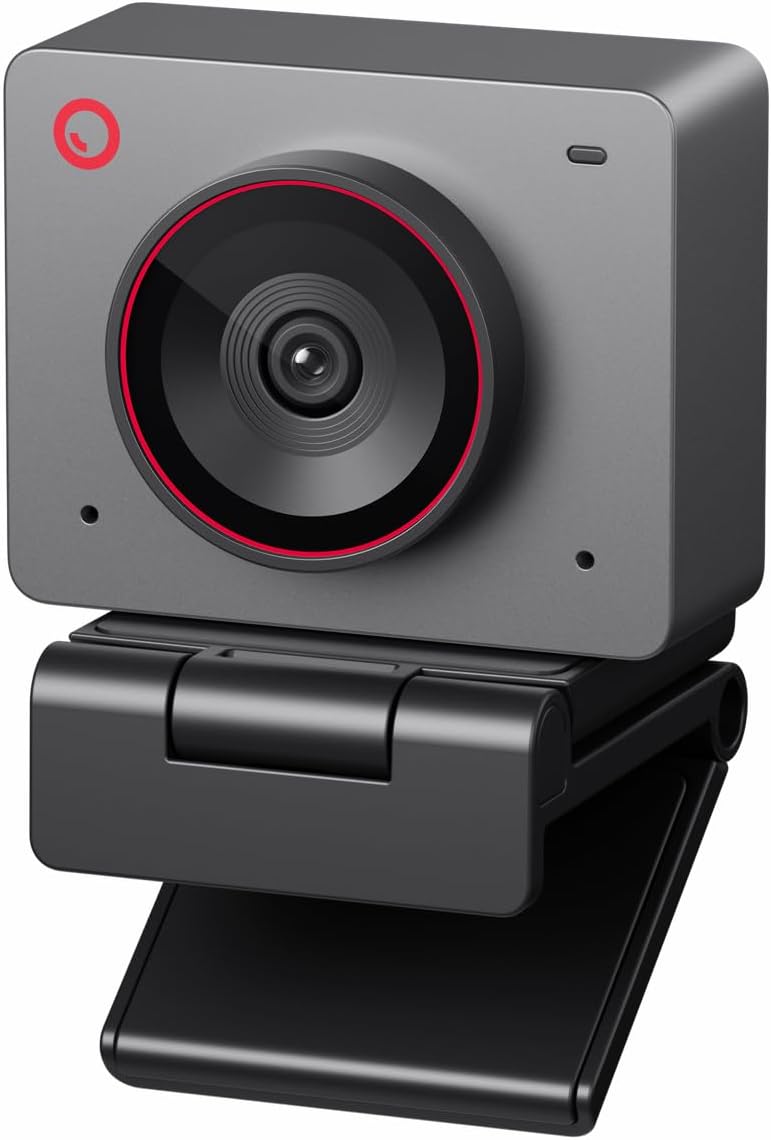
OBSBOT Meet 2-4K
4.4Editor score
Compact 4K sensor design
AI framing and autofocus
Dual noise-canceling microphones
An AI Powered Webcam adds automated framing, subject tracking, gesture controls, and intelligent image adjustments to the familiar computer camera format. These features can keep speakers centered, improve composition, reduce unwanted noise, and make meetings or streams easier to manage without constant manual intervention.
The models in this guide were compared using their published specifications, feature sets, compatibility information, and customer ratings. We looked closely at sensor size, resolution, frame rates, autofocus behavior, AI tracking, microphones, mounting options, and the different ways each camera supports calls, teaching, streaming, and collaboration.
Each review highlights the strongest use case, important trade-offs, and the people most likely to benefit from that model. The list ranges from compact 1080p options to 4K cameras with advanced PTZ movement, while ratings and product details reflect the supplied information. Prices and availability can change, so check current listings before buying.
4.4Editor score

4.6Editor score

4.4Editor score
As an Amazon Associate we earn from qualifying purchases.
This side-by-side comparison highlights each camera's core resolution, sensor, AI capabilities, audio hardware, and most useful specialty features, helping you identify the model that best matches your room, platform, and workflow.


The OBSBOT Tiny 2 Lite is a 4K PTZ webcam aimed at creators, teachers, and remote professionals who want a camera that can move beyond a fixed laptop position. It carries a 4.3 rating and combines a 1/2-inch CMOS sensor with AI tracking, physical pan and tilt, gesture controls, and customizable presets, making it unusually versatile for a compact webcam.
We may earn a commission when you buy through this link, at no additional cost to you.
Its strongest feature is the range of tracking behavior. The camera can follow an upper body or hands, and users can define tracking and non-tracking areas to suit a particular workspace. Multiple preset positions can each have separate parameters and tracking modes, reducing the need to rebuild the composition whenever a meeting or broadcast changes. The included whiteboard and voice-control features listed for the broader Tiny 2 family are streamlined in this Lite version.
There are trade-offs. The removal of dedicated whiteboard mode and voice control makes the Tiny 2 Lite less expansive than the full-featured OBSBOT models, while its 1/2-inch sensor is smaller than the sensors found in the Tiny 3 and YoloCam S3. For most teaching and streaming situations, though, the remaining tracking, zoom, orientation, and preset functions cover the essential needs without overcomplicating the setup.
This is a strong recommendation for anyone who moves around a desk, presents demonstrations, teaches remotely, or records a stream with changing camera angles. It is less compelling for users who specifically need voice commands or an advanced whiteboard workflow, but for flexible AI-assisted PTZ operation, the Tiny 2 Lite offers a focused and capable feature set.
Custom tracking regions and adjustable non-tracking areas let the camera distinguish the active part of a scene from the rest of the room. This makes it particularly useful when a teacher writes, demonstrates a product, or changes position during a live lesson.
Each saved preset can carry its own parameters and AI tracking mode. A creator can move between a close presentation view, a wider teaching frame, and a carefully composed shot with less repeated adjustment between segments.
We may earn a commission when you buy through this link, at no additional cost to you.
The EMEET PIXY is an expressive 4K webcam built around a dual-camera system. One camera handles the main image, while an auxiliary AI camera detects a face and helps optimize focus and exposure. With a 4.3 rating, 0.2-second AI-assisted focusing, and 3-chip tracking, it presents itself as a lively alternative to a conventional fixed webcam.
We may earn a commission when you buy through this link, at no additional cost to you.
Tracking is the PIXY's defining feature. The three-chip system separates stable framing, motion and lighting prediction, and physical PTZ movement, allowing the camera to follow dancers, presenters, fitness instructors, and other moving subjects. A 310-degree pan and 180-degree tilt provide wide movement, while an open-palm gesture held in the center for two seconds activates gesture control. EMEET STUDIO adds preset positions, whiteboard mode, privacy controls, field-of-view adjustment, and AI-generated shot lists and movements.
Audio receives equal attention. The triple-microphone array offers a Live Mode for steady background noise, a Noise Canceling Mode for hums and sudden sounds, and an Original Sound Mode that preserves ambient detail for music. The main compromises are accessory-based: a tripod and remote are sold separately. The camera is also most compelling for users willing to explore its software rather than those wanting only a simple video-call device.
Choose the PIXY when movement, presentation, performance, or a distinctive live-stream aesthetic matters. It is a particularly good fit for dance and fitness creators because its PTZ tracking and audio modes are designed around dynamic scenes. For routine calls, it offers more than most users need, but it rewards those who make full use of the tracking and production controls.
The auxiliary camera gives the PIXY a separate way to monitor the scene. That focus information can support rapid autofocus and more consistent exposure and skin tones as a presenter moves closer to or farther from the lens.
Live, Noise Canceling, and Original Sound modes make the built-in array useful across streaming, podcasting, teaching, and music. Creators can prioritize dialogue clarity or preserve a fuller sense of the environment without relying on a separate microphone.
We may earn a commission when you buy through this link, at no additional cost to you.
The OBSBOT Tiny 3 Lite combines 4K recording, three-chip AI tracking, a triple-microphone array, and PTZ movement in a body described as 48 percent smaller and 34 percent lighter than its predecessor. Its 4.3 rating makes it one of the strongest compact choices for creators who want substantial automated control without a large desk-mounted camera.
We may earn a commission when you buy through this link, at no additional cost to you.
The 1/2-inch CMOS supports 4K at 30FPS or 1080p at 120FPS, while precision PDAF autofocus changes modes as lighting and subject distance change. A wide ISO domain of 100 to 6400 and HDR help the camera balance detail in difficult lighting. AI Tracking 2.0 can identify a person, group, or more than 200 object types, and multiple tracking modes allow the framing to be tailored to different scenes.
Audio is a major upgrade. One omnidirectional microphone captures the surrounding scene while two directional MEMS microphones locate voices, feeding five specialized audio modes. OBSBOT Center adds Beauty Mode, Background Blur, Teleprompter, exposure controls, white-balance offset, and NVIDIA Maxine Eye Contact. One practical caution in the supplied information is that erratic gimbal behavior or abnormal wake and sleep states can occur, in which case voice and gesture control should be turned off.
The Tiny 3 Lite is ideal for streamers, remote presenters, and multitaskers who need the camera to follow them. Its smaller size also makes it more travel-friendly than many PTZ webcams. It may not be the right choice for someone seeking the Tiny 3's larger sensor and higher ISO ceiling, but it still delivers one of the strongest combinations of tracking, audio, and physical movement in a compact form.
Despite its reduced size and weight, the camera retains pan, tilt, tracking, presets, zone tracking, and adjustable composition lines. That makes it easier to place on a crowded desk without giving up the automated framing associated with larger studio models.
OBSBOT Center provides a practical control room for a polished presentation. Teleprompter, background blur, beauty controls, HDR tools, and camera calibration settings can be adjusted without replacing the webcam's basic plug-and-play operation.
We may earn a commission when you buy through this link, at no additional cost to you.
The OBSBOT Tiny 3 is the most advanced model in this roundup, with a 1/1.28-inch CMOS sensor, three-chip AI tracking, PTZ movement, a triple-microphone array, and a 4.4 rating. It is designed for content creators, remote professionals, and anyone who wants the automated control of a studio camera in a remarkably small enclosure.
We may earn a commission when you buy through this link, at no additional cost to you.
Image quality is supported by dual all-pixel PDAF, a wide ISO range of 0 to 12800, and DCG HDR. The camera records 4K at 30FPS or 1080p at 120FPS, giving creators flexibility between detailed 4K output and high-frame-rate motion. Its three-chip tracking system can lock onto a person, group, or more than 200 object types, while desk and whiteboard modes, presets, composition lines, and zone tracking help tailor the frame.
Spatial audio uses one omnidirectional microphone and two directional MEMS microphones, with five modes for different recording conditions. Voice and gesture commands can wake the camera, select targets, change zoom, and switch presets. OBSBOT Center adds advanced calibration, beauty controls, teleprompter features, NVIDIA Maxine Eye Contact, remote interaction, and VR avatars. As with the Tiny 3 Lite, the supplied guidance recommends disabling voice and gesture control if the gimbal behaves erratically or wakes or sleeps abnormally.
This is the recommendation for a buyer who prioritizes image quality and extensive AI-assisted operation over minimizing the hardware footprint. It connects through USB to Windows 10 64-bit or later systems and macOS 11 or later. While the advanced feature set may exceed the needs of a basic call, it offers the broadest creative and presentation toolkit in the group.
The 1/1.28-inch sensor and broad ISO range provide a strong foundation for detailed 4K output and low-light performance. The dual all-pixel PDAF system further supports consistent sharpness when a speaker changes distance or moves across the frame.
One-touch presets, zone tracking, composition lines, and software calibration make the camera adaptable to repeated production formats. It suits creators who have a defined workflow and want consistent framing without rebuilding every scene.
We may earn a commission when you buy through this link, at no additional cost to you.
The OBSBOT Meet 2-4K is a compact fixed-lens webcam that pairs 4K resolution with a 1/2-inch sensor, AI framing, autofocus, gesture controls, and dual noise-canceling microphones. Its 4.4 rating and 40.5-gram weight make it an appealing everyday choice for people who want better image quality without the bulk of a PTZ streaming camera.
We may earn a commission when you buy through this link, at no additional cost to you.
The sensor's larger light-sensitive area supports clearer and brighter images than many small webcams, while the AI algorithm adjusts composition and focus for either a solo user or a group. A palm gesture opens or closes AI framing, and an upward-pointing gesture changes zoom. Users can personalize behavior through OBSBOT Center, while the single USB-C connection keeps initial setup straightforward.
The most notable limitation is the lack of mechanical PTZ. AI framing can adjust the digital composition, but it cannot pan and tilt in the way the Tiny 2 Lite, Tiny 3 models, or EMEET PIXY can. The manufacturer also notes that the camera may become warm during use, describing this as normal and not damaging to its function. Those are important considerations for a permanently active office installation.
Meet 2-4K is a strong recommendation for hybrid workers, students, and families who regularly move between calls and travel with their equipment. It delivers essential AI framing, 4K detail, useful microphones, and a tiny footprint. It is best for people who need a smart fixed camera rather than a motorized production device.
The camera can adjust to one person or a group, helping keep participants visible without manual reframing. That makes it useful for team check-ins and classes where the number of people in frame may change.
At 40.5 grams, the camera is easy to carry between a home office, classroom, or shared workspace. The USB-C connection and 4K sensor preserve a professional image without asking the user to carry a separate laptop camera.
We may earn a commission when you buy through this link, at no additional cost to you.
The YOLOLIV YoloCam S3 earns the highest listed customer rating in this guide at 4.6. Its defining combination is a large 1/1.3-inch sensor, uncompressed 4K at 30FPS, 1080p at 60FPS, fast PDAF autofocus, and AI-enhanced imaging, giving it a strong foundation for both polished streams and high-quality calls.
We may earn a commission when you buy through this link, at no additional cost to you.
The AI system tunes exposure, white balance, and HDR, with the listed performance emphasizing clearer faces and finer details in low light. An 82-degree field of view balances room coverage with a relatively controlled composition. At 1080p, users also receive a 4x digital zoom that is described as preserving image clarity, while the foldable magnetic mount supports flexible positioning and an integrated 1/4-inch-20 thread supports most tripods.
The software is particularly attractive to streamers who want more than automatic results. Manual controls include contrast, sharpness, saturation, exposure, white balance, autofocus, and color grading. Picasso Resolve provides a dedicated YOLOLIV grading engine, although it is currently available only on Windows and is described as coming soon for Mac. The all-aluminum body acts as a heat sink, supporting stable continuous streaming without the overheating and lagging that the manufacturer says it is designed to prevent.
The YoloCam S3 is our best overall recommendation for a buyer who wants strong image quality, refined manual control, and a camera that can handle long streaming sessions. It is particularly well suited to creators who will use color tools and understand the importance of sensor and autofocus behavior. Mac users should note the current software limitation before relying on Picasso Resolve.
A larger sensor generally gives the camera more room to capture detail and light. Combined with AI exposure, white balance, HDR, and PDAF, it gives streamers a strong starting point for sharp, balanced images without constant intervention.
The camera does not limit creators to a one-click look. Automatic tools provide a useful baseline, while detailed color, focus, and exposure settings allow a streamer to develop a more deliberate visual style.
We may earn a commission when you buy through this link, at no additional cost to you.
The Insta360 Link 2C is a 4K PC and Mac webcam with a 1/2-inch sensor, HDR, PDAF autofocus, automatic framing, gesture control, and AI noise cancellation. Its 4.5 rating reflects a well-rounded feature set for video calls, streaming, gaming, and creative work, with several details that extend beyond the basic webcam category.
We may earn a commission when you buy through this link, at no additional cost to you.
A notable strength is Natural Bokeh, which is controlled through the Link Controller and creates a depth-of-field-style background separation. Auto Framing zooms and adjusts to keep one person or a group visible, while gesture commands can start AI Tracking and Auto Framing, change zoom, and activate Whiteboard Mode. The camera can also be managed remotely from a smartphone, making it easier to adjust a composition after the camera has already been placed.
DeskView and Whiteboard modes address common professional use cases, while the dedicated Link Controller provides advanced settings. The AI noise-canceling microphone is designed to reduce distracting background sound during communication. Privacy is handled with an easy-access physical switch. Compatibility is broad across major conferencing and streaming software, including Zoom, Microsoft Teams, and Twitch, but the product is not currently compatible with ARM-based Windows systems or Windows Hello face recognition.
The Link 2C is a persuasive choice for remote workers, teachers, and streamers who want presentation tools without a bulky PTZ camera. It is especially attractive when natural-looking subject separation matters. Users on ARM-based Windows systems should choose a different model, but most standard Windows and Mac users can benefit from its strong imaging and intelligent framing features.
DeskView and Whiteboard Mode help the camera shift between a person and the content being discussed. This is useful in lessons, design reviews, and hybrid presentations where switching the physical camera angle would otherwise be inconvenient.
Smartphone remote control is particularly valuable when the camera is positioned away from the computer. A presenter can refine the frame without walking back to the desk or relying on a separate physical remote.
We may earn a commission when you buy through this link, at no additional cost to you.
The OBSBOT Meet Flip is a foldable 4K webcam designed for people who move between meetings and want a camera that can disappear into a laptop setup when it is not needed. It weighs 37.7 grams, includes an integrated stand, and uses a 1/2-inch CMOS with HDR, AI auto framing, and PDAF autofocus.
We may earn a commission when you buy through this link, at no additional cost to you.
The camera is oriented toward modern meeting workflows. Its AI meeting companion includes real-time transcription, smart highlights, AI meeting summaries, and teleprompter support, while four audio modes and a dual-microphone system handle different environments. AI framing keeps individuals or groups composed, and a palm gesture activates framing while an upward gesture adjusts zoom. The foldable structure also provides a clear physical privacy advantage.
It does not mechanically pan or tilt, so it cannot follow a presenter walking around the room in the manner of a PTZ model. Some of the meeting intelligence may also depend on the relevant software environment rather than operating entirely on the camera. The fixed format is nevertheless highly practical for a laptop user who wants to clamp the device to a screen or place it on a nearby surface.
Meet Flip is a strong recommendation for frequent travelers, hybrid employees, and students attending classes from different locations. Its combination of 4K, HDR, AI framing, meeting tools, and fold-away privacy creates a compelling portable package. It is best suited to stationary seated use rather than active presentations that require motorized tracking.
Closing the camera triggers sleep mode and physically conceals the lens. That is a useful design for shared offices and temporary workspaces where leaving an active camera exposed is undesirable.
Transcription, highlights, summaries, and a teleprompter reflect the growing role of webcams as meeting tools. These functions can support preparation and delivery while the camera remains compact enough for a mobile kit.
We may earn a commission when you buy through this link, at no additional cost to you.
The 4K AI-Powered Conference Webcam is built for small meeting spaces rather than a personal desk. It has a 4.1 rating and differentiates itself with AI group framing, presenter tracking, a 120-degree field of view, and microphones designed to capture voices across a table up to five meters away.
We may earn a commission when you buy through this link, at no additional cost to you.
For hybrid collaboration, the camera can detect and frame attendees while presenter tracking follows the active speaker. The broad viewing angle is designed to keep the full meeting area visible without repositioning the device. Its physical lens cover adds a straightforward privacy measure for shared offices, while plug-and-play USB connectivity is compatible with Zoom, Teams, and Webex.
The package title mentions microphones and speakers, although the supplied details primarily describe the two AI noise-canceling microphones and do not provide detailed speaker specifications. Its room orientation also means it is less relevant to a person seeking a small travel camera or a motorized creator setup. The relatively modest 4.1 rating, while still positive, is lower than those of the other models in the roundup.
This webcam is best for a small business conference room, training space, or hybrid team environment with multiple seated participants. It prioritizes wide coverage and active-speaker awareness over portability, creative color controls, and high-end streaming features. Buyers should confirm that the room dimensions match the camera's intended small-conference-room design.
AI group framing adjusts to a collection of attendees rather than assuming one person remains in a fixed close-up. This makes the camera more appropriate for a shared room than a personal computer setup.
The 120-degree view and microphones with stated reach of up to five meters support clear communication around a table. This balanced coverage is the main reason to choose the model for a dedicated meeting space.
We may earn a commission when you buy through this link, at no additional cost to you.
The OBSBOT Meet SE is built around high-frame-rate performance, offering 1080p at 100FPS, 1080p at 60FPS, and 720p at 150FPS. It carries a 4.4 rating and uses AI framing to identify individuals or groups, making it a distinctive option for fast-motion streams, gaming, and high-frame-rate recording.
We may earn a commission when you buy through this link, at no additional cost to you.
Its 1/2.8-inch stacked CMOS uses dual native ISO, 2.9-micrometer pixels, staggered HDR, and a 12-bit dynamic color range to support image quality in challenging lighting. For 100FPS recording, the supplied instructions specify using the More Output Options section in OBSBOT software. AI framing keeps people or groups properly composed, while palm and upward-pointing gestures open or close framing and change zoom.
The camera also provides adjustable beauty parameters, including facial and body contouring and makeup modifications, alongside broader video controls in OBSBOT Center. It connects through USB-C and supports SDK, OSC, Stream Deck, and global hotkey functions for users who need deeper control. Its main limitation is resolution: the maximum 1080p output will not satisfy someone who specifically requires 4K detail.
Meet SE is a strong recommendation for streamers who value motion smoothness over 4K resolution. It is also a practical option for competitive gaming or motion-focused content where high frame rates can matter more than native UHD resolution. For office calls, its AI framing is useful, but buyers seeking maximum detail should move to a 4K model.
Options up to 100FPS at 1080p and 150FPS at 720p provide smoother motion than a standard 30FPS webcam. The practical benefit is greatest in fast gameplay, sports, demonstrations, and other content with frequent movement.
The stacked CMOS, dual native ISO, relatively large pixel size, and 12-bit dynamic range are designed to preserve usable image information in weak lighting. These specifications support clearer output when a room cannot rely on strong studio illumination.
We may earn a commission when you buy through this link, at no additional cost to you.
The right AI webcam depends on how you use it, the size of your room, and the balance you want between image quality, motorized movement, software intelligence, and convenience. Consider the following factors before narrowing your choice.
Sensor size is one of the most useful indicators of a webcam's imaging potential. Larger sensors can gather more light and retain more detail, especially when a room is dim or a user is exposed on a large streaming canvas. The YoloCam S3 uses a 1/1.3-inch sensor, the Tiny 3 uses a 1/1.28-inch sensor, and several compact options use 1/2-inch sensors. Resolution alone does not tell the whole story because pixel size, lens design, processing, and HDR implementation also influence the result.
Prioritize a larger sensor when image quality matters, particularly for low-light rooms, close-up demonstrations, and professional broadcasts. A smaller sensor can still produce excellent video in controlled lighting, so it should not be the only consideration.
AI tracking comes in several forms. Digital auto framing can crop and reposition the image around a person or group, while PTZ tracking physically pans and tilts to follow a subject. Zone tracking lets a user define the area the camera may watch, and composition lines or presets provide repeatable framing for lessons, meetings, and broadcasts. The Tiny 3 models, EMEET PIXY, and Tiny 2 Lite offer mechanical movement, while the Meet models and Insta360 Link 2C use fixed housings with intelligent digital framing.
Choose PTZ if you move around a room and need the camera to follow you. Choose fixed AI framing for seated calls and small groups. Always check what kinds of subjects and tracking areas each model supports.
4K provides greater detail and more flexibility for cropping, while high frame rates create smoother motion. The Tiny 2 Lite, Tiny 3 models, Meet 2-4K, YoloCam S3, and Insta360 Link 2C support 4K at 30FPS. The Meet SE prioritizes speed with 1080p at 100FPS, 1080p at 60FPS, and 720p at 150FPS, making it more appropriate for gaming and action-oriented content. Some models also offer 1080p at 60FPS or 120FPS.
For most professional calls, 1080p is sufficient, while 4K benefits detailed demos and content creation. For fast motion, favor a higher frame rate over resolution when your software and computer support it.
A webcam that looks sharp at one fixed distance can still blur when a person leans forward or walks around. PDAF, phase-detection autofocus, and AI-assisted focusing are designed to adjust more quickly than basic contrast-based systems. The EMEET PIXY advertises a 0.2-second focusing result, while the YoloCam S3, Insta360 Link 2C, and OBSBOT models use PDAF systems. Exposure controls and auto white balance are equally important when lighting changes during a session.
Look for fast autofocus if you move, stand, or demonstrate objects close to the lens. For a stationary office user, autofocus is less demanding, but manual exposure and white-balance options can still improve color consistency.
Built-in microphones can simplify a setup, although their performance varies with the room. The Tiny 3 models use a three-microphone array with five audio modes, the EMEET PIXY provides live, noise-canceling, and original-sound recording options, and the Insta360 Link 2C uses AI noise cancellation. Smaller fixed cameras generally use dual microphones. Dedicated microphones still offer a major advantage for podcasts, music, or professional speech.
Choose a strong onboard array for calls, teaching, and casual streaming. If voice quality is the central requirement, test the microphone in the actual room or plan to add a dedicated audio device.
A camera that is difficult to position will often provide less value than its specifications suggest. Consider whether you need a laptop clip, desktop stand, tripod thread, or freestanding base. The YoloCam S3 combines a magnetic mount with a 1/4-inch-20 interface, the EMEET PIXY includes a clip and supports a separately sold tripod, and the OBSBOT Meet Flip has an integrated folding stand. Privacy controls range from software modes to physical lens covers and folding designs.
Match the mounting system to your desk and room. If the camera will travel, weight and folded size matter. In a shared office, a physical shutter, switch, or lens cover may be more reassuring than software privacy alone.
AI features often depend on companion software, and the depth of that software can be as important as the hardware. OBSBOT Center includes tracking, presets, beauty tools, teleprompter features, and calibration. YOLOLIV supplies extensive manual controls and the Picasso Resolve grading engine, currently limited to Windows. Insta360 Link Controller provides advanced settings, while EMEET STUDIO covers presets, privacy, whiteboard mode, and AI-assisted production features.
Confirm the operating system, conferencing applications, streaming platforms, and control methods you use. Pay special attention to whether advanced features work with your preferred browser, USB hardware, or production software.
Start by placing the camera at eye level, approximately the same distance from your face as a typical built-in laptop camera. Connect the supplied USB cable before opening your meeting or streaming application, then choose the camera from the software's device settings. Keep the lens clean and avoid positioning a bright window directly behind you, since backlighting can make automatic exposure and white balance less consistent.
Open the manufacturer's control software and enable only the AI features you need. Test person detection, group framing, tracking zones, autofocus, microphone modes, and privacy controls in a short recording. For a PTZ model, save a preset for your normal framing and another for wider scenes. Check the result in both a live preview and a recorded clip because compression can change the apparent sharpness of fine details.
For ongoing care, handle the camera by its base or mount rather than twisting the head of a PTZ model. Keep liquids away from the lens and ports, and use a soft dry cloth to clean the surface. Update the control software when a new version is available, particularly after an operating-system change. Before an important meeting, verify tracking behavior, current lighting, privacy state, and application compatibility rather than waiting until the call begins.
An AI Powered Webcam can automatically detect people, adjust framing, maintain focus, and respond to gestures or commands. These functions reduce the need to move the camera or correct composition manually. The value is greatest for people who move during meetings, teach remotely, stream frequently, or appear in changing group configurations.
A 4K model can provide more visible detail and may perform better when lighting is strong enough to exploit its sensor. Many conferencing platforms still compress or scale the feed, so the difference may be modest in a small call window. A 4K camera is more compelling for recorded content, larger displays, demonstrations, and streaming work.
A PTZ webcam is better when you move around a room and want the camera to physically follow you. A fixed camera is quieter, more compact, and often easier to position for seated calls. The OBSBOT Tiny 2 Lite, EMEET PIXY, and Tiny 3 models offer motorized movement, while models such as the Meet 2-4K and Insta360 Link 2C rely on digital composition.
Basic video calling and streaming usually work through standard USB camera support, but the advanced AI functions generally use the manufacturer's companion software. OBSBOT Center, EMEET STUDIO, Link Controller, and YOLOLIV's controls expose features such as tracking, presets, exposure, noise handling, and framing. Review operating-system requirements before installation.
Several models can recognize groups, including the OBSBOT Meet 2-4K, Tiny 3 models, EMEET PIXY, and OBSBOT Meet SE. Their exact behavior differs: some recompose a digital frame, while others physically pan and tilt. For a group seated in a small meeting room, confirm that the camera's field of view and intended room size match the space.
That depends on the content. A 100FPS stream can look smoother during gaming, sports, or rapid movement, while 4K provides finer detail and more useful cropping latitude. The OBSBOT Meet SE is designed around high frame rates, whereas most of the 4K models in this guide focus on detailed 30FPS output.
Look for directional pickup, multiple microphones, adjustable noise reduction, and modes designed for speech, music, or ambient sound. The Tiny 3 models and EMEET PIXY offer multi-microphone arrays with several operating modes. For professional podcasts or music, however, a dedicated external microphone will usually provide more control and isolation.
Use the physical privacy mechanism whenever one is available. The OBSBOT Meet Flip folds to conceal the lens, the Insta360 Link 2C has a physical privacy switch, and the conference webcam includes a physical lens cover. Software privacy modes can add protection, but physical concealment is useful when the device is not actively in use or when the room is shared.
The YOLOLIV YoloCam S3 stands out as the best overall option because it combines the highest listed customer rating with a large sensor, detailed manual controls, AI-assisted imaging, and a stable aluminum design. The OBSBOT Meet 2-4K is a particularly balanced compact choice, while the OBSBOT Tiny 3 is the premium recommendation for users who want advanced tracking, spatial audio, and extensive creative controls.
Prioritize the type of movement your work requires. Pick a PTZ model when you need physical panning and tilting, a fixed AI-framing camera for seated calls, a large-sensor 4K model for image quality, or a high-frame-rate camera for fast motion. Audio, mounting, privacy, software compatibility, and room size can be just as important as headline resolution.
Product details, ratings, and availability can change over time, and current prices should be checked before purchasing. Compare the final specification against your actual computer, meeting platform, lighting, and workflow to avoid paying for capabilities the rest of your setup cannot use.