
Lenovo ThinkBook 16 Gen 8
4.6Editor score
Intel Core Ultra 7
32 GB DDR5 memory
1 TB PCIe storage
Windows 11 Professional
AI laptops have evolved from experimental machines into practical everyday computers built around faster processors, dedicated neural processing units, and intelligent software features. A strong model should handle demanding applications while remaining comfortable for work, study, creative tasks, communication, and travel. The right balance depends more on your priorities than on the AI label alone.
We compared these 10 models using their published specifications, including processor architecture, memory, storage, display quality, battery claims, connectivity, security, and platform-specific AI functions. The guide covers premium business systems, affordable ARM-based notebooks, OLED ultraportables, touchscreen models, and larger machines designed for multitasking, emphasizing the trade-offs behind each configuration.
Each review explains the hardware, intended user, and most compelling qualities without suggesting every AI feature will be equally useful for everyone. The top picks represent the strongest combinations of value, capability, and premium features in this group. Product listings and prices can change, so confirm the current configuration and terms before making a purchase.
4.6Editor score

5.0Editor score

4.4Editor score
As an Amazon Associate we earn from qualifying purchases.
The comparison below highlights the major hardware and usability differences among all 10 AI laptops, including processor type, memory, display, battery, and standout features.
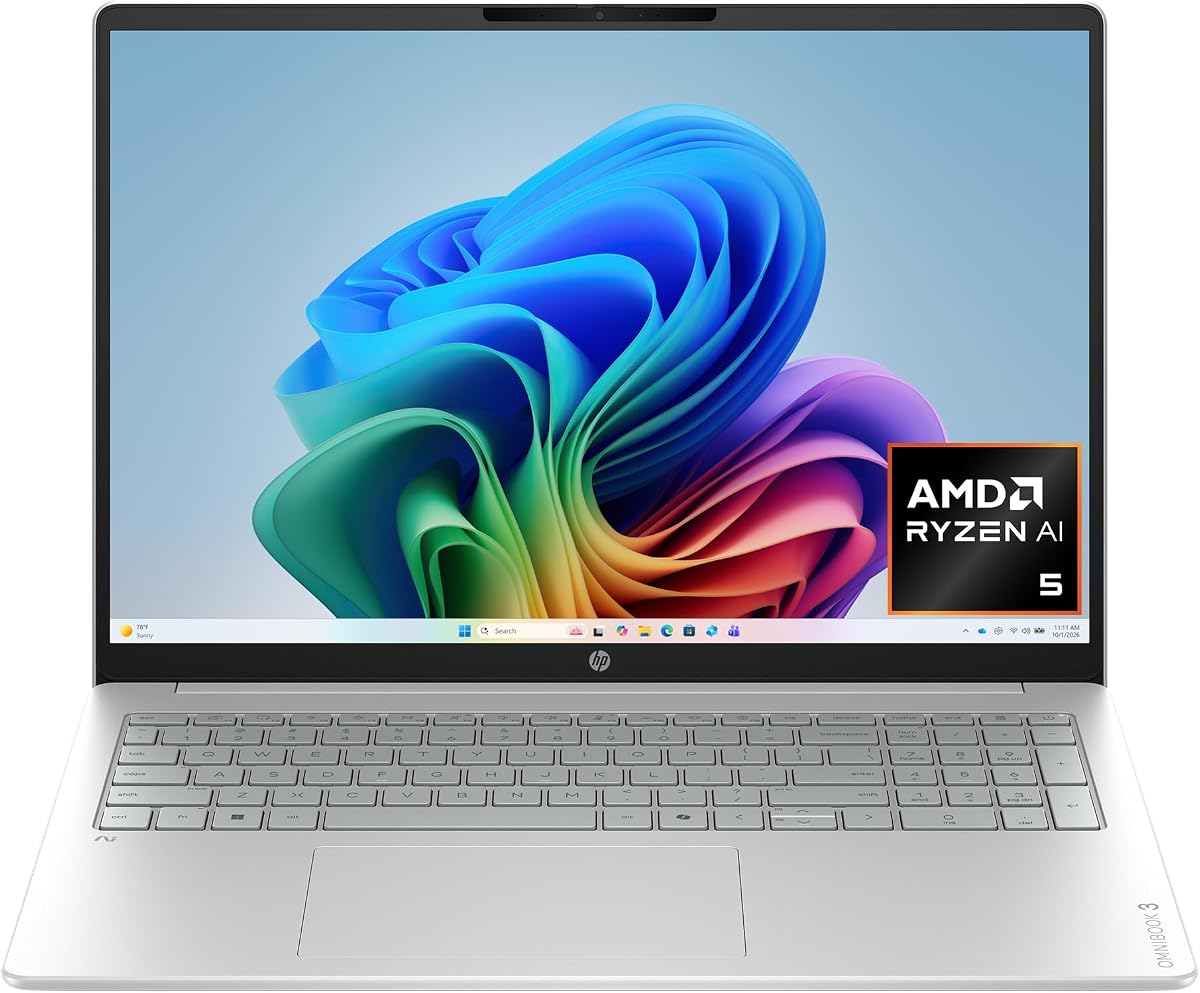


The HP OmniBook 3 16 combines an AMD Ryzen AI 5 430 processor, Radeon 840M graphics, a 2K IPS touchscreen, and 16 GB of DDR5 memory in a well-balanced everyday configuration. Its 4.8 rating is the highest among the Intel- and AMD-based models in this guide, making it an especially strong all-around recommendation for users who want useful AI hardware without moving into a larger workstation class.
We may earn a commission when you buy through this link, at no additional cost to you.
The Radeon 840M GPU is one of the more compelling specifications here for a notebook without a discrete graphics card. HP describes it for high-resolution display support, hardware-accelerated encoding, and more engaging gaming performance than typical integrated graphics. Meanwhile, the 1920 x 1200 touchscreen gives the machine a clear advantage for media viewing, browsing, drawing, and touch-based navigation.
HP also provides thoughtful collaboration tools. Advanced Personal Mode is designed to isolate the user's voice and filter other sounds during calls, while the FHD camera with HDR auto-switch is intended to balance backlit and challenging lighting conditions. The claimed battery life reaches 19 hours and 30 minutes, and Fast Charge can reportedly restore the battery from 0 to 50 percent in about 45 minutes.
This is a sensible recommendation for students, home users, office workers, and creative professionals who value a large, sharp display and capable integrated graphics. The 512 GB drive is the main limitation, especially for large media libraries or project archives, but the overall balance of display quality, performance, connectivity, and everyday AI features is excellent.
The 2K IPS panel offers 1920 x 1200 resolution, wide viewing angles, and touchscreen input. That combination makes the OmniBook 3 16 suitable for both conventional productivity tasks and more interactive work.
The Ryzen AI processor, Copilot+ PC functions, dedicated Copilot key, and AI noise filtering work together to support everyday communication and workflow assistance without treating AI as a standalone selling point.
We may earn a commission when you buy through this link, at no additional cost to you.
The Lenovo ThinkBook 16 Gen 8 is built around the Intel Core Ultra 7 255H, a 16-core processor with AI acceleration. Paired with 32 GB of DDR5 memory and a 1 TB PCIe SSD, it is designed for complex spreadsheets, video calls, enterprise applications, and simultaneous workloads. Its 4.6 rating and business-oriented configuration make it a particularly compelling option for organizations and professionals.
We may earn a commission when you buy through this link, at no additional cost to you.
Windows 11 Professional and the built-in fingerprint reader distinguish this ThinkBook from many consumer-focused alternatives. Those details are especially relevant for managed work environments, where centralized device administration, policy controls, and secure sign-in can matter more than a touchscreen or highly saturated display. Wi-Fi 6E and Bluetooth 5.3 provide modern wireless connectivity for offices, remote work, and shared spaces.
The 16-inch FHD+ screen offers enough room for presentations, data analysis, document comparisons, and side-by-side application work. It may not be the most visually striking panel in this list, especially next to OLED models, but the emphasis here is clearly on useful workspace, strong memory capacity, and a professional operating system rather than entertainment specifications.
Choose the ThinkBook 16 Gen 8 for business productivity, office work, and users who want current enterprise features in a capable 16-inch machine. It is less suited to buyers whose priorities center on touch interaction or a highly specialized GPU, but its balanced processor, memory, storage, security, and collaboration specifications make it an excellent premium business recommendation.
Windows 11 Professional and a fingerprint reader create a more suitable foundation for company deployment. These features help address security and device-management needs that can be difficult to add later.
With 32 GB of DDR5 RAM and a 1 TB PCIe SSD, the ThinkBook can comfortably support numerous business applications, large files, and long work sessions without relying on a small storage configuration.
We may earn a commission when you buy through this link, at no additional cost to you.
The HP OmniBook X 14 is a premium 14-inch AI PC whose defining feature is its 3K OLED touchscreen. The display lights each pixel separately, producing deeper blacks, richer contrast, and greater color depth. It is an ideal candidate for creative work, media consumption, and users who want a highly refined panel in a more portable form factor.
We may earn a commission when you buy through this link, at no additional cost to you.
Its Intel Core Ultra 7 356H processor combines performance, built-in graphics, and AI capabilities, while 24 GB of LPDDR5x memory and a 1 TB PCIe Gen4 NVMe SSD provide a generous foundation for creative applications and multitasking. HP's Smart Sense feature adjusts performance, temperature, and fan behavior according to the active workload, which can improve comfort during long sessions.
HP claims up to 27 hours and 30 minutes of battery life and says Fast Charge can restore 50 percent in approximately 30 minutes. The 5MP infrared camera with HDR auto-switch, Poly Studio audio with dual speakers, and dedicated Copilot key add useful functionality for calls and collaboration. Windows 11 Home remains the primary limitation for managed enterprise use.
The OmniBook X 14 is a compelling choice for creative professionals, students, and mobile users who prioritize a beautiful high-resolution OLED display. Its 4.3 rating does not lead the list, but the combination of display quality, memory, storage, intelligent power management, and portable dimensions makes it one of the most premium-focused options here.
The 3K OLED panel provides the strongest combination of resolution and contrast in this group. Its 16:10 format also provides useful vertical space for documents, editing timelines, and web content.
Smart Sense can tailor performance and cooling to the current task, while the advertised fast-charge capability is useful for short gaps between meetings or classes.
We may earn a commission when you buy through this link, at no additional cost to you.
The HP OmniBook 5 16 is a straightforward 16-inch touchscreen AI laptop built around an Intel Core Ultra 7 processor, 16 GB of RAM, and a 1 TB SSD. Its 4.5 rating reflects a well-rounded configuration that should appeal to students, professionals, and home users seeking a large display, ample storage, and modern AI support.
We may earn a commission when you buy through this link, at no additional cost to you.
The most immediately useful feature is the touchscreen, which expands the ways users can browse, present, stream, and interact with creative applications. Wi-Fi 6E connectivity, a backlit keyboard, and Windows 11 with Copilot AI make it a comfortable general-purpose machine. The silver aluminum-style design gives it a more professional appearance than many entry-oriented alternatives.
Unlike several other HP models in this guide, the listing does not identify the precise Intel Core Ultra 7 processor, display resolution, brightness, graphics, camera specification, or a measured battery claim. That limited detail makes it harder to compare the system directly with richly specified competitors. Its 16 GB of memory is adequate for mainstream productivity, though users running memory-intensive applications may prefer 24 or 32 GB.
The HP OmniBook 5 16 is best for buyers who prioritize screen size, touch interaction, storage, and a polished design over highly technical specifications. It is also a sensible choice for shared family computers and workplace users who want modern connectivity without moving to a premium workstation. Confirm the exact component list before buying because the summary listing leaves several important details unspecified.
A 16-inch touchscreen provides a generous canvas for presentations, browsing, streaming, and creative workflows. It also makes the system more approachable for users who prefer direct touch control.
Windows 11 with Copilot AI, Wi-Fi 6E, and a backlit keyboard provide a modern foundation for study, office work, and communication. The 1 TB drive also avoids one of the most common capacity constraints.
We may earn a commission when you buy through this link, at no additional cost to you.
The HP OmniBook 5 16 ARM combines the Snapdragon X X1-26-100 processor with a 2K OLED display, 16 GB of LPDDR5x memory, and 512 GB of PCIe Gen4 storage. Its defining strength is efficiency: HP advertises up to 34 hours and 45 minutes of battery life, making this model appealing to mobile workers and students who spend much of the day away from an outlet.
We may earn a commission when you buy through this link, at no additional cost to you.
The OLED screen has a 1920 x 1200 resolution and up to 300 nits of brightness, providing vivid colors and crisp output for work and entertainment. Qualcomm's Adreno GPU is positioned for responsive mobile graphics, while Wi-Fi 6E and Bluetooth 5.3 support fast, modern connectivity. The device also includes a physical privacy camera and infrared support for Windows Hello.
Otter.ai adds practical AI utility by recording, transcribing, and summarizing meetings and capturing slides, according to HP. However, users should consider the software ecosystem carefully. Windows on ARM has improved considerably, but specialized applications, drivers, plug-ins, and games may not all behave as they do on traditional x86 Windows hardware.
This model is best for mainstream mobile productivity, web-based work, note-taking, media consumption, and users interested in meeting transcription. It is less appropriate for specialized legacy software, demanding gaming, or buyers who want maximum storage without using external media. Its long battery claim and efficient platform make it a distinctive option among the larger options in this guide.
The claimed 34-hour-and-45-minute runtime creates a strong reason to choose this model for flights, commutes, school days, and locations where charging access is uncertain.
Otter.ai can record, transcribe, organize, and summarize conversations. For frequent meeting participants, that focused application of AI may be more valuable than a long list of generic assistant features.
We may earn a commission when you buy through this link, at no additional cost to you.
The HP OmniBook 3 14 is the most affordable model in this lineup and still manages to include a 2K OLED display, 16 GB of LPDDR5x memory, and a Snapdragon X X1-26-100 processor with AI capabilities. Its 4.4 rating and 14-inch form factor make it a compelling budget option for students and value-conscious mobile users.
We may earn a commission when you buy through this link, at no additional cost to you.
HP advertises up to 41 hours and 45 minutes of battery life, the highest figure in the group, along with fast charging from 0 to 50 percent in approximately 45 minutes. The 1920 x 1200 OLED panel reaches up to 300 nits and delivers the visual benefits associated with OLED technology. Wi-Fi 6E, an FHD IR camera, and an AI-oriented Copilot+ key round out the feature set.
The principal compromises are the 256 GB SSD and the need to verify application compatibility on the ARM-based processor. Storage can be expanded through external media or cloud services, but users who keep large project files locally may find the limitation restrictive. Likewise, specialized engineering, gaming, or business applications should be checked for native support before purchase.
For everyday browsing, schoolwork, document editing, communication, streaming, and note-taking, the OmniBook 3 14 offers an unusually complete package. The combination of OLED quality, 16 GB of memory, portability, and exceptional battery claims makes it the strongest budget recommendation here, especially for buyers who do not need intensive software or maximum storage.
A 2K OLED panel is uncommon at the lower end of this list. It gives students and everyday users crisp text, rich contrast, and excellent media quality without requiring the largest chassis.
The 41-hour-and-45-minute maximum is especially relevant for commuters and students. Real-world duration will vary, but the efficiency target makes this an attractive travel and all-day-use machine.
We may earn a commission when you buy through this link, at no additional cost to you.
The Dell 16 Plus is a business-oriented touchscreen laptop with a high-end Intel Core Ultra 9 288V vPro processor, 32 GB of LPDDR5X memory, and a 1 TB PCIe NVMe SSD. Its 4.5 rating reflects a particularly complete package of performance, connectivity, security, and enterprise-oriented hardware features.
We may earn a commission when you buy through this link, at no additional cost to you.
The processor includes a 12 TOPS NPU and 12 cores, while the accompanying NPU supports up to 48 TOPS for AI-accelerated workloads such as Microsoft Studio Effects. Intel Arc 140V graphics are positioned for AI-assisted digital content creation and video editing. The 16-inch 1920 x 1200 WVA touchscreen provides a roomy 16:10 workspace, though it is less premium than the OLED options.
Connectivity is a major strength. The system includes USB-A, USB-C, Thunderbolt 4, HDMI 2.1, an audio jack, Wi-Fi 7, and Bluetooth 5.3. A backlit Copilot key, numeric keypad, fingerprint reader, FHD+ webcam, and AI noise cancellation support a professional workflow. The Intel vPro Platform also provides remote manageability and layered security for IT departments.
Choose the Dell 16 Plus for business users who value ports, manageability, and high-end specifications more than maximum portability. Its 32 GB of memory and 1 TB drive are particularly attractive for sustained office use. Although Windows 11 Home and the conventional display temper its enterprise positioning, the hardware is well suited to demanding professional workflows.
Thunderbolt 4, USB-C with DisplayPort and power delivery, USB-A, and HDMI 2.1 give this laptop unusually flexible connectivity for a 16-inch business system.
The Intel vPro Platform adds remote management, stability, and multilayer security capabilities. These are important advantages for organizations that need centralized control over deployed hardware.
We may earn a commission when you buy through this link, at no additional cost to you.
The ASUS Vivobook S16 is a 2026 Copilot+ PC that combines an AMD Ryzen AI 9 465 processor, up to 50 NPU TOPS, 32 GB of memory, and a 1 TB SSD. Its 5.0 rating makes it the highest-rated model in this guide, and the balanced specification supports writing, organizing, searching, creative work, and everyday computing.
We may earn a commission when you buy through this link, at no additional cost to you.
The 16-inch 1920 x 1200 OLED display is one of the standout components. Its 16:10 format, deep contrast, vivid detail, and narrow borders create an immersive workspace for work, study, and entertainment. The laptop is also remarkably thin at 0.7 inches and weighs 3.75 pounds, giving it a premium mobile profile without sacrificing screen size.
ASUS advertises up to 23 hours of battery life with a 70Wh battery and says fast charging can reach 60 percent in 49 minutes. Dolby Atmos, an array microphone, an IR FHD camera, a physical privacy shutter, and quick Windows Hello sign-ins support communication and privacy. Connectivity includes two USB-C ports, two USB-A ports, HDMI 2.1, and a 3.5 mm audio jack.
The Vivobook S16 is an excellent recommendation for buyers who want a premium OLED laptop, strong AI hardware, generous memory, and a refined design. It is particularly suitable for creators and professionals who can take advantage of the large display and fast hardware. Wi-Fi 6 is not the newest standard here, but the overall feature balance remains exceptionally compelling.
The Ryzen AI 9 465 and up to 50 NPU TOPS provide substantial capacity for on-device AI functions. That headroom can benefit writing, organization, search, and creative workflows when supported by the relevant applications.
At 3.75 pounds and 0.7 inches thick, the Vivobook S16 pairs a large OLED panel with a portable enclosure. Dolby Atmos and the built-in microphone array further improve its suitability for media and collaboration.
We may earn a commission when you buy through this link, at no additional cost to you.
The acer Aspire 16 AI stands out for its 16-inch WUXGA multitouch display, which combines a 120Hz refresh rate with 100% sRGB color coverage. It is an engaging screen for entertainment, browsing, creative work, and touch navigation, particularly on a large 16-inch canvas.
We may earn a commission when you buy through this link, at no additional cost to you.
Its Snapdragon X X1-26-100 processor is supported by an integrated Qualcomm Hexagon NPU rated at 45 TOPS, while the GPU is claimed to reach up to 1.7 TFLOPs. The laptop also includes 16 GB of LPDDR5X memory, a 512 GB PCIe Gen 4 SSD, and Wi-Fi 7. These specifications support efficient productivity, communication, and AI-assisted experiences.
AcerSense adds AI-based tools for system answers, settings, video presence, and communication. The platform also supports Windows Studio Effects and features such as Recall, improved Windows search, and Click to Do, some of which are identified as previews. As with other ARM systems, buyers should verify the requirements of their most important applications before committing.
The Aspire 16 AI is best for users who value a smooth, colorful touchscreen and current wireless technology in a large form factor. It can serve as a capable family, student, or productivity computer, but the 512 GB drive is modest and the sparse listing offers little battery or port detail. Checking the final specification sheet is especially important for this model.
The 120Hz panel can make scrolling, animation, and touch interaction feel more immediate than a conventional 60Hz screen. Full sRGB color coverage also makes it attractive for browsing, media, and color-sensitive everyday tasks.
AcerSense is intended to simplify settings, improve video presence, and optimize communication. Rather than treating AI as a single assistant, Acer incorporates it into several routine device-management tasks.
We may earn a commission when you buy through this link, at no additional cost to you.
The HP Omnibook 16 combines an AMD Ryzen AI 7 350 processor, a 50 TOPS NPU, 32 GB of memory, and a 1 TB PCIe Gen4 SSD. Its 4.6 rating reflects a high-powered configuration aimed at creators and professionals who want substantial AI processing, storage, and memory in a conventional 16-inch Windows notebook.
We may earn a commission when you buy through this link, at no additional cost to you.
The Ryzen AI 7 350 is described as an eight-core, 16-thread processor built on the Zen 5 architecture and capable of boosting to 5.0 GHz. That performance foundation, combined with LPDDR5x-7500 memory, should serve demanding multitasking and creative workflows. The 2K IPS touchscreen provides 1920 x 1200 resolution, 300 nits, and an anti-glare finish.
Windows 11 Pro, DTS:X Ultra audio, an HP True Vision 1080p FHD IR camera, and a full-size backlit keyboard with numeric keypad support professional use. Connectivity includes two USB-C ports, two USB-A ports, HDMI 2.1 with 4K output, Wi-Fi 6, and Bluetooth 5.4. The NPU is particularly notable for local AI workloads, although the available functions depend on supporting software.
This is a strong recommendation for content creators, designers, and business users who need more memory and storage than a standard model while retaining a touchscreen. The trade-offs are the absence of a stated maximum battery runtime and a 300-nit panel that will not rival the brightest OLED options. For power, capacity, and Windows Pro in one package, however, it is highly capable.
The combination of 32 GB of fast memory and a 1 TB Gen4 SSD provides room for large libraries, creative applications, and professional files. It also reduces the need for frequent storage upgrades.
A dedicated 50 TOPS NPU can support compatible on-device AI features without relying entirely on cloud processing. This is valuable for responsive creative and productivity tools as software support expands.
We may earn a commission when you buy through this link, at no additional cost to you.
Selecting an AI laptop requires balancing processor architecture, memory, display, battery life, software compatibility, and the kinds of intelligent tools you actually want to use. The following factors help narrow the field before you compare individual models.
For the broadest application compatibility, prioritize conventional Intel or AMD Windows systems. ARM-based Snapdragon laptops can be highly efficient and capable, but you should verify native support for essential software, drivers, plug-ins, games, peripherals, and security tools. The best processor is the one that runs your actual workload smoothly and remains compatible with your required applications.
Choose 16 GB for general productivity, 24 GB for a useful middle ground, and 32 GB for demanding multitasking or professional work. A 512 GB drive may suit lighter users, but 1 TB is more comfortable for modern application libraries and media. Always confirm the listed storage type, such as PCIe Gen4 NVMe, and check whether memory is upgradeable before assuming it can be expanded later.
Choose OLED for visual richness and premium media, IPS for a traditional productive look, and a high-refresh screen when smooth scrolling and animation matter most. A 120Hz panel can improve fluidity but may increase power demands. If you type extensively or travel with the laptop, weigh the benefit of touch against portability and battery efficiency.
Do not choose a laptop solely by its highest advertised runtime. Evaluate whether the performance and display you need can be sustained away from a charger. A less extreme but well-balanced machine may serve you better than a highly efficient system that cannot run your workload smoothly.
Match the ports to your working environment. Thunderbolt 4 and USB-C are particularly useful for external displays, storage, charging, and docks, while a full-size port selection can reduce accessory clutter. Check whether the port supports display output and charging before buying a bare-bones machine.
Do not assume a fingerprint reader alone makes a machine enterprise-ready. Management features, update policies, application deployment, and hardware support all contribute. For personal use, Home may provide a simpler experience at no practical disadvantage, provided the security and management features you need are included.
Prioritize a clear webcam, decent microphone array, physical privacy controls, and reliable sign-in methods. AI effects are most helpful when they remain transparent and consistent. Treat meeting transcription and camera enhancements as useful additions rather than replacements for a quiet environment or carefully managed permissions.
For portability, prioritize weight, battery life, and a comfortable keyboard over maximum screen size. For a desk-based setup, a larger display, more ports, and a numeric keypad can be worth the extra footprint. Try to account for the charger and accessories as well when deciding whether a device fits your mobile routine.
Begin by completing the operating system setup, signing in with the account you intend to use, and reviewing available Copilot or platform-specific AI features. Enable only the assistants, recording tools, camera effects, and permissions you need. Updating the operating system and device drivers also helps ensure that processor, NPU, graphics, and wireless features work correctly with the latest applications.
For local AI tools, check the software's requirements for memory, graphics, and NPU support. A feature advertised on the product page may still depend on the application version, subscription, language, region, or cloud connectivity. Keep the laptop's storage from becoming full, since temporary files and model data can affect performance, and leave adequate space for operating-system updates and project files.
To protect battery health and avoid unnecessary stress, use the charging options that best match your routine and keep the system ventilated during intensive work. Clean the screen and vents with appropriate materials, keep liquids away from openings, and use a protective case when transporting the machine. Review privacy settings regularly, especially when meeting transcription, camera effects, or cloud-based assistants are enabled.
An AI laptop typically combines a capable processor with a dedicated neural processing unit for accelerating selected on-device tasks. Features may include meeting transcription, voice effects, intelligent search, camera processing, image tools, and Copilot-style assistance. The label alone does not guarantee useful performance, so buyers should consider processor, memory, software support, and their actual needs.
They can be, because modern AI systems also benefit from efficient processors, fast memory, improved displays, and strong battery life. However, many useful AI functions require compatible applications and may not work with every program. For basic browsing, office work, and media, a well-equipped non-Copilot+ laptop may still provide an equally satisfying experience.
Sixteen GB is sufficient for many everyday tasks, including web browsing, documents, video calls, and standard productivity applications. Heavy multitaskers, creators, developers, and analysts benefit from 24 GB or 32 GB. Local AI tools can also benefit from additional memory, particularly when models, large media libraries, and several demanding applications are open simultaneously.
Windows on ARM supports an expanding collection of common applications, including many mainstream productivity tools, but specialized programs, drivers, plug-ins, and games may still require x86 emulation or lack support. Emulation can introduce compatibility or performance limitations. Check the requirements of every essential application, especially specialist business software, before purchasing an ARM-based model.
No. TOPS describes theoretical processing capacity, but real results depend on software optimization, memory, thermal design, model size, and the particular task. A capable NPU can accelerate supported workloads, yet some applications may use the CPU, GPU, or cloud services instead. Treat TOPS as one specification among several rather than the sole measure of AI capability.
An OLED panel can provide excellent contrast, rich color, and sharp productivity, particularly for media, design, and general visual work. IPS displays may be preferable for consistent brightness, lower cost, or a less reflective appearance. Consider your workspace lighting, sensitivity to reflections, battery priorities, and whether touch functionality is worth the additional weight.
Some functions, including selected camera effects, voice processing, and certain on-device tools, can work without an internet connection. Other assistants and transcription services may require cloud access or an online account. Review the requirements of each feature and how it handles your data, especially for confidential business meetings and documents.
A 14-inch model is usually easier to carry and can be a better choice for frequent travel or limited desk space. A 16-inch model offers a larger workspace, often a numeric keypad, and more room for media and presentations. The best choice depends on whether you prioritize mobility or a comfortable, screen-rich stationary computing experience.
The HP OmniBook 3 16 offers the strongest overall balance of a sharp touchscreen, capable Radeon graphics, modern connectivity, and useful collaboration features. The Lenovo ThinkBook 16 Gen 8 is the business-focused alternative, with Windows 11 Professional, 32 GB of memory, a 1 TB drive, and security features. The HP OmniBook 3 14 stands out as the value choice because it combines a 2K OLED panel, 16 GB of memory, and exceptional claimed battery life with a compact footprint.
Prioritize the fundamentals that affect every day: processor compatibility, sufficient memory, comfortable storage, a display you can use in your environment, and battery life that matches your routine. AI acceleration is an important bonus, but it works best when paired with software support and hardware that can sustain the rest of the task. Premium buyers may favor the ASUS Vivobook S16's OLED display and 50 TOPS NPU, while Windows Pro users may find the Lenovo more suitable for deployment.
The best available model can shift as configurations, software support, and product listings change. Before purchasing, confirm the exact processor, display, storage, operating system edition, included accessories, and current warranty terms. Checking the live listing and current price also helps ensure that the configuration remains a good fit for the features you value most.