
Thermalright TL-C12C-S X3
4.7Editor score
Three-fan ARGB value set
PWM control up to 1550RPM
S-FDB bearing reduces vibration
Our Be Quiet Case Fans guide compares 10 quiet 120mm and 140mm PWM options for airflow, pressure, lighting, bearing life, noise, and fit across models.
A quiet case fan can make a PC feel more refined without sacrificing the cooling needed by modern components. The right choice depends on airflow, static pressure, frame design, bearing quality, PWM control, and whether illuminated styling is important. Fans also differ in thickness, making careful case-clearance checks essential before installation.
This guide compares ten 120mm and 140mm case fans using the supplied specifications, including blade design, operating speed, noise claims, bearing technology, lighting, mounting suitability, and stated service life. It covers the featured be quiet! models alongside alternatives from Noctua, Thermalright, ARCTIC, NZXT, and ASUS for shoppers with different priorities.
The recommendations show why a universally quiet fan is only one part of a successful build. Some options excel as budget three-packs, others prioritize restrained acoustics, and several focus on visual customization. Review the dimensions, connector requirements, and case layout first, and remember that product listings, availability, and prices can change over time.
4.7Editor score

4.7Editor score

4.8Editor score
The table below compares all ten finalists by size, control, cooling focus, acoustic characteristics, and notable features, making it easier to identify the fan that matches your case layout and cooling priorities.


The be quiet! Pure Wings 3 120mm PWM High-Speed Case Fan earns a 4.7 rating and stands out as a focused cooling solution rather than a visual upgrade. Its seven airflow-optimized blades, purpose-designed frame outlet, and high-speed PWM platform make it appealing to builders who want substantial case ventilation without paying attention to illuminated effects.
We may earn a commission when you buy through this link, at no additional cost to you.
The frame is specifically shaped with radiator performance in mind, while the blade design is intended to reduce noise while maintaining pressure and movement. Unlike ARGB models, there is no lighting system to power or synchronize. That simplicity can be a major advantage in a clean, understated build, particularly when every additional cable and lighting controller would make the installation more complicated.
The rifle bearing has a stated operating lifetime of 80,000 hours, and the fan can operate at very low minimum RPM for quieter background cooling. The trade-off is that the listing does not emphasize a multi-fan bundle or a particular maximum-speed noise figure, so buyers wanting the most explicit acoustic specification may find other models easier to compare.
This is a strong recommendation for performance-minded builders, quiet-workstation owners, and anyone who prefers the recognizable be quiet! engineering approach without RGB. It is particularly appropriate for radiators or restrictive intake positions where airflow and pressure matter more than synchronized illumination. For a visually themed system, the Light Wings LX offers a more decorative alternative.
The optimized frame outlet and seven-blade design target configurations where moving air consistently matters, including radiators and crowded case interiors. The lack of ARGB also means the fan can focus on its core cooling function without adding lighting hardware, software dependencies, or a visual profile that may not suit every build.
One of the product's defining advantages is its ability to run at low minimum RPM, allowing users to create a gentle fan curve that reduces audible activity during lighter workloads. PWM control makes this approach practical, while the 80,000-hour rifle-bearing specification supports long-term use in a carefully tuned system.
We may earn a commission when you buy through this link, at no additional cost to you.
The be quiet! Light Wings 120mm PWM three-pack combines a 4.7 rating with one of the clearest package configurations in the guide. It includes three fans and an ARGB hub, providing a coordinated foundation for case intake and exhaust positions while avoiding the need to source every fan and lighting accessory separately.
We may earn a commission when you buy through this link, at no additional cost to you.
Each fan uses nine silence-optimized blades intended to move air through demanding positions such as radiators and heatsinks. The listing identifies a 31dB(A) acoustic figure at 2,500rpm, which gives buyers a useful reference when comparing this high-speed model with quieter, lower-RPM alternatives. Eighteen LEDs and multiple lighting modes provide visual customization.
The included hub can synchronize up to six ARGB components, making this set attractive for builders who want a coordinated lighting system without manually connecting each fan to a separate header. The trade-off is that the hub requires suitable free space inside the case, and the ARGB arrangement adds another connection to manage alongside the four-pin PWM leads.
This three-pack is a good fit for new builds that need several matching 120mm fans. It balances rapid airflow, recognizable low-noise engineering, and polished illumination better than a basic single fan. Choose it when radiator performance, synchronized lighting, and a complete coordinated installation matter more than maximum compactness or the lowest possible acoustic specification.
Receiving three fans, a hub, and an ARGB control path in one set simplifies the initial build considerably. The hub can coordinate the included lighting and extend synchronization to as many as six ARGB components, making it a practical centerpiece for a coordinated case.
Nine silence-optimized blades support a performance-to-noise approach that remains useful around radiators and heatsinks. At 2,500rpm, the stated noise level is 31dB(A), so users can decide whether the additional speed is appropriate for their expected thermal load and acoustic tolerance.
We may earn a commission when you buy through this link, at no additional cost to you.
The be quiet! Light Wings LX 120mm PWM Reverse Black Fan is designed specifically for visually prominent intake positions, particularly the side or bottom of a showcase case. Its 4.6 rating reflects a product where blade orientation, appearance, and airflow are all treated as central parts of the installation rather than separate concerns.
We may earn a commission when you buy through this link, at no additional cost to you.
Sixteen LEDs sit inside the impeller hub and shine outward across the frosted blades, producing a distinctive illuminated effect. The reversed blade layout and frame outlet that minimizes air leaks work together to support airflow in the intended side-intake or bottom-intake arrangement. That makes the fan more specialized than a conventional exhaust model.
The ARGB cable includes both input and output connections, allowing the fan to connect to a motherboard or controller and then daisy-chain with additional Light Wings LX units. Its rifle bearing carries a stated average lifespan of 60,000 hours. The main compromise is that this listing covers one fan, so a multi-fan visual arrangement requires separate purchases.
Choose this model when the view through a tempered-glass panel is central to the build and the intake fan should look polished from the front. It is less suitable for users who want lighting-free cooling or a ready-made three-pack. For those priorities, the Pure Wings 3 and standard Light Wings set offer simpler and more economical routes.
Reverse airflow allows the attractive side of the fan to face outward while air is drawn into the case. Combined with the leak-minimizing frame outlet and optimized blades, this arrangement is particularly compelling for side or bottom intake positions in cases designed to showcase their internals.
Sixteen LEDs within the hub cast light outward across the frosted blades, creating a bright central glow rather than relying only on edge lighting. Input and output ARGB connections make it easier to add more compatible fans while preserving a coordinated appearance throughout the case.
We may earn a commission when you buy through this link, at no additional cost to you.
The be quiet! Light Wings 140mm PWM Premium Low Noise ARGB Cooling Fan offers a larger alternative to the 120mm models in this roundup. It holds a 4.7 rating and combines front and rear ARGB lighting with a stated maximum noise level of 23.3dB(A), making it especially interesting for larger, quieter builds.
We may earn a commission when you buy through this link, at no additional cost to you.
Seven silence-optimized blades are designed to produce high airflow while limiting noise-generating turbulence. The larger format can cover more of a radiator or case opening, although that advantage only materializes when the case includes compatible 140mm mounting positions and sufficient clearance around the intake or exhaust area.
Twenty LEDs provide multiple colors and modes, while the rifle bearing is rated for 60,000 hours. As with the reverse LX model, this is a single-fan listing, so building a fully matching array means purchasing several units. Its larger dimensions can also make it unsuitable for compact cases or positions already occupied by a standard 120mm fan.
This model makes sense for a spacious case where low noise, generous airflow, and a refined illuminated appearance are priorities. It is a stronger fit for large mid-towers and full towers than small-form-factor systems. If case compatibility is uncertain, verify both the available mounting pattern and the space needed behind the frame before ordering.
The 140mm frame gives the fan a broad cooling area, while seven silence-optimized blades support efficient movement through larger openings. A maximum noise claim of 23.3dB(A) makes this an appealing option for builders who want visible size and ARGB effects without choosing the highest-speed fans in the comparison.
Front and rear ARGB illumination improves the fan's appearance from multiple viewing angles, while 20 LEDs offer several color and mode choices. This is especially useful in a showcase build where an ordinary black frame and unlit blades would leave the case looking visually unfinished.
We may earn a commission when you buy through this link, at no additional cost to you.
The Noctua NF-P12 redux-1700 PWM is a 4.8-rated option with a strong reputation for balanced cooling and quiet operation. Its pressure-optimized blade design is suited to air-based CPU coolers, radiators, and low-noise chassis ventilation, giving it broader usefulness than a basic decorative case fan.
We may earn a commission when you buy through this link, at no additional cost to you.
The fan reaches a maximum of 1,700 RPM and operates with a 25.1dB(A) maximum noise figure. Four-pin PWM support allows automatic motherboard control, letting the fan run quietly during lighter loads and increase output when temperatures rise. This is particularly useful for users who prefer a carefully tuned, thermally responsive system.
The streamlined redux edition retains a stated MTTF of more than 150,000 hours and supports optional anti-vibration mounts, SATA adapters, Y-splitters, and extension cables. The compromises are visual and practical rather than thermal: there is no ARGB lighting, and this listing includes only one fan. A matching multi-fan set therefore requires multiple units.
This is an excellent choice for quiet workstations, compact builds needing efficient 120mm ventilation, and radiator or heatsink positions where pressure matters. It is less appropriate for builders whose priority is synchronized RGB. Even without lighting, its established noise-control focus and PWM flexibility make it one of the most compelling all-round quiet-fan choices here.
The NF-P12 design is tuned to move air through resistance rather than merely spin freely in open case space. That makes it a natural fit for radiators, CPU heatsinks, and filtered or otherwise restrictive intake positions where static-pressure performance has practical value.
Four-pin PWM support enables motherboard-controlled fan curves, allowing the NF-P12 to reduce output during cooler periods and respond to system demand. This approach helps preserve the fan's quiet character without requiring constant manual adjustment.
We may earn a commission when you buy through this link, at no additional cost to you.
The Thermalright TL-C12C-S X3 provides three 120mm ARGB fans in one package, making it the most budget-oriented top pick in this guide. Its 4.7 rating and extensive specifications give shoppers a clear picture of the expected speed, noise, pressure, and airflow before choosing it for a case or CPU-cooler position.
We may earn a commission when you buy through this link, at no additional cost to you.
Each fan uses a four-pin PWM connection and can reach 1,550 RPM, with automatic motherboard control allowing speed to change according to temperature. The listed figures include up to 66.17 CFM airflow, 1.53mm H2O air pressure, and noise of 25.6dBA. Those specifications make the set more than a visual bundle for users who need meaningful air movement.
S-FDB bearings are intended to minimize blade shaking, operational noise, and vibration. The ARGB blades support up to 17 lighting effects and can be managed or synchronized through a compatible motherboard port. The trade-off is a more involved cable setup, and users without ARGB support will not be able to use the full lighting feature.
This set is best for budget builds that need several coordinated 120mm fans for front intake, rear exhaust, or compatible CPU cooling positions. It gives the shopper more flexibility than buying individual fans and includes detailed performance data that is often missing from entry-level alternatives. Verify that the case has suitable 120mm mounts and an available ARGB header.
A three-fan configuration is one of the most common layouts for new PC builds, covering front intake and rear exhaust positions with matching hardware. Buying the set as a unit also reduces the need to mix models with slightly different blade shapes, lighting, or acoustic characteristics.
The listing states 66.17 CFM airflow, 1.53mm H2O air pressure, a 1,550 RPM maximum speed, and 25.6dBA noise. These figures make direct comparison easier and indicate that the set is designed to serve both open case ventilation and more demanding cooling positions.
We may earn a commission when you buy through this link, at no additional cost to you.
The be quiet! Light Wings LX 120mm PWM White Triple Pack is a coordinated three-fan solution for builders seeking a bright, polished case. Its 4.7 rating, illuminated hubs, frosted blades, and matching white frames make it especially relevant to systems built around light-colored components or an all-white visual theme.
We may earn a commission when you buy through this link, at no additional cost to you.
Sixteen LEDs are positioned within each impeller hub and shine outward over the frosted blades. The optimized blade design and frame outlet that minimizes air leaks support airflow across a range of case configurations. The included ARGB wiring provides input and output connectors, so the three fans can daisy-chain with additional compatible Light Wings LX units.
The rifle bearing technology has a stated average lifespan of 60,000 hours, and PWM control allows speed management. The main compromises are that ARGB requires a compatible header or controller and that a light finish naturally shows dust and fingerprints more readily than a dark one, so careful cleaning helps preserve the intended appearance.
Choose this pack for a white-themed build that needs multiple illuminated intake and exhaust positions. It saves the buyer from matching three separate fans and simplifies the visual design. It is less appealing for a completely unlit system or for a case with no room for ARGB control, but for compatible builds it offers one of the strongest coordinated aesthetics in the guide.
The white frame and frosted blades are designed as a unified visual element, while hub-mounted LEDs brighten the center of each fan. This approach suits showcase cases where conventional black fans would interrupt an otherwise light and coordinated internal theme.
Input and output ARGB connectors allow daisy-chaining the included Light Wings LX fans and extending the same lighting system to other compatible components. The result is a cleaner installation than treating every fan as a separate lighting branch.
We may earn a commission when you buy through this link, at no additional cost to you.
The ARCTIC P12 Slim PWM PST three-pack solves a specific case-clearance problem: fitting 120mm fans in locations where a standard 25mm fan will not fit. With a rating of 4.6, it combines a slim 15mm installation height with pressure-optimized cooling and four-pin PWM control.
We may earn a commission when you buy through this link, at no additional cost to you.
The set reaches up to 2,100 RPM and delivers a listed 1.33mmH2O static pressure. Those figures make it suitable for heatsinks and radiators where resistance is present, although slim fans generally have less blade area than standard-thickness models. The design should therefore be judged as a space-saving option rather than a direct substitute for every full-size fan.
PWM PST allows the fans to be controlled together through the supplied connection arrangement, which is convenient for coordinated case ventilation. The compromise is reduced independent adjustment compared with separately connected PWM fans. Buyers who need precise per-fan curves may prefer to connect individual four-pin headers instead.
This three-pack is ideal for compact cases, unusually tight radiators, and builders who need more fan positions than the available depth permits. It is less attractive when clearance is abundant and maximum airflow per fan is the main priority. Confirm the available mounting pattern and the true free depth before ordering any slim fan.
A 15mm installation height creates room for a 120mm fan in locations that cannot accept a standard 25mm model. The three-pack format is especially useful in compact builds where users may want several front or side intake positions despite limited structural clearance.
The listed 1.33mmH2O static-pressure figure and wide speed range show that the slim format is intended for more than open-box ventilation. It remains useful around heatsinks and radiators, provided the installation has adequate airflow and the case is not restricted to extremely low speed operation.
We may earn a commission when you buy through this link, at no additional cost to you.
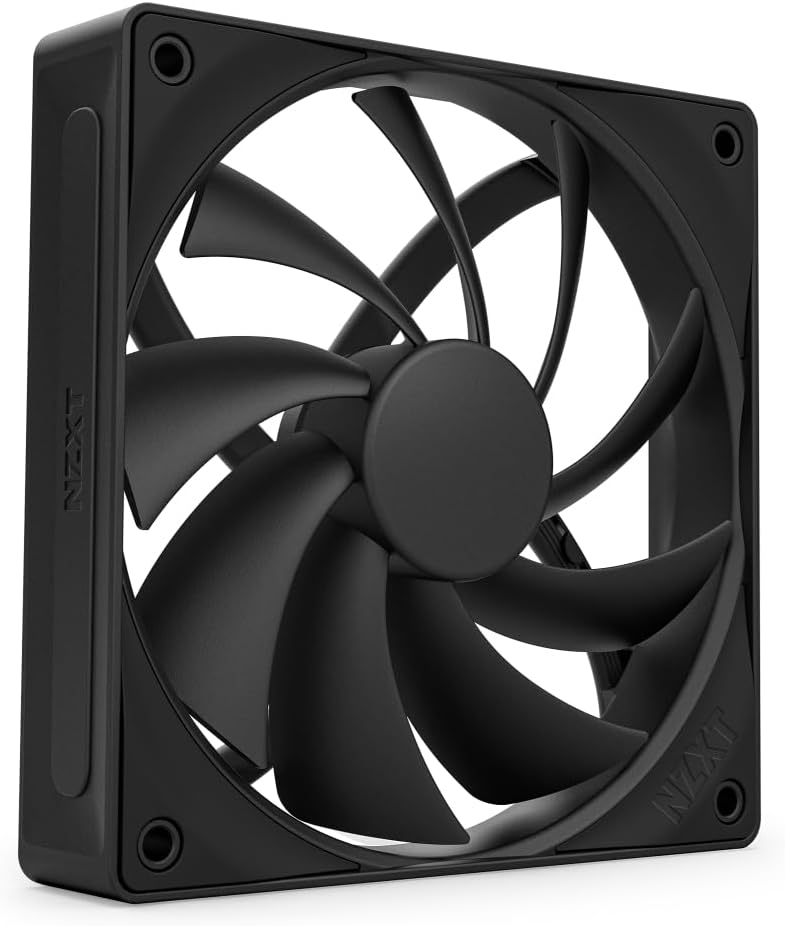
The NZXT F120Q is a 120mm PWM case fan built around a simple promise: move substantial air while remaining unobtrusive. Its 4.6 rating, nine sickle-style blades, and concentrated frame design make it a practical option for builders who prioritize case airflow over ARGB lighting or elaborate controls.
We may earn a commission when you buy through this link, at no additional cost to you.
Nine blades are optimized to move large volumes of air, while a minimal gap between the blade edges and frame increases the effective spinning area. A chamfered frame directs air in a concentrated path into the case, which can help cooling reach components positioned farther inside the chassis.
The fluid dynamic bearing is stated to provide low-noise operation and a 60,000-hour lifespan. PWM control adjusts output according to system temperature, allowing quieter behavior at lower loads. Compared with several competitors, however, the supplied information does not include a maximum RPM or exact noise value, making the thermal headroom harder to evaluate numerically.
Choose the F120Q for a straightforward black, non-illuminated build where efficient airflow and clean installation matter. It is a good front intake or rear exhaust option for standard 120mm positions. Buyers requiring synchronized lighting, a multi-fan bundle, or a published acoustic figure may find one of the more explicitly specified alternatives easier to justify.
The chamfered frame creates a focused airflow pattern designed to carry air farther into the case. This approach is useful in systems where important components sit deeper inside the chassis and benefit from a directed stream of ambient air.
The fan avoids unnecessary lighting and relies on PWM thermal control for everyday operation. Fluid dynamic bearings and a stated 60,000-hour lifespan support stable use, while the black finish fits easily into conventional case layouts.
We may earn a commission when you buy through this link, at no additional cost to you.
The ASUS ROG Strix XF120 combines a 4.8 rating with an unusually strong set of longevity and acoustic specifications. Its magnetic-levitation bearing is stated to last up to 400,000 hours, while the 22.5dB(A) maximum noise figure makes it one of the quietest options in the comparison by stated measurement.
We may earn a commission when you buy through this link, at no additional cost to you.
The fan operates from 250 to 1,800 RPM, providing a broad range for building a quiet fan curve. It can spin down at zero percent PWM utilization, and its aerodynamic blades and frame are designed to minimize turbulence while maintaining airflow and static pressure for cases, radiators, or CPU cooling positions.
Anti-vibration pads and mounts help reduce transmitted vibration and rattling, while the magnetic-levitation bearing stabilizes the rotor for lower friction and noise. The fan has no ARGB, so buyers seeking a stylized illuminated array will need a different model. A five-year warranty adds reassurance, and the stated bearing life is a major strength.
This is a strong recommendation for a high-end quiet workstation, a premium gaming system, or a builder who wants one exceptionally durable fan per position. The lack of a bundle means matching several units requires separate purchases, but the XF120's acoustic ceiling, broad control range, and long-life bearing make it particularly compelling for careful builds.
The stated 400,000-hour bearing life is the strongest longevity figure among the products reviewed. Magnetic levitation stabilizes the rotor and reduces friction, supporting consistent operation and a long service life in a carefully maintained case.
A maximum of 22.5dB(A), a 250-to-1,800-RPM operating range, and the ability to stop at zero percent PWM give builders several ways to reduce sound. Anti-vibration mounts further limit the transfer of movement into the chassis.
We may earn a commission when you buy through this link, at no additional cost to you.
The best quiet case fan is one that fits the available space, moves enough air for the chosen cooling layout, and remains quiet at a realistic operating speed. Compare dimensions, PWM behavior, pressure, lighting requirements, and bearing specifications before selecting a model.
Choose the standard size your case supports, then use a slim model only when actual clearance requires it. Confirm that the airflow direction and mounting holes will match your planned intake and exhaust positions.
Use high airflow for unrestricted case openings and prioritize pressure around restrictive components. Always balance either choice against the available RPM range and your noise tolerance.
Create a deliberate fan curve instead of leaving a high-speed fan at full output. A quieter maximum figure is valuable, but controllable low-speed operation usually has a greater effect on everyday acoustic comfort.
Count available PWM and ARGB headers before ordering. Include the hub and all daisy-chain cables in your plan, and confirm that the lighting controller supports the chosen connection standard.
Treat stated lifetime figures as manufacturer specifications rather than guarantees for every unit. Proper mounting, clean airflow, and avoiding persistent fan obstruction remain important throughout a fan's service life.
Favor designs that explicitly address the position you plan to fill. Open-case users may need maximum volume, while radiator and heatsink users should look for pressure-oriented frames and blades.
Match the fan finish, blade direction, and lighting to the case design. Lighting should support the build rather than become the main reason to choose a fan with less appropriate airflow characteristics.
A multipack is convenient for a new build, but a single fan can be more economical when replacing one failed unit. Choose based on the number of positions you actually need to fill.
Install each fan in the direction that moves air through the case as intended. Most cases use front or bottom fans as intake and rear or top fans as exhaust, but airflow paths can differ. A reverse-blade model is designed for a visible intake face, while a standard fan usually looks best with its illuminated side facing outward at exhaust positions. Secure every mounting point evenly to avoid vibration and confirm that the frame does not interfere with cables, radiators, or memory modules.
Connect the four-pin PWM leads to compatible motherboard or controller headers, then use the software provided by the board or controller to create a fan curve. ARGB systems also need their lighting connections attached to a suitable header or controller. Test the fans before closing the case, checking that every fan spins in the same direction, responds to control changes, and produces a steady light pattern. Add the fans gradually to the software and confirm that the displayed RPM readings are plausible under load.
For routine care, power the system down before removing a fan and use compressed air to clear dust from the blades and frame. Hold the fan by its frame rather than its wires, and avoid pulling on the connector. Inspect rubber or silicone anti-vibration pieces periodically, replace any fan that rattles or develops irregular noise, and keep intake filters or mesh clean. A stable airflow path and clean bearings help preserve both cooling performance and acoustic consistency.
No. A fan becomes quieter as its speed decreases, but the sound at a common operating speed is what affects everyday experience. Compare maximum noise figures only as a guide because manufacturers may use different test methods, and use PWM control to keep each fan at the lowest effective speed. Noise also depends on mounting quality, vibration, airflow restrictions, and nearby components.
Usually not. Constant full-speed operation can create unnecessary noise when the system is cool. A PWM fan curve tied to CPU and GPU temperatures lets the fans ramp up only when demand rises. Test the curve under realistic workloads, including sustained gaming or rendering, because a curve that is too conservative may increase temperatures or create rapid speed changes.
That depends on the number of lighting connections and the features of your motherboard. Some boards provide enough ARGB headers for a small setup, while others require a hub or controller. The be quiet! Light Wings three-pack includes a hub, and the Light Wings LX models support daisy-chaining, but compatible lighting software and power connections are still important to verify before installation.
Only if the mounting pattern and available space allow it. A 120mm fan can usually be adapted to standard 140mm positions, but it will cover less of the opening and may require a different speed to move the same air. A 140mm fan cannot fit a 120mm-only position, and a slim 15mm fan may be required where a standard 25mm model will not fit.
Yes, if the fan's airflow and static-pressure characteristics are appropriate and it can move at the required speed. The Pure Wings 3, Noctua NF-P12 redux, ARCTIC P12 Slim, and ASUS ROG Strix XF120 all identify radiator or heatsink use as a strength. ARGB lighting adds a cable, so builders should account for that additional routing requirement.
They are intended to reduce vibration transferred from the fan into the case, particularly at lower speeds. Properly installed pads can help eliminate rattling and perceived noise without meaningfully reducing airflow. Follow the manufacturer's mounting instructions and ensure the fan is held securely rather than left with excessive movement at its corners.
The correct number depends on case volume, component heat, existing airflow, and the design of the intake and exhaust positions. A balanced build often uses several intake fans and fewer exhaust fans, but there is no universal formula. Start with the openings the case already provides, ensure warm air has a clear exit, and add or reduce fans according to measured temperatures and noise.
Shut down and disconnect the power before cleaning, then hold the fan by the frame and use short bursts of compressed air to remove dust. Do not spin the blades rapidly with a blower, disconnect the fan while it is operating, or pull on the wires. If the fan remains noisy after cleaning, check the mounting and vibration pads before considering replacement.
The be quiet! Pure Wings 3 is the strongest general recommendation for users who value purposeful airflow, low-RPM operation, and a clean unlit design. The Thermalright TL-C12C-S X3 is the most budget-friendly way to establish a complete three-fan ARGB layout, while the ASUS ROG Strix XF120 stands apart for its exceptionally low stated noise, wide PWM range, and long bearing specification. Each targets a different priority rather than competing in exactly the same way.
Before buying, confirm case clearance, mounting compatibility, available PWM and ARGB headers, and the required direction of airflow. Radiator and heatsink positions benefit from pressure-focused models, while open intake positions can favor higher-volume airflow. Low-speed operation, anti-vibration mounting, and a well-tuned fan curve may deliver a more quiet build than choosing a fan solely from its maximum headline speed.
Finally, check the current listing, included accessories, connector requirements, and specifications before ordering, since product details and prices can change. With the right size, electrical connections, and acoustic priorities established, one of these ten fans should provide a dependable foundation for a quieter and better-balanced PC.