
Amazon Fire HD 8
4.5Editor score
Compact eight-inch HD display
Voice-assisted calls and reminders
Up to thirteen hours mixed use
An easy to use tablet for seniors should make communication, entertainment, and everyday tasks feel straightforward rather than intimidating. The most useful models pair a clear interface with large displays, intuitive navigation, front-facing cameras, flexible text options, and dependable access to the people and content that matter most.
We compared ten tablets using the supplied specifications, customer ratings, display dimensions, operating systems, connectivity, cameras, storage, battery information, and senior-focused features. The list covers purpose-built senior devices, simplified Android tablets, standard entertainment tablets, portable models, and premium options.
Each pick highlights a different balance of simplicity, capability, and screen size, showing why it may suit a particular senior or family. Product details and availability can change, and current prices fluctuate, so readers should confirm the latest specifications and cost before making a purchase.
4.5Editor score

4.6Editor score
4.7Editor score
As an Amazon Associate we earn from qualifying purchases.
This side-by-side comparison highlights display size, senior-oriented navigation, connectivity, camera setup, and standout practical features across all ten tablets.




GrandPad is the most explicitly senior-focused tablet in this guide, earning a 4.2 customer rating. It combines a tablet with a phone and is built around large icons, straightforward navigation, and a curated set of activities. That design philosophy makes it a practical option for an older adult who may prefer fewer settings and less complexity than a conventional Android tablet.
We may earn a commission when you buy through this link, at no additional cost to you.
The secure private network is one of its strongest features. It blocks spam and scams, reducing exposure to unwanted calls and messages while keeping the device focused on trusted communication. Voice and video calls, photo sharing, games, curated music, and the Grandie virtual companion create several ways to stay engaged, while companion apps for Android and iOS let family members share photos, videos, and memories securely.
The important trade-off is that activation is required. GrandPad must be activated by calling the company and selecting one of its Basic, Premium, or Ultimate plans, and limited functionality remains without a plan. It is also locked and incompatible with Consumer Cellular and other wireless carriers. Buyers should therefore value predictable simplicity and safety over carrier freedom.
GrandPad is best for a senior who primarily wants calling, family photos, entertainment, and a deliberately restricted experience. It is less appropriate for technically independent users who want the complete Android app ecosystem or need to change wireless carriers. For the intended audience, however, its purpose-built interface and safety features are unusually convincing.
Large icons, curated applications, and limited configuration choices make GrandPad substantially less intimidating than a general-purpose tablet. The interface keeps communication and familiar activities close at hand, which can reduce the need for repeated troubleshooting.
A private network that filters spam and scams supports easier, safer calling. Family companion apps add another direct route for sharing photos and videos without asking the senior user to navigate complicated sharing menus.
We may earn a commission when you buy through this link, at no additional cost to you.
Pix Star Touch is designed specifically for seniors and beginners, but its 2.9 rating is the lowest in this list, so prospective buyers should weigh that feedback carefully. Its ten-inch touchscreen, 10.1-inch display, simplified interface, and adjustable zoom offer a thoughtful attempt to make common tasks accessible without sacrificing access to a wide range of applications.
We may earn a commission when you buy through this link, at no additional cost to you.
Email, web browsing, video conferencing, photos, and social media are presented through a beginner-oriented layout. Important buttons are highlighted, helping users focus on the controls needed for a particular task. The zoom feature can enlarge or reduce the interface, which is especially useful for changing preferences over time or accommodating different levels of visual comfort.
Its limitations are meaningful. Internal storage is 32 GB, and the product does not offer the same dedicated family ecosystem or curated senior content as GrandPad. The low rating also makes independent customer feedback particularly important. The supplied information does not identify the precise reason for the rating, so it would be misleading to claim a specific defect.
Pix Star Touch may suit a senior who values a visibly simple interface and adjustable text size more than expansive storage. Families should review current customer comments, confirm the included accessories and connectivity details, and test the setup process before committing. It offers a compelling simplicity concept, but its customer rating places it behind the more consistently rated models.
The ability to enlarge or reduce the entire interface is valuable because it changes more than isolated text. Icons, controls, and menus can become easier to distinguish with less strain.
Google Play access gives users flexibility for video calls, social media, reading, and other activities. The simplified layout aims to make those capabilities more approachable than a conventional tablet interface.
We may earn a commission when you buy through this link, at no additional cost to you.
Amazon Fire HD 10 has a 4.5 customer rating and offers a strong combination of a large, sharp display, responsive hardware, and familiar Amazon features. Its 10.1-inch 1080p Full HD screen is well suited to streaming, reading, browsing, video calls, and light gaming, while the octa-core processor and 4 GB of RAM support smooth everyday use.
We may earn a commission when you buy through this link, at no additional cost to you.
Battery life is advertised at up to 13 hours, making the tablet practical for extended reading, entertainment, and communication away from a charger. A five-megapixel front-facing camera supports video calls with family and friends, and pressure-sensitive stylus support adds another way to write and sketch when a compatible Made for Amazon Stylus Pen is purchased separately.
Alexa can assist with recipes, jokes, reading, reminders, news, weather, shopping lists, smart-home control, and communication through supported apps. The trade-off is ecosystem dependence. Fire tablets do not support Google Play, so some Android applications and services familiar from other tablets may be unavailable. The supplied specification also lists 32 GB of internal storage, making expandable storage relevant for additional media.
This is a strong choice for a senior who primarily wants video calls, streaming, books, and uncomplicated Amazon services. The large Full HD display and voice assistance are particularly useful, although buyers who require a broad Google app selection should consider a standard Android tablet instead.
The 10.1-inch 1080p display provides more visual room than the compact Fire HD 8 and sharper imagery than many entry-level alternatives. That makes it well suited to reading, watching television, and joining video calls.
Alexa can handle reminders, information requests, music, and supported communication tasks. Voice input is especially helpful when navigating small controls or entering information becomes tiring.
We may earn a commission when you buy through this link, at no additional cost to you.
Samsung Galaxy Tab A11+ is a well-rounded family tablet with a 4.6 customer rating, placing it near the top of the group. Its large 11-inch screen and refresh rate of up to 90Hz provide a smooth, comfortable platform for video calls, streaming, web browsing, reading, games, and everyday productivity.
We may earn a commission when you buy through this link, at no additional cost to you.
The listed configuration includes 6 GB of RAM and 128 GB of storage, with expandable storage available. A long-lasting battery and fast charging help reduce interruptions, while quad speakers with Dolby Atmos create a more satisfying experience for movies, music, and conversations. A five-megapixel front camera is designed to make face-to-face communication more engaging.
Google Gemini and Circle to Search can make common tasks more convenient, although actual feature access can depend on software, region, account status, and connectivity. A general Android tablet also presents more settings and choices than a purpose-built senior device. Buyers who need a simplified experience should be prepared to arrange a simple home-screen setup, disable unnecessary notifications, and teach the essential gestures.
Galaxy Tab A11+ is well suited to a senior who wants a modern, full-featured tablet but still values a large screen, strong customer feedback, and a polished media experience. It is our premium pick in this guide because it combines capable hardware and useful family features without moving into the same premium category as the iPad.
The 11-inch panel and up-to-90Hz refresh rate make text, video, and motion appear fluid. Its scale is well suited to family members who want a visible screen without an oversized device.
Four speakers with Dolby Atmos add useful clarity for conversations and entertainment. Long battery life and fast charging help the tablet remain ready for travel, appointments, or extended family video calls.
We may earn a commission when you buy through this link, at no additional cost to you.
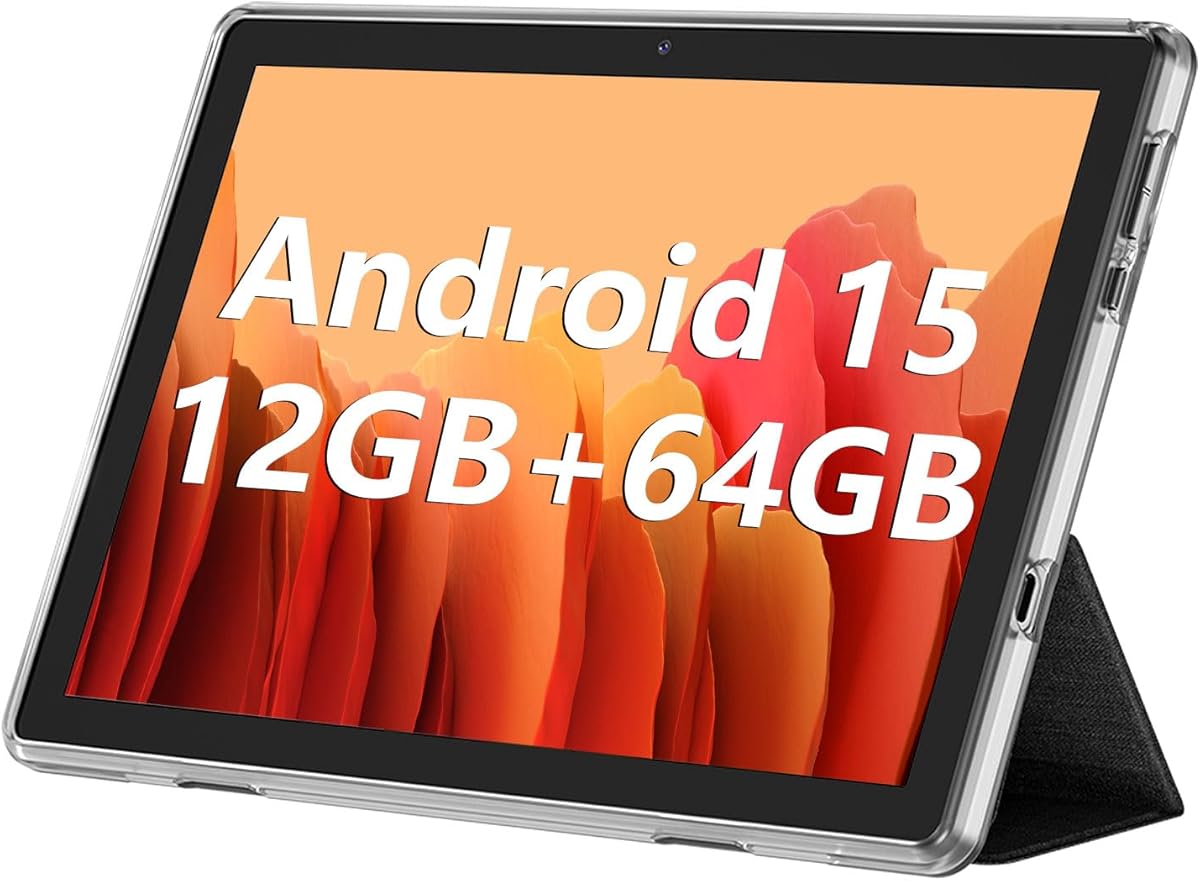
ECOPAD 10.1 Inch is an Android 15 tablet with a 3.8 customer rating and a broad set of practical specifications. It combines a 10.1-inch IPS touchscreen, 12 GB of combined RAM, 64 GB of internal storage, expandable storage up to 1 TB, and a 6000mAh battery. The inclusion of Google Mobile Services makes it more conventional than a restricted senior tablet.
We may earn a commission when you buy through this link, at no additional cost to you.
The IPS panel is suitable for reading, video playback, gaming, and video calls, while a 2-megapixel front camera and 8-megapixel rear camera cover both communication and photography. Dual-band Wi-Fi can offer a more stable connection when a home network supports both 2.4 GHz and 5 GHz bands, and Bluetooth 5.0 covers common accessory connections.
The screen resolution of 1280×800 is less detailed than the Full HD or Retina options in this guide, and the 3.8 rating suggests the overall experience may not be as consistently well received. Some descriptions also distinguish 4 GB of physical memory from 8 GB of virtual memory, so buyers should not interpret the combined figure as equivalent to dedicated RAM in every scenario.
ECOPAD is most appealing for a budget-conscious senior who wants familiar Android applications, generous storage expansion, and a large screen. It is not a purpose-built simplified device, so setup support and a carefully configured home screen may be needed. The one-year warranty and prompt customer support offer some reassurance.
The 64 GB of internal storage can be supplemented with a separately sold microSD card for supported expansion up to 1 TB. This is useful for families that keep many photos, videos, or downloaded media files.
Google Mobile Services support provides access to a broad app ecosystem. While not automatically simplified, standard Android functions make it easier to use the tablet with accessories and services already familiar to the buyer.
We may earn a commission when you buy through this link, at no additional cost to you.
Amazon Fire HD 8 is a compact, approachable tablet with a 4.5 customer rating and a clear advantage for users who want a small, portable device. Its eight-inch HD display is easy to hold, while a thin, light, durable design makes it suitable for travel, reading in a chair, or moving around the home.
We may earn a commission when you buy through this link, at no additional cost to you.
The newest model offers up to 4 GB of RAM, 64 GB of storage, a hexa-core processor, and expandable storage up to 1 TB. Amazon advertises up to 13 hours of reading, browsing, video, gaming, and music use. A five-megapixel rear camera handles photos, while Alexa can make video calls through supported applications, play content, answer questions, manage reminders, and control compatible smart-home devices.
As with other Fire tablets, Google Play is not supported, and some apps require separate subscriptions. The smaller display may also be less comfortable for prolonged reading, detailed web pages, or face-to-face video chats than the larger models listed here. The 64 GB option is more spacious than many entry-level alternatives, though expandable storage still requires a separate card.
The Fire HD 8 is our best budget pick for seniors seeking an uncomplicated entertainment and communication device. It is especially attractive when portability matters more than a large screen. Buyers who depend on a particular Google Play application should verify its availability before purchasing, while those comfortable with Amazon services get a compact, capable tablet with strong customer feedback.
A compact eight-inch design is easier to carry and can be held comfortably for shorter sessions. Its light build also makes it convenient for a senior to move between rooms or bring to family gatherings.
Alexa can set reminders, provide news and weather, control smart devices, and assist with supported calls. These functions allow many daily needs to be handled without repeatedly searching menus.
We may earn a commission when you buy through this link, at no additional cost to you.
Lenovo Tab One is a lightweight 8.7-inch Android tablet with a 4.2 customer rating. It emphasizes portability, a long advertised streaming duration, and a practical design rather than a dedicated senior interface. The included folio case provides protection and a built-in stand, making it a straightforward all-in-one choice for reading, streaming, browsing, and video calls.
We may earn a commission when you buy through this link, at no additional cost to you.
Its MediaTek Helio G85 processor and 60Hz refresh rate are designed for fluid browsing, streaming, and responsive gaming. The HD display reaches 480 nits of brightness, which can improve visibility in brighter rooms, and dual Dolby Atmos speakers add stronger audio for music and movies. Battery life is advertised at up to 12.5 hours of unplugged YouTube streaming, with faster charging than earlier models.
The tablet is not designed specifically for seniors, so it requires standard Android setup and may present more settings and navigation choices than a purpose-built device. Its 8.7-inch display is also smaller than the ten- and eleven-inch options, which can make fine text and video-call framing less spacious. Security updates are listed as two years, so longer-term support is another point to consider.
Lenovo Tab One is a good match for a senior who values a light, protected, portable tablet and is comfortable with a standard Android interface. The included folio stand can also make video calls and media viewing easier. Families who want minimal setup may prefer a more specialized model, but this tablet offers capable hardware in a highly manageable form.
The included case shields the tablet from accidental damage, while its integrated stand supports hands-free viewing. That combination is particularly useful for video calls, reading, and watching programs.
A 480-nit HD screen offers useful brightness for reading and media in varied environments. Combined with the sub-pound weight, it is designed for comfortable use away from a desk.
We may earn a commission when you buy through this link, at no additional cost to you.
FEONAL 11 Inch is a 4.3-rated Android 16 tablet that stands out through its dual 4G LTE capability. Unlike Wi-Fi-only choices, it includes a dual-SIM slot, allowing cellular use when needed. That can be valuable for a senior who wants video calls and internet access while traveling rather than relying exclusively on home Wi-Fi.
We may earn a commission when you buy through this link, at no additional cost to you.
The 11-inch 1280×800 display includes Reading Mode, Eye Protection Mode, and Dark Mode, all of which may improve comfort during extended reading or browsing. A 7000mAh battery, USB-C charging, and fast charging provide useful endurance, while dual stereo speakers add a more satisfying experience for calls and entertainment. The included GMS certification supports familiar Android applications.
Several details deserve attention. The stated 20 GB of memory consists of 8 GB physical memory plus 12 GB virtual memory, so it should not be compared directly with 20 GB of dedicated RAM. The TF card needed for expanded storage is not included, and the SIM card is also absent. A 1280×800 screen is adequate but less detailed than higher-resolution alternatives.
FEONAL is worth considering for a senior who values a large display and occasional mobile internet more than premium construction or specialized senior software. It can serve as a flexible travel and family tablet, but families should confirm cellular carrier compatibility, select the appropriate service, and simplify the home screen after setup.
Dual 4G LTE and simultaneous voice and data support can keep the tablet useful away from Wi-Fi. This is especially handy during travel, appointments, or family visits.
Reading Mode, Eye Protection Mode, and Dark Mode offer several ways to adapt the large screen to different viewing preferences. They can make extended ebook and web use more comfortable.
We may earn a commission when you buy through this link, at no additional cost to you.
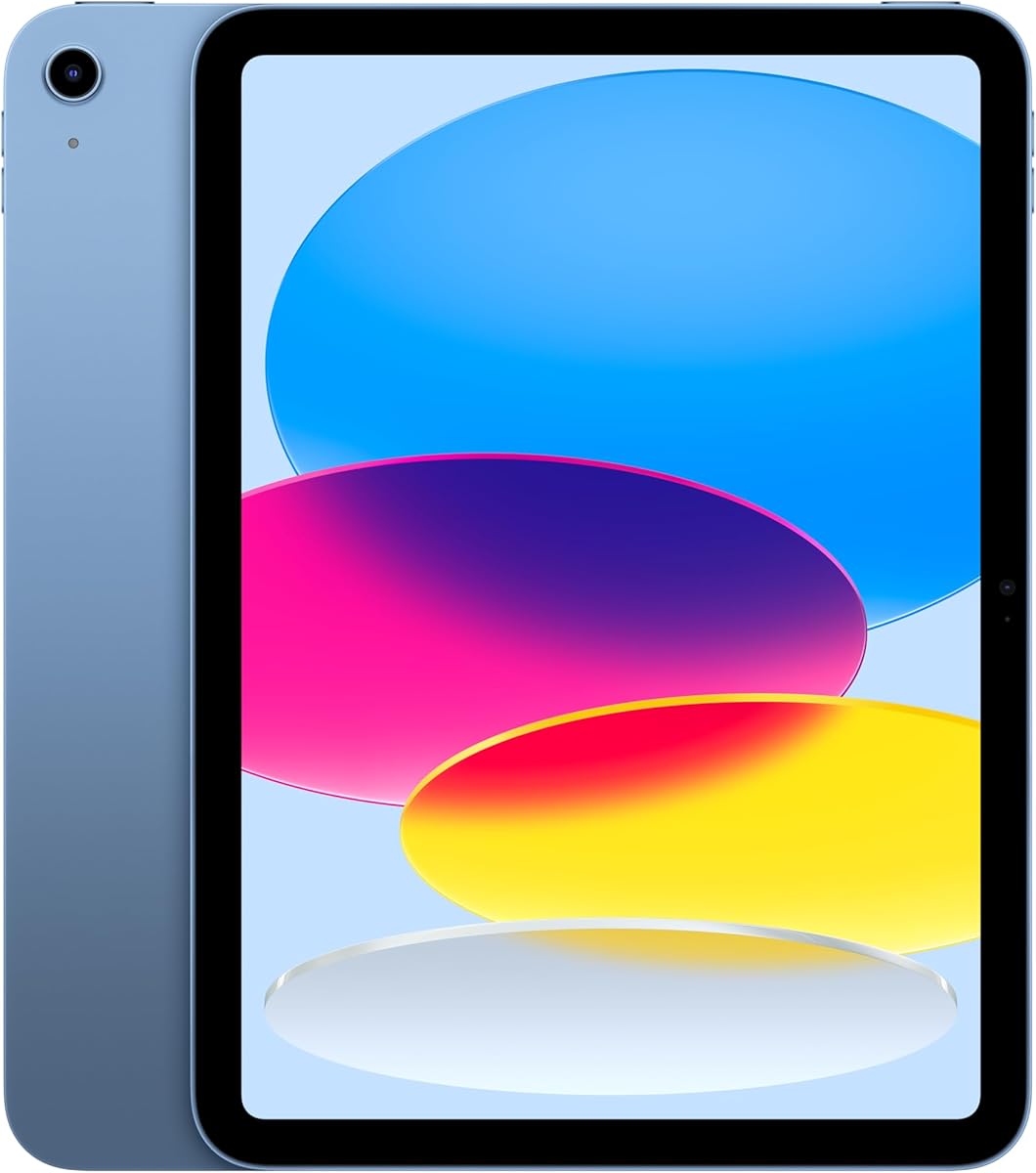
Apple iPad 11-inch has the highest customer rating in this guide at 4.7, combining the A16 chip, an 11-inch Liquid Retina display, 128 GB of storage, Wi-Fi 6, and all-day advertised battery life. It is a premium general-purpose tablet rather than a dedicated senior device, but its large display and refined interface can provide an excellent reading, communication, and entertainment experience.
We may earn a commission when you buy through this link, at no additional cost to you.
True Tone adjusts color temperature to the surrounding light, which supports comfortable viewing in changing environments. A 12-megapixel Center Stage front camera is designed for detailed video calls and selfies, while a 12-megapixel wide rear camera supports photos, document scanning, and 4K video. Touch ID allows secure unlocking, app sign-ins, and payments without repeatedly typing a passcode.
iPadOS supports multiple apps at once and works with Apple Pencil and Magic Keyboard Folio accessories, though those are optional. The extensive app selection and polish come with a higher-end hardware category, and iPadOS still introduces gestures, settings, and naming conventions that may require some instruction. Buyers should also consider compatibility with the wider Apple ecosystem.
The iPad is a strong premium recommendation for a senior who wants a high-quality, long-lasting device for family calls, reading, creative activities, and everyday tasks. Its rating, display, camera system, and security features create a compelling complete package. For the lowest complexity, however, GrandPad remains more explicitly tailored to senior users.
The display adjusts its color temperature to the light in the room. This can make books, websites, and video calls feel more natural across morning, afternoon, and evening use.
Touch ID turns the top button into a secure, convenient way to unlock the tablet and approve supported sign-ins. It is especially useful for users who struggle with small on-screen keyboards.
We may earn a commission when you buy through this link, at no additional cost to you.
Samsung Galaxy Tab A11 is a compact international version of Samsung's tablet line, earning a 4.2 rating. Its 8.7-inch 90Hz TFT display, 64 GB of storage, 4 GB of RAM, and expandable memory offer a familiar Android tablet format in a manageable size, with enough specifications for browsing, media, communication, and everyday apps.
We may earn a commission when you buy through this link, at no additional cost to you.
The 1340×800 display supports 16 million colors and smooth motion, while a MediaTek Helio G99 octa-core processor provides the underlying performance. An 8-megapixel autofocus rear camera, 5-megapixel front camera, 5100mAh battery, Bluetooth 5.3, and USB-C 2.0 cover the common needs of a modern tablet. Storage can be expanded by up to 2 TB with a separately sold microSD card.
This is explicitly an international Latin American model with no warranty, and a charger is not included. It is Wi-Fi only, with no SIM slot or cellular network support. During setup, the country may not be selectable and can be updated later after connecting to Wi-Fi, while English is available. These details may matter considerably for a buyer who expects local support.
The Tab A11 is best for a user who wants a compact, smooth standard Android tablet and is comfortable with an international configuration. It may be a practical alternative to larger or purpose-built models, but the lack of warranty, missing charger, and setup quirks warrant careful confirmation before purchase.
The 90Hz refresh rate makes scrolling and everyday navigation appear fluid. Its 8.7-inch size remains portable while providing more room than a small dedicated e-reader.
A microSD slot supports up to 2 TB of additional memory. Buyers should still confirm app and media compatibility with the card and purchase the storage separately.
We may earn a commission when you buy through this link, at no additional cost to you.
The easiest tablet is not necessarily the one with the fewest features; it is the device whose interface, display, connectivity, and support match the user's abilities and daily routine. These factors deserve careful comparison before purchase.
Choose a restricted interface when simplicity and safety come first. Choose standard Android when access to a wide app catalog matters more.
For books and video calls, favor a ten- or eleven-inch screen. For frequent travel, a compact eight- or 8.7-inch tablet may be easier to manage.
Verify calling apps and home Wi-Fi first. Choose cellular only when portable internet is genuinely important, and check carrier compatibility before buying.
Prioritize a long mixed-use estimate, fast charging, and an included charger. Higher capacity alone does not guarantee a better user experience.
Choose enough built-in storage for the intended library, then confirm expansion options. Do not assume a folio, stylus, SIM card, or memory card is included.
Compare security features, warranty coverage, and support access before buying. Do not overlook region-specific limitations on international models.
Set up the tablet with the senior present. Simplify the home screen, teach only essential gestures, and document the few tasks the user actually needs.
Begin with a short, hands-on setup session. Connect the tablet to the home network, sign into the appropriate account, update the operating system, enlarge text and controls, set the screen to a comfortable brightness, and arrange frequently used contacts and apps on the first page. Removing unused apps and disabling distracting notifications can make the device feel much less complicated.
Teach a small number of essential actions, such as opening a contact, placing a video call, finding the camera, using a web browser, returning to the home screen, and charging the device. Written reminders placed near the charging location can help. If the tablet includes a folio stand or case, keep it on during calls and reading to prevent accidental drops. Families can also schedule a short follow-up after a few days to answer new questions without making the initial lesson overwhelming.
Care for the device with regular software updates, a protective case, and careful charging habits. Clean the screen with a soft, dry cloth, avoid liquids, and keep the charging port free of debris. Use reputable charging equipment, do not leave the tablet in extreme heat, and review permissions for apps that request camera, microphone, location, or contacts access. Periodically remove unused accounts and apps, confirm important data is backed up, and check that remote-location or tracking features are configured as intended.
GrandPad is the most explicitly senior-focused option because it uses large icons, a private calling network, curated applications, and a dedicated phone function. The Amazon Fire HD 8 is another approachable choice for buyers already comfortable with Amazon services. The easiest device ultimately depends on whether simplicity, app choice, portability, or premium polish matters more to the user.
Cellular service is useful when the tablet must remain online away from reliable Wi-Fi. Models such as the FEONAL 11 Inch offer 4G LTE, but they require a compatible SIM and carrier service. A Wi-Fi-only tablet is usually simpler and less demanding to manage, while dedicated senior devices may require their own activation plan instead of a conventional carrier.
A larger screen generally makes text, buttons, photographs, and video-call faces easier to see. The Samsung Galaxy Tab A11+ and Apple iPad offer eleven-inch displays, while Fire HD 10 provides a ten-inch Full HD screen. Compact eight- and 8.7-inch models are easier to carry, so display size should be balanced against grip, portability, and the user's vision.
GrandPad explicitly combines a tablet and phone through its dedicated calling service. Other tablets can handle voice and video calls through Wi-Fi and apps, and some support cellular service, but they do not necessarily provide the same dedicated buttons, simplified contacts, or safety-focused calling experience. Confirm service availability before treating another tablet as a full phone replacement.
Storage needs depend on whether the tablet mainly handles video calls and browsing or stores many downloaded movies, books, and photographs. Thirty-two gigabytes can become limited quickly, while 64 GB or 128 GB offers more room. Models with microSD expansion provide additional flexibility, although the card must be purchased separately and should be checked for app and media compatibility.
Purpose-built senior tablets are usually easier to set up and can include large icons, curated content, simplified calling, scam filtering, and family companion tools. Standard tablets generally offer more applications, flexibility, premium hardware, and a familiar Android or iPad experience. The best choice depends on the senior's comfort with technology and the amount of support available from family or a retailer.
GrandPad includes companion applications for Android and iOS that support secure family communication and shared media. Standard tablets offer account-based features and app controls, but the exact remote-management options depend on the operating system and services used. A family can also help in person by arranging icons, permissions, accessibility settings, and a simple support routine.
No. The international Samsung Galaxy Tab A11 specification explicitly states that a charger is not included, while the other listings do not make every accessory detail equally clear. Buyers should check the package contents before ordering and obtain a suitable USB-C or device-specific charging adapter if one is not provided.
The strongest overall choice depends on how the tablet will be used. GrandPad stands apart for seniors who value a purpose-built interface, integrated calling, and safety-focused family communication. The Amazon Fire HD 8 is the budget and portability leader, while the Samsung Galaxy Tab A11+ delivers an excellent balance of screen quality, sound, performance, and family usefulness.
Premium buyers can consider the Apple iPad 11-inch for its refined Liquid Retina display, strong customer rating, Touch ID, and extensive app support. For anyone who prefers a conventional tablet, the Fire HD 10, ECOPAD, Lenovo Tab One, FEONAL, and smaller Galaxy Tab A11 each provide distinct combinations of display, portability, storage, connectivity, and accessories.
Before ordering, confirm the screen size, calling apps, service requirements, included accessories, warranty terms, and current product specifications. Prices and availability can change over time, so compare the latest listings and choose the device that offers the clearest experience for the intended user rather than simply the longest specification list.