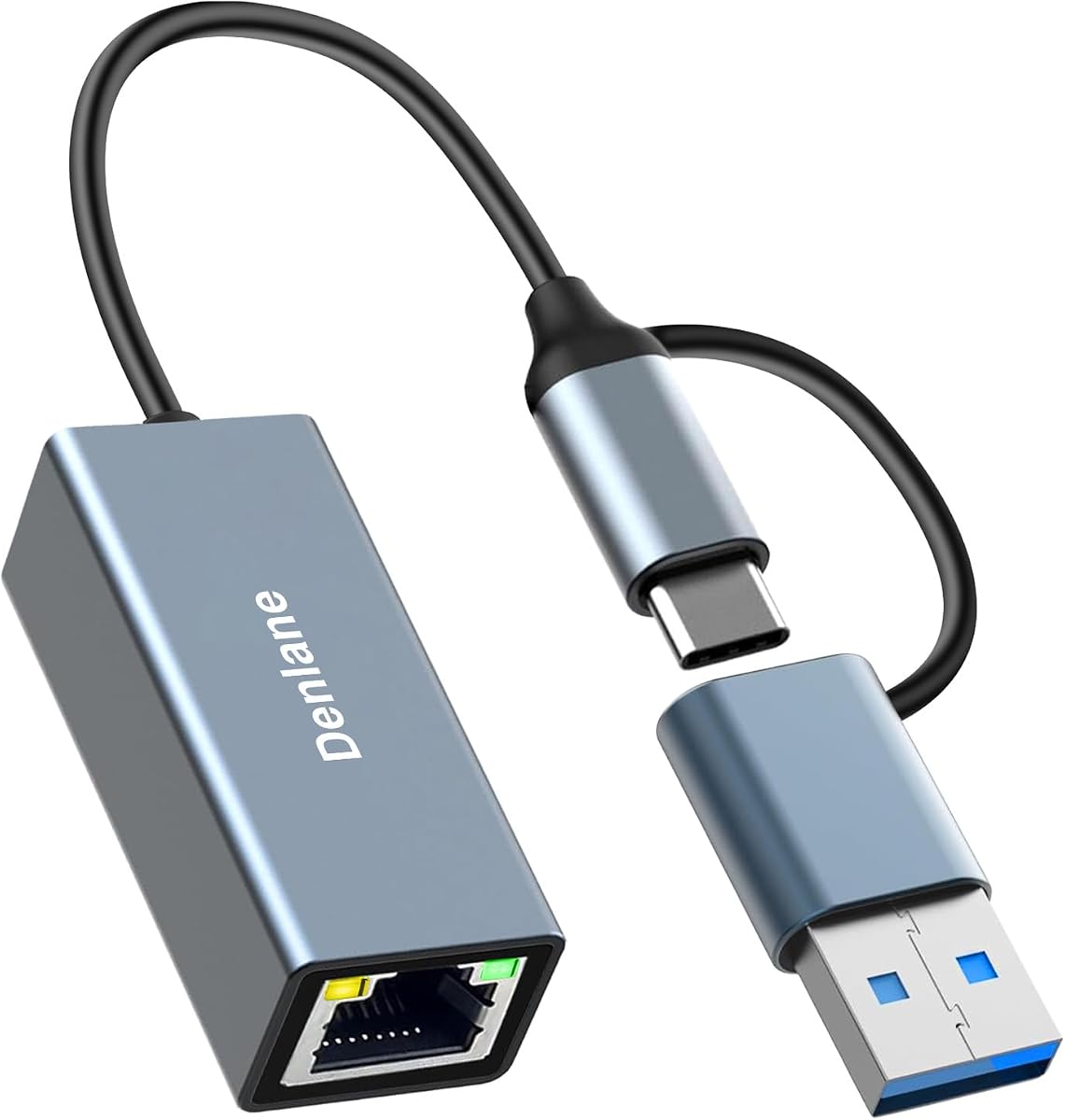
USB 3.0 to Ethernet Adapter, 2 Connector
4.0Editor score
Dual USB-A and USB-C
Gigabit network capability
Broad mobile compatibility
This guide compares Ethernet adapters for Android phones, covering connector types, speeds, charging support, compatibility, portability, and setup.
Ethernet adapters give Android phones a dependable wired connection for stable downloads, video calls, streaming, gaming, and access to local networks. The right model must fit the phone, match its Android version, and suit the network speed while remaining practical to carry and use.
We compared ten adapters by examining connector design, stated network speeds, operating-system support, charging functionality, construction, and device compatibility. The list covers USB-C, Micro USB, and dual-interface options, from compact adapters to models designed for higher-bandwidth networks.
Each review explains the product's strongest use case, practical limitations, and compatibility considerations. Ratings reflect the supplied customer feedback, while technical details come from the listed product information; prices and availability can change, so confirm current listings before purchasing.
4.0Editor score

4.7Editor score

5.0Editor score
The comparison below highlights the connector, maximum network speed, charging support, and stated device compatibility of each adapter, making it easier to identify the right option for a particular Android phone and network.





The BENFEI USB-C to Ethernet Adapter is a broadly compatible wired-network solution for Android phones that support USB-C data connections. Its customer rating is 4.5, and the product information specifically names Samsung S20, S10, S9, S8, and Galaxy Tab A 10.5 among compatible devices. It also supports USB-C laptops, tablets, and phones across several brands, making it a practical general-purpose choice.
We may earn a commission when you buy through this link, at no additional cost to you.
The adapter is designed for stable connections up to 1Gbps, with backward compatibility for 100Mbps and 10Mbps networks. Its listing notes that a CAT6 or better Ethernet cable is needed to reach the full stated speed. A braided nylon cable adds flexibility and durability, while the aluminum casing is intended to improve heat management. The non-slip shape also makes repeated connections easier to handle.
The main limitation is that the adapter does not provide a separate USB-C charging port. A phone therefore cannot charge while it is connected to Ethernet through this model. Buyers also need to consider their cable and network requirements: the adapter provides the RJ45 connection, but the product information does not state that an Ethernet cable is included. The broad compatibility claim should still be checked against the exact phone model.
This BENFEI adapter is a solid choice for users who want straightforward 1Gbps wired networking across a wide range of USB-C Android devices. It is especially useful for stable video calls, large transfers, and local-network access where Wi-Fi performance is inconsistent. The main reason to pass is a need for simultaneous charging or a phone that lacks functional USB-C data support.
Stable Ethernet can improve large downloads, remote work, streaming, and local file access when wireless congestion is the problem. The adapter supports Gigabit rates while remaining compatible with slower 10Mbps and 100Mbps networks.
The compact housing and reinforced braided lead make the adapter easy to carry between home, office, and hotel networks. Its broad device list also reduces the need to replace the accessory when moving between compatible Android phones and tablets.
We may earn a commission when you buy through this link, at no additional cost to you.
The uni USB C to Ethernet Adapter combines a 4.6 rating with a simple driver-free design for compatible Android devices. The product information identifies support for Samsung S20, S10, S9, S8, and Galaxy Tab A 10.5, as well as numerous USB-C laptops and tablets. Its stated 1Gbps capability makes it appropriate for users who want more consistent performance than a typical wireless connection.
We may earn a commission when you buy through this link, at no additional cost to you.
The adapter is described as lightweight and compact, with an aluminum casing for heat dissipation and a braided nylon cable for durability. Its high-quality USB-C connector is designed to sit securely in the device, while the low-profile form is intended to avoid blocking adjacent USB-C ports. No driver is required for the Android versions supported by the listing.
As with the BENFEI model, simultaneous charging is not supported. The Ethernet cable appears to be a separate requirement, and CAT6 or higher is specified for reaching 1Gbps. The stated compatibility is extensive, but Android behavior can vary by manufacturer and version, so users with an older or unusually configured phone should verify that USB-C networking is available before ordering.
The uni adapter is a strong all-around option for a compatible USB-C Android phone that needs a compact, fast wired accessory. It has a slightly higher listed rating than several alternatives and avoids the driver setup associated with some systems. Choose it when portability, clean installation, and broad phone compatibility matter more than integrated power delivery.
The adapter's driver-free operation simplifies setup on supported Android versions. After connecting it to the phone and a wired network, users can use the network without installing separate software, although individual Android builds may still impose their own Ethernet requirements.
A small aluminum body and flexible braided lead make this adapter suitable for a phone pouch, laptop sleeve, or travel bag. The connector shape also helps preserve access to neighboring ports on compatible devices.
We may earn a commission when you buy through this link, at no additional cost to you.
The Micro USB OTG Ethernet Adapter is a practical choice for older Android phones and tablets that use Micro USB rather than USB-C. It has a 4.5 rating and provides 10/100Mbps wired connectivity, a useful option for basic browsing, file sharing, and local-network tasks where Gigabit speed is unnecessary.
We may earn a commission when you buy through this link, at no additional cost to you.
This adapter is listed as driver-free for supported Android 4.0 and later systems, as well as specified Windows and Mac versions. LINK and ACT indicator lights make it easier to confirm whether the cable and network connection are active. It can also be used with compatible tablets, Raspberry Pi systems, Windows tablets, and other supported devices with an available Micro USB port.
Compatibility is the crucial caveat. The product information warns that Android support is limited and recommends checking whether the device has a grayed-out Ethernet option under Wireless & Networks settings before buying. It cannot connect to a modern USB-C phone without an appropriate physical adapter, and its 100Mbps ceiling is much lower than that of the 1Gbps and faster alternatives in this guide.
This adapter is best for a legacy device that lacks native Ethernet and already supports OTG networking. It is not a good match for a current USB-C Android phone or for users who want the highest possible transfer rates. Confirm the device's Ethernet menu and Micro USB OTG behavior first; if both are present, this compact adapter can restore convenient wired access.
The presence of a grayed-out Ethernet entry in the phone's network settings is a useful compatibility check described in the product information. If that option is unavailable, the adapter may not establish a network connection even when the connector fits.
The 10/100Mbps specification is suitable for everyday browsing, configuration tasks, and modest transfers. Users moving large files or operating a demanding local network should choose a Gigabit-capable USB-C model instead.
We may earn a commission when you buy through this link, at no additional cost to you.
The Cable Matters USB C to Ethernet Adapter with Charging is built for users who need a wired network and power at the same time. It carries a 4.4 rating and combines a Gigabit RJ45 connection with an integrated USB-C Power Delivery port capable of delivering up to 140W. That feature distinguishes it from simpler one-purpose Ethernet dongles.
We may earn a commission when you buy through this link, at no additional cost to you.
The product information describes a lightweight aluminum housing, flexible braided pigtail, and a design intended to improve heat dissipation. It supports Windows, macOS, iPadOS, ChromeOS, and Linux, while also being listed for compatibility with MacBook, iPad Pro, Dell XPS, Surface, NAS systems, and other USB-C or Thunderbolt devices. The listing states that no drivers or software are needed.
A phone must support the relevant USB-C data and power-delivery behavior for the complete two-function setup to work as intended. The adapter is larger and more complex than a basic USB-C Ethernet adapter, and the integrated charging feature is most useful with devices capable of accepting meaningful PD input. Chromecast with Google TV support is also noted, with a stated Ethernet speed of up to 480Mbps for that use.
This is an excellent choice for extended work sessions where a phone or tablet needs to remain connected to Ethernet without draining its battery. It is less compelling for a quick connection or for a device that lacks USB-C PD. Check the phone's charging specification and the requirements of any connected network equipment before buying.
The separate USB-C PD input allows a compatible device to receive up to 140W while the RJ45 port carries network traffic. This makes long downloads, video conferences, and desktop-style work sessions easier to sustain.
The braided pigtail and aluminum housing are designed for repeated use and improved heat management. Broad operating-system support also makes the adapter useful across mixed personal and work environments.
We may earn a commission when you buy through this link, at no additional cost to you.
The UGREEN USB C to Ethernet Adapter is our Editor's Choice because it combines a 4.7 rating, explicit Android support, and a balanced feature set. It supports network speeds up to 1000Mbps and is listed as driver-free for Android, Windows, macOS, and ChromeOS. Compatibility is broad, covering many modern USB-C phones, tablets, and laptops.
We may earn a commission when you buy through this link, at no additional cost to you.
Its construction is designed for regular use. The product information highlights a durable aluminum alloy case for heat dissipation, a reinforced cable tail, and a wear-resistant network port. A status LED provides a quick indication of connection activity, while the compact body is easy to carry. Older Windows versions and Linux may require drivers, but the main Android use case is designed for simple plug-and-play operation.
The adapter does not include a separate charging function, so a phone cannot replenish its battery while the Ethernet link is active. Its actual throughput also depends on the phone, cable, network equipment, and the Ethernet cable used. A CAT5e or better cable is generally sensible for Gigabit networks, although each listing's specific guidance should be checked before purchase.
This UGREEN model is a strong recommendation for a modern USB-C Android phone that needs fast, dependable Ethernet without additional software. It is compact enough for daily carry and broad enough for many other USB-C devices. The main tradeoff is that users who need simultaneous charging should instead consider a USB-C adapter with a dedicated PD input.
The adapter is explicitly listed as driver-free for Android, removing one common source of setup friction. Its LED status indicator makes it easy to confirm when the adapter is active, helping separate network problems from connection setup.
The reinforced cable tail and wear-resistant port address common weak points in small adapters. Aluminum construction assists with heat dissipation, which is useful during sustained large transfers or long network sessions.
We may earn a commission when you buy through this link, at no additional cost to you.
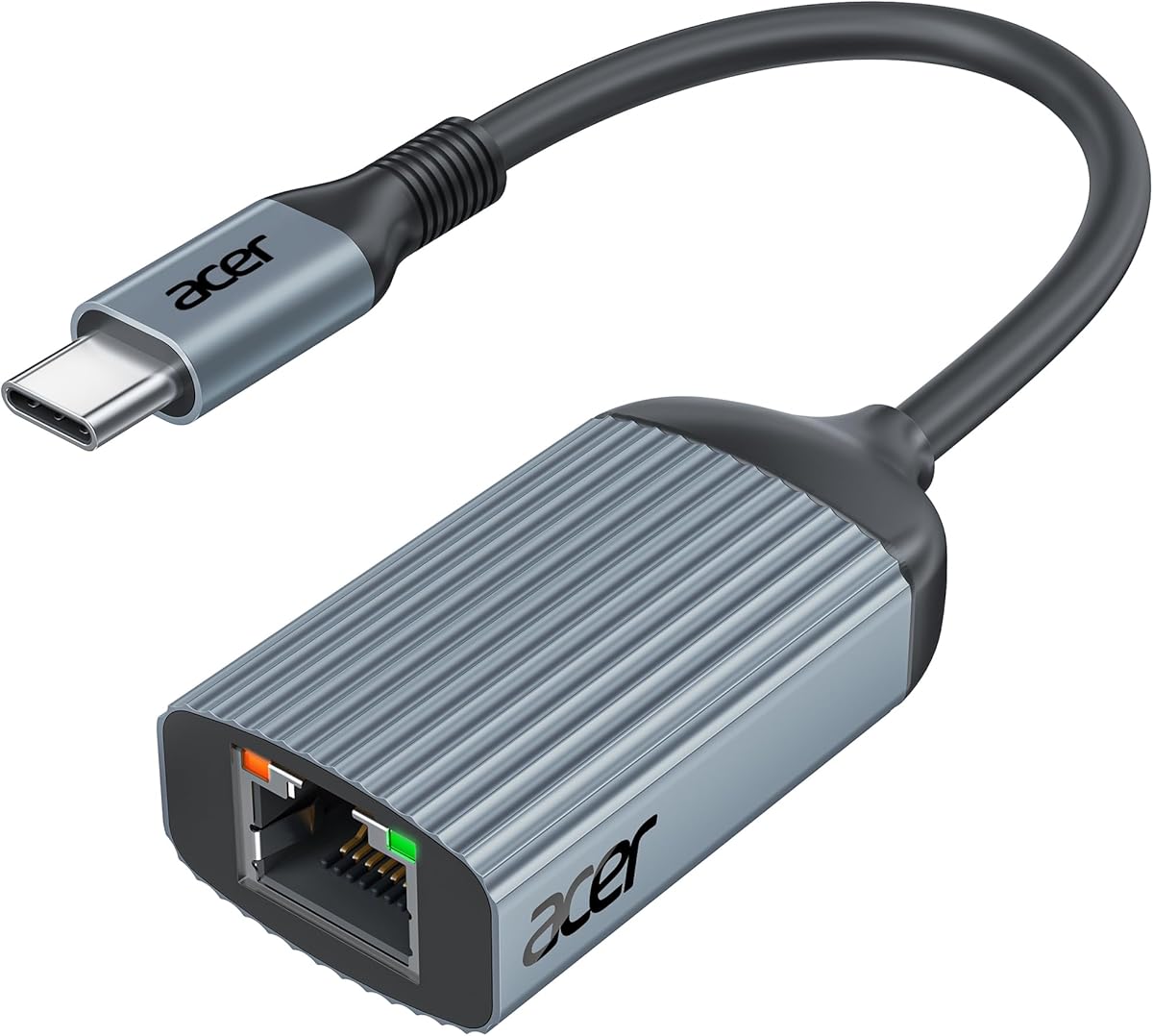
The Acer USB C to Ethernet Adapter is a straightforward 1Gbps option for compatible Android phones. Its customer rating is 4.4, and the product information names Samsung S23, S22, S21, and S20 models alongside numerous laptops and tablets. The adapter is presented as a useful answer for devices without a standard Ethernet port or for locations where Wi-Fi is unreliable.
We may earn a commission when you buy through this link, at no additional cost to you.
It uses an RTL8153B chip and supports speeds up to 1Gbps, with backward compatibility for 100Mbps and 10Mbps networks. The product listing notes that CAT6 or higher Ethernet cabling is required for the full 1Gbps rate. A compact aluminum shell helps dissipate heat, while reinforced ports are intended to withstand frequent plugging and unplugging.
The adapter offers true plug-and-play use, with no need to download drivers or software. Two status indicators provide quick connection diagnostics, which is helpful in offices and hotels where troubleshooting opportunities may be limited. It does not include a Power Delivery port, so a phone connected to Ethernet will need another charging arrangement.
This Acer model is a good fit for a USB-C Android phone that needs a portable Gigabit adapter and prefers a recognized, straightforward design. Its rating is slightly below the leading UGREEN and uni options, but the feature set remains balanced. Choose it when easy setup, clear indicators, and a compact aluminum form are the main priorities.
No separate driver or software is required, so the adapter can be connected and used quickly. The two indicator lights provide visible feedback that can reduce guesswork when a cable, switch, or network setting is not working as expected.
The small aluminum body is easy to carry and designed to manage heat during network activity. Reinforced ports add durability for users who regularly move the adapter between a desk, travel bag, and different devices.
We may earn a commission when you buy through this link, at no additional cost to you.
The USB 3.0 to Ethernet Adapter is a flexible budget-oriented choice because it offers both USB-A and USB-C connectors. It has a 4.0 rating, the lowest among the listed products, but its core specifications remain practical: Gigabit network capability, plug-and-play operation, and support for a wide range of Android devices and operating systems.
We may earn a commission when you buy through this link, at no additional cost to you.
The dual-interface design allows users to choose the appropriate connector for the device at hand. This can be helpful when working across a modern USB-C phone, a USB-A-equipped device, or an assortment of tablets and laptops. The listing identifies compatibility with Samsung S8, S8 Plus, Note 8, Note 9, Galaxy Tab A 10.5, Pixel, and Pixel 2, among other devices.
The adapter supports network speeds up to 1Gbps and is backward compatible with 100Mbps and 10Mbps connections. No external power supply or driver is required. Its aluminum alloy housing and bend-tested flexible cable emphasize durability, although the product does not provide a way to charge a connected phone and depends on the quality of the USB cable used for the USB-A side.
This adapter is a strong value-oriented option for users who want one accessory to cover both USB-A and USB-C connections. The lower customer rating means expectations should be measured, and buyers may prefer a higher-rated dedicated USB-C model for long-term use. Even so, the broad connector compatibility and straightforward Gigabit connection make it a practical choice for mixed-device travel kits.
The dual connector design reduces the need to carry separate adapters for different Android phones and related devices. It is especially useful for users who still encounter USB-A equipment alongside modern USB-C hardware.
The adapter offers up to 1Gbps without requiring an external power supply. Its compact aluminum body and flexible cable make it easy to include in a daily carry bag for travel, office use, or home-network troubleshooting.
We may earn a commission when you buy through this link, at no additional cost to you.
The Monoprice USB-C to 5Gbps Ethernet Adapter stands out for its stated 5Gbps network speed and perfect 5.0 customer rating. It is designed to add Ethernet connectivity to devices without RJ45 ports and is listed as compatible with most USB-C laptops, tablets, smartphones, and gaming devices. For an Android phone with the right USB-C and OTG support, it offers a high-bandwidth option.
We may earn a commission when you buy through this link, at no additional cost to you.
Plug-and-play installation requires no drivers on Windows, macOS, ChromeOS, or Android. The adapter draws power from the connected USB-C port, so no extra power adapter is required. Its robust aluminum housing is designed to withstand daily wear while remaining compact enough to fit in a laptop bag or pocket.
The headline speed is a maximum capability rather than a guaranteed real-world result. The phone, USB-C link, Ethernet cable, router, switch, and network service must all support the desired throughput. Users whose equipment tops out at Gigabit may see little practical difference, and those with slower USB-C implementations should investigate the actual link rate before purchase.
This is the premium performance-oriented recommendation for a compatible Android phone working with high-speed local or internet infrastructure. It is particularly relevant to large transfers and advanced local-network use. Users with ordinary home broadband may not need 5Gbps, but the adapter's strong rating, robust body, and broad device orientation make it a compelling premium option.
The stated 5Gbps capability gives the adapter an advantage for compatible high-speed networks and large local transfers. Actual performance remains limited by the slowest component in the connection chain, especially the phone and its USB-C link.
No drivers or separate power supply are required on the listed major systems. The compact, powered-by-USB-C design simplifies both initial connection and travel packing.
We may earn a commission when you buy through this link, at no additional cost to you.
The Gigabit USB C to Ethernet RJ45 Male to Type C Female Network Adapter offers a distinctive alternative to conventional Ethernet dongles. It has a 4.7 rating and uses a male RJ45 plug alongside a female USB-C socket. That means users can connect a standard Ethernet cable to the adapter and use a familiar USB-C-to-C or USB-A-to-C cable to reach the phone.
We may earn a commission when you buy through this link, at no additional cost to you.
The product's claim is to reduce the amount of specialized cabling required for travel. Instead of carrying a fixed Ethernet cable and a separate adapter body, users can repurpose cables they may already own. It supports 10/100/1000Mbps auto-negotiation, with full 1Gbps possible through suitable USB 3.0, 3.1, 4.0, or Thunderbolt 3, 4, or 5 cables. USB 2.0 cables limit performance to 100Mbps.
Driver-free operation is listed for Windows, macOS, iPadOS, ChromeOS, and Android with OTG support. Linux requires a manual driver download. The arrangement is not as direct as plugging a conventional adapter into the phone, and it may consume more bag space because two separate cables remain part of the setup. The male RJ45 design can also feel less familiar to first-time users.
This adapter is a strong choice for travelers who already carry a USB-C charging or data cable and want to reduce specialized accessories. Its 4.7 rating and broad platform support are encouraging. Ensure the chosen USB-C cable supports data and the required transfer rate, and confirm that the Android phone has OTG networking enabled before relying on it.
The female USB-C socket accepts common USB-C-to-C and USB-A-to-C data cables. This can simplify packing because the same cable may already be used for charging or data transfer elsewhere in the user's setup.
The adapter can support up to 1Gbps, but the connecting USB-C cable determines how much data can reach the phone. Older USB 2.0 cables are limited to 100Mbps, while newer high-speed or Thunderbolt cables enable the full stated rate.
We may earn a commission when you buy through this link, at no additional cost to you.
The UGREEN USB C to Ethernet Adapter 2.5G is built for Android phones and other USB-C devices that need more headroom than a conventional Gigabit connection. It carries a 4.6 rating and supports speeds up to 2.5Gbps using an RTL8156BG controller. It can therefore serve users with compatible 2.5Gb switches, routers, NAS equipment, or local network infrastructure.
We may earn a commission when you buy through this link, at no additional cost to you.
The adapter's aluminum body and reinforced ports are designed for durability, while the listed chip is intended to operate with low power and reduced heat at full 2.5Gb speed. Indicator lights provide quick feedback on transmission status. Its compatibility list includes modern USB-C phones, tablets, MacBook Pro and Air models, Dell XPS systems, iPad Pro and Air, Mac Mini, and iPhone 15 through 17 variants.
A faster adapter cannot create a faster network by itself. The phone, USB-C cable, Ethernet cable, router, switch, and remote server must all be capable of the intended rate. A standard 1Gb network will normally limit performance accordingly. The adapter also does not offer a separate charging port, so users planning prolonged connected sessions should account for battery life.
This UGREEN 2.5G model is a strong advanced option for users who already operate multi-gigabit equipment or frequently move large data between an Android phone and a high-speed local network. For ordinary internet access, a 1Gbps adapter is likely sufficient, but this model provides extra capacity for compatible high-bandwidth workflows.
Supporting 2.5Gbps makes the adapter relevant to users upgrading compatible routers, switches, and local storage. The gain is most meaningful when every component in the path can sustain the higher rate.
The aluminum housing and listed low-power controller are designed to manage heat during sustained high-speed activity. Reinforced ports and clear indicator lights support repeated practical use and easier network diagnosis.
We may earn a commission when you buy through this link, at no additional cost to you.
Choosing an Ethernet adapter for an Android phone requires matching the connector, Android networking support, intended speed, and charging needs. The following factors cover the details that most affect compatibility, portability, and daily usefulness.
Start by identifying whether the phone uses USB-C or Micro USB, then confirm that its port supports data as well as charging. A physically compatible plug does not guarantee that Ethernet traffic will work; some Android versions, manufacturers, and device configurations restrict OTG networking. Current flagships are generally USB-C, while the Micro USB option in this guide primarily serves older devices. USB-C is the more flexible standard for present-day purchases, but its protocol generation can affect maximum speed.
Most home networks and internet connections top out well below the fastest speeds supported by the adapters in this guide. A 1Gbps model is therefore a sensible general-purpose choice, while 2.5Gbps and 5Gbps options matter primarily for compatible local networks, fast NAS systems, large transfers, and specialized infrastructure. The listed maximum is only the adapter's capability. The phone, USB-C connection, Ethernet cable, router or switch, and network service can all impose lower limits.
Most compact USB-C Ethernet adapters provide network connectivity but no power input, which means the phone cannot charge while the adapter is attached. A model with a separate USB-C Power Delivery input can support wired networking and charging together. The Cable Matters option in this list states support for up to 140W. This is valuable for long downloads, video calls, and desk-based use, but the phone must also support the relevant power-delivery behavior for the complete setup.
Many adapters are driver-free on recent Android versions, while older systems and some Linux distributions may require additional software. The supplied information also identifies a Micro USB model with limited Android support and recommends checking for a grayed-out Ethernet menu under Wireless & Networks settings. For any adapter, the phone should have access to a wired Ethernet configuration option after connection. Updating Android and reviewing the manufacturer's support information can prevent a mismatch.
A conventional USB-C Ethernet adapter includes an RJ45 female port and requires an Ethernet cable, while the RJ45 male design lets the adapter plug directly into a cable. The latter may reduce specialized accessories, although it still needs a suitable USB-C data cable. Cable quality matters: BENFEI specifies CAT6 or higher for 1Gbps, while the RJ45 male adapter notes that USB 2.0 cables limit throughput to 100Mbps. Check the included components and required cable standards to avoid an incomplete setup.
A phone adapter is most useful when it is small enough to carry without adding clutter. Compact aluminum bodies, reinforced cable tails, and short leads are helpful for travel, while low-profile connectors can preserve access to adjacent ports. The dual USB-A and USB-C design offers flexibility across devices but is not necessarily smaller than a dedicated USB-C model. The RJ45 male design is portable in a different way, relying on standard network and USB cables rather than a fixed adapter lead.
Sustained Gigabit or multi-gigabit transfers generate heat, making material and construction relevant to long-term performance. Aluminum housings appear on many options in this guide and are intended to dissipate heat more effectively than basic plastic bodies. Reinforced cable tails, wear-resistant RJ45 ports, and bend-tested flexible cables address other common failure points. Buyers who frequently connect and disconnect the adapter should pay particular attention to strain relief and connector durability.
A useful adapter should support Android, but broad platform support can make it easier to share with a laptop, tablet, or other device. The listed products vary in their named compatibility, covering Samsung S8 through S23 families, Galaxy tablets, Pixel phones, iPhones with USB-C, and numerous laptops and tablets. A listing that includes a phone is a useful signal, though it is not a guarantee for every regional model or software build. Check the exact device, connector, and required network standard.
Begin by checking the phone's connector type and confirming that the adapter's operating-system support includes your Android version. Connect the adapter to the phone, plug an Ethernet cable into the RJ45 port, and connect the other end to a router, switch, or network wall port. On many Android devices, the wired network option appears automatically, although users may need to open Settings and review Wireless & Networks or a dedicated Ethernet menu.
For an adapter with USB-C Power Delivery, attach the appropriate power cable to the charging input. Verify that the phone displays a network connection and test the link with a modest download before beginning a large transfer. If the network does not appear, reseat the connector, try another known-good Ethernet cable, confirm that the router port is active, and check whether the phone exposes wired Ethernet settings.
To maintain the adapter, handle it by the housing rather than pulling the phone by its attached cable. Keep the RJ45 port and USB-C connector free of dust and moisture, and avoid sharply bending the reinforced lead near either end. Store the adapter in a small pouch or cable organizer, and use a protective case to prevent pressure on the connector. For high-speed models, good ventilation around the housing is useful during sustained transfers.
No. The phone must expose a compatible USB-C data connection and support Android OTG networking. The adapter also needs to be compatible with the phone's Android version. If a wired Ethernet option does not appear in the phone's network settings after connection, the phone or adapter may not support the required function.
A 1Gbps adapter supports a maximum theoretical network rate of 1,000Mbps, while a 2.5Gbps adapter supports 2,500Mbps. The faster option only provides a benefit when the phone, USB-C link, Ethernet cable, router, switch, and destination equipment all support the higher rate. Ordinary internet connections rarely depend on this extra capacity.
Only with an adapter that includes a separate USB-C Power Delivery input. Most simple Ethernet dongles use their only USB-C connection for data and power, leaving no dedicated charging port. The Cable Matters model in this guide includes a PD input stated to support up to 140W, subject to phone compatibility.
Most do, because their RJ45 female port accepts a standard network cable. The RJ45 male adapter is different: it plugs into an Ethernet cable and uses a separate USB-C data cable to reach the phone. Check the product's included components carefully so you know which additional cable, if any, is required.
First, confirm that the connector and Android version are supported. Reconnect the adapter directly rather than through an unpowered hub, try a different Ethernet cable, and inspect the ports for damage. Some older devices have limited OTG support or show a grayed-out Ethernet menu, which can indicate that the required network function is unavailable.
Usually not if the internet service itself is the limiting factor. A faster adapter can help with local transfers, NAS access, and high-speed networks where other equipment also supports the higher rate. For typical home browsing and streaming, a stable 1Gbps connection is generally more than adequate.
Use a cable rated for the required category and verify that it is undamaged. BENFEI specifically recommends CAT6 or higher to reach 1Gbps, and good-quality Cat5e or Cat6 cabling is commonly suitable for Gigabit networks. The RJ45 male adapter also requires a sufficiently fast USB-C data cable, since USB 2.0 limits the stated rate to 100Mbps.
Yes. It can connect the phone to a local router, home network, NAS, printer, or another device for file sharing and local services. Internet access still depends on the connected router or network having an active upstream connection.
The UGREEN 1Gbps USB-C adapter is the strongest general recommendation, combining a 4.7 rating, explicit Android support, and a compact aluminum design. The dual-interface USB 3.0 adapter is the budget pick for mixed USB-A and USB-C equipment, while the Monoprice 5Gbps model is the premium choice for compatible high-speed networks.
Prioritize exact connector and Android compatibility before focusing on headline speed. Consider simultaneous charging if the phone will remain connected during long sessions, and verify the necessary Ethernet and USB-C cable requirements. Older Micro USB phones may need the dedicated OTG option, but only after checking for an Ethernet menu in Android settings.
Prices, promotions, and availability can change over time, so review the current product listing and customer feedback before making a final decision. The specifications in this guide are intended to make that final check easier by separating broad compatibility, network capacity, charging support, and portability.