
ARCTIC Case Fan Hub 10-Port
4.7Editor score
Ten synchronized PWM outputs
Direct SATA power input
Motherboard RPM monitoring
Explore the best Fan Control Hub for PC options, comparing PWM control, ARGB support, power capacity, mounting, and compatibility for clean, capable builds.
A fan control hub for PC can turn a crowded collection of case headers, power leads, and lighting cables into a cleaner, easier-to-manage system. The right hub adds usable connections, centralizes airflow control, and can make it simpler to synchronize PWM fans and ARGB lighting throughout a custom build.
The products in this guide were compared by examining fan capacity, PWM and lighting support, power delivery, signal behavior, mounting methods, dimensions, and software or hardware control features. The list covers both simple expansion hubs and more advanced controllers for builds that need independent fan channels, visible lighting controls, or broader operating-system compatibility.
Each review explains where a product stands out, what limitations to consider, and which type of builder it best suits. Ratings and specifications reflect the supplied product information, while availability, bundle contents, firmware behavior, and pricing can change over time, so buyers should verify current listings before making a final decision.
4.7Editor score

4.7Editor score
4.6Editor score
This side-by-side comparison highlights the main differences among simple signal hubs, combined PWM and ARGB controllers, and software-controlled fan hubs, with particular attention to channel count, current capacity, lighting support, monitoring, and installation requirements.


The Thermalright ARGB 8-Port Hub has a 4.5 rating and serves primarily as a wiring and interface expansion device for systems with more ARGB equipment than the motherboard can conveniently handle. Its eight supported fan groups, four-pin fan connection, and five-volt three-pin ARGB support make it especially relevant to builders combining illuminated case fans with light strips or other addressable accessories.
We may earn a commission when you buy through this link, at no additional cost to you.
Power comes directly through a SATA connection, while the hub passes the motherboard's PWM and lighting signals to connected devices. Strong paste and magnetic suction provide two mounting approaches, helping the builder position the compact enclosure where the wiring is easiest to conceal. The product is also compatible with ARGB light bars, making it more versatile than a pure PWM splitter.
There is an important distinction between signal expansion and active control. The supplied information states that this hub does not adjust fan speed or lighting color, and that only the speed of a single fan in the red interface may be recognized because of the motherboard PWM controller's limitations. It should therefore be viewed as a tidy distribution hub rather than a standalone control center.
This is a sensible pick for a builder who has already established fan curves and ARGB lighting through motherboard software and now needs cleaner connections or additional compatible ports. It is less appropriate for someone who expects per-fan sliders, remote lighting modes, or independent temperature-based control. For those requirements, a more advanced controller is the better choice.
The hub gathers eight ARGB fan groups and compatible addressable lighting into a central point, reducing the number of loose motherboard connections. That makes it easier to maintain a custom build while keeping five-volt lighting and four-pin fan power organized.
Magnetic suction can help position the unit on a suitable metal surface, while the strong paste option offers a more fixed installation. Builders should still check clearance around the hub, fan positions, and any drive or cable routing that may cross the selected mounting area.
We may earn a commission when you buy through this link, at no additional cost to you.
The ARCTIC 10-Port Fan Controller carries a 4.7 rating and is the most capable choice here for users who want a separate PWM channel for each connected fan. Unlike a basic splitter that broadcasts one motherboard signal, this controller moves beyond limited shared signals and provides independent management for a full ten-fan setup.
We may earn a commission when you buy through this link, at no additional cost to you.
It can supply up to 2 A on each port with a total maximum of 4.5 A. That headroom is useful for demanding configurations because it avoids relying on a collection of motherboard headers with different output limits. Native driver support for Windows and Linux with Kernel 7.2 or later broadens its appeal to enthusiasts who use monitoring and fan-control software across multiple operating systems.
The trade-off is that this is a dedicated fan controller rather than a combined ARGB hub. It addresses airflow complexity, cable organization, and precise control, but the supplied specification does not identify an addressable lighting controller. Users who need both independent fan control and onboard ARGB selection may need separate lighting management through the motherboard or a dedicated lighting hub.
The recommendation is strongest for advanced builders running numerous PWM fans, particularly anyone frustrated by motherboard headers being assigned to fixed groups. It also suits Linux users who want native support rather than a workaround. It is less compelling for a small, simple case that needs only two or three additional fan connections.
Independent channels let each fan react separately instead of sharing a single synchronized speed command. That level of control is valuable for radiator fans, intake and exhaust groups, or any layout where different areas of the case benefit from different airflow levels.
Centralizing the connections can reduce the loose Y-splitters and extension cables often found behind a motherboard tray. The result is easier maintenance and a more deliberate cable route, although software compatibility should be confirmed for the exact control program used in the finished build.
We may earn a commission when you buy through this link, at no additional cost to you.
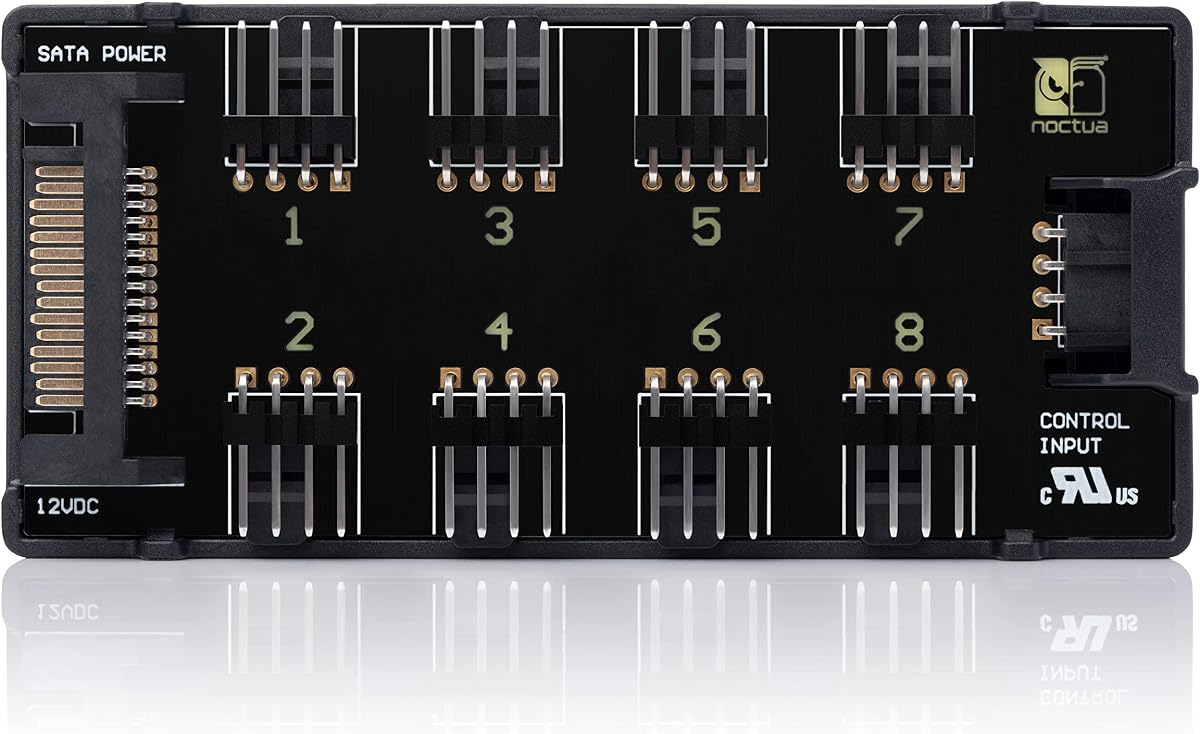
The Noctua NA-FH1 has a 4.6 rating and is a high-quality choice for builders who prioritize protection, refined power distribution, and a long manufacturer warranty. Its eight-way fan splitter can power, control, and monitor multiple fans through signals from a motherboard or an optional NA-FC1 fan controller.
We may earn a commission when you buy through this link, at no additional cost to you.
A major strength is the ability to use four-pin and SATA inputs simultaneously. Power can come through SATA for compatible 12-volt fans, while RPM and PWM information passes through the four-pin connection. Safety fuses add protection against overcurrent and short circuits, making the hub well suited to installations where several fans remain connected for long periods.
The NA-FH1 handles up to 54 W through its SATA input for 12-volt fans and up to 24 W through the four-pin interface, with the latter also supporting five-volt applications when used with appropriate Noctua fans and USB power adapter cables. Four strong magnets simplify attachment to a steel case panel, and the product carries several listed safety certifications.
It is best for a builder who wants a protected, established-brand distribution hub and values the six-year manufacturer warranty. The trade-off is that it offers eight outputs rather than the ten found on several alternatives and does not include ARGB lighting functions. It is a premium airflow solution, not an all-in-one lighting controller.
Integrated fuses guard against overcurrent and short circuits, adding a useful layer of protection when several fans draw power from one central system. This makes the hub especially appropriate for builds that run continuously or contain multiple high-airflow fan groups.
Using SATA and four-pin inputs at the same time separates power delivery from RPM and PWM signal transmission. That makes the hub more versatile for mixed 12-volt and supported five-volt fan arrangements than a simple motherboard-header splitter.
We may earn a commission when you buy through this link, at no additional cost to you.
The ARCTIC Case Fan Hub has a 4.7 rating and delivers a straightforward way to expand the number of PWM case fans supported by a motherboard. It can accommodate ten four-pin fans, expanding a system by nine more case fan slots beyond the header used to connect the hub.
We may earn a commission when you buy through this link, at no additional cost to you.
The hub passes the motherboard's PWM signal synchronously to every connected fan, which means the group generally follows the system's existing fan curve rather than receiving separate commands for each socket. RPM from the first fan slot is read out and returned to the system, allowing compatible monitoring software to reflect the connected fan speed.
Power for the connected fans comes directly from the supply through SATA, while a four-pin fan header carries the control signal. Direct power delivery is intended to reduce voltage loss and maintain smoother operation. Each port supports up to 1 A, and the combined input is rated at up to 4.5 A, so high-current fan selections still need to be considered carefully.
This hub is a strong match for ordinary gaming builds that need more PWM connections and a cleaner cable arrangement. It is not the right choice when independent fan curves are essential, and it does not handle addressable lighting. For those needs, choose a dedicated software-controlled controller or a combined PWM and ARGB hub.
Ten outputs make it possible to connect a large group of intake and exhaust fans to one motherboard header. The result is useful when a case supports more physical fan positions than the motherboard has available PWM headers.
SATA power feeds the fan group directly, while the first connected fan's RPM is reported back to the system. Builders can use that information to confirm that the group is operating and to create a broad fan curve for the synchronized set.
We may earn a commission when you buy through this link, at no additional cost to you.
The Thermalright ARGB and Fan HUB X12 IR White has a 4.4 rating and is designed for builds that need to support up to twelve fan groups while also distributing addressable lighting. It combines four-pin PWM fan connections with three-pin five-volt ARGB connectors, providing one of the broadest physical connection counts in this guide.
We may earn a commission when you buy through this link, at no additional cost to you.
Its white enclosure measures 108 by 50 by 21 millimeters and includes a 500-millimeter cable, making it easier to consider for a coordinated light-colored build. Both PWM and ARGB connectors appear on the sides for convenient routing, and the hub is powered directly from SATA to maintain stable output under high loads.
The red PWM interface is designated for speed recognition, but the product information notes that the motherboard controller may read only one connected fan's speed. The hub expands interfaces and synchronizes signals; it does not itself provide speed adjustment or lighting-color controls. A SATA power cable is also not included and must be obtained separately.
Choose this model when fan quantity, ARGB distribution, and a white finish matter more than local control. It is especially practical for large cases with extensive intake and exhaust arrangements. Builders wanting per-fan curves or remote lighting effects should instead select a more advanced controller.
The twelve-group capacity reduces the need for multiple separate splitters in a case with many fans. Side-mounted connectors also help keep the fan and lighting leads aligned and make individual connections easier to reach during assembly.
The white enclosure is intended to blend into light-colored interiors where a black hub would stand out. The effect is cosmetic rather than functional, but appearance can be important in a carefully themed custom PC.
We may earn a commission when you buy through this link, at no additional cost to you.
The upHere PWM and 5V Addressable ARGB Magnetic Fan Hub has a 4.6 rating and is aimed at builders who want centralized fan wiring alongside visible, remotely adjustable lighting. It supports up to nine PWM fans as well as five-volt addressable ARGB devices in one compact SATA-powered unit.
We may earn a commission when you buy through this link, at no additional cost to you.
A front-facing RGB panel can synchronize with connected ARGB fans, and the included remote allows the user to change colors and dynamic effects without opening a software utility. Built-in magnets make the hub easier to place on a ferrous surface, while the complete kit includes the remote, SATA cable, PWM and ARGB cables, and a synchronization cable.
The hub is primarily a distribution and lighting control solution. The supplied data does not describe independent per-port fan control, so it should not be treated as a software-driven replacement for the ARCTIC ten-channel controller. Its stronger distinction is the integrated lighting panel and remote, which can make a finished build more convenient to operate.
This model is a good fit for custom RGB systems where the builder wants coordinated effects and a physical control option. It is less compelling for users who need distinct intake, exhaust, and radiator fan curves, and the nine-fan maximum leaves less room than several ten-port alternatives.
The remote provides a direct way to select colors and dynamic effects, which is convenient when the PC is positioned where software access is inconvenient. The hub's own RGB panel can also provide a visible indication of the active lighting setup.
Including the SATA, PWM, ARGB, and synchronization cables reduces the need to source several compatible leads separately. Buyers should nevertheless inspect the included cable lengths and connector types against the layout of their case before installation.
We may earn a commission when you buy through this link, at no additional cost to you.
The Thermalright Integrated Fan Hub has a 4.6 rating and focuses on a simple proposition: connect as many as ten groups of case fans while drawing power directly from the SATA supply. It is a clean solution for builders who have outgrown their motherboard headers but do not require independent fan curves.
We may earn a commission when you buy through this link, at no additional cost to you.
The hub uses a four-pin PWM connection to carry the motherboard's control and monitoring signal. A red interface is provided for fan-speed recognition, although the supplied description explains that only one fan's speed may be read because of the limitations of the motherboard PWM controller. The connected group otherwise receives the same control command.
SATA power is described as maintaining stable output under high load, and a double-sided sticker provides a fixed mounting option inside the chassis. The small body is useful in crowded builds, while the ten fan connections avoid the need for several individual splitters. A SATA cable is not included, so the builder must have an appropriate spare cable available.
This hub suits mainstream multi-fan cases where synchronized airflow and tidy routing are the main goals. It is not a lighting solution, and its shared signal means it cannot independently balance different fan groups. Users with more complex thermal demands should consider a channel-specific controller instead.
A single ten-port unit replaces a collection of small Y-splitters, reducing visual clutter behind the motherboard tray. The shared PWM signal also means the connected fans can follow the motherboard's existing curve as one group.
The hub requires a SATA power connection, but the product information says the cable is not included. Builders should check whether their power supply offers a suitable spare lead and whether that lead can reach the intended mounting position without crossing other cables.
We may earn a commission when you buy through this link, at no additional cost to you.
The Thermalright Fan and ARGB HUB X8 has a 4.5 rating and offers a balanced combination of PWM and addressable lighting connections. It supports eight ARGB fans or strips and eight PWM fan connections, allowing a builder to coordinate a moderately sized lighting and cooling installation through a single hub.
We may earn a commission when you buy through this link, at no additional cost to you.
Four lighting connectors and fan power connectors are placed on each side to make access and cable management easier. After connection to the motherboard, the hub synchronizes the lighting effects of three-pin five-volt devices and the speed behavior of compatible PWM fans. This makes it a practical intermediary between motherboard control and a larger collection of accessories.
The hub is powered directly through SATA and is designed to maintain stable output under high loads. A strong double-sided sticker secures it inside the chassis, and the black enclosure measures 140 by 64 by 16 millimeters. The SATA cable is not included, while twelve-volt four-pin RGB equipment must not be connected to the five-volt ARGB sockets.
This product is well matched to a balanced eight-fan build that values neat lighting management and synchronized cooling. It lacks direct controls, so the motherboard remains the source of fan curves and lighting effects. For larger systems, a ten- or twelve-port option offers more room, and for separate fan curves, a channel-based controller is preferable.
Combining PWM and five-volt ARGB distribution makes this useful for builds where cooling and decorative lighting are expanding together. One motherboard connection can then serve multiple compatible fans, strips, and light bars.
Placing connectors on both sides can make it easier to attach and remove devices without disturbing unrelated wiring. This is particularly useful in cases where the hub sits between storage drives, a radiator, or a tight motherboard-tray cavity.
We may earn a commission when you buy through this link, at no additional cost to you.
The ARGB Fan HUB J-10 Pro has a 4.4 rating and emphasizes convenient local lighting operation through an RF remote and a chassis key. It supports up to ten sets of ARGB fans, making it a strong option for an illuminated build that wants more lighting ports than the motherboard provides.
We may earn a commission when you buy through this link, at no additional cost to you.
The hub also handles four-pin PWM fans and passes their control signal to the motherboard. A red interface can provide speed recognition, but only one connected fan's speed may be reported because of the PWM controller limitation. Lighting is synchronized across compatible five-volt three-pin devices, while an RF remote and chassis key provide convenient control options.
Power enters through SATA, and magnetic suction helps secure the compact 3.83 by 2.33 by 0.6-inch enclosure. The remote and chassis key are useful for changing the lighting presentation without entering a motherboard utility, although the product note emphasizes that the controller is intended for lighting switching. PWM operation remains dependent on the motherboard connection.
This is a good choice for a builder prioritizing visible, remote-adjusted ARGB across many devices. It is less suitable when individual fan control or comprehensive RPM reporting is the goal. Users should also be careful to distinguish five-volt three-pin ARGB from twelve-volt four-pin RGB, which the product does not support.
The RF remote and chassis key offer alternatives to entering a system utility, which is useful for quick lighting changes. The controller supports ARGB fans and light bars through five-volt three-pin connections.
Its short housing and magnetic mounting can help reduce the amount of space required behind the motherboard tray. Position should still allow access to the connectors and keep the hub clear of rotating or hot components.
We may earn a commission when you buy through this link, at no additional cost to you.
The Thermalright Fan and ARGB HUB X8 has a 4.6 rating and provides a compact way to distribute both four-pin PWM fan power and five-volt three-pin ARGB lighting. It is designed for builds where the number of connected cooling and lighting devices has outgrown the motherboard's available headers.
We may earn a commission when you buy through this link, at no additional cost to you.
The hub uses direct SATA power and is described as maintaining stable output under high loads. Once connected to the motherboard's PWM and ARGB headers, compatible fans and lighting devices can follow the system's synchronized speed and lighting effects. A red interface supports speed recognition, but the product information notes that only one connected fan may be reported.
Installation relies on strong double-sided stickers, making it easy to place the hub in a concealed area. The enclosure is compact, which helps in crowded cases, and the black finish is intended to blend with typical PC components. Twelve-volt four-pin RGB equipment must not be plugged into the five-volt ARGB ports, and the SATA cable is not supplied.
Choose this hub for a modest custom build that needs clean PWM and ARGB distribution without a more elaborate controller. It is a practical alternative to larger hubs when eight groups are sufficient, but it does not provide independent fan curves or direct lighting selection. Verify cable placement and connector types before finalizing the installation.
The hub consolidates cooling and lighting connections into a small enclosure that can be hidden behind the motherboard tray. Its side arrangement of connectors can also reduce the length of unmanaged cable runs.
The PWM signal, five-volt ARGB lighting, and SATA power each have a defined role, allowing the builder to create a predictable wiring plan. Correctly separating five-volt ARGB from twelve-volt four-pin RGB is essential to avoid damage.
We may earn a commission when you buy through this link, at no additional cost to you.
The best fan control hub depends on how many fans you use, whether you need independent curves, whether the build includes addressable lighting, and how much electrical headroom your selected equipment requires. Compare connection types and control behavior before considering the enclosure or mounting method.
Begin with the physical number of fans in the planned build rather than the number of ports printed on the packaging. A case may have more mounting positions than the motherboard has fan headers, but additional power, lighting, and signal cables can make a larger installation difficult to route. Eight-port hubs suit moderate systems, while ten- and twelve-port models provide more room for extensive intake, exhaust, and radiator arrangements. Check the actual connector quantity and whether a listed capacity refers to fan groups, individual ports, or a mixture of device types.
In short, count every planned fan first, then choose a hub with enough compatible ports and comfortable installation space.
A shared PWM hub sends one motherboard speed command to every connected fan, which is simple and works well when the entire group should behave alike. An independent controller assigns a separate channel to each fan, allowing software to vary intake, exhaust, and cooling speeds. Independent control provides more precise thermal tuning, but it may also require a compatible operating system, driver, and monitoring program. Do not interpret the word controller in a product title as proof of per-fan adjustment; some devices only expand and synchronize signals.
In short, choose shared synchronization for simplicity and independent channels when separate fan curves are genuinely useful.
Most modern addressable lighting uses a five-volt three-pin ARGB connection, while older or different RGB systems may use twelve-volt four-pin RGB. These are not interchangeable, and the supplied product information repeatedly warns against connecting twelve-volt four-pin RGB equipment to five-volt ARGB ports. A combined hub can make the build tidier, but it may not provide color selection or lighting effects on its own. Decide whether the motherboard, a remote, or a dedicated controller should manage the lighting.
In short, match every lighting connector by both pin count and voltage, and do not force incompatible standards together.
A hub may draw fan power from the motherboard, from SATA, or from a combination of inputs. Review both the per-port and total current figures because a high total rating does not guarantee that every port can handle a high-current fan at the same time. SATA power can reduce voltage loss and motherboard strain, while four-pin input can carry PWM and RPM signals. The ARCTIC 10-Port Fan Controller offers up to 2 A per port with a 4.5 A total, whereas the ARCTIC Case Fan Hub lists up to 1 A per port and the Noctua NA-FH1 provides a maximum total wattage by input type.
In short, match the hub's electrical limits to the combined demand of the connected fans rather than looking at port count alone.
RPM monitoring lets fan-control software confirm that a connected fan is running and can use measured speed in a fan curve. Some hubs pass the motherboard's signal to all fans, while others report the speed of the first fan or a designated red interface. The products here note that several Thermalright models recognize only one fan's speed because of the limitations of the motherboard PWM controller. Those limitations usually affect visibility and per-fan reporting rather than basic synchronization, but they matter to users who depend on precise telemetry.
In short, check whether you need individual RPM readings or whether one representative speed is sufficient for the group.
Magnetic, adhesive, and bracket-based mounting methods suit different case layouts. Magnets are useful for trial positioning or steel-panel installation, while strong double-sided adhesive creates a more permanent position. Before attaching a hub, verify the dimensions, connector orientation, cable length, and nearby components. A hub placed beside a hot exhaust area, drive cage, or radiator may be difficult to access. Good placement can shorten cable runs and prevent connectors from being strained when the case side panel is fitted.
In short, choose a mounting method and location that keep the hub secure, accessible, and clear of heat and moving parts.
If a hub offers independent control, determine which software is intended to manage it and whether that software supports the builder's operating system. The ARCTIC 10-Port Fan Controller explicitly lists native Windows and Linux support for Kernel 7.2 and later. By contrast, a motherboard-connected hub may depend entirely on BIOS utilities, the board's fan-control suite, or a third-party program. Independent channels are not useful if the required software is unavailable, unstable, or incompatible with the rest of the monitoring setup.
In short, confirm the software and driver path before buying a controller based on its channel count or per-port capabilities.
Electrical protection becomes more important as the number of connected fans rises. Fuses or other safeguards can reduce the consequences of an overcurrent or wiring fault, while formal safety certifications and a long warranty provide additional confidence in the product's design. The Noctua NA-FH1 stands out in this category with listed protection features, multiple safety certifications, and a six-year manufacturer warranty. These considerations do not eliminate the need for correct installation, but they can be meaningful for systems that run continuously or use a large number of fans.
In short, look beyond port count and consider protection, certification, and manufacturer support for a high-fan-count build.
Plan the installation before connecting any devices. Identify the motherboard's PWM header, SATA power connection, and any required five-volt ARGB header. Confirm that every planned fan uses a compatible four-pin connector, then group fans by the role you want them to share. For a controller with independent channels, map each port in the relevant software before attaching the physical fans.
Install the hub in a dry, accessible area away from hot exhaust airflow and moving components. Use magnets for convenient positioning, strong adhesive for a fixed attachment, or the specified mounting method. Connect power to the correct input, route fan and lighting leads with gentle bends, and avoid forcing connectors. Twelve-volt four-pin RGB devices must never be inserted into five-volt three-pin ARGB sockets.
After connecting the system, power it on and verify that each fan spins, that the expected motherboard header recognizes the group, and that the selected RPM source is reporting correctly. Open the applicable fan-control or lighting software to configure curves, synchronization, and effects. Periodically inspect connections for looseness, verify that airflow remains unobstructed, and keep the hub and cables clear of dust and heat sources.
A fan splitter usually distributes one motherboard PWM signal and power to several connected fans, causing them to run together. A fan controller may provide independent channels, software monitoring, temperature-based curves, or local lighting controls. The distinction is important because a device described as a controller can still be only a signal hub, so buyers should review the listed functions rather than relying on the title.
Several hubs in this guide provide both four-pin PWM fan connections and five-volt three-pin ARGB lighting connectors. These devices can usually share motherboard signals for synchronized fan speed and lighting effects, but they do not necessarily provide local color or speed adjustment. A separate software-controlled fan controller and dedicated lighting system may be needed for independent channels.
Not every hub requires SATA power, but models designed for many fans often use it to supply fan current directly from the power supply. This can reduce voltage loss and avoid loading a motherboard header that was intended for only one or two fans. Some products, including the Thermalright X12 IR White and Integrated 10-Port Hub, do not include the required SATA cable, so builders should plan to supply one.
No. Five-volt three-pin ARGB and twelve-volt four-pin RGB use different electrical arrangements and must not be mixed by force or through an improvised adapter. The relevant product information repeatedly warns that twelve-volt four-pin RGB equipment is unsupported on the Thermalright ARGB hubs. Using the wrong connector can damage the hub or connected equipment.
Some motherboard PWM controllers read a representative speed and broadcast the same command to the group, rather than monitoring every fan independently. Several Thermalright products specifically identify one red interface for speed recognition while noting that only one connected fan may be reported. Independent monitoring requires a controller with separate channels and compatible monitoring software.
Not necessarily. If the case uses only a few fans and the motherboard provides enough compatible headers, a hub may add unnecessary complexity. A hub becomes valuable when fan positions outnumber available headers, when direct SATA power is preferred, or when cable organization is important. A software controller is more justified when different fan groups need separate curves.
That location is often convenient because it keeps fan and lighting cables out of view and close to the motherboard headers. However, the hub should not block airflow, interfere with a drive cage, or sit where the side panel presses against its connectors. Magnetic mounting can be used for initial positioning, while strong adhesive is better for a permanent installation.
Check the number and type of fan ports, ARGB connector voltage, current limits, power input, RPM monitoring behavior, and mounting dimensions. Also confirm which software is needed for independent control and whether it supports the intended operating system. Finally, check current bundle contents because several hubs list SATA cables or other required accessories as not included.
The ARCTIC 10-Port Fan Controller is the strongest all-around recommendation for builders who want independent PWM control, generous per-port current, and native Windows and Linux support. The ARCTIC Case Fan Hub is a more straightforward option for synchronized ten-fan setups, while the Noctua NA-FH1 stands out for protection, input flexibility, certifications, and its six-year manufacturer warranty.
For mixed cooling and lighting builds, the Thermalright X12 IR White and the related X8 hubs can reduce clutter by distributing PWM and five-volt ARGB connections. The upHere P10PARGB BK adds a remote and visible lighting panel, whereas the J-10 Pro emphasizes remote-controlled ARGB switching. Prioritize connector compatibility, electrical capacity, and genuine control requirements before appearance or port count.
Product listings, ratings, included accessories, and pricing can change, so confirm the current specifications and bundle contents before ordering. Check the hub's dimensions against the case, verify that the necessary SATA or motherboard cables are available, and never connect twelve-volt four-pin RGB equipment to a five-volt three-pin ARGB interface.