
Anker USB C to USB Adapter
4.8Editor score
Premium aluminum construction
Side-by-side port fit
Ten-thousand-cycle connectors
Female USB Adapter buying guide comparing 10 top options for compatibility, speed, durability, portability, charging, and everyday use.
A female USB adapter makes it easier to connect USB-A accessories, cables, drives, and charging hardware to a USB-C device. The right choice depends on connector direction, transfer speed, charging support, OTG behavior, physical size, and the devices you intend to connect.
This guide compares ten female USB adapters using the specifications and compatibility information supplied for each product. It covers male-to-female and female-to-female designs, USB 2.0, USB 3.0, and USB 3.1 options, plus multi-packs suited to travel, offices, and shared workspaces.
Each selection highlights the adapter configuration, likely strengths, limitations, and best type of user. Ratings indicate the supplied customer feedback, while practical compatibility details matter more than rating alone. Product availability and pricing can change, so confirm current details before ordering.
4.8Editor score

4.7Editor score

4.6Editor score
The comparison below places all ten adapters side by side, focusing on connector orientation, supported transfer generation, power capabilities, pack size, and important compatibility restrictions.




The JSAUX USB C to USB 3.0 Adapter is a well-rounded choice for anyone who regularly needs to connect standard USB-A accessories to a USB-C computer, tablet, or compatible phone. Its supplied rating is 4.7, and the two-pack configuration provides a practical balance between portability, availability, and the ability to keep a spare nearby.
We may earn a commission when you buy through this link, at no additional cost to you.
Its primary strength is stated USB 3.0 SuperSpeed transfer performance up to 5Gbps, which is substantially quicker than the 480Mbps limit associated with USB 2.0. That makes the adapter suitable for flash drives, external storage, hubs, keyboards, mice, and other OTG-supported peripherals. The nylon-braided cable and aluminum alloy body also reinforce its suitability for frequent travel and desk use.
There are boundaries to understand. The product does not support video output, so it should not be selected as a DisplayPort or HDMI-style video solution. It also adds another connector between the device and accessory, which can make a setup slightly less compact than using a native cable. Nevertheless, those limitations are reasonable for a data-focused adapter.
This is our leading recommendation for users who want a dependable male-to-female USB-C adapter, USB 3.0 file transfer, and broad compatibility in a portable two-pack. It is particularly useful for MacBook, iPhone, iPad, and Samsung Galaxy users who need OTG accessories or access to existing USB storage.
The adapter is designed to connect USB-A flash drives, hubs, external drives, and other supported peripherals to compatible USB-C devices. Up to 5Gbps transfer speeds make it a practical bridge for moving files instead of relying on the slower USB 2.0 ceiling.
A nylon-braided cable resists tangling and adds flexibility, while the aluminum alloy housing is intended to withstand repeated handling. The two adapters also allow one to remain in a laptop bag while the other stays at home or in an office.
We may earn a commission when you buy through this link, at no additional cost to you.
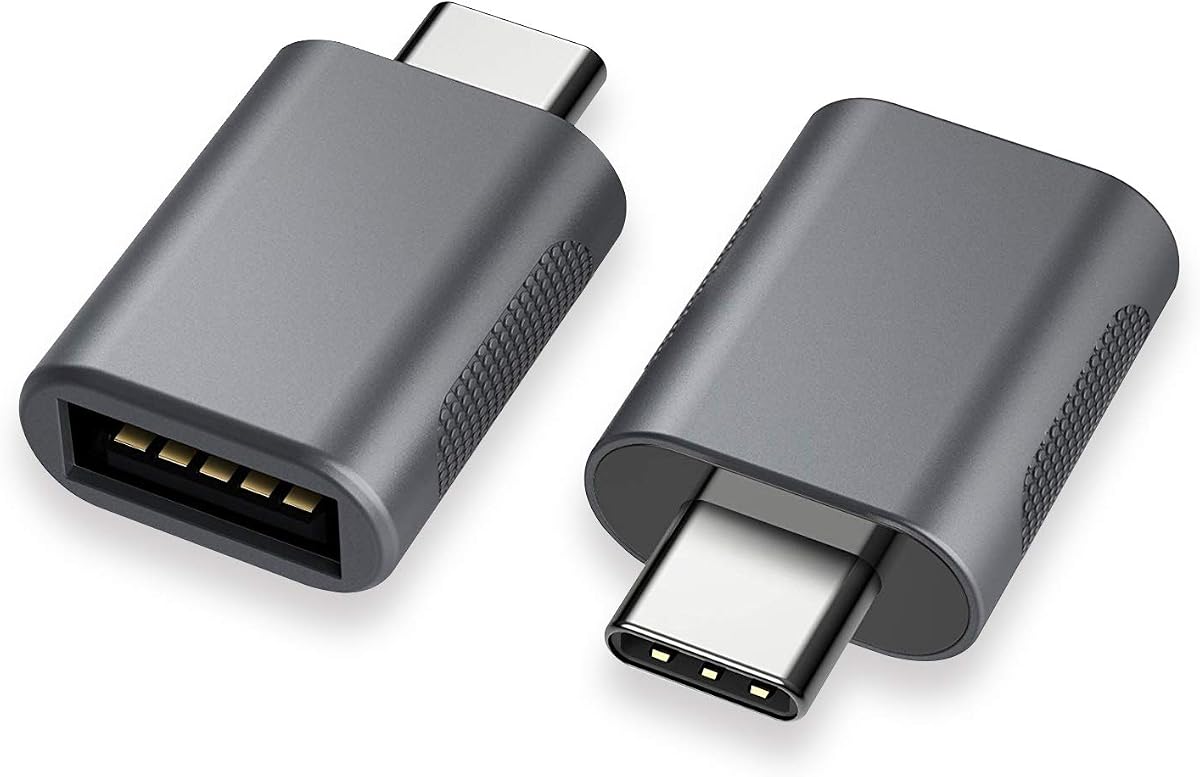
The Anker USB C to USB Adapter combines polished construction with broad everyday utility, earning the highest supplied rating in this roundup at 4.8. It converts a USB-C port into a USB-A connection for devices such as external hard drives, phones, mice, printers, and other compatible accessories.
We may earn a commission when you buy through this link, at no additional cost to you.
Its aluminum housing is described as scratch-resistant, while the male USB-C and female USB-A 3.0 connectors are engineered for up to 10,000 insertion cycles. The ultra-slim form is especially thoughtful for MacBook Pro users because two adapters can occupy adjacent USB-C ports without creating an overly obstructive arrangement.
The main drawback is that its premium construction and branded presentation may be more than a basic user needs. It is also a data-oriented adapter rather than a solution for every possible display or charging standard. Buyers should still verify the requirements of the phone, drive, printer, or other accessory they intend to connect.
The Anker is best suited to frequent users who value build quality, compactness, and a strong customer-rating profile. It works particularly well for professionals carrying a MacBook Pro and needing mouse, printer, drive, or phone connections through familiar USB-A hardware.
The low-profile body is intended to sit neatly beside another port or adapter on a MacBook Pro. That makes it convenient for users who regularly alternate between accessories while still wanting to retain access to neighboring ports.
The stated ten-thousand-cycle connector design targets repeated daily insertion and removal. Paired with the scratch-resistant aluminum shell, it creates a reassuring option for a component that will likely live inside a bag, laptop sleeve, or desk drawer.
We may earn a commission when you buy through this link, at no additional cost to you.
The Duyasurs 3Pack is a practical choice for shoppers who want several functional adapters without paying for a specialized premium accessory. Its supplied rating is 4.6, and the set includes three USB-C male to USB-A female adapters that support data transfer, OTG peripherals, and phone charging.
We may earn a commission when you buy through this link, at no additional cost to you.
The adapters support USB 3.0 transfer speeds up to 5Gbps and use a scratch-resistant aluminum construction. Two miniature LED indicators help show when a connection is active. Their plug-and-play design requires no drivers, making them convenient for users who switch frequently among phones, tablets, notebooks, external drives, card readers, microphones, and other supported equipment.
Audio and video functions are not supported, and in-vehicle data transfer is excluded. The product information also advises that external storage devices must be functioning properly and connected with a USB 3.0-capable cable. These restrictions mean the adapter is better viewed as a storage and OTG bridge than as a universal connection solution.
The three-pack is especially appealing for people who want adapters in multiple locations, for a household with several USB-C devices, or as a travel and office set. It delivers the most useful combination of quantity, stated transfer speed, charging support, and straightforward operation among the budget-focused selections.
A three-piece set can cover a laptop bag, office drawer, and home setup. It is also helpful when several people use the same collection of USB-A accessories but keep their own USB-C devices.
The two mini LED indicators provide a visible indication of a successful connection. This is a small convenience that makes troubleshooting easier when a cable, drive, or accessory is not behaving as expected.
We may earn a commission when you buy through this link, at no additional cost to you.
The UGREEN USB C to USB Adapter stands out for its claimed transfer rate of up to 10Gbps and a four-pack format. Its 4.7 supplied rating reflects a favorable balance of performance, portability, and broad compatibility with Type-C laptops, tablets, and OTG phones.
We may earn a commission when you buy through this link, at no additional cost to you.
The four adapters use aluminum alloy housings and metal connectors, and the product is described as tested to withstand more than 10,000 insertion cycles. A 10Gbps specification can benefit flash drives, card readers, and hard disks when the connected device and cable also support the required standard. The thumb-sized design fits easily into a purse, backpack, or laptop sleeve.
Charging is not emphasized in the supplied specifications, so users seeking a dependable charging adapter should not assume that every USB-A charger will negotiate power correctly. Transfer performance also depends on the source device, attached storage, and intermediary cable. The instructions also advise cleaning the interface and inserting the adapter in the marked direction without forcing it.
This four-pack is an excellent choice for users who move between several locations or need more than one converter available. It is particularly attractive for fast storage workflows and compatible MacBook, iPad, Samsung Galaxy, and iPhone OTG setups where the source hardware supports the stated transfer standard.
The stated maximum transfer rate exceeds the 5Gbps level of several other adapters. Real performance will depend on the flash drive, hard disk, card reader, cable, and host device, but the specification gives compatible setups more headroom.
Four adapters can be divided among coworkers, family members, or several device bags. The compact body also makes the set easier to carry than a collection of larger fixed adapters.
We may earn a commission when you buy through this link, at no additional cost to you.
The Pastall 4Pack is unusual because it uses a USB-C female-to-female configuration rather than the more common male-to-female OTG layout. This makes it a different kind of solution, one intended to extend or couple compatible USB-C connections while also supporting charging, data, audio, and video signal transmission.
We may earn a commission when you buy through this link, at no additional cost to you.
The supplied specifications state transfer speeds up to 10Gbps and output up to 5V/3A. Metal alloy shells, bare copper conductors, and shielding are intended to preserve signal clarity and reduce interference. The four adapters are described as simple, compact, and easy to carry, with placement options around the home, office, or car.
Its performance depends heavily on the connected equipment. The product information specifically notes that both the input and output ports must support 10Gbps for the stated transfer level. Likewise, charging and media functions depend on the source, cable, and display or peripheral. This is therefore a more conditional adapter than a straightforward USB-A converter.
Choose the Pastall when the required connection is female-to-female and your existing cables need to be joined. It may not suit users seeking a standard USB-C male to USB-A female OTG adapter, but it is a capable and versatile option for compatible Type-C equipment.
Unlike several data-focused OTG adapters in the list, the stated capabilities include audio output and video signal transmission. These functions still depend on complete compatibility across the host, adapter, cable, and destination device.
The claimed 10Gbps transfer rate and 5V/3A output make the adapter relevant to both storage workflows and lower-power charging. Checking the specifications of every connected component avoids surprises.
We may earn a commission when you buy through this link, at no additional cost to you.
This two-pack USB-C to USB 3.0 adapter is aimed at users who need a straightforward OTG bridge with durable construction. Its supplied rating is 4.7, and the listed device support covers modern laptops, tablets, and smartphones with USB Type-C ports, including MacBook Pro and MacBook Air models.
We may earn a commission when you buy through this link, at no additional cost to you.
The adapters support USB 3.0 SuperSpeed transfers up to 5Gbps and operate without additional drivers or software. A zinc alloy body is intended to resist scratches, while the USB-C connector is described as passing more than 10,000 push-and-pull tests. These characteristics make the pair suitable for travel, office work, and frequent accessory changes.
The transfer rate is modest compared with the 10Gbps options, and the supplied information does not emphasize a particular charging wattage. As a result, the strongest case rests on data access and physical durability rather than high-power charging. Users should also remember that OTG support varies among phones and tablets.
This is a good selection for MacBook, iPad, Samsung, and other Type-C device owners who prioritize a durable, driver-free USB-A OTG connection. The two-pack adds convenience without requiring a large collection of different adapters.
The zinc alloy housing and connector cycle testing target a component that will be inserted and removed frequently. That makes the adapter appealing for shared workspaces and daily use with legacy USB-A accessories.
No drivers or special software are needed, so compatible laptops, tablets, and smartphones can recognize supported peripherals through the adapter. Device-specific OTG behavior still determines whether every accessory will work.
We may earn a commission when you buy through this link, at no additional cost to you.
The JXMOX adapter reverses the more common converter orientation by presenting a USB-C female end and a USB-A male end. It lets a USB-C device connect to a legacy charger, power bank, or computer, making it especially useful for people who still rely on older USB-A hardware.
We may earn a commission when you buy through this link, at no additional cost to you.
Its stated data transfer speed is 480Mbps, corresponding to USB 2.0 performance. Power output can reach 3A. The adapter includes a double-sided 56KΩ resistor intended to improve charging and data-transfer safety, and the four-pack is supported by a long compatibility list covering iPhone, iPad, Samsung Galaxy, Google Pixel, Apple Watch, and other Type-C devices.
Important limitations include no video signal transmission, incompatibility with the specified 12 MagSafe charger, and inability to charge a MacBook because of charging-protocol differences. The slower transfer rate also makes it a poor choice for moving large files or operating high-speed storage.
The JXMOX is best for travelers, households, and offices that retain USB-A charging accessories but use modern USB-C devices. Its four-pack format makes it easy to keep one adapter with each bag or device, while its charging focus distinguishes it from faster storage adapters.
This adapter lets a USB-C device draw from an existing USB-A wall charger or power bank. It is a practical way to reduce unused hardware without changing the charging standard already used throughout a home or office.
Physical connector compatibility does not guarantee full charging compatibility. The stated exclusions for MagSafe 12 and MacBook charging make it important to confirm protocol support before purchasing for those setups.
We may earn a commission when you buy through this link, at no additional cost to you.
The three-pack USB C to USB 3.0 adapter offers a simple, colorful approach to a common compatibility problem. It connects USB-A accessories to Type-C devices and includes black, grey, and silver finishes, making it easier to assign an adapter to a particular bag, desk, or device.
We may earn a commission when you buy through this link, at no additional cost to you.
Its slim housing is designed not to obstruct adjacent ports, while the zinc alloy construction is intended to reduce interference and maintain stable connections. The connectors are described as capable of up to 10,000 insertion cycles. Compatibility includes iPhone 15-series devices, MacBook Pro models after 2016, MacBook Air models after 2018, and many other Type-C laptops, tablets, and phones.
The product supports USB 3.0 data transfer and charging, but no precise transfer speed is supplied. It also has the lowest customer rating among the products here, at 4.5, though that remains a positive result. Users should not interpret its USB 3.0 label as a guarantee of the maximum rate found in explicitly quantified 5Gbps or 10Gbps adapters.
This set is best for buyers who value a useful three-pack, distinct finishes, and a slim shape for MacBook workflows. It is a sensible general-purpose choice for standard USB-A storage, peripherals, and compatible charging rather than a specialized high-speed solution.
The black, grey, and silver finishes make the three adapters visually distinct. That simple detail can reduce confusion when several people or device types use the same set of legacy accessories.
The slim profile is intended to prevent neighboring ports from being blocked. This makes the adapter convenient for users who attach and remove USB-A accessories while still working with multiple ports on a modern laptop.
We may earn a commission when you buy through this link, at no additional cost to you.
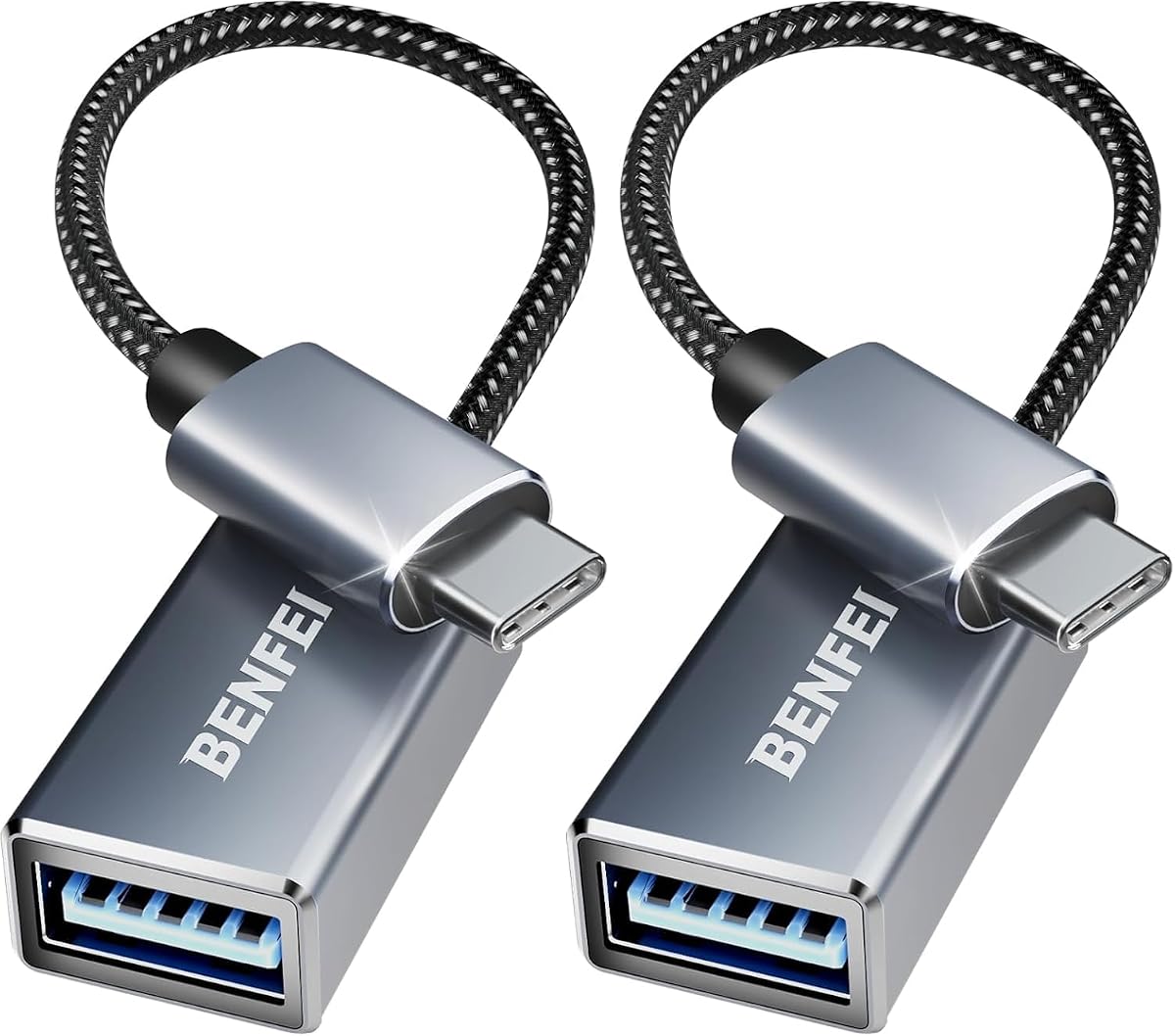
The BENFEI USB C to USB 3.0 adapter is a compact, two-pack option for connecting legacy USB-A devices to modern Type-C systems. Its 4.6 supplied rating is solid, and its design is aimed at users who need a short, practical connection rather than a large permanent converter.
We may earn a commission when you buy through this link, at no additional cost to you.
The adapters support transfers up to 5Gbps for syncing files, media, and other content. Nickel-plated USB-C and USB-A connectors are intended to resist corrosion and abrasion, while braided nylon cables add durability and a non-slip surface for insertion and removal. Aluminum alloy housings provide heat insulation around the connector body.
Its compact form is designed to allow two USB-C ports to be used simultaneously without interference, which is valuable on laptops with closely spaced ports. The product information does not state a specific charging wattage, so buyers should treat it primarily as an OTG and data adapter and verify charging behavior with their specific devices.
BENFEI is best for MacBook, iMac, iPhone, Samsung Galaxy, XPS, and other Type-C users who already own USB-A accessories. The braided two-pack is especially appealing for carrying in a laptop sleeve while leaving another adapter at a shared workstation.
The small housing is engineered to fit closely beside other USB-C ports. That lets users retain access to neighboring sockets on devices where every millimeter of space matters.
Braided nylon helps resist tangling and wear at a point where adapters are frequently pulled from bags. Nickel plating also supports reliable connector performance over repeated use.
We may earn a commission when you buy through this link, at no additional cost to you.
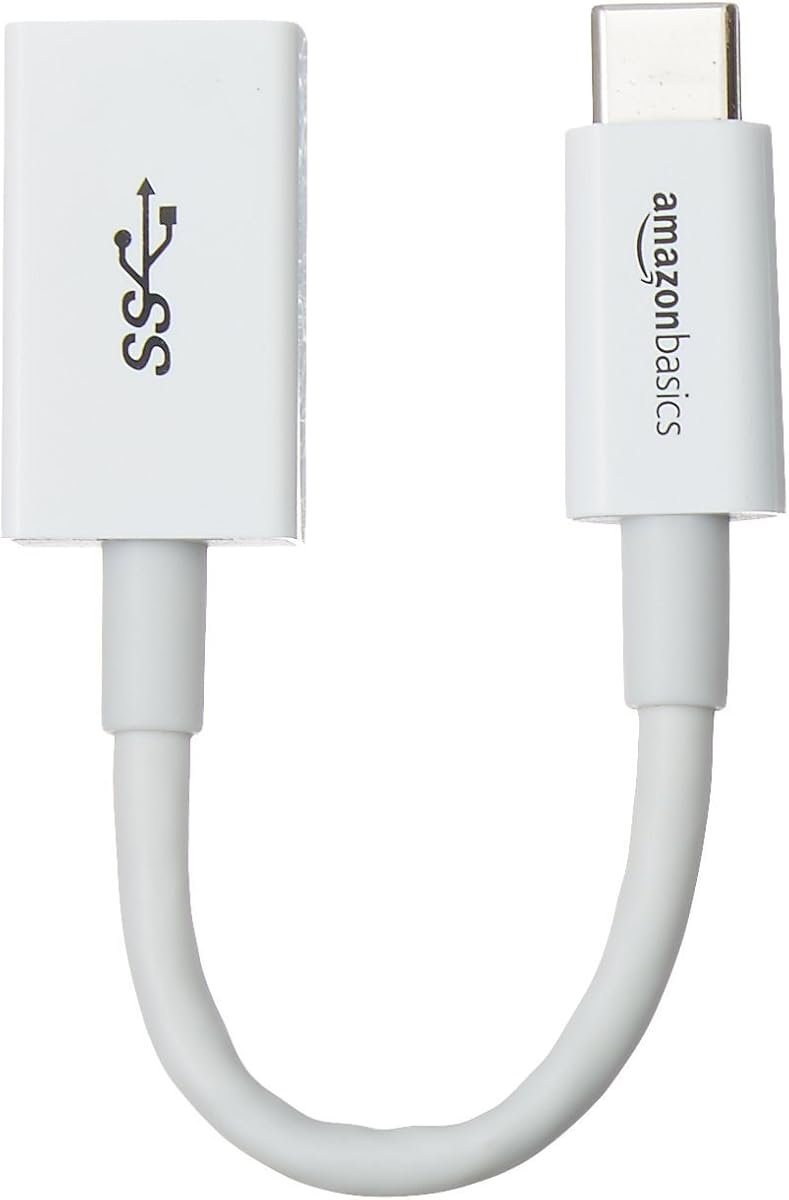
The Amazon Basics USB-C adapter is a focused single-adapter solution with USB-IF certification and clearly stated performance limits. Its supplied rating is 4.6, and its USB-C male to USB-A female configuration supports data transfer, charging, and connections to familiar USB-A-enabled devices.
We may earn a commission when you buy through this link, at no additional cost to you.
The included adapter is 5.5 inches long and uses USB 3.1 Gen 1 technology with transfer rates up to 5Gbps. It is compatible with USB 3.0 and USB 2.0 devices and can carry up to 15W, specified as 5V/3A. The product information explicitly warns not to exceed that recommended load and notes that PD-enabled devices may charge more slowly.
Because only one adapter is included, it offers less convenience for people who need separate units at home and work. Its 15W charging ceiling is modest for modern devices, and the certification should not be interpreted as a guarantee that every power arrangement will negotiate at the maximum rate.
This adapter is best for users who want a straightforward, certified converter for file transfer and modest charging. It is also a sensible choice for travel because the short cable and single-piece format minimize bulk, while the included one-year limited warranty adds manufacturer support.
USB-IF certification gives the adapter a defined standards-based foundation, while the listed USB 3.1 Gen 1 specification makes its intended transfer class easier to understand than vague high-speed wording.
The stated 15W maximum and 5V/3A limit are clear enough to help buyers avoid unsuitable charger expectations. Users needing more power should use a USB-C charger and cable designed for their device's charging protocol.
We may earn a commission when you buy through this link, at no additional cost to you.
Choosing the right female USB adapter starts with the exact connection you need, then requires checking speed, power, OTG support, media functions, and the dimensions of your devices. Connector labels alone cannot guarantee that every feature will work.
Female USB adapters are not all physically interchangeable. A USB-C male-to-USB-A female adapter plugs directly into a Type-C device and accepts legacy USB-A plugs. A USB-C female-to-female adapter instead joins two female-ended cables or components, while a USB-C female-to-USB-A male adapter connects a modern Type-C device to an older charger, power bank, or computer port. Read both ends of every cable in the intended chain before purchasing.
Start with the connector on the host device and write down the connector required by the accessory. If a smartphone needs a USB-A flash drive, a male-to-female OTG adapter is normally the relevant format. If an old USB-A wall charger must charge a USB-C phone, a female-to-male adapter may be the correct direction. If two USB-C cables must be extended, look for a female-to-female coupler.
The USB generation determines the maximum theoretical transfer rate and influences which storage accessories work as intended. USB 2.0 adapters are listed at up to 480Mbps, USB 3.0 options commonly state up to 5Gbps, and two selections claim up to 10Gbps. Faster ratings only matter when the host device, adapter, cable, and attached drive all support the same standard.
A 10Gbps specification offers the greatest potential for fast storage, but it cannot accelerate an older USB 2.0 flash drive. Conversely, buying a USB 2.0 adapter for a fast SSD may leave substantial performance unused. For most file transfers and peripheral connections, 5Gbps is a practical middle ground, while 10Gbps is worth considering for compatible high-capacity storage.
USB-C describes a connector, not an automatic guarantee that a phone or tablet can act as a host. The device must support USB On-The-Go or otherwise recognize the peripheral through the connected adapter. Compatibility lists are helpful, but operating-system behavior and the accessory itself can still determine whether a keyboard, mouse, controller, drive, or microphone is recognized.
For phones and tablets, check whether the model supports OTG and whether the accessory advertises compatibility with that platform. Laptop users face fewer host-function restrictions, but may still need to update operating-system software. If your goal is display output, do not rely on a general data adapter; choose a solution explicitly designed for video.
Charging claims vary considerably across the list. The Amazon Basics adapter is limited to 15W, or 5V/3A. The Pastall supports up to 5V/3A, the JXMOX supports 3A power output, and the Duyasurs states that it can charge a phone. Other products emphasize data transfer rather than a defined charging wattage. These differences matter when a device uses USB Power Delivery or another negotiated charging protocol.
A physical USB-A-to-USB-C adapter does not automatically provide fast charging. The charger, cable, adapter, and device must all support compatible protocols and adequate power levels. For a MacBook or another high-power computer, use a native USB-C charging solution rather than assuming a basic adapter can power it.
Many inexpensive OTG adapters are designed for data rather than display output. The JSAUX explicitly does not support video, while the Duyasurs excludes both audio and video. The Pastall lists audio output and video signal transmission, and the Amazon Basics is presented around data and charging. These distinctions prevent a costly mismatch when the real goal is connecting an external display.
USB-C can carry display signals, but only when the host device, adapter, cable, and display support the same alternate mode. A connector that fits physically may still produce no picture. For video, prioritize an explicitly stated video-capable product and verify every component in the chain rather than assuming all USB-C adapters support display output.
The adapter's length and width determine whether neighboring ports remain accessible. Slim aluminum, zinc alloy, or plastic housings can fit closely beside other connectors, while a bulky adapter may block a second port. The Anker, UGREEN, BENFEI, and three-color USB 3.0 set specifically address compact use. Connector cycle ratings and braided cabling also indicate attention to repeated insertion and removal.
For a laptop used at a desk, favor a low-profile body that permits side-by-side access. For travel, a short cable and light housing are easier to manage. For frequently shared equipment, metal housings, scratch resistance, and higher stated insertion-cycle figures deserve additional consideration.
Single adapters minimize clutter and are ideal for one stationary device or a short trip. Two-packs provide a spare without creating an oversized collection, while three- and four-packs suit households, offices, and people who use separate adapters in several bags. The Duyasurs, UGREEN, Pastall, and JXMOX options include three or four units.
Do not judge value by quantity alone. A larger set is most useful when you have genuine locations or devices to equip. If all of your equipment stays at one desk, a single well-built adapter may be cleaner. If you regularly travel between home and work, a two-pack can cover both while one remains as a backup.
Begin by confirming that the adapter orientation matches the connection you need. Identify the male and female ends, inspect both ports for dust or debris, and compare the adapter with the device and accessory specifications. For a USB-C host and USB-A accessory, insert the male USB-C plug squarely into the host port and connect the accessory to the female end without forcing either connector.
After connecting the adapter, check the host device for recognition of the flash drive, card reader, keyboard, mouse, or other peripheral. Mobile users should confirm that OTG is supported and enabled by the device. When moving files, check the source, storage, and intermediary cable for matching USB generations; otherwise, the adapter will operate at the slowest supported level.
Care for the adapter by unplugging it by its housing rather than pulling sharply on the attached cable. Keep the interfaces free of dust, moisture, and debris, and avoid using the adapter as a handle for a storage device. Store braided or elongated adapters loosely to prevent connector strain, and check the charging, video, and data limitations again whenever you connect the adapter to a different system.
A female USB adapter converts one connector type or orientation into another so that existing cables and peripherals can work with a different device. Common examples include plugging a USB-A flash drive into a USB-C laptop or joining USB-C cables through a female-to-female coupler. The exact use depends on the adapter's male and female ends, so check both connector labels before buying.
Not necessarily. A USB-C female-to-USB-A male adapter commonly lets a USB-C device use a USB-A charger, power bank, or computer. A USB-C male-to-USB-A female OTG adapter instead adds a USB-A port to a USB-C host, allowing compatible peripherals such as drives, keyboards, and mice to be attached. Direction, host support, and charging protocols all matter.
No. The adapter may support 10Gbps, but the attached drive, source device, and intermediary cable must also support that standard. An older USB 2.0 drive will remain limited to its own speed, and some host devices expose only slower USB functionality. Compatibility should therefore be checked across the entire connection chain.
Only when the adapter, host device, cable, and display all support compatible USB-C video modes. Several adapters in this roundup are expressly limited to data, charging, or OTG use and do not support video output. For display use, choose a product that explicitly lists the required video capability rather than relying on its USB-C connector alone.
The phone may not support OTG, the flash drive may use an unsupported format, or the drive may not receive enough power. The cable and adapter can also introduce compatibility or speed limitations. Confirm that the phone supports OTG, test the drive with a compatible computer, and verify that the adapter's stated functions include phone peripheral use.
Generally, a basic USB-A female adapter is not an appropriate MacBook charging solution. MacBook charging depends on USB-C power delivery and a power profile the basic adapter and attached charger may not provide. Use a native USB-C charger and cable rated for the computer's requirements, and reserve the adapter for compatible peripherals or data.
Usually, USB 3.0 adapters are backward compatible with USB 2.0 accessories, but operation occurs at the slower USB 2.0 limit. The host device and cable must also support the older standard. Conversely, a USB 2.0 adapter cannot deliver the transfer rate advertised by a USB 3.0 drive.
Match the connector direction, USB generation, charging capability, and media functions to your actual equipment. Then consider adapter size, port spacing, durability, and how many locations need coverage. A multi-pack is useful for travel, offices, and shared devices, but extra units do not compensate for an incompatible connector orientation or unsupported function.
The JSAUX two-pack stands out as the best overall option for balanced USB 3.0 performance, broad OTG compatibility, and durable construction. Anker is the premium choice for refined materials, a compact side-by-side fit, and the highest supplied rating, while the Duyasurs three-pack delivers strong utility for shoppers prioritizing value, charging support, and multiple adapters.
For faster storage, prioritize the UGREEN or Pastall adapters with stated 10Gbps performance, while remembering that every connected component must support the same standard. The Amazon Basics model is appealing for certification and clearly stated limits, and the JXMOX set serves users who need to reuse older USB-A chargers. Above all, verify connector orientation, OTG support, charging protocols, and video needs before purchasing.
Ratings, device compatibility, and product availability can change, and current prices should be checked before ordering. Review the exact specifications of your host device and accessory, select the smallest adapter that meets your needs, and verify the seller's current listing for the most recent details.