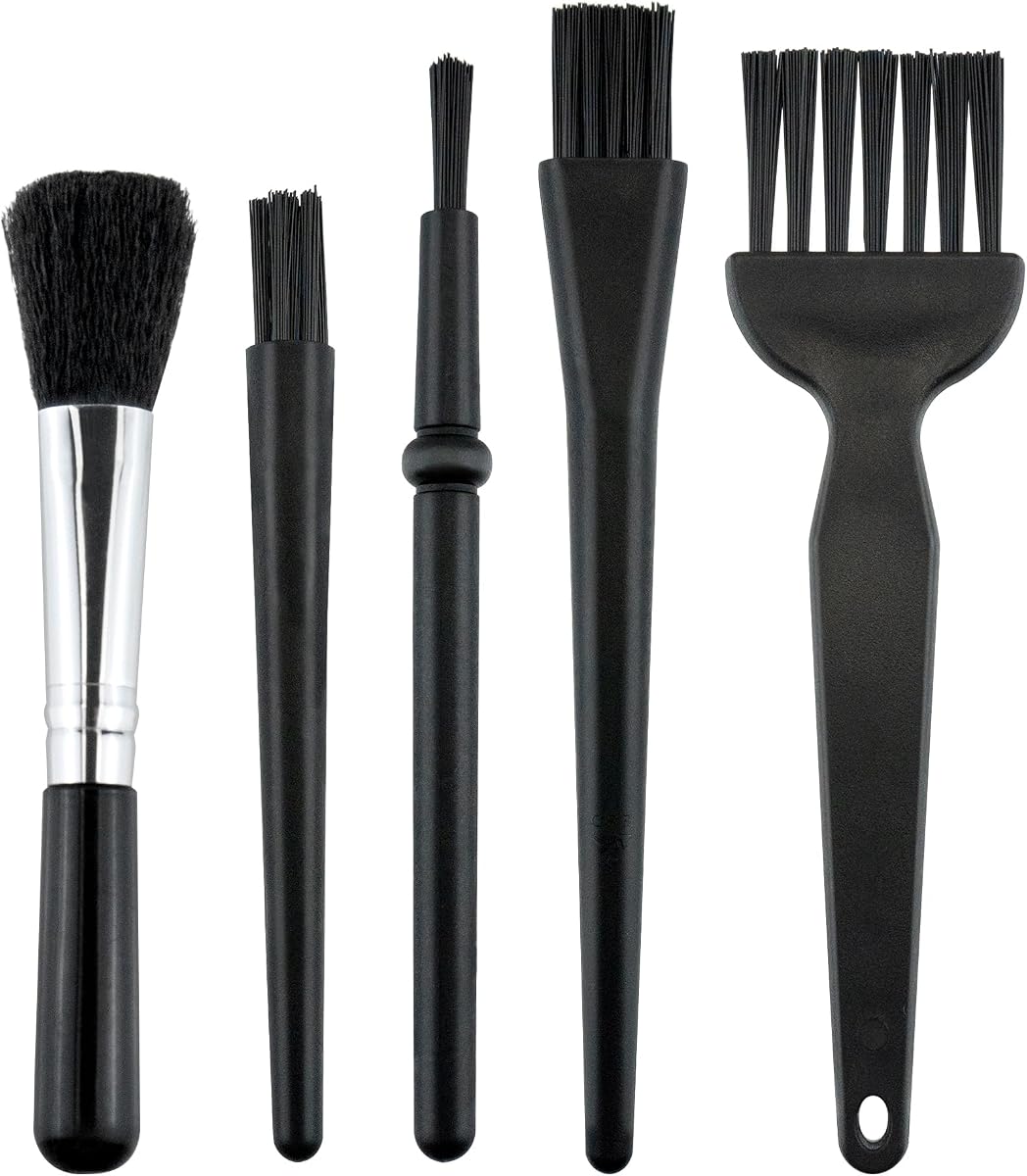
5 PCS Mini Keyboard Brushes
4.6Editor score
Five differently shaped brushes
Anti-static nylon bristles
Compact and easy to carry
PC cleaning kits compared for airflow, brush precision, accessories, portability, and rechargeable design, helping you choose the right tools for computers and
PC cleaning kits make computer maintenance more practical by combining the tools needed to remove dust, crumbs, fingerprints, and debris from keyboards, cases, fans, screens, and other electronics. A useful kit balances airflow, brush precision, safe accessories, portability, and ease of storage while matching the cleaning demands of your equipment.
We compared ten PC cleaning kits using their supplied specifications, accessory lists, ratings, power options, and intended uses. The selection covers rechargeable electric air dusters, anti-static brush sets, multi-tool electronics kits, and combined duster-and-vacuum designs, giving desktop users, laptop owners, gamers, and repair hobbyists several practical choices.
Each pick highlights a distinct approach to PC care, from compact manual brushes to high-speed cordless blowers. Ratings reflect the information available for each listing, while practical features determine which tool suits a given setup. Product availability and prices can change, so confirm the current listing and specifications before purchasing.
4.6Editor score

4.8Editor score

4.8Editor score
The comparison below highlights the cleaning method, power source, key specifications, and accessory coverage of each kit, making it easier to match a tool to desktops, laptops, peripherals, and delicate electronics.


The WOLFBOX MegaFlow 50 is an electric compressed-air duster rated 4.6, combining a maximum motor speed of 110,000 RPM with three selectable airflow levels. It is designed to clear dust and debris from computer cases, keyboards, electronic devices, household surfaces, and vehicles, making it one of the most broadly applicable options in this guide.
We may earn a commission when you buy through this link, at no additional cost to you.
Its strongest feature is the balance between airflow control and portability. The three gears allow users to move between gentler cleaning around delicate components and stronger bursts for visible debris. Four nozzles improve reach and make the tool useful for narrow keyboard gaps, case openings, desks, car vents, and other confined spaces. The 0.45-pound body also reduces fatigue during longer maintenance sessions.
The rechargeable design is an alternative to disposable compressed-air cans, while a stated runtime of up to 240 minutes on the lowest setting makes it useful for regular upkeep. A Type-C connection and approximately 3.5-hour charging time support convenient use. The trade-off is that the supplied guidance recommends fully charging the battery before use, and the maximum runtime figure applies to the lowest setting rather than the highest.
This is a strong recommendation for a desktop owner or laptop user who wants a single powered tool for keyboards, cases, fans, and other electronics. It may not replace a vacuum for settled debris, and it does not include precision brushes for delicate surfaces, but its combination of power, reach, and portability makes it a dependable general-purpose PC cleaning solution.
The three gear settings help prevent every cleaning job from receiving the same amount of force. Users can start gently around sensitive equipment and reserve the strongest mode for crumbs, dust, and debris collected in vents or around computer fans.
At 0.45 pounds, the MegaFlow 50 is easy to hold and carry. Its four nozzles extend the tool beyond a computer tower, allowing the same device to service keyboards, car interiors, desks, and other electronics.
We may earn a commission when you buy through this link, at no additional cost to you.
The Ordilend Keyboard Cleaner and Laptop Cleaning Kit is a manual, all-in-one solution rated 4.6. Rather than relying on a motor to dislodge debris, it provides brushes, cloths, a keycap puller, a metal pen tip, a flocking sponge, and other tools for cleaning keyboards, screens, earbuds, cameras, and other electronics.
We may earn a commission when you buy through this link, at no additional cost to you.
The kit is particularly useful for desktop builders and mechanical-keyboard owners because it includes a keycap puller alongside several brush styles. A retractable brush handles broader surfaces, a high-density brush reaches between keys, and a thin soft brush suits flatter laptop keyboards. Multiple polishing cloths and replacement cloths expand its screen-cleaning utility.
Its screen-care design is another important strength. The angled polishing cloth is shaped to fit screen corners better than a standard square cloth, while the included cleaning spray is intended to absorb stubborn marks without discoloration, streaking, or fiber shedding. The flocking sponge and plastic lens-cleaning pen add value for earbud cases and delicate surfaces.
This kit is best for people who want a complete maintenance drawer rather than a high-powered blower. It cannot clear dense dust as quickly as an electric air duster, and removing tightly packed crumbs still requires careful manual work. Even so, the broad accessory selection makes it a practical companion for keyboards, laptops, phones, cameras, and screens.
The included keycap puller supports routine keycap removal, while the differently sized brushes address flat surfaces, narrow gaps, and crevices. That combination is more useful for detailed keyboard care than a blower alone.
The shaped polishing cloths and cleaning spray provide a dedicated option for laptop and monitor surfaces. The set also includes replacement cloths, reducing the need to purchase additional material for routine screen care.
We may earn a commission when you buy through this link, at no additional cost to you.
The WOLFBOX MF60 is a cordless electric air duster rated 4.5. It reaches up to 110,000 RPM and offers three defined airflow levels, making it suitable for PC gamers, photographers, campers, and anyone who regularly cleans keyboards, computer cases, radiator fans, camera equipment, or vehicle vents.
We may earn a commission when you buy through this link, at no additional cost to you.
The gear structure is clearly defined: 25,000 RPM for delicate electronics, 60,000 RPM for everyday dusting, and 110,000 RPM for difficult debris. This makes it easier to select an appropriate level than working with a vague high-and-low switch. A flat nozzle handles broad case surfaces, a long nozzle reaches into keyboards and vents, and additional nozzles cover general and outdoor inflation tasks.
Two 2500mAh batteries support up to 240 minutes on Gear 1 and a stated full charge time of 3.5 hours. At 0.5 pounds, the unit is light enough for regular handheld use, while its compact shape suits storage in a camera backpack or vehicle glove box. The broad nozzle lineup also extends the product beyond electronics maintenance.
The MF60 is a good fit for users who want precise control over blower output and several attachment options. Its headline runtime is tied to the lowest gear, so buyers who need maximum airflow should not interpret it as a high-speed endurance claim. With that qualification, it is a versatile powered cleaning tool for computer and household upkeep.
The three documented speed levels make it easier to match airflow to the task. Low speed protects delicate equipment, medium speed handles routine dust, and maximum speed tackles stubborn debris in cases and cooling assemblies.
A long nozzle reaches into narrow keyboard spaces and vehicle vents, while a flat nozzle works across case panels and desks. The additional round and inflation options increase utility for outdoor and household tasks.
We may earn a commission when you buy through this link, at no additional cost to you.
The ten-piece Electronics Anti-Static Brush Kit has a 4.8 rating and is designed for detailed cleaning of keyboards, computer fans, motherboards, cameras, 3D printers, and sensitive electronics. Its defining advantage is variety: brushes range in size and stiffness so users can address tight ports, larger surfaces, and delicate lenses with the appropriate tool.
We may earn a commission when you buy through this link, at no additional cost to you.
Anti-static bristles are intended to reduce electrostatic buildup during cleaning, making the set relevant to users who work around sensitive components. Different stiffness levels allow a user to choose firmer bristles for stubborn material and softer ones for delicate surfaces. The assortment also supports cleaning duties beyond PCs, including cameras and other technical equipment.
Storage and portability are handled by a zippered mesh pouch, which keeps the ten brushes organized and prevents them from scattering across a workbench. This makes the set particularly attractive to repair hobbyists and technicians who want dedicated tools for multiple component types rather than a single general-purpose brush.
The kit is a strong pick when precision and controlled contact matter more than speed. It cannot remove dust already suspended in the air, and it lacks suction for large debris, so it may need to be paired with an electric air duster for complete computer maintenance. Even used alone, it is a versatile, well-organized, and budget-conscious detail-cleaning solution.
The assortment includes different sizes and stiffness levels, allowing precise work in ports, around fans, and across larger components. This makes the set more adaptable than a single-brush cleaning tool.
Anti-static bristles help reduce static buildup while the softer options suit cameras and delicate surfaces. The set is better suited to careful component care than aggressive scrubbing.
We may earn a commission when you buy through this link, at no additional cost to you.
The MiaEpic Z3 is a feature-rich electric air duster rated 4.5. Its brushless motor reaches up to 280,000 RPM and provides four adjustable speed settings, making it suitable for removing stubborn debris from PC components, cameras, premium electronics, keyboards, consoles, and industrial equipment.
We may earn a commission when you buy through this link, at no additional cost to you.
The built-in LCD is one of its most useful differentiators because it displays battery status and the selected speed. That information helps users judge remaining runtime and choose an appropriate level without relying entirely on memory. An integrated LED light illuminates dark areas inside a PC tower, around keyboard keys, and within other detailed spaces.
The accessory system includes four nozzles and two cleaning brushes, allowing the tool to move between computer cleaning, camera maintenance, dashboard dusting, outdoor use, and air-mattress inflation. Its stated runtime is 90 to 150 minutes, with Type-C charging taking approximately 2.5 to 3 hours. That makes it more of a portable session tool than an all-day maintenance device.
This is a strong recommendation for users who value visibility, control, and multiple attachments in one powered product. The very high speed figure may be unnecessary for routine keyboard care, and runtime is shorter than some competing electric dusters, but the display and LED make the Z3 particularly convenient for detailed work in poorly lit areas.
The LCD provides immediate information about remaining power and the active speed setting. This is useful during a long cleaning session because the user can select a lower setting or recharge before an interruption.
A built-in LED illuminates dark corners inside cases and beneath keyboards. It reduces the guesswork involved in finding dust that is not obvious to the naked eye.
We may earn a commission when you buy through this link, at no additional cost to you.
The 5 PCS Mini Keyboard Brushes set is a compact, affordable cleaning option rated 4.6. It includes five different brush forms for reaching deep spaces and cleaning areas that a larger household brush cannot access efficiently, with particular usefulness around computer keyboards and other electronics.
We may earn a commission when you buy through this link, at no additional cost to you.
The brushes use PP handles and nylon bristles described as durable, resistant to shedding, and non-static-generating. That combination is appealing for routine electronics cleaning because the user does not have to worry about disposable bristle fragments or unnecessary static buildup. The different shapes also make it easier to choose an appropriate tool for each gap.
Its portability is straightforward: the brushes are small and light enough to move between a home desk, office, vehicle, or travel bag. The set can also address appliance vents, car interiors, circuit boards, mobile phones, and cameras, which extends its usefulness beyond a single computer.
This set is best for buyers who need a simple, inexpensive way to remove crumbs and surface debris from keyboards and small electronic areas. It offers no motor, suction, screen cloth, or liquid, so it is not a complete all-purpose kit. Within that narrower role, however, it delivers useful variety and straightforward operation.
The varied brush profiles provide options for deep recesses, narrow spaces, and broader surfaces. This allows a user to work through a keyboard systematically instead of relying on one brush angle.
The compact size makes the set easy to carry or keep in an office drawer. It can also move between several devices without the weight and storage demands of a powered cleaner.
We may earn a commission when you buy through this link, at no additional cost to you.
The 2-in-1 Compressed Air Duster and Vacuum is rated 4.1 and combines a brushless blower with suction. Its motor reaches up to 320,000 RPM, the highest stated figure in this comparison, while three adjustable modes support both delicate dusting and more demanding removal of crumbs, dirt, and debris.
We may earn a commission when you buy through this link, at no additional cost to you.
The suction function is the principal distinction from conventional electric air dusters. Instead of relying exclusively on airflow to move particles, the device can collect dirt directly through a dust cup. The package includes three nozzles, two brush heads, three cleaning brushes, a dust cup, and an extension tube, providing a more complete cleaning setup for computers, keyboards, air-conditioning filters, furniture, car seats, and pet hair.
A 7800mAh battery provides up to 180 minutes on low-speed mode, and the unit uses Type-C fast charging with an approximately 3.5-hour full-charge time. The aluminum alloy body, included carrying bag, and stated overheat, short-circuit, and battery-temperature protections make it oriented toward portability and repeated use.
The combination is appealing for a shared household or gaming setup where both loose dust and settled debris need attention. However, the 4.1 rating is the lowest among the ten selections, and the larger multi-function body requires more storage than a brush set. It is still the most versatile option for users who want one device to cover blowing, vacuuming, and household cleanup.
Airflow lifts debris from difficult spaces, while suction gathers material that has settled onto desks, seats, and other surfaces. The dual design reduces the need to switch immediately between an air duster and a separate vacuum.
Nozzles, brush heads, cleaning brushes, a dust cup, and an extension tube create a flexible platform. The tool can address computer internals as well as keyboards, furniture, filters, vehicle interiors, and pet hair.
We may earn a commission when you buy through this link, at no additional cost to you.
The 170,000 RPM Handheld Electric Air Duster has a 4.8 rating and provides strong, steady airflow for removing dust, crumbs, and debris without direct contact. Its four speed levels cover everything from gentle work around cameras and delicate electronics to stronger cleaning of PC cases, cooling fans, vents, and vehicle interiors.
We may earn a commission when you buy through this link, at no additional cost to you.
The nozzles are central to the product's versatility. They can reach between keyboard keys, around heatsinks, toward ports, into cooling fans, and into narrow gaps that are difficult to service with a brush. This makes the tool relevant to desktops, laptops, gaming equipment, consoles, cameras, and office devices without requiring a separate attachment for every situation.
Its cordless rechargeable format removes the tethering inconvenience of a powered blower and avoids the need to keep replacing disposable compressed-air cans. The package includes four nozzles, a cleaning brush, a lanyard, a storage bag, and a charging cable. That combination of accessories and storage supports both regular use and travel.
The product is a particularly compelling premium pick for a user who wants reusable power, adjustable output, and a broad accessory set. The supplied information does not state a specific runtime, so buyers who require long continuous sessions should verify that detail. For ordinary periodic cleaning, however, its 4.8 rating and thoughtfully included accessories make it an excellent all-around choice.
Multiple speed levels let users match the output to the surface and debris. A gentle setting is appropriate for delicate electronics, while stronger modes address case interiors, fan areas, vents, and stubborn crumbs.
The included nozzles, brush, lanyard, storage bag, and charging cable make the package ready for routine use. Cordless operation also allows cleaning in a car, office, or other location without proximity to a wall outlet.
We may earn a commission when you buy through this link, at no additional cost to you.
The UltraBlow VC023 is a rechargeable electric blower rated 4.4. It produces up to 130,000 RPM and 1.86 to 2.51 ounces of blowing power, with three airflow modes for different equipment and debris levels. Its stated goal is rapid cleaning of PCs, keyboards, vehicles, household surfaces, and other electronics.
We may earn a commission when you buy through this link, at no additional cost to you.
The accessory package is unusually comprehensive, combining five nozzles with three brushes. Different nozzles can address keyboard gaps, case surfaces, vehicle seating, appliances, and inflation tasks, while the brushes provide contact-based cleaning when airflow alone is insufficient. The unit also supports tasks such as clearing camping equipment and inflating air cushions, kayaks, and swimming rings.
A high-definition display reports the remaining battery and active wind gear, and an LED light illuminates the cleaning area. The 6000mAh battery supports approximately 20 to 40 minutes of continuous use and recharges through a Type-C cable in about three to four hours. Temperature, current, and short-circuit protections are included for the battery.
This is a good option for users who want a readable status display, a built-in light, and many attachments. The shorter runtime means it is better suited to quick maintenance sessions than extended projects, and inflation use is limited to the first speed to protect the battery. For computer cleaning, however, the control and accessory variety are substantial.
The display makes remaining battery and the selected wind gear easy to check. The integrated LED helps reveal dust in dark areas, reducing the need for a separate flashlight during detailed cleaning.
Five nozzles address a range of spaces, while three brushes cover surfaces that benefit from direct contact. Together, they support detailed electronics work and broader household tasks.
We may earn a commission when you buy through this link, at no additional cost to you.
The Tounee 20-in-1 Keyboard Cleaner Kit is rated 4.4 and provides more than twenty accessories for phones, tablets, computers, monitors, televisions, cameras, earbuds, and other electronics. Its breadth makes it a useful general maintenance kit for a household or shared workspace containing many device types.
We may earn a commission when you buy through this link, at no additional cost to you.
The retractable brush is a convenient core component, while a keycap puller, shaft puller, high-density brush, and dual-bristle brush support keyboard work. The air blower provides gentle manual airflow, and an extension rod can extend the reach of compatible tools. These features are aimed at cleaning flat surfaces, desktop areas, laptop gaps, and recessed keyboard spaces.
The kit also pays considerable attention to small electronics. A lens brush and cleaning pen are suitable for camera lenses, binoculars, and telescopes, while the AirPod and earbud pen combines a metal tip with soft brushes for acoustic mesh, shallow holes, charging ports, and narrow cracks. A screen spray, microfiber cloth, and card pickup pin complete the maintenance setup.
The Tounee is best for users who want a portable drawer organizer for many kinds of electronics. It does not provide the speed of a motorized air duster or the collection capacity of a vacuum, so large debris may require additional tools. Its major advantage is the unusual variety of specialized implements delivered in one compact multi-tool package.
The metal tip reaches small cracks, the plush brush addresses acoustic mesh, and separate hard and soft brushes work around charging ports. These focused tools are difficult to replace with a general-purpose cloth.
Keyboard tools, optical cleaning implements, screen materials, a blower, and an extension rod cover a wide range of household electronics. The compact format also makes the set convenient to store or carry.
We may earn a commission when you buy through this link, at no additional cost to you.
The right PC cleaning kit depends on the kinds of debris you encounter, the components you maintain, and how much control or portability you need. Compare cleaning methods, power, attachments, and safe handling before deciding.
Powered air dusters are best for loose dust, crumbs, and debris located inside computer cases, around cooling fans, between keyboard keys, and in narrow vents. Their multiple speed settings can also help users vary the force applied to different components. Manual brush kits, by contrast, provide better control for surface dust and delicate parts, but they require more time and repeated physical contact. Many users maintain the best approach by combining one of each rather than expecting a single tool to handle every situation.
Motor speed is one of the most prominent specifications among electric dusters, but higher numbers are not automatically better for every task. A multi-speed design gives you control: low or medium output can clean camera equipment and sensitive electronics, while a higher setting helps shift stubborn dust from case interiors, heatsinks, and cooling assemblies. The best PC cleaning kit should provide clear settings rather than forcing one output level on every surface.
Nozzles determine how precisely a blower can direct air. A long, narrow nozzle is valuable for keyboard gaps, ports, heatsinks, and cooling fans, while a flat nozzle works well across PC cases, desks, and vehicle surfaces. Round and general-purpose nozzles add flexibility for household tasks. When comparing kits, check the number and type of attachments rather than looking only at the motor specification, since reach can determine whether the tool can clean the spaces that matter in your setup.
Brushes are essential for dust that does not move with airflow and for delicate surfaces that should not be blasted at high speed. Look for an assortment of sizes, shapes, and stiffness levels so you can move from broad keyboard surfaces to tightly packed ports and camera components. Anti-static bristles are particularly relevant around sensitive electronics because they are designed to reduce electrostatic buildup during contact cleaning.
A rechargeable electric duster avoids repeated reliance on disposable compressed-air cans and supports cordless use around a desk, vehicle, or outdoor workspace. Compare the documented runtime by speed because maximum output often consumes power faster than low settings. Charging time, battery capacity, and the presence of Type-C charging also affect convenience. Users who clean large systems frequently may value a larger battery, while those performing occasional maintenance may find a smaller battery sufficient.
A broad kit can cover keyboards, screens, cameras, earbuds, phones, and other devices without requiring several separate purchases. Look for keycap pullers, cleaning pens, microfiber cloths, sprays, brushes, and extension tools when your equipment inventory is diverse. However, more accessories do not automatically make a kit better; each tool should have a clear purpose and fit the devices you actually maintain. Focused sets may be easier to organize and use than oversized assortments.
A battery display can help prevent interrupted cleaning sessions, while a speed indicator makes it easier to repeat the same setting on subsequent tasks. Built-in LED lighting is particularly helpful inside dark PC towers, beneath keyboards, and around camera equipment. Clear controls also reduce the chance of applying excessive airflow to delicate components. These features are conveniences rather than absolute requirements, but they can make a powered duster noticeably easier to use.
The best tool is one you can keep available and use without a complicated setup. Compact brush sets fit easily in a drawer, while cordless blowers are useful across a home, office, car, or travel bag. Electric models with carrying cases and nozzles stored together are more convenient than models whose attachments can easily be misplaced. Consider both the tool's weight and the space required to store its accessories.
Before cleaning, shut down the computer or device and disconnect its power source. If a component remains powered, avoid directing air at moving fans. Allow hot equipment to cool, move removable objects away from the work area, and use a soft brush or microfiber cloth to remove loose surface debris before reaching for a powered blower. Work in a well-ventilated area and avoid spraying liquid directly onto a computer, keyboard, monitor, or camera.
For a computer case, open the side panel, identify the dust-prone areas, and use controlled bursts around fans, heatsinks, filters, vents, and motherboard surfaces. Direct the air away from components that can move or spin freely. Hold the tool steady, keep the nozzle moving, and use the lowest practical setting around delicate parts. A brush attachment can collect remaining dust, but the device should remain disconnected throughout the process.
Clean keyboards with the power off, turning it upside down so loose crumbs fall away. Use a brush, keycap puller, or soft blower to dislodge debris between keys, and remove keycaps only if they can be lifted without force. Wipe screens with a clean microfiber cloth and a product approved for the display. Afterward, let surfaces dry fully, return keycaps and panels correctly, and reconnect only when every part is seated and no moisture remains.
A laptop can benefit from a smaller cleaning kit that includes a soft brush, microfiber cloth, and narrow blower or brush. Laptop keyboards and vents trap crumbs and dust, while screens collect fingerprints and oily smudges. A full desktop kit becomes more useful if you also maintain a tower, gaming accessories, cameras, or other electronics.
An electric duster provides reusable, cordless airflow without requiring replacement cans. It can offer several speed levels, useful for moving from delicate electronics to stubborn debris. Compressed-air cans remain portable and can provide a quick burst, but repeated use requires replacement and some cans can cool or freeze during operation.
The safest practice is to shut down and disconnect the device before using an air duster. A powered fan can spin faster when struck by a strong burst, and the computer should not be operating while its side panel is open. Allow hot components to cool and direct air carefully around fans and other movable parts.
Soft, anti-static bristles are generally the most appropriate for contact cleaning around cameras, motherboards, ports, and other sensitive parts. The brush should be dry, clean, and free of damaged fibers. Use firmer brushes only on sturdy surfaces such as keyboard frames or dusty ventilation areas where the material can withstand more contact.
Compressed air is better for dislodging debris from inside cases and vents, while suction is better for collecting settled dust from desks, seats, and other broad surfaces. A combined duster-and-vacuum can cover both jobs, but separate tools may offer more capacity and specialized attachments. For many setups, a brush kit for detail work and an electric blower for hidden debris provide a balanced approach.
Cleaning frequency depends on the environment and how much the computer is used. Systems in dusty, carpeted, or pet-friendly spaces may need attention more often, while a clean office setup may require less frequent service. Inspect intake filters, vents, fan areas, and visible dust buildup rather than cleaning on a rigid schedule alone.
Do not spray cleaner directly onto a display unless the manufacturer explicitly permits it. Apply an appropriate amount to a clean microfiber cloth, or follow the kit's instructions, and wipe gently without pressing hard. Confirm that the product is suitable for the screen coating, and never allow liquid to enter bezels, ports, keyboards, or other openings.
A keycap puller is helpful for deeper cleaning because it allows trapped debris to be removed from beneath the keys. It is not necessary for basic surface wiping. Use it only on removable keycaps, avoid pulling forcefully, and consult the keyboard manufacturer if the caps are not designed to be removed.
The WOLFBOX MegaFlow 50 offers a balanced combination of adjustable airflow, multiple nozzles, and portability, while the 170,000 RPM Cordless Air Blower stands out with its 4.8 rating and complete accessory package. For a simpler approach, the five-piece mini brush set or ten-piece anti-static brush kit delivers targeted manual cleaning without the weight of a powered tool.
Prioritize the cleaning problems you actually face. Choose a multi-speed air duster for hidden dust and case interiors, a varied anti-static brush set for delicate surfaces, or an all-in-one manual kit for keyboards, screens, earbuds, and cameras. A combined duster-and-vacuum is worth considering when you also clean furniture, vehicle interiors, and household surfaces.
Finally, check the current product listing, included accessories, battery information, and compatibility before ordering. Product configurations and prices can change, so the current seller page is the best source for final details. With the right balance of airflow, brush control, and portability, a PC cleaning kit can make routine computer maintenance faster and more convenient.
