
Silkland 80Gbps USB C Adapter
4.7Editor score
80Gbps USB4 V2.0 bandwidth
240W extended power delivery
16K and dual 8K video
120Gbps dynamic display bandwidth
Compare the 10 best right angle USB C adapters for charging, data transfer, video output, broad compatibility, durability, and a cleaner setup.
Right angle USB C adapters redirect a connected cable into a more natural path, reducing strain at the device port while keeping desks, gaming stations, and travel setups neater. A worthwhile adapter should also preserve the charging, data, and display capabilities required by your equipment, rather than offering only a convenient shape.
This guide compares ten right angle USB C adapters based on their stated power delivery, data-transfer speed, video support, physical design, compatibility, construction, and included directional options. It covers basic 100W models, 240W options, 40Gbps USB4 adapters, and a USB4 V2.0 model designed for the newest high-speed workflows.
Each review explains where the adapter stands out, where its specifications require compatible hardware, and who is most likely to benefit. The top selections represent the strongest balance of features, while every listing remains eligible to change in price, availability, or manufacturer details as the October 2026 shopping landscape evolves.
4.7Editor score

4.6Editor score

4.4Editor score
The comparison below places each adapter's charging capacity, data speed, video capabilities, and directional design side by side. Specifications represent maximum supported capabilities, so the device, cable, charger, and display must all meet the necessary requirements to achieve the advertised result.


The UGREEN 90 Degree USB C Adapter 3 Pack combines a practical cable-routing solution with unusually broad capabilities. Its 4.6 rating reflects a well-rounded option for users who want more than a simple charging-angle converter. The package also includes three adapters, making it easier to keep one at home, one at work, and one in a travel bag.
We may earn a commission when you buy through this link, at no additional cost to you.
Its most attractive feature is the combination of up to 240W USB-C Power Delivery, 40Gbps USB4 data transfer, and display output up to 8K@60Hz. That makes it relevant to high-power laptops, handheld gaming systems, external SSDs, docking stations, and compatible monitors. The aluminum alloy housing is also designed for heat dissipation, scratch resistance, and repeated use, with the product listing noting testing for more than 10,000 plug cycles.
The right-angle geometry is the reason to buy an adapter like this in the first place. It helps route a cable away from the immediate edge of a device, reducing a sharp bend and lowering the force transferred to the port when the cable is moved or tugged. It is especially useful for laptops close to a desk edge, phones used in bed, and handheld consoles that otherwise rest on a sharp surface.
This is the strongest all-around choice for buyers who want one adapter type to cover charging, storage transfers, and display connections. The main qualification is straightforward: the connected computer, phone, charger, cable, and monitor must support the relevant protocol. If your equipment only needs ordinary charging, its potential is far greater than necessary, but for a modern USB4 setup it offers a particularly balanced feature set.
The 90-degree form changes the direction in which cable tension reaches the port. Instead of the cable projecting straight out and being forced sideways, it bends immediately and runs parallel to the device, which can make desks and gaming setups look cleaner while reducing repeated strain.
The combination of 240W charging, 40Gbps data transfer, and 8K display support allows the same compact adapter to serve a laptop, a compatible phone, an external drive, or a monitor. Multiple USB-C ports, devices, and adapters in the pack add convenience without changing the basic installation.
We may earn a commission when you buy through this link, at no additional cost to you.
Silkland's 40Gbps USB C 90 Degree Right Angle Adapter 2 Pack is a compact, high-rated choice for users who need full-featured USB4 routing. It carries a 4.7 rating and supports USB-C Power Delivery 3.1 Extended Power Range, including 140W, 180W, and 240W charging profiles, along with 40Gbps data transfer and 8K video.
We may earn a commission when you buy through this link, at no additional cost to you.
The adapter's slim profile is a meaningful selling point for modern laptops. Rather than extending far from the port, it is designed not to block the neighboring connection. That matters on densely arranged MacBook, Chromebook, and tablet systems, where every available port may already be occupied by another cable, drive, or accessory.
Silkland identifies an aluminum alloy frame with scratch resistance and heat dissipation as the core of its construction. A non-slip exterior is intended to make insertion and removal easier, which can be useful in docks, bedside setups, and other places where there is little room to grip the plug. The two-adapter pack is also suitable for keeping separate connectors in different locations.
The important caveat is physical clearance. Silkland specifically advises that the USB-C port should be fully exposed because thick or bulky cases may prevent a proper fit. Otherwise, this is a persuasive option for someone seeking a slim 240W, 40Gbps adapter and broad compatibility with USB-C and Thunderbolt 3 or 4 equipment.
The low-profile construction is intended to sit close to the device and leave adjacent ports accessible. This makes it more practical than a bulky right-angle converter in workflows involving external monitors, storage, and other everyday laptop accessories.
Support for 140W, 180W, and 240W USB PD profiles makes the adapter suitable for high-power mobile workstations. Actual charging remains dependent on the laptop, charger, cable, and negotiated power level, so checking all four components is important.
We may earn a commission when you buy through this link, at no additional cost to you.
The Basesailor USB C 90 Degree Right Angle Adapter 3 Pack distinguishes itself with three directional choices. Rather than supplying identical right-angle connectors, the set can accommodate a wall, desk edge, sofa, or bedside table where the best cable path changes from one setup to another. Its 4.6 rating makes it a solid option for flexible household and travel use.
We may earn a commission when you buy through this link, at no additional cost to you.
Despite being a directional adapter, it retains up to 100W Power Delivery, 40Gbps USB4 or USB 3.2 data transfer, and 4K@60Hz video output. That makes it suitable for MacBook, Steam Deck, ROG Ally, Switch, compatible iPhone and iPad models, Samsung Galaxy phones, and other USB-C equipment. Full 40Gbps performance requires compatible devices and cables on both ends.
The physical benefits are straightforward. Positioning the cable parallel to a device can reduce sharp bends and lessen the pull applied directly to a charging port. The compact aluminum alloy housing also makes the adapter easy to carry, while the three-option format gives users more flexibility than a single directional design.
This adapter is best for someone who changes workspaces and needs different angles in one purchase. Its 100W charging ceiling and 4K@60Hz video specification are less ambitious than the 240W and 8K options in this list, but for many phones, tablets, handhelds, and moderately equipped laptops, those capabilities are more than sufficient.
A connector that works well on a desk may point awkwardly toward a wall or bed. Including multiple directions makes it easier to create a natural cable path without pulling the cable around the device or forcing it into a sharp bend.
Up to 40Gbps data transfer makes the adapter useful for compatible external SSDs and docks, while 4K@60Hz output supports a secondary display. These functions require USB4, Thunderbolt, or appropriate DisplayPort Alternate Mode support across the connected hardware.
We may earn a commission when you buy through this link, at no additional cost to you.
UGREEN's 40Gbps Right Angle USB C Adapter Combo emphasizes flexibility across different physical setups. The two-pack includes top or bottom and left or right 90-degree configurations, allowing users to select an approach that suits a particular port location. It also supports up to 240W charging and 40Gbps USB4 or Thunderbolt 4 data transfer.
We may earn a commission when you buy through this link, at no additional cost to you.
Its stated 8K video output and high data rate make it more than a simple charging accessory. It can serve compatible MacBook Pro or Air, iPad Pro, Steam Deck, Nintendo Switch, ROG Ally, and Thunderbolt 3 or 4 systems. The ability to alter the cable direction is particularly useful when a device is placed against a wall, on a stand, or beside a monitor.
The listing describes a rugged aluminum housing and metal connectors intended to create a secure connection and limit signal loss. Those materials also suit adapters that will be carried between locations, although the need to match the adapter's direction to the device means the set may not be as instantly universal as several identical adapters.
For buyers who need both high charging capability and more than one cable direction, this is a particularly useful UGREEN option. It is less convenient for a traveler who wants identical spares, but the two different orientations can solve installation problems that a standard right-angle adapter cannot.
The included top or bottom and left or right designs make it possible to match the adapter to the placement of a port. A quick check of the device's orientation can prevent a forced cable bend and make a desk or gaming station look more deliberate.
The 40Gbps transfer rate supports demanding storage tasks on compatible USB4 systems, while 240W charging suits power-hungry laptops. Display support up to 8K makes the adapter viable for a compatible external monitor when the host, cable, and display also support the needed standards.
We may earn a commission when you buy through this link, at no additional cost to you.
This Silkland 40Gbps 240W USB4 right-angle adapter offers the same broad core capabilities as the brand's other 40Gbps offering, including a 4.7 rating, up to 240W charging, 40Gbps data transfer, and 8K video support. It is a portable choice for users who want a small, full-featured connector that can accompany a laptop or handheld.
We may earn a commission when you buy through this link, at no additional cost to you.
The physical design is intended to minimize obstruction around the host device. Its compact aluminum alloy body, non-slip finish, and slim profile are particularly appropriate for modern laptops with closely spaced ports. A right-angle adapter also changes cable movement from a direct outward pull into a gentler lateral route, which can reduce wear at the socket.
Compatibility covers major USB-C categories, including Thunderbolt 3 and 4 devices, MacBook Pro, Steam Deck, Switch, ROG Ally, Quest 3, Surface Book 2, recent iPhone models, Samsung Galaxy phones, Google Pixel devices, and Chromebooks. This broad list is useful, but the clearest caution remains physical: the connected port must be exposed rather than hidden by a thick case.
The adapter makes sense for a traveler who already owns USB4 cables and wants to preserve their full charging and data capabilities while changing the connection angle. If the purpose is only slow charging or standard-speed file transfer, a simpler adapter would suffice, but this model is ready for more demanding compatible equipment.
The small aluminum body is easy to carry and does not need separate power. It can be packed alongside a laptop cable, phone cable, or gaming handheld accessory without adding meaningful weight or bulk to a bag.
Rather than limiting the connection to charging, the adapter is designed to retain USB4 data transfer and high-resolution display output. Compatible cables and source devices remain necessary, but the adapter can serve multiple roles without separate specialized converters.
We may earn a commission when you buy through this link, at no additional cost to you.
The Silkland 80Gbps USB C 90 Degree Right Angle Adapter 2 Pack is the advanced USB4 V2.0 option in this guide. It supports up to 80Gbps data transfer, 240W charging, 16K or dual 8K video, and dynamic display bandwidth of up to 120Gbps. Its 4.7 rating and extensive specifications make it the premium choice for newer high-end systems.
We may earn a commission when you buy through this link, at no additional cost to you.
The distinction between 80Gbps data bandwidth and 120Gbps dynamic display bandwidth is important. The adapter's data connection tops out at 80Gbps, while USB4 V2.0 can allocate up to 120Gbps to video transmission when the device, cable, and monitors support the appropriate configuration. That can support dual 8K or 6K displays, triple 4K displays, or other arrangements depending on the host system's capabilities.
Its compatibility focus is on USB4 V2.0 and Thunderbolt 5, 4, or 3 equipment, including modern MacBook, iPad, iPhone, Steam Deck, ROG Ally, Nintendo Switch 2, Quest 3, Samsung Galaxy, and Google Pixel systems. A slim aluminum alloy shell provides heat dissipation and durability, while the non-slip shape helps with insertion and removal.
This is not the most universally useful adapter, because older USB-C equipment may negotiate lower speeds and cannot access every display configuration. It is most compelling for a workstation or enthusiast with a USB4 V2.0 or Thunderbolt 5 computer, a certified high-speed cable, and demanding storage or multi-display requirements.
An 80Gbps data ceiling is the central advantage of this adapter. Compatible external storage, docks, and high-resolution workflows can benefit from the added bandwidth, although the source computer and cable must also support USB4 V2.0 or an equivalent standard.
USB4 V2.0 can dynamically shift more bandwidth toward displays, supporting demanding configurations such as dual 8K or 6K screens. The 120Gbps figure applies to video transmission rather than ordinary data transfer, and the final output depends on device, cable, and monitor support.
We may earn a commission when you buy through this link, at no additional cost to you.
The Vanjua 4 Pack 90 Degree USB-C Male to Female Adapter is a straightforward way to obtain several inexpensive spares. It supports up to 100W charging, 40Gbps USB4 data transfer, and 8K@60Hz display output, giving it more capability than a simple charge-only adapter. Its 4.4 rating remains positive while leaving it slightly behind the highest-rated options.
We may earn a commission when you buy through this link, at no additional cost to you.
Four adapters make this pack convenient for people who use USB-C equipment in several places. One can stay with a desktop, one with a laptop bag, and others can serve phones, tablets, or handhelds. The compact aluminum alloy shell is portable and the listing reports testing across more than 10,000 plug-and-unplug cycles.
The right-angle design can reduce loose connections, cable wobble, and repeated strain on a charging socket by changing the cable's exit direction. That makes it particularly useful with Steam Deck, ROG Ally, Legion Go, Nintendo Switch, and other devices that may otherwise rest close to a surface. Plug-and-play operation means there is no software or driver setup.
The clear limitation is case compatibility. Vanjua states that the adapter is not applicable when protective cases, covers, or skins are installed. Buyers should also recognize that 100W is the maximum charging level. For ordinary phones, tablets, many handhelds, and numerous laptops, however, the four-pack format is highly convenient.
A four-piece pack can cover multiple charging locations without asking the user to move one adapter from device to device. It is a practical format for households, shared desks, and travel kits containing several USB-C accessories.
Although charging stops at 100W, the stated 40Gbps data rate and 8K@60Hz video support make the adapter suitable for compatible USB4 storage, docks, and displays. The host device, connected cable, and display must all support the relevant standards.
We may earn a commission when you buy through this link, at no additional cost to you.
JSAUX's 90 Degree USB C to USB C Adapter 2 Pack offers a polished combination of 100W charging, 40Gbps data transfer, and 4K@60Hz display output. Its 4.7 rating places it among the strongest-rated products here, and the understated gray finish should blend easily into a laptop, monitor, or gaming setup.
We may earn a commission when you buy through this link, at no additional cost to you.
The practical value of a right-angle connector becomes clearest when a device is close to a wall or sits on a desk. The cable can run parallel to the device rather than projecting into the workspace, reducing strain and producing a neater visual. That benefit is equally useful when charging a phone in bed, positioning a handheld console, or connecting a laptop to a dock.
The adapter supports modern workflows involving 40Gbps external SSDs, docking stations, and fast file transfers when the source and cable meet USB4 or Thunderbolt requirements. Display output up to 4K@60Hz is suitable for many single-monitor setups, and the listing identifies compatibility with MacBook Pro, Steam Deck, ROG Ally, Switch, iPad, iPhone, Samsung Galaxy, Google Pixel, and other USB-C devices.
This is a good general-purpose option for users who want a tidier connection and high-speed data but do not need 240W charging or 8K output. The two-adapter pack allows a spare to be kept in different working locations, while the compact form should be easy to carry.
The adapter's angled outlet keeps the cable close to the device and reduces visual clutter. It can also reduce the leverage created when a straight cable is pulled or pressed, potentially extending the useful life of both the connector and device port.
The 40Gbps transfer capability makes this more than a charging adapter, and it can work well with compatible external SSDs or docks. Its charging limit remains 100W, which covers many common devices but not the highest-power laptop charging profiles.
We may earn a commission when you buy through this link, at no additional cost to you.
The JSAUX 90 Degree USB C Male to Female Adapter 2 Pack includes left- and right-facing versions, making it well suited to devices used in different positions. It carries a 4.7 rating and combines up to 100W Power Delivery, 40Gbps data transfer, and 4K@60Hz video and audio pass-through.
We may earn a commission when you buy through this link, at no additional cost to you.
Directional flexibility is especially helpful when docking a laptop. One side may be needed beside a monitor or dock, while the opposite direction may prevent a cable from crossing the edge of a desk. The angled design also reduces the immediate bend at the device and can improve comfort during prolonged charging, gaming, or media use.
For compatible USB4 and Thunderbolt equipment, 40Gbps data transfer supports external SSDs, docks, and rapid file movement. Display and audio pass-through can simplify connections to compatible monitors, televisions, and VR accessories. Broad compatibility is listed for MacBook Pro, Steam Deck, ROG Ally, Nintendo Switch, iPads, iPhones, Samsung Galaxy phones, Google Pixel devices, and other USB-C products.
This pack is most attractive to a buyer who understands the usefulness of both left and right orientations but does not need more than 100W charging. It provides a flexible everyday solution for clean routing, and the high product rating supports its place among the most appealing general-purpose choices in this guide.
Left and right adapters make it easier to keep a cable from blocking a neighboring port or crossing the front of a workspace. They also allow the user to match the connector to how a laptop or handheld is naturally held.
Supporting 4K@60Hz video and audio pass-through makes the adapter useful with compatible monitors and entertainment equipment. Its 40Gbps data capability adds fast external storage support, provided every component in the chain supports the required USB4 or Thunderbolt standard.
We may earn a commission when you buy through this link, at no additional cost to you.
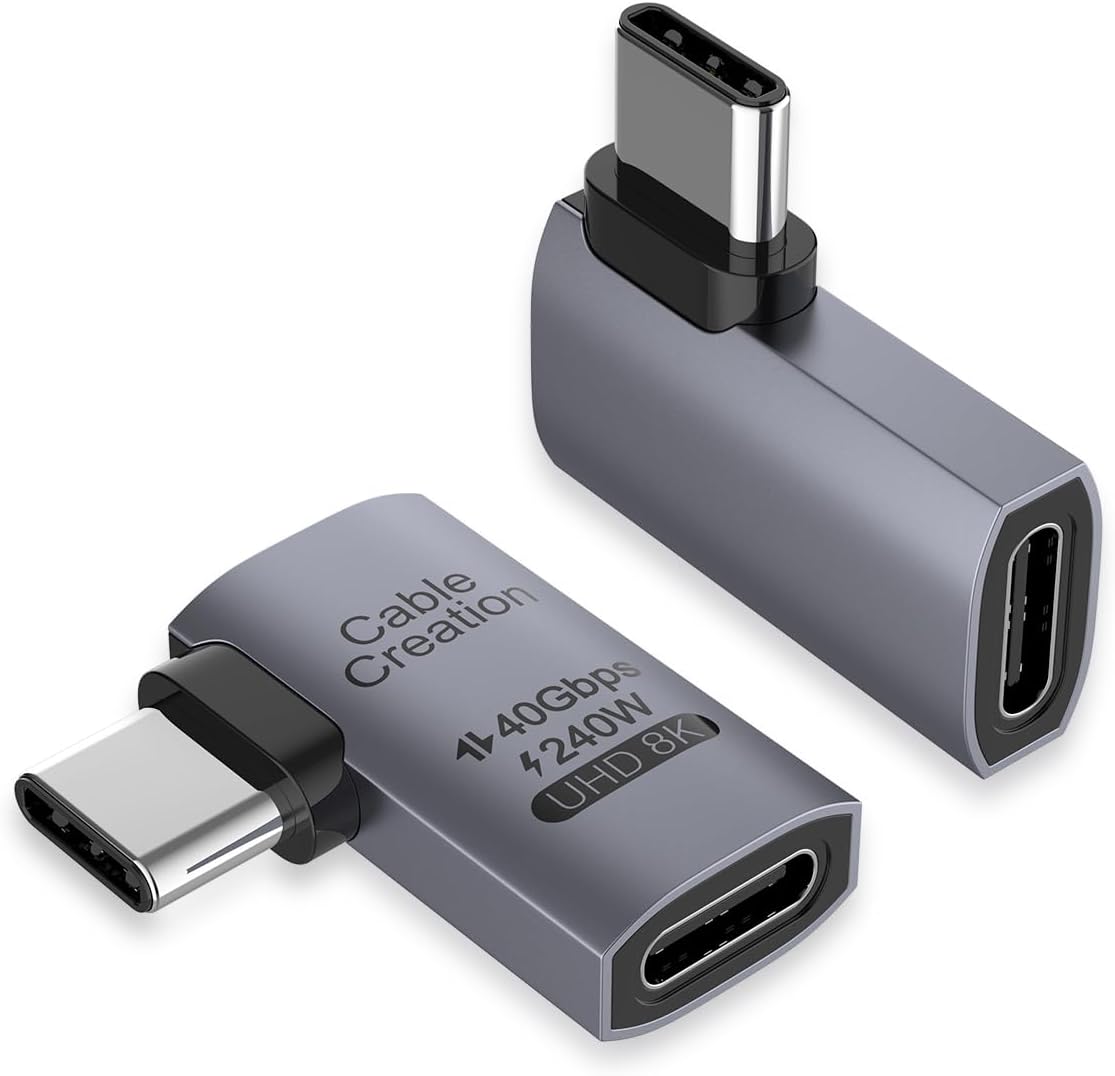
CableCreation's Right Angle USB C Adapter 2 Pack combines 240W fast charging, 40Gbps data transfer, and 8K@60Hz video output. Its 4.6 rating and broad compatibility with USB4, Thunderbolt 4, and Thunderbolt 3 devices make it a well-rounded option for a mixed collection of modern hardware.
We may earn a commission when you buy through this link, at no additional cost to you.
The adapter redirects the cable into a more suitable direction, helping avoid repeated wear on the cable and device input. It is designed for simple plug-and-play operation with no driver software, making it convenient for office, travel, and occasional use with compatible laptops, tablets, phones, Steam Deck, Nintendo Switch, and Oculus Quest or other VR equipment.
Charging support extends through 240W and is backward compatible with lower levels including 180W, 140W, 100W, and 60W. The display specifications include a single 8K@60Hz or 5K@60Hz output and dual 4K@60Hz support, subject to the capabilities of the source device, cable, and monitors. Data transfers can reach 40Gbps on compatible USB4 equipment.
CableCreation also provides a 24-month product warranty, lifetime technical support, and customer service described as available within 24 hours. The two-pack is lightweight and easy to carry, making this a practical selection for anyone who wants high charging and data specifications without moving beyond the mainstream USB4 generation.
The adapter supports high USB PD levels and can fall back to lower charging rates for less demanding equipment. Actual output depends on the charger, cable, device, and negotiated power profile, so maximum charging should not be assumed from the adapter alone.
The stated 24-month warranty and lifetime technical support can add confidence for a connector used repeatedly. Its compact two-pack format also gives users a spare while keeping a right-angle option close to multiple devices.
We may earn a commission when you buy through this link, at no additional cost to you.
The right angle shape matters, but charging speed, data bandwidth, display support, directional options, fit, and device compatibility ultimately determine whether an adapter suits your setup. Compare these factors before choosing a model.
Charging capacity is one of the most consequential specifications. A 100W adapter will cover many phones, tablets, handhelds, and ordinary laptops, while a 240W adapter is better suited to high-power notebooks and devices that support USB PD 3.1 Extended Power Range. Even with a 240W adapter, the negotiated rate depends on the device, wall charger, cable, and adapter, so the figure is a maximum rather than a guarantee. Look for explicit support for the USB-C Power Delivery profile used by your equipment.
Data speed matters when moving files to an external SSD, connecting a dock, or using other high-bandwidth peripherals. Most of the adapters in this guide support up to 40Gbps through USB4 or compatible Thunderbolt connections, while the Silkland USB4 V2.0 option reaches 80Gbps. Neither speed can be achieved if the computer, cable, or peripheral has a lower limit. USB4, Thunderbolt 3, and Thunderbolt 4 are often associated with 40Gbps, but exact behavior varies by host and configuration.
Right-angle adapters can also carry display signals when the source port supports DisplayPort Alternate Mode. Most choices offer 4K@60Hz, while several claim support for 8K@60Hz, and the premium USB4 V2.0 model lists 16K, dual 8K or 6K, and triple 4K possibilities. These are maximum configurations. The host graphics capability, cable, operating system, adapter, and monitor must all be compatible, and a single display may have different limits from a multi-display arrangement.
Not every right-angle adapter points in the same direction. Some sets include left- and right-facing pieces, while others provide top, bottom, left, and right configurations. The most useful option is the one that lets a cable run parallel to the device without blocking a neighboring port. A two-direction pack is more versatile for different desks and devices, whereas several identical adapters are convenient for placing a spare in multiple locations.
A low-profile adapter may fit comfortably beside a laptop's other ports, but a bulky protective case can leave too little room for the connector. Silkland specifically warns that thick cases may interfere with a proper fit, while Vanjua says its adapter is not applicable when protective cases, covers, or skins are installed. Before buying, compare the adapter's dimensions and opening with the device's port area. A connector that is difficult to insert or requires excessive force is not a good solution even if it supports impressive specifications.
Aluminum alloy housings are common among the higher-specification options because metal can aid heat dissipation and resist scratches compared with basic plastic. Several products also describe non-slip surfaces to help with insertion and removal. UGREEN reports testing for more than 10,000 plug cycles, and Vanjua makes a similar durability claim. These figures are useful indicators, but connector longevity also depends on alignment, insertion force, cable quality, and how often the device is plugged and unplugged.
A broad compatibility list is helpful, but the best match is the device you actually own. Consider whether the host is a laptop, phone, tablet, handheld console, monitor, or VR headset, and whether the adapter is intended for charging, data, video, or all three. Listed support for USB-C, Thunderbolt 3 or 4, and USB4 devices gives a good starting point, but proprietary charging behavior, port placement, and operating-system support can still affect the experience.
Pack size should reflect how many locations you need to cover. A two-pack is a balanced choice for a laptop and a mobile device, while a three- or four-pack can support a desk, bedside table, travel bag, and gaming setup. The adapters themselves are compact, so a larger set does not necessarily add much bulk, but it may be unnecessary if you use only one device. Consider keeping a directional pair rather than several identical pieces if device orientation changes frequently.
Begin by identifying the correct orientation for the device and the location of the port. A right-angle adapter should redirect the cable away from the edge of a desk or the direction in which it would be pulled. Connect the adapter without forcing it, inspect for debris, and make sure the connector slides in evenly. If a protective case prevents the adapter from seating properly, remove or replace that case rather than applying extra force.
For charging, use a reputable USB-C charger and a cable that supports the intended power and data standard. For fast file transfers, connect the adapter to a compatible USB4 or Thunderbolt host and matching external storage. For display use, confirm that the host supports DisplayPort Alternate Mode, then verify the selected resolution and refresh rate on the connected monitor. Remember that the fastest advertised adapter cannot make an older device, cable, or display exceed its own capabilities.
Handle the adapter by its housing rather than pulling on the attached cable. Keep the connection supported when moving a device, avoid sharply twisting the plug, and do not leave a strained cable hanging from the port. Periodically inspect the connector, housing, and port for looseness, discoloration, scratches, or heat damage. Discontinue use if damage is visible, and keep adapters away from moisture, excessive heat, and crushing pressure during travel.
They can reduce wear by changing the direction in which the cable exits the device. Instead of a straight cable being pulled sideways or forced into a sharp bend, the adapter redirects it and allows a gentler curve. The result depends on correct orientation, good alignment, and avoiding tension on the cable. A right-angle adapter is not a substitute for a damaged cable or connector.
No. A maximum charging rating applies only when the adapter, device, charger, and cable all support the required USB Power Delivery level. Many phones and tablets use lower limits, and some laptops require specific Extended Power Range profiles. Check the device's charging requirements and the adapter's compatibility information rather than assuming the highest figure will always be reached.
It depends on the case and adapter. Some low-profile adapters fit around normal cases, while thick cases can leave too little clearance for the connector. Silkland warns that bulky cases may affect compatibility, and Vanjua states that its adapter is not applicable with protective cases, covers, or skins. Confirm the physical dimensions and fit before ordering.
Yes, when the host, cable, adapter, and peripheral support the necessary standards. Many adapters in this guide provide up to 40Gbps data transfer and 4K or 8K display output, but those are maximum capabilities. Data performance depends on USB4 or Thunderbolt support, while video also requires DisplayPort Alternate Mode and a compatible display configuration.
The 80Gbps model uses USB4 V2.0 and offers twice the stated data bandwidth of the 40Gbps models. It can also support more advanced display arrangements, including dual high-resolution displays. Most current devices and cables are limited to the older 40Gbps tier, so a faster adapter will not create additional speed unless every part of the connection supports it.
Choose left-and-right adapters if your device is used in several orientations or if you need to avoid blocking a neighboring port. Choose identical spares if you mainly need the same right-angle solution for several devices or locations. Basesailor, UGREEN, and JSAUX offer different or multiple directions, which can be useful when docking or using a device on a stand.
The slowest component determines the actual transfer rate. A computer without USB4, a cable rated only for standard USB-C, a slower external drive, or device limitations can all reduce performance. Check the specifications of the host, cable, adapter, and storage or dock, and confirm that USB4 or the appropriate Thunderbolt generation is being used.
An aluminum adapter can offer better heat dissipation, wear resistance, and a more durable feel, particularly during high-power charging or large data transfers. It does not automatically make a device compatible or prevent all connector damage. Fit, supported protocols, cable quality, and careful handling remain equally important.
The UGREEN 90 Degree USB C Adapter 3 Pack stands out as the most balanced overall recommendation, combining 240W charging, 40Gbps USB4 transfer, 8K display support, and a useful three-pack format. For the newest high-end workflows, the Silkland 80Gbps USB4 V2.0 option provides the strongest premium specifications, while the Vanjua four-pack is a practical budget-oriented way to cover multiple devices and locations.
Prioritize the functions you actually use. A 100W adapter with 40Gbps transfer may be entirely sufficient for a phone, tablet, handheld console, or ordinary laptop. A 240W model becomes more relevant for demanding notebooks, and 8K or 16K display claims only matter when the computer, cable, operating system, and monitor can support them. Direction, case clearance, and port placement are just as important as headline specifications.
Before purchasing, confirm that the adapter physically fits the device, that the connected cable supports the intended charging and data modes, and that the required USB4, Thunderbolt, or display capabilities are present. Product details, inventory, and prices can change over time, so checking the current listing at the time of purchase helps ensure the selected right angle USB C adapter remains the right fit for your setup.