
750W Charging Station for Multiple Devices, Zobirez 10-Port Fast Charger
4.6Editor score
10 mixed USB ports
Up to 120W per USB-C
Laptop-ready center bays
Ten cables included
Tablet charging station guide comparing the best 10-port, 20-port, AC, USB-C, and laptop-ready models for homes, offices, classrooms, and travel and use tips.
A tablet charging station does more than provide power: it gathers phones, tablets, laptops, earbuds, and accessories into one organized charging area. The best models balance port variety, usable power, case-friendly storage, safety features, and a footprint appropriate for the space where they will be used.
We compared all 10 products by examining their charging architecture, port mix, advertised power, device support, included accessories, divider or slot design, safety features, and suitability for shared environments. The list covers compact USB docks, high-capacity multi-port chargers, and vertical racks with both AC outlets and USB ports.
Each review identifies what the product does particularly well and where its limitations matter. The top three receive our featured awards, while the full comparison also considers practical details such as laptop support, included cables, removable dividers, and cable-management needs. Product availability and prices can change.
4.6Editor score

4.5Editor score

4.4Editor score
The table below compares port count, total or per-port power, device support, and storage design so tablet charging stations can be evaluated at a glance.


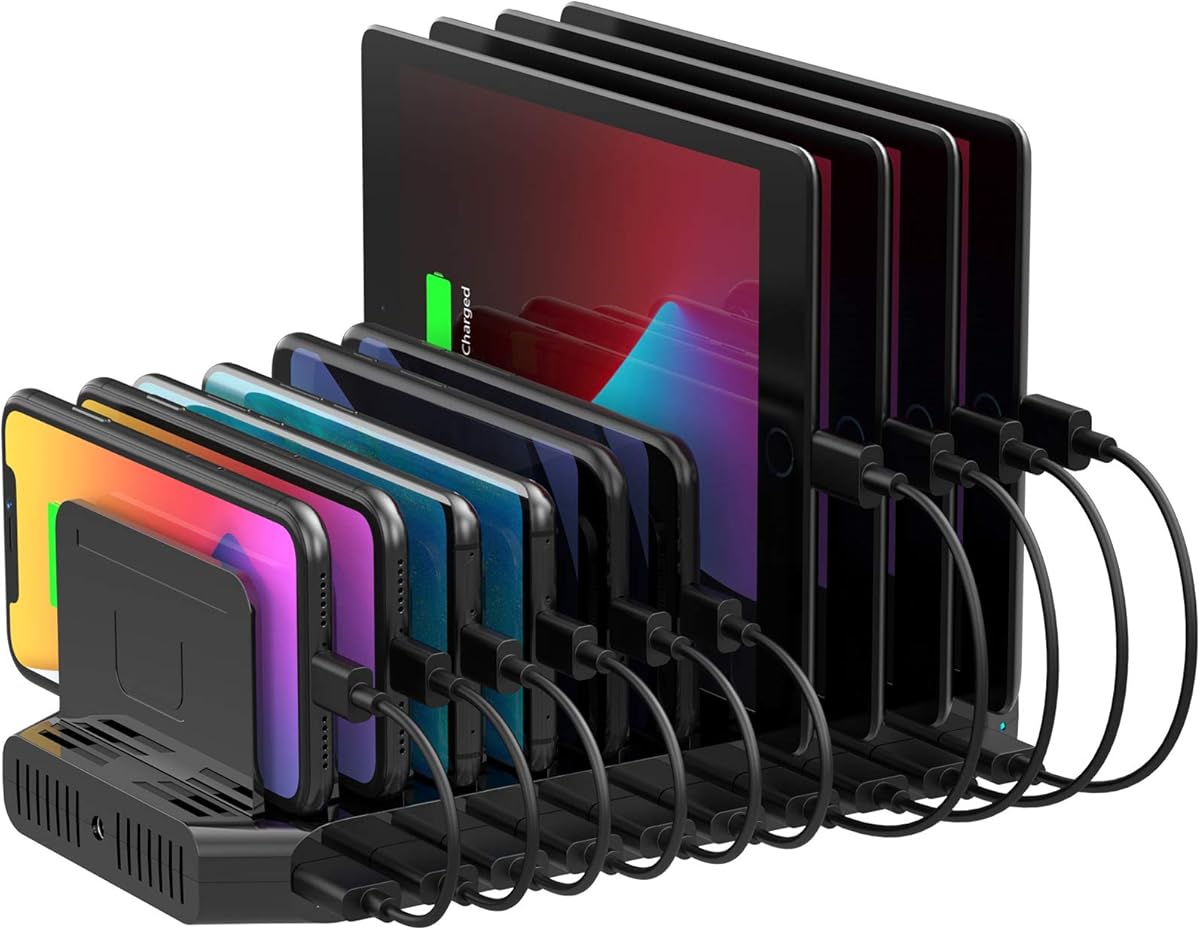


The Zobirez 750W charging station ranks first because it offers the most ambitious mix of high aggregate output, individual USB-C power, and device organization in the roundup. Its ten-port arrangement includes five USB-C connections advertised at up to 120W each and five USB-A connections at up to 30W each. That makes it unusually well suited to environments where tablets, phones, and occasionally a laptop need to charge together.
We may earn a commission when you buy through this link, at no additional cost to you.
The major advantage is the possibility of powering high-demand USB-C devices without relying on a separate wall charger. Compatible laptops, high-power tablets, and other USB-C equipment can draw from the stronger connections, while conventional USB-A accessories use the remaining ports. Two wide center bays are designed to hold a laptop or a cased tablet upright. The durable one-piece slot construction also avoids the loose or broken dividers that can undermine some adjustable organizers.
This station includes ten short charging cables: one 100W USB-C-to-C cable, five 11-inch USB-C cables, two 11-inch iPhone cables, and two 11-inch Micro USB cables. That is a generous package for households, offices, classrooms, or hotels, although the included cable length may be less useful when a device must remain far from the dock. Protection against over-current, over-voltage, overload, overheating, overcharging, and short circuits adds practical confidence for unattended charging.
The tradeoff is complexity and power. A ten-device station with laptop-class output is more than many homes need, and actual charging rates still depend on connected devices, cables, and the charger’s power-sharing behavior. Even so, it is the strongest all-around recommendation for buyers who want one dock to handle a genuinely broad mix of devices, particularly if a tablet sometimes doubles as a laptop workstation.
The five high-output USB-C ports distinguish this model from ordinary family charging docks. It is especially relevant for USB-C tablets, power-hungry accessories, and compatible laptops that need more power than a basic USB-A connection can provide.
The widened center bays reduce the need to remove protective cases before charging. A fixed-slot design also provides more consistent spacing than docks dependent on many small removable dividers.
We may earn a commission when you buy through this link, at no additional cost to you.
The black Zobirez 420W station delivers a compelling balance of charging capacity, physical organization, and device coverage. It has five USB-C and five USB-A ports, with the two highest-output USB-C connections advertised at 65W. Three other USB-C ports provide 45W, while the five USB-A ports provide 30W. That graduated design is useful when several different devices need to be connected at once.
We may earn a commission when you buy through this link, at no additional cost to you.
The supplied information specifically positions the two 65W ports for compatible MacBook-series and other USB-C laptops. The remaining outputs are suitable for common phones, tablets, headphones, Kindles, watches, and game consoles. Including eight short mixed cables reduces setup friction, with connections for iPhone and iPad, USB-C devices, and legacy Micro USB accessories.
Its one-piece flame-retardant ABS construction uses two extra-wide, extra-tall center slots measuring 1.57 inches wide and 1.77 inches high. These can accommodate a laptop or a child’s tablet with a protective case. Four non-slip pads underneath help prevent sliding and scratching. Protection features cover over-current, over-voltage, overcharge, overload, overheating, and short circuits.
A watch charger is not included, and a separate watch cable may be necessary for compatible wearables. Users should also verify that their own cables and devices support the desired charging speeds. Even with those caveats, this is an excellent general-purpose dock for a shared desk or family charging area where both phones and tablets are central.
The mix of 65W, 45W, and 30W outputs gives the station more flexibility than a basic dock. It can reserve its strongest connections for compatible laptops while keeping everyday accessories on dedicated lower-power ports.
The integrated slot system gives devices consistent support without requiring a collection of small dividers. Wide middle bays accommodate bulkier hardware, while the low-profile footprint suits desks and counters.
We may earn a commission when you buy through this link, at no additional cost to you.
The 20-Port 270W station is built for households, offices, libraries, and shared workspaces that need to keep a large number of smaller devices connected. It combines ten USB-C and ten USB-A ports, and its auto-detect technology is designed to identify connected equipment and provide suitable charging. Up to five devices can charge rapidly within the stated per-port limits.
We may earn a commission when you buy through this link, at no additional cost to you.
Its standout feature is the 11 removable, high-strength dividers. They can be repositioned or removed to accommodate slim phones, thicker phones, and tablets in protective cases. The included cable set covers USB-C-to-iPhone or iPad, USB-C-to-C, USB-A-to-iPhone or iPad, USB-A-to-C, and USB-A-to-Micro-USB connections. This variety is helpful in mixed-device spaces where the original charging leads have been separated from their equipment.
Safety features include over-temperature control, over-voltage protection, overload prevention, short-circuit mitigation, and overcurrent regulation. An on/off switch provides a convenient way to deactivate the station. The package also includes the main power cable, ten mixed charging cables, and the adjustable dividers.
Its main limitation is that 270W spread across 20 connections is not the same as having 20 full-speed laptop outputs. It is best viewed as a high-capacity organizer for phones, tablets, earbuds, watches, e-readers, and power banks rather than a dedicated multi-laptop charging system. The removable dividers also require careful adjustment when devices have different thicknesses.
Twenty ports make this a practical central dock for offices, classrooms, or busy homes. The equal USB-C and USB-A allocation helps reduce adapter clutter when older and newer devices share a space.
Unlike fixed-slot designs, the dividers can be rearranged around varying device sizes. This is useful when tablets, large phones, and smaller accessories need to share the same station.
We may earn a commission when you buy through this link, at no additional cost to you.
The Unitek dock is a straightforward option for buyers who want a tidy charging location for USB-A devices. It provides ten ports, built-in BC1.2 support, and up to 5V/1.5A per port, with support for Apple-device fast charging at 5V/2.4A. Its total output is 60W, shared among connected devices.
We may earn a commission when you buy through this link, at no additional cost to you.
Eleven removable baffles can be assembled to accommodate the thickness of different phones and tablets. This is particularly useful for mixed-device households that still rely on older USB-A cables. The dock also includes a 60W DC power adapter with UL, CE, FCC, and RoHS certification, along with a smart charging system that detects devices and stops charging when a battery reaches full capacity.
The product does not include charging cables, so existing leads or separate purchases are necessary. Its 60W limit also makes it less suitable for demanding tablets or multiple high-power devices used at once. Importantly, the product guidance recommends devices smaller than 11 inches and says not to place laptops on it.
For readers seeking a straightforward USB-A charging organizer for phones, small tablets, microphones, or accessories, this remains a practical pick. It is less versatile than the mixed USB-A and USB-C docks, but its adjustable baffles, certified adapter, and clear safety behavior keep the proposition focused and understandable.
Every port uses USB-A, which can simplify setup for homes stocked with legacy cables. It is an effective organizer when modern USB-C charging is not a priority.
The eleven baffles allow the slots to be configured around the actual device thickness. Buyers should keep the dividers close to the hardware and ensure the dock, rather than the thin dividers, bears the load.
We may earn a commission when you buy through this link, at no additional cost to you.
The 100W ten-port station offers a middle-ground combination of capacity, portability, and organization. Five USB-C and five USB-A ports cover both modern and legacy devices, while a 100W total output is sufficient for a varied collection of phones, tablets, headphones, e-readers, flashlights, and power banks.
We may earn a commission when you buy through this link, at no additional cost to you.
Auto-detect technology is intended to identify each device and deliver appropriate current. The stated per-port limits are 5V/3A for USB-C and 5V/2.4A for USB-A. It is therefore a sensible hub for normal household electronics, though its aggregate output is much less suitable for powering a demanding USB-C laptop alongside numerous other devices.
Eleven removable baffles make the internal layout adaptable to phones and cased tablets. Ten mixed cables are included, spanning USB-C-to-iPhone or iPad, USB-C-to-C, USB-A-to-iPhone or iPad, USB-A-to-C, and USB-A-to-Micro-USB. A power button allows the whole station to be switched on or off with one press.
The multi-protection system covers temperature, voltage, overload, short circuits, and overcurrent. Its 4.2 rating is lower than those of several close competitors, but the feature set remains competitive. This model makes the most sense for shared desks where many everyday devices need one organized home and full laptop charging is not a primary requirement.
A 100W aggregate output is practical for common accessories and mobile devices. It gives users a single station without dedicating separate adapters to every category of cable.
The integrated switch is useful when the station is not needed overnight or during periods of high shared-device traffic. It also makes the unit easier to manage as part of a tidy workstation.
We may earn a commission when you buy through this link, at no additional cost to you.
This laptop and tablet charging rack is the most structurally distinct option in the roundup. Instead of relying exclusively on low-power USB cables, it combines six AC outlets with four USB charging ports. That makes it suitable for a broader mix of devices, including laptops, Chromebooks, tablets, iPads, phones, and e-readers that use standard wall plugs.
We may earn a commission when you buy through this link, at no additional cost to you.
The vertical slot layout is a major advantage in classrooms, offices, libraries, reception areas, and training rooms. Devices remain visible and easy to remove without opening a cabinet or moving stacked equipment. The rack is designed to hold as many as ten devices, making it a practical centralized storage and charging point for shared equipment.
Integrated cable routing helps keep cords organized along the rack instead of allowing them to spread across a desk or counter. Its pre-installed surge-protected power strip is rated for 110V/10A operation. This setup reduces reliance on loose power strips and multiple wall adapters while keeping shared equipment close to its power source.
The supplied data does not specify the output rating of the four USB ports, so buyers with power-hungry USB devices should verify compatibility before relying on those connections for rapid charging. The vertical form also takes more visual and physical space than a low-profile tabletop dock. Nevertheless, it is the most compelling option here for institutional or office-based laptop and tablet management.
Six AC outlets distinguish the rack from USB-only organizers. Devices that need their manufacturer’s full-size charger can be connected without introducing an additional multi-outlet adapter.
Keeping devices upright in open slots makes them easy to retrieve and reduces the visual disorder created by a row of chargers and loose cables. The format is especially helpful where devices are routinely checked out and returned.
We may earn a commission when you buy through this link, at no additional cost to you.
The 50W six-port charging dock is the most compact and approachable choice in the roundup. It can charge up to six devices simultaneously through six USB ports, with up to 2.4A available per port. A smart chip detects connected devices and supplies suitable charging current, while the UL-tested adapter includes overvoltage, overcharge, and short-circuit protection.
We may earn a commission when you buy through this link, at no additional cost to you.
Unlike many competing organizers, it uses a fixed one-piece slot design rather than fragile removable dividers. The slots measure one inch wide and 1.3 inches high, allowing phones and tablets to remain upright even with thicker protective cases. Anti-slip pads underneath help prevent the dock from moving or scratching the surface below.
The package is unusually complete for a smaller station. It includes six mixed charging cables, a built-in watch holder, and a USB-A-to-USB-C adapter. The watch holder is a useful addition, although the required watch charging cable is not included. The included cables cover Micro USB, USB-C, and Lightning-style connections, giving users flexibility across different device generations.
This is not a laptop charger, and its 50W combined output is best suited to phones, tablets, earbuds, Kindles, and smaller accessories. Its six-device capacity may also be restrictive for large households. For a bedroom, travel setup, office desk, or classroom, however, the compact size, simple organization, and inclusive accessory package make it an excellent budget-oriented recommendation.
The fixed slots are wider and taller than those on many small docks. That gives tablets and protected phones a stable upright position without the need to fiddle with loose dividers.
Six cables, a watch holder, and a USB-A-to-USB-C adapter reduce the need for immediate extra purchases. The watch holder remains useful even though its charging lead is not supplied.
We may earn a commission when you buy through this link, at no additional cost to you.
The MERGROLY 320W station combines ten charging ports with enough power to support compatible MacBook Pro laptops and other demanding USB-C equipment. Two USB-C ports provide up to 65W, three additional USB-C ports provide 30W, and five USB-A ports complete the mixed-port arrangement. The product is also listed as compatible with iPhone, Android, iPad, tablet, and Kindle devices.
We may earn a commission when you buy through this link, at no additional cost to you.
Its wide, raised, one-piece slots are intended to accommodate thicker devices without removing protective cases. An anti-slip partition area helps keep phones and tablets from sliding, while eight rubber pads protect the desktop and stabilize the base. The fixed-slot approach gives the stand a durable feel and avoids the repeated adjustment associated with removable baffles.
Eight short charging cables are included: four Type-C-to-Type-C, three USB-to-Lightning, and one USB-to-Micro-USB. An Apple Watch charger holder is also provided, but its charging cable is not included. Smart chips detect connected devices and select the appropriate current, helping reduce overcharging risk.
The product guidance recommends using the original included cable for optimal performance and safety. That is an important consideration because the full charging capability of high-power USB-C ports depends on suitable cables and compatible devices. Buyers who need many full-speed laptop connections may find the two 65W ports limiting, but the MERGROLY remains a versatile dock for one or two laptops alongside a larger collection of mobile devices.
Two 65W USB-C connections add meaningful flexibility for compatible laptops. The remaining ports support a mixed collection of tablets, phones, and accessories without requiring separate desktop chargers.
Raised slots accommodate protected tablets, while anti-slip details keep devices and the dock in position. This creates a cleaner charging area than a row of loose adapters.
We may earn a commission when you buy through this link, at no additional cost to you.
The white Zobirez 420W station offers the same core charging architecture as the black version while fitting more naturally into bright bedrooms, offices, and minimalist workspaces. It includes five USB-C and five USB-A ports, with two USB-C connections at up to 65W, three at 45W, and five USB-A ports at 30W.
We may earn a commission when you buy through this link, at no additional cost to you.
The graduated output makes it possible to reserve the two strongest ports for a compatible MacBook-series laptop or another demanding USB-C device. Lower-power connections accommodate phones, tablets, headphones, Kindles, watches, and game consoles. The station can organize and charge up to ten devices simultaneously, with eight short mixed cables included.
Two center bays measuring 1.57 inches wide and 1.77 inches high provide space for a laptop or a child’s cased tablet. Flame-retardant ABS construction, four non-slip rubber feet, and protections against over-current, over-voltage, overcharge, overload, overheating, and short circuits support regular use.
This is essentially a finish-based alternative to the black model rather than a distinct performance class. It does not include a watch charging cable, and users should still verify the power requirements of every connected device. For buyers who prefer a light-colored charging station for a visible desk or nightstand, it provides the same well-balanced combination of power and organization.
The white finish blends more readily with light furnishings and clean office equipment. It offers the same 420W charging architecture as the black version rather than trading power for appearance.
The enlarged center openings accommodate a laptop or tablet while its protective case remains attached. That avoids the inconvenience of removing accessories every time a device needs charging.
We may earn a commission when you buy through this link, at no additional cost to you.
The Moezuti 20-Port 600W station combines the roundup’s highest customer rating with one of its strongest power profiles. It has 20 mixed ports: two 65W PD USB-C ports, ten 30W PD USB-C ports, and eight 20W QC USB-A ports. The station can charge as many as 20 devices while offering dedicated high-power connections for compatible MacBook Air, MacBook Pro, and other USB-C laptops.
We may earn a commission when you buy through this link, at no additional cost to you.
A one-piece flame-retardant ABS design uses physical slots instead of removable dividers. Two wider center bays are intended for laptops or children’s tablets with thick cases. This approach prioritizes structural stability and upright positioning, making the dock suitable for families, offices, classrooms, and nightstands where many devices regularly collect.
The package includes a five-foot power cord and ten 11-inch short cables: four Type-C, two iPhone charger cables, two USB-C cables, and two Micro USB cables. These short leads encourage organized charging and reduce the number of separate wall adapters needed. The station’s GaN V chip provides protection against overcharging, overheating, short circuits, and overcurrent or overvoltage, with real-time temperature monitoring.
With 20 ports, setup takes more planning than a six-port dock, and the stated outputs are maximum capabilities rather than a promise that every port delivers its maximum simultaneously. Buyers should also use cables capable of carrying the intended power. Even with those practical caveats, the station’s rating, 600W output, and two high-power laptop ports make it an excellent high-capacity option.
Twenty ports support a very large device collection, while the ten included short cables cover common connector formats. The result is a centralized station that can replace many separate adapters and long charging leads.
The two 65W ports are positioned for compatible laptops, while ten 30W USB-C ports serve modern mobile devices. Eight USB-A ports preserve support for older accessories and legacy charging leads.
We may earn a commission when you buy through this link, at no additional cost to you.
The right tablet charging station depends on device count, power requirements, connector types, storage needs, and the environment where it will be used. These factors help separate a convenient family dock from a high-capacity charging system for offices or classrooms.
Total wattage tells you how much power the station can allocate across all connected devices, while per-port ratings reveal the maximum available to an individual tablet or phone. A basic dock with around 50W may handle several small devices, but high-output USB-C tablets and laptops benefit from dedicated 30W, 45W, 65W, or even 120W connections. Shared power can reduce individual charging speeds when many ports are occupied, so compare the advertised output with the largest device you intend to connect.
Choose enough aggregate power for your heaviest device plus the rest of your routine load. Verify that the tablet’s charging standard and included cable support the desired output.
A mixed-port design is usually the most adaptable because newer tablets and phones increasingly use USB-C while older accessories, power banks, and peripherals may still rely on USB-A. USB-C also provides the foundation for higher laptop power levels, but its usefulness depends on the tablet or device supporting USB-C Power Delivery. A USB-A-only station can still be effective for legacy devices, though it cannot provide the same high-power charging profile.
Prioritize the connector types actually used by your household or workplace, then leave a few spare ports for visitors and future devices.
Think about how many devices need to charge at the same time, not merely how many the station could theoretically hold. A six-port dock is easy to manage for two people, while a 20-port station makes more sense in a classroom, family charging area, or shared office. Physical dividers and slots also affect usable capacity because thick tablets consume more room than phones.
List the devices that will be connected simultaneously and add a little room for occasional guests or accessories.
Many tablet charging stations are optimized for phones and smaller accessories, while a few include USB-C ports powerful enough for compatible laptops. The top-rated models in this guide advertise 65W or 120W USB-C connections, and the vertical rack includes six AC outlets for devices that use standard wall chargers. Buyers should distinguish a station that can store a laptop from one that can actually fast-charge it.
For occasional laptop charging, look for a high-output USB-C port and a compatible cable. For routine laptop use, an AC-equipped rack may be the more practical choice.
Removable dividers offer flexibility because they can be rearranged around different device widths and thicknesses. They also introduce more small parts that may loosen or break. Fixed one-piece slots tend to feel more uniform and can provide better structural support, but the slot dimensions must accommodate tablets in protective cases. The best designs for bulkier devices include raised or extra-wide center bays.
Measure a representative device with its case on, then compare the opening dimensions before buying. Also check whether dividers are meant to position devices or bear their full weight.
A charging station can organize devices while still leaving a tangle of long leads behind it. Short included cables and built-in routing reduce clutter, especially in classrooms and offices. Some packages provide ten or more mixed cables, while smaller models include only a few or none at all. Cable length matters: short leads are excellent for compact nightstands, while longer laptop leads may be necessary when a device is stored upright in a rack.
Check the package contents against the connectors your family actually uses. Treat included cables as a convenience, not proof that every port will deliver maximum speed.
Look for over-current, over-voltage, overcharge, overload, over-temperature, and short-circuit protection. Auto-detection circuitry can also help the station allocate appropriate current to different devices. For rack-style products, a listed or certified power supply and surge protection add another layer of confidence. These safeguards are especially important when the station will remain unattended or operate overnight.
Prefer models that clearly document their electrical protections and use a certified included power adapter where applicable.
A low-profile horizontal dock works well on a nightstand, kitchen counter, or office desk. A vertical rack consumes more height but can store and display up to ten larger devices without spreading them across the work surface. Consider available space, ventilation, access to outlets, and whether cables can be routed cleanly. Shared institutional settings also benefit from open slots that make devices easy to remove.
Match the physical design to the location, and avoid placing a densely packed station where heat cannot dissipate or where a cable can easily be pulled.
Position the station on a stable, dry, level surface near a properly rated wall outlet. Before connecting devices, review the port markings and arrange the included cables or your own compatible leads. Keep the power cord and device cables from becoming a trip hazard, particularly around children or in a busy office walkway.
Connect devices to the ports that match their charging standards. For a USB-C tablet, use a capable USB-C cable and choose a higher-output port if the station provides one. Place thicker tablets in wider bays, adjust removable dividers snugly where applicable, and ensure the device is supported by the station rather than resting against fragile divider pieces.
Inspect cables periodically for visible damage and remove damaged accessories from use. Keep the charging area ventilated, avoid placing fabric or other heat-retaining objects over the station, and use the on/off control or disconnect the power cord when the equipment will be unattended for extended periods. Clean the exterior with a dry or lightly damp cloth after unplugging it; avoid spraying liquid directly into the ports.
Yes, if the model has enough aggregate and per-port power. Look for a USB-C connection with a 65W or higher rating and use a cable that supports the required charging standard. Smaller tablets may share the station with phones, but the highest-powered device should receive a dedicated strong port. Some basic USB-A-only docks cannot charge laptops at all.
The best option depends on the number of tablets, their charging requirements, and whether they are stored upright. A 10- or 20-port mixed USB dock offers flexibility, while a model with 30W or higher USB-C outputs is preferable for newer tablets. A rack with AC outlets is useful when tablets use standard wall chargers or the environment is a shared classroom.
Removable dividers are more flexible because they can be repositioned for different device thicknesses, but they can loosen or break. Fixed one-piece slots are usually more stable and offer consistent spacing, though every device must fit the opening. Buyers with varied devices should compare case-inclusive dimensions rather than relying on the number of dividers alone.
Not necessarily. A device will only charge as quickly as its own charging controller, cable, and protocol allow. The station must also be able to allocate enough power to that connection, and high-output ports may share power when many devices are connected. A higher-wattage station is most valuable when it includes suitably strong ports and the buyer has demanding devices.
The port count sets the maximum number of powered connections, while the physical slots determine how many devices can be stored comfortably. The products reviewed range from six to 20 ports, although large tablets may occupy wider bays. A six-port model suits a small family, while 20-port stations are more appropriate for classrooms, offices, and busy shared spaces.
Modern charging stations commonly include overcharge, over-temperature, overcurrent, and short-circuit protections, making overnight use more practical. The included charger and cables should still be undamaged, and the station should have ventilation. Buyers should follow the guidance provided with their specific model and avoid covering the unit with blankets or other heat-trapping materials.
Included cables can make setup much easier, especially when they match the devices in the household. However, their connector types and capabilities vary, and a cable may not support high-power laptop charging even when the port does. Keep the supplied leads for convenient short connections and use certified higher-capability cables for demanding USB-C devices.
Choose USB-A only if all intended devices use legacy cables or if the goal is a simple, lower-cost organizer. A mixed USB-C and USB-A station is more future-oriented and can support higher charging speeds. USB-C is particularly useful for newer tablets, phones, and laptops, but the connected device must support the relevant USB-C charging protocol.
The Zobirez 750W station leads for buyers who need the strongest charging performance, especially when a compatible laptop and several tablets share one dock. The 6 AC and 4 USB vertical rack stands apart for offices and classrooms that need both full-size charger support and vertical storage. The 50W six-port dock provides the most compact, budget-conscious way to organize a smaller group of devices.
Prioritize per-port power for the most demanding device, then choose a port count and slot design that match the actual charging group. Mixed USB-C and USB-A connectivity offers the broadest compatibility, while fixed slots suit stable organization and adjustable dividers suit changing device sizes. Included cables, cable management, safety protections, and the intended location are equally important to long-term convenience.
Finally, check the current product listing, compatibility details, included accessories, and price before purchasing. Charging technology and bundle contents can change, and prices vary over time. The selections in this guide provide a practical starting point for comparing the strongest tablet charging stations available in November 2026.