
Lycan Universal Holder POS Mount Adapter
3.9Editor score
Supports devices up to 0.7 inches thick
Works with 75x75mm VESA mounts
Works with 100x100mm VESA mounts
Supports two-hole AMPS patterns
A Tablet VESA Mount can transform a tablet from a handheld screen into a useful part of a permanent workstation. The right adapter connects a device to a monitor arm, wall bracket, desk clamp, vehicle rail, or another VESA-compatible support while providing better positioning, cable management, and desk organization.
The products in this guide cover several distinct mounting approaches. We compared VESA hole patterns, supported device sizes, clamp or magnetic attachment methods, adjustment ranges, installation requirements, material construction, weight limits, and suitability for office, travel, retail, and automotive environments. Adapters and complete mounting systems are clearly distinguished throughout.
Each review explains the product's strongest use case, meaningful limitations, and ideal buyer. The list includes budget clamp adapters, universal articulated holders, magnetic portable stands, and heavy-duty mounting systems. Product configurations and customer ratings can change, so confirm current specifications and availability before making a final purchase.
3.9Editor score

4.6Editor score

4.8Editor score
As an Amazon Associate we earn from qualifying purchases.
This comparison organizes the mounts by attachment system, VESA support, device range, adjustability, and intended environment, helping readers distinguish simple adapters from complete desktop or vehicle mounting solutions.



The Universal VESA Mount Adapter is a flexible extension system for adding a tablet, phone, or portable display to an existing monitor setup. Its 4.0 rating reflects a useful combination of compatibility and adjustability, although the product is not a complete stand by itself. The broad device support and familiar VESA patterns make it appealing to users who want to reuse an arm they already own.
We may earn a commission when you buy through this link, at no additional cost to you.
Its strongest feature is the choice of clamp, VESA, and magnetic models. The clamp variant accommodates phones and tablets from 4.7 to 13 inches, while the VESA version is intended for portable monitors as large as 17 inches. Installation works with flat 75 x 75 mm and 100 x 100 mm plates, but only in vertical positions above or below a monitor. A 135-degree rotating arm and a 360-degree rotating lamp head allow more directional positioning than a basic fixed bracket.
The construction combines an aluminum-alloy arm with a durable ABS holder, and the joints can be tightened using knobs and supplied Allen keys. The clamp has a stated capacity of up to 2.2 pounds, so heavier portable monitors may be better served by a stronger system. The package also creates a common source of confusion: buyers receive the extension arm and selected adapter, but not the monitor arm needed to complete the installation.
This is a good choice for a desk user who already owns a compatible monitor arm and wants to add a second display without replacing the entire setup. It is less suitable for first-time buyers who do not already own the necessary support or for anyone requiring horizontal side mounting. For those circumstances, a complete clamp-based stand would offer a more straightforward path.
The adapter's main value is compatibility with a monitor setup that is already in place. Adding a tablet or phone to a VESA arm can create a dedicated control display, reference screen, or entertainment display while preserving the position of the primary monitor.
The rotating arm and multiple tightening points help accommodate changing viewing needs. Users can reposition a smaller device for reading, media viewing, or a vertically oriented task without replacing the entire mounting assembly.
We may earn a commission when you buy through this link, at no additional cost to you.
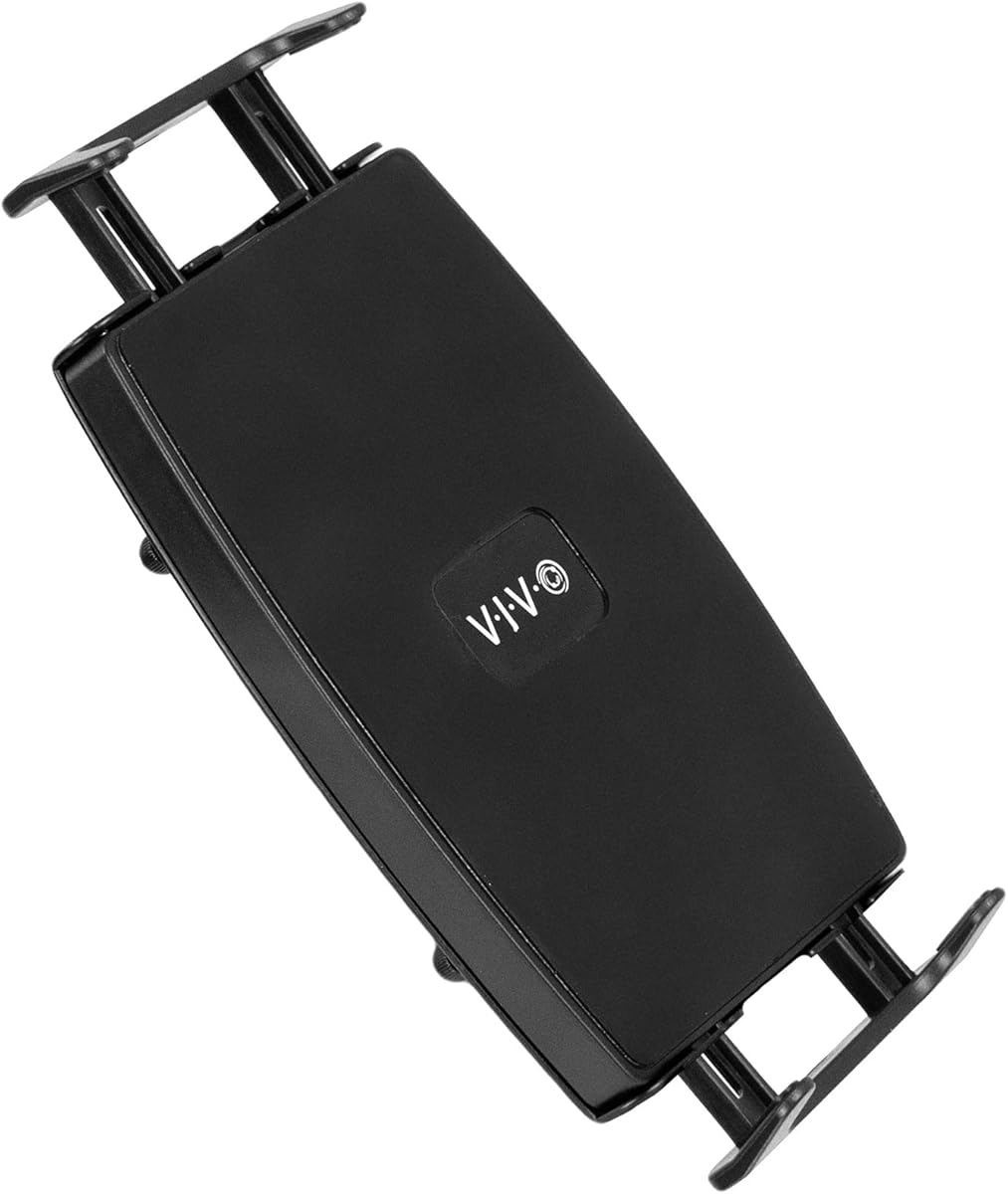
The VIVO Black Universal VESA Mount Adapter is a compact, low-profile holder intended primarily for seven-inch tablets and compatible portable displays. It carries a 4.5 rating and stands out for straightforward installation, broad VESA-pattern support, and a spring-loaded arm that can accommodate different screen widths. The understated black finish also helps it blend into an existing workstation.
We may earn a commission when you buy through this link, at no additional cost to you.
The holder connects to either 75 x 75 mm or 100 x 100 mm VESA mounts, making it compatible with a broad selection of monitor arms and brackets. Its spring-loaded section expands to accept different device sizes, after which two thumb screws secure the tablet. Beyond seven-inch tablets, the product data also lists most two-in-one devices and portable monitors up to 15.6 inches, provided the device is no more than 0.75 inches thick.
One important qualification is the exclusion of most tablets with a 4:3 aspect ratio. That distinction matters because screen size alone does not determine whether the device will fit securely. The included hardware and instructions simplify assembly, although this remains an adapter rather than a full support arm. Buyers should therefore verify both the thickness and aspect ratio of the intended device before ordering.
This VIVO adapter is best for users who want to add a compact tablet to an established VESA mount without a visually bulky bracket. It is a particularly good fit for slim seven-inch tablets, portable monitors, and compatible two-in-one devices. Those needing a larger tablet, a magnetic quick-change system, or a complete desk clamp should select a more specialized product.
The restrained black finish and minimal structure help the holder blend with laptops, monitor arms, and portable screens. This makes it useful when the mount should remain visible but avoid dominating the appearance of a professional workstation.
A spring-loaded arm expands to suit different device widths, while two thumb screws lock the screen in place. The system offers fewer position changes than an articulated arm, but its simplicity can make daily changes and initial setup more manageable.
We may earn a commission when you buy through this link, at no additional cost to you.
The Universal Portable Monitor Adapter shares a versatile extension-arm design with several other mounting concepts, giving users a choice of clamp, VESA, or magnetic attachment methods. Its 3.6 rating is the lowest among the products reviewed, so buyers should weigh the available attachment choices carefully against their existing equipment and device size.
We may earn a commission when you buy through this link, at no additional cost to you.
For standard mounting needs, the adapter supports flat 75 x 75 mm and 100 x 100 mm VESA plates. Installation involves loosening the existing screws, sliding in the adapter, and tightening them again. The extension arm rotates through 135 degrees, while the lamp head offers 360-degree rotation. The clamp model fits phones and tablets from 4.7 to 13 inches, and the VESA model supports portable monitors up to 17 inches.
Its main limitation is installation orientation. The product is designed for vertical placement above or below a monitor and does not support side mounting. It is also only an extension component, meaning the supporting monitor arm is not included. For heavier equipment or layouts that need lateral reach, a different mounting architecture may be more appropriate.
Despite its lower rating, the product can be useful when flexibility across attachment styles is the priority. Choose it when the correct selected model matches a relatively light device and a vertical arrangement. For a first-time installation, a product that includes a desk clamp or complete articulated arm may be easier to integrate.
The clamp, VESA, and magnetic versions serve different devices and mounting situations. Buyers should identify the model included with the package before purchase, because the product is designed to expand the functions of an existing monitor arm rather than operate independently.
The 135-degree arm and rotating head provide enough movement to fine-tune a vertically placed display. Although side installation is not supported, the available motion can still align a smaller screen with a seated user or a nearby secondary workstation.
We may earn a commission when you buy through this link, at no additional cost to you.
The Lycan Universal Holder POS Mount Adapter is a straightforward clamping adapter for tablets, smartphones, and portable LCD monitors that do not have native VESA support. Its 3.9 rating reflects a practical design centered on broad compatibility, edge protection, and installation on common point-of-sale hardware. It is also the top budget recommendation in this guide.
We may earn a commission when you buy through this link, at no additional cost to you.
The holder supports 75 x 75 mm and 100 x 100 mm VESA patterns as well as two-hole diamond AMPS mounting solutions. A secure spring-loaded clamp holds the device, while improved silicone pads reduce slipping and help protect the edges from scratches. The listed thickness limit is 0.75 inches, which allows many tablets and portable monitors but may be reduced substantially by a protective case.
Unlike an articulated monitor arm, this product focuses on secure attachment rather than a wide range of viewing positions. That makes it appropriate for retail counters, service desks, presentation areas, and other environments where a stable display is more important than continuous repositioning. It should also be paired with a suitable VESA or AMPS support, which is not described as part of this adapter package.
The Lycan holder is a compelling choice for users who already have a compatible point-of-sale arm and need an inexpensive way to support a device without native mounting holes. It is less suitable for users seeking a complete desk stand, heavy articulated movement, or compatibility with thicker tablets in their cases. Confirm the assembled device thickness before installation.
The non-slip silicone pads distribute contact around the device's edge and help prevent movement. This is especially valuable in retail, hospitality, and service environments where the display may be touched frequently and must remain stable.
Support for both square VESA patterns and two-hole AMPS mounting expands the number of compatible arms and stands. This makes the adapter especially useful in professional environments where existing mounting hardware may use different standards.
We may earn a commission when you buy through this link, at no additional cost to you.
The Pholiten Universal VESA Mount Adapter is a low-profile holder for most seven-inch tablets, compatible portable monitors, and two-in-one devices. Its 3.8 rating indicates a serviceable product with a clean design, although the narrower VESA support limits its compatibility compared with several alternatives in the guide.
We may earn a commission when you buy through this link, at no additional cost to you.
The defining feature is its 100 x 100 mm VESA pattern. That works with many monitor arms, but it will not fit a mount that only offers the smaller 75 x 75 mm pattern. The spring arm extends from 6.1 to 8 inches, allowing it to accommodate a variety of device widths. Once the device is positioned, the user can set the viewing angle without relying on a large, complex articulation system.
The stated device range is centered on most seven-inch tablets, excluding models with a 4:3 aspect ratio. The product data also lists maximum sizes of 15.6 inches for most two-in-one tablets and laptop screens, though actual fit depends on the holder's physical dimensions and the device's width. Installation hardware and instructions are included, making initial setup relatively convenient.
This adapter suits a user who wants a subtle way to add a small tablet to an existing 100 x 100 mm monitor arm. It is less useful for a multi-monitor configuration that includes 75 x 75 mm equipment, and buyers should avoid choosing it solely by the maximum stated screen size. Measure the device and verify its aspect ratio before ordering.
The simple black design is intended to blend with laptop, tablet, and monitor arrangements. It can add a dedicated display without the visual bulk of a full-size articulating stand.
The 6.1-to-8-inch extension gives the holder flexibility across smaller portable devices. It is a practical middle ground between a fixed cradle and a more complex arm with broad directional control.
We may earn a commission when you buy through this link, at no additional cost to you.
The Portable Monitor Holder Mount Arm is the most complete travel-oriented solution in this guide, combining a magnetic attachment surface, a 75 x 75 mm VESA plate, and a foldable articulated structure. Its 4.6 rating reflects a versatile package with a stated load capacity of more than 4.4 pounds and compatibility with displays ranging from 4.7 to 18.5 inches.
We may earn a commission when you buy through this link, at no additional cost to you.
Users can switch between magnetic placement and VESA attachment without installing a separate stand. The aluminum-alloy construction is designed to remain light enough for travel while resisting ordinary daily wear. Its hollow-core, foldable arm collapses nearly flat, and built-in cable clips help keep display cables organized. The rotating base permits a broad range of positioning, while built-in adjustment tools support angle and height changes without requiring a separate tool kit.
The magnetic system is the most device-dependent part of the design. A larger tablet may need the VESA route if it does not attach securely to the magnetic sheet, and the product should be used only when the surface and arrangement provide a stable connection. The listed VESA support covers the 75 x 75 mm pattern rather than the 100 x 100 mm pattern, so this is not a universal solution for every existing arm.
This mount is a strong fit for frequent travelers, hybrid workers, and users who alternate among a tablet, portable monitor, and larger display. It is less appropriate for someone needing permanent 100 x 100 mm support or a permanently fixed retail installation. For a flexible desk that moves between home, office, and remote locations, however, the combination of quick attachment, folding, and adjustment makes it especially compelling.
The folding hollow-core design reduces the footprint when the arm is not needed. That portability makes the mount practical for travelers who want a dependable screen support without carrying a separate full-size desktop arm.
The magnetic surface enables rapid changes between compatible devices, while the VESA plate offers a more traditional attachment option. This dual approach is useful when a workspace alternates between a tablet and a portable monitor.
We may earn a commission when you buy through this link, at no additional cost to you.
The Urmust Magnetic Portable Monitor Stand is a complete articulated desk system that combines a magnetic ring, a 75 x 75 mm VESA plate, and a triple-joint arm. Its 4.4 rating reflects solid flexibility and a clean metal construction, making it a strong option for users who want to reposition a tablet frequently.
We may earn a commission when you buy through this link, at no additional cost to you.
The extended arm can fold, swivel, and reach, while the magnetic head rotates through 360 degrees. This movement supports landscape viewing for video calls, gaming, and general work, as well as portrait orientation for reading, browsing, or following recipes. A reinforced aluminum-alloy structure and screw-lock construction are intended to limit wobble and preserve stability during extended use.
Installation is handled through a desk clamp that avoids permanent drilling. This is a major advantage in rented spaces and temporary workstations, although the clamp must be checked against the desk's thickness, edge shape, and load limits. The magnetic ring is another important variable: some devices may require a suitable magnetic plate, while the VESA option provides a conventional alternative.
This stand is best for a permanent desk setup used for work, study, streaming, gaming, or creative tasks. It is less appealing for a compact workstation because the extended arm occupies more space than a simple adapter, and its desk clamp is not intended for walls or vehicles. Users who value smooth repositioning and portrait support will find that flexibility especially valuable.
The combination of a rotating base, triple-joint arm, and 360-degree magnetic head provides extensive orientation changes. This is especially useful for tablets used as both a wide productivity display and a vertical reading or video screen.
The included clamp provides a secure mounting point without requiring holes in the work surface. It is a practical solution for temporary offices, dorm rooms, and home desks where permanent modifications are undesirable.
We may earn a commission when you buy through this link, at no additional cost to you.
The Mount Plus VESAT01 Universal VESA Tablets Mount Adapter is a focused, easy-to-install solution for adding tablets and portable monitors to a 75 x 75 mm monitor arm. With a 4.6 rating, it combines a generous stated screen range with a straightforward spring-loaded clamp and a design that does not require the device to have native VESA holes.
We may earn a commission when you buy through this link, at no additional cost to you.
The holder supports iPads, iPad Pro models, other tablets, and portable monitors up to 15 inches. Its spring-loaded arm expands to accommodate different screen sizes, and two side screws secure the device once it has been placed. It can also support portable monitors that lack VESA compatibility, which broadens its usefulness for users assembling mixed equipment.
The main constraint is the 75 x 75 mm VESA pattern. It will not directly support an arm that offers only 100 x 100 mm holes unless the user has suitable additional hardware, and that is not included in the described package. The product also focuses on holding the device rather than providing a broad articulated range, so it works best with an adjustable monitor arm that supplies the larger positioning movements.
This adapter is a strong choice for a home office or productivity setup where an existing 75 x 75 mm arm needs to become a multi-device hub. The included hardware and straightforward clamp reduce installation complexity, while the 15-inch limit covers many mainstream tablets and portable displays. Buyers should verify the arm pattern and measure the device before installation.
The adapter allows a compatible tablet or portable monitor to share an existing 75 x 75 mm mounting point. This is a useful way to create a dedicated secondary display without installing a completely separate support.
The spring-loaded clamp grips the device at its edges, allowing tablets and portable monitors without VESA holes to be mounted. Side screws maintain the grip after the screen size has been set.
We may earn a commission when you buy through this link, at no additional cost to you.
The ARKON VESA-Compatible Car Seat Rail Mount is a specialized, premium mounting system built for cars and trucks. It holds the highest rating in the guide at 4.8 and offers a genuinely different proposition: a permanent vehicle installation that can position a compatible tablet, monitor, navigation display, or tablet holder within the driver's line of sight.
We may earn a commission when you buy through this link, at no additional cost to you.
The system supports both 75 mm and 100 mm VESA devices. Its industrial-strength aluminum arm measures 22 inches and uses a ridged design to remain securely positioned after adjustment. A 20 mm ball end allows the device to rotate through 360 degrees, supporting landscape, portrait, and angled placements. Installation uses one of four differently shaped aluminum brackets to fit variations in vehicle seat rails.
Because the mount attaches to the seat rail rather than a desk or wall, buyers need a compatible rail and a basic socket wrench. The permanent installation may be less appealing to someone who moves frequently between vehicles, and the size of the arm can occupy a noticeable area. The system also assumes that a VESA-compatible tablet holder or display will be attached at the end.
This is the premium choice for commercial drivers, delivery fleets, mobile navigation users, and road-trip setups where keeping a display securely mounted matters. For an ordinary home desk, it would be unnecessarily specialized. Its combination of strong construction, broad VESA support, multiple bracket options, and precise positioning justifies its top rating in a vehicle-oriented category.
The ridged 22-inch arm resists unwanted movement after adjustment, while the seat-rail connection provides a more stable foundation than a temporary dashboard placement. This makes the system useful in driving-oriented work environments.
Four bracket shapes allow installers to match the mount to different rail configurations. This adaptability improves the chance of a proper fit across varied cars and trucks, subject to the presence of a compatible rail.
We may earn a commission when you buy through this link, at no additional cost to you.
The ARKON Heavy-Duty Tablet Mount is designed for permanent, high-use installations in vehicles, walls, tables, counters, and customer-service areas. Its 4.5 rating reflects a rugged construction and flexible positioning, while its four-hole drill-in base distinguishes it from the clip-on and VESA adapters featured elsewhere in the guide.
We may earn a commission when you buy through this link, at no additional cost to you.
A durable molded body and low-vibration joints are intended to withstand frequent adjustment and sustained daily use. The 360-degree swivel allows the tablet to move between landscape and portrait positions, making the mount useful for point-of-sale displays, kitchen tablets, dashboards, production stations, and wall-mounted information screens. The large holder can accommodate a tablet while maintaining a stable viewing position.
The main tradeoff is installation permanence. Drilling the base into a wall, counter, desktop, or vehicle surface may not suit renters, temporary workspaces, or users who need frequent relocation. It also is not described as a standard 75 x 75 mm or 100 x 100 mm VESA adapter, so buyers searching specifically for an existing monitor arm should select a different product from this list.
This ARKON mount is a strong choice for environments where a temporary desktop stand would be inadequate and the device must remain securely positioned. It is especially appropriate for vehicle use, production areas, retail displays, and wall-mounted tablet access points. If a removable setup is essential, the Urmust desk-clamp model or a standard VESA adapter will be easier to adapt.
The drill-in base and reinforced joints prioritize stability over portability. That makes the mount suitable for commercial or shared environments where the screen must withstand frequent use and repositioning.
A single mounting architecture can serve dashboards, walls, desks, counters, and production areas. This versatility makes it useful for installers who need a consistent permanent solution in several settings.
We may earn a commission when you buy through this link, at no additional cost to you.
Choosing a tablet mount requires matching the attachment method to the device, existing hardware, available space, and desired portability. The most important checks are VESA pattern, device dimensions, load rating, installation method, and the amount of adjustment required.
VESA compatibility is defined by the distance between the four mounting holes, not merely by whether a product uses the term VESA. The 75 x 75 mm and 100 x 100 mm patterns are the two most common options in this guide. An adapter must match the pattern on the existing arm, bracket, or mounting plate exactly; a visually similar plate does not guarantee a secure fit. Devices without native VESA holes need a clamp or magnetic adapter rather than a direct plate.
Check both the mount and the device before buying. Some products support only one pattern, while universal adapters cover both. The Lycan adapter and ARKON seat-rail system support both 75 mm and 100 mm, whereas several competitors are limited to 75 x 75 mm or 100 x 100 mm.
Screen size is only one dimension to consider. A secure holder must accommodate the device's width, thickness, aspect ratio, and weight, including any protective case. The Lycan and VIVO products exclude most 4:3 tablets, while several spring-loaded holders have enough range for slimmer portable monitors and two-in-one devices. Measuring from edge to edge prevents a purchase that looks suitable but cannot secure the device properly.
Use the holder's stated limits as a starting point, then compare them with the assembled dimensions of the device. Pay particular attention to thickness when a spring clamp or non-slip pad is used, because a case can consume much of the available space.
Some products are complete stands with a desk clamp, while others are adapters that require a separate arm, wall bracket, or mounting plate. The Universal VESA Mount Adapter explicitly excludes the monitor arm, and the VIVO, Pholiten, Mount Plus, and Lycan products are similarly designed to work with compatible support hardware. A complete system is usually more convenient for a new installation, whereas an adapter is economical and versatile for an existing setup.
Read the included-component description carefully. A universal title does not guarantee that every base, arm, clamp, and adapter is present. Buyers should identify the exact hardware already owned and the pieces still required.
Clamp holders grip the device at its edges and generally offer reliable retention with the right dimensions. Magnetic mounts enable quick changes and cleaner transitions between tablets, but attachment strength and balance depend on the device, surface, and alignment. VESA-to-VESA adapters connect equipment that already has standardized mounting holes and usually work with the least modification to the device.
Choose based on workflow rather than convenience alone. Frequent device swapping favors magnetic attachment, permanent displays favor clamps, and multi-monitor desks often benefit from standard VESA integration. The Portable Monitor Holder and Urmust stand combine magnetic and VESA methods for greater flexibility.
A mount must hold the device securely without sagging, twisting, or loosening during use. The Universal VESA Mount Adapter lists a 2.2-pound capacity for its clamp, while the portable magnetic arm states a capacity above 4.4 pounds. Material construction is also important: aluminum alloy offers a favorable strength-to-weight balance, while molded ABS and reinforced joints can suit fixed installations.
Consider both the device's weight and the leverage created by an extended arm. A stronger frame and a larger load rating provide more margin, particularly for large portable monitors or arms that project well away from the mounting surface.
Fixed clamp adapters are sufficient when a display only needs to face forward. Articulated arms, rotating bases, and ball heads are more useful for video calls, standing and seated work, portrait content, or a shared screen. The ARKON seat-rail system provides 360-degree positioning, while the Urmust stand uses a triple-joint arm and a rotating magnetic head.
Avoid choosing elaborate movement when the display will remain in one place. Extra joints can add bulk, cost, and potential wobble. Select the simplest support that provides every orientation and height adjustment the intended workspace actually requires.
A permanently drilled mount provides excellent security but cannot be moved easily. A desk clamp offers a strong balance of stability and portability, while a foldable arm is useful for travel. Magnetic quick-change systems are also convenient for users who alternate between a tablet and portable monitor. The installation method should match how often the device changes location and whether modifications to the surface are permitted.
For commercial or shared setups, prioritize stability and serviceability. For hybrid workers, prioritize folding, low weight, and tool-free or quick adjustment. A permanently drilled system is rarely the best choice when portability is a primary requirement.
A mount that positions the screen correctly but leaves cables loose can still create a cluttered workspace. The Portable Monitor Holder includes cable clips and a hollow arm designed to organize display leads. Other holders may not manage cables directly, so users should consider leaving enough slack, routing wires behind the support, and keeping charging cables clear of moving joints.
Desk footprint matters too. A full articulated stand can save surface area by lifting the screen, while a compact adapter may leave the device close to the desk. Evaluate the complete footprint, including clamp clearance, arm extension, and the space required to access charging connectors.
Begin by identifying every component and confirming that the mount pattern, device dimensions, and weight fall within the product's stated limits. If the device is already attached to an arm, power it down and disconnect charging or data cables before changing the hardware. For clamp models, measure the device with its case installed and loosen the adjustment or tightening controls before placing it in the holder.
Install the base according to its design. A desk-clamp system should be tightened firmly against a suitable edge, while a drill-in base requires careful hole placement and appropriate fasteners. When attaching a VESA adapter, remove the existing screws, align all four holes, and reinstall the screws evenly. Place the tablet or portable monitor in the clamp, adjust the spring or bracket to its width, and tighten the specified screws without forcing the device edges.
After assembly, set the final viewing angle before connecting cables. Route wiring through clips or along the arm where possible, leaving enough slack for full movement and avoiding pinched conductors near hinges. Periodically check the mount for loosening, unusual movement, cable strain, or marks on the device edge. Clean the metal and plastic surfaces with a soft, dry cloth, and keep the mounting holes and magnetic surfaces free of dust and debris.
A Tablet VESA Mount connects a tablet to an existing monitor arm, wall bracket, desk clamp, vehicle support, or another VESA-compatible fixture. It can raise the display, support portrait or landscape orientation, and create a more organized workstation. Many models use a clamp or magnetic plate so the tablet does not need native VESA holes.
Not automatically. The two patterns have different hole spacing, so an adapter designed for 75 x 75 mm cannot directly attach to a 100 x 100 mm plate without suitable additional hardware. Check the pattern of the existing mount and select an adapter that explicitly supports it.
Yes, if the product uses a spring-loaded clamp, padded clamp, or magnetic attachment system. These adapters hold the device directly and therefore work with many tablets that lack native mounting holes. You must still confirm the device's width, thickness, weight, and aspect ratio against the holder's limits.
It can, particularly with tightly fitted clamp models. A case adds thickness and may increase the device's width or weight. Measure the device while it is in the case, then compare those dimensions with the holder's stated range and thickness limit before installation.
A properly aligned magnetic mount can be practical for quick device changes, but strength depends on the magnet, device position, surface, and whether the tablet includes a compatible magnetic plate. Stability also changes when the arm extends. A VESA-connected clamp is generally preferable for a large display or an extended articulated arm.
Choose a clamp when portability, renter-friendly installation, and rapid relocation matter. A drill-in base is better for a permanent vehicle, wall, counter, or workstation installation where maximum stability is more important. A desk clamp also needs a compatible edge and adequate surface thickness, while a permanent base requires careful drilling.
Some products can, particularly dual magnetic-and-VESA stands and universal adapters that offer selectable clamp or VESA models. The device must still fit the selected attachment method, and the mount's load rating must cover the heavier device. A large portable monitor generally benefits from a sturdier arm than a lightweight seven-inch tablet.
It depends on the product. Some listings are complete mounting systems with a base, arm, clamp, and device holder, while others include only the adapter or extension arm. If you already own a compatible arm, an adapter can extend that setup. New buyers should verify the package contents and add a suitable base and arm when they are not included.
The Mount Plus VESAT01 Universal Adapter offers the best balanced choice for adding a tablet or portable monitor to a compatible 75 x 75 mm monitor arm. The Lycan Universal Holder stands out as the budget option for retail and point-of-sale hardware, while the ARKON seat-rail system is the premium choice for professional vehicle installations.
Prioritize the details that affect daily use: exact VESA pattern, measured device dimensions, stated load capacity, installation permanence, and the amount of adjustment required. A magnetic or folding system is convenient for travel, an articulated desk arm offers superior positioning, and a drilled base provides dependable stability in demanding environments.
Before purchasing, confirm the current specifications, included components, and compatibility with your existing support. Product configurations, customer feedback, and current market listings can change, so check the latest listing details before completing your order.