
2 Pack 15 Pin SATA to 5 SATA Power Splitter Extension Cable
4.8Editor score
Five SATA device outputs
Two cables included
Twenty-one-inch reach
Flexible wear-resistant wiring
SATA Power Splitters compared for connector count, cable length, device support, installation ease, and build flexibility in this expert guide.
SATA power splitters let a single 15-pin power connection serve multiple hard drives, SSDs, optical drives, and compatible expansion cards. A useful splitter should match your connector needs, provide manageable cable routing, and deliver dependable power without adding unnecessary clutter inside the case.
We compared all ten products by examining their branching design, stated device compatibility, cable length, conductor construction, connector features, and intended installation environment. The list covers compact Y-cables, higher-capacity splitters, extension-style options, and a broader storage-cable kit.
Each pick highlights a different practical advantage, from economical two-way expansion to multi-drive setups and tighter chassis organization. Product ratings and availability can change, and current prices fluctuate, so shoppers should verify the latest listing details before making a purchase.
4.8Editor score

5.0Editor score

4.7Editor score
This side-by-side comparison covers the connector layout, branching capacity, stated use cases, and physical characteristics of every splitter, helping you identify the right option for drive expansion or cleaner internal wiring.
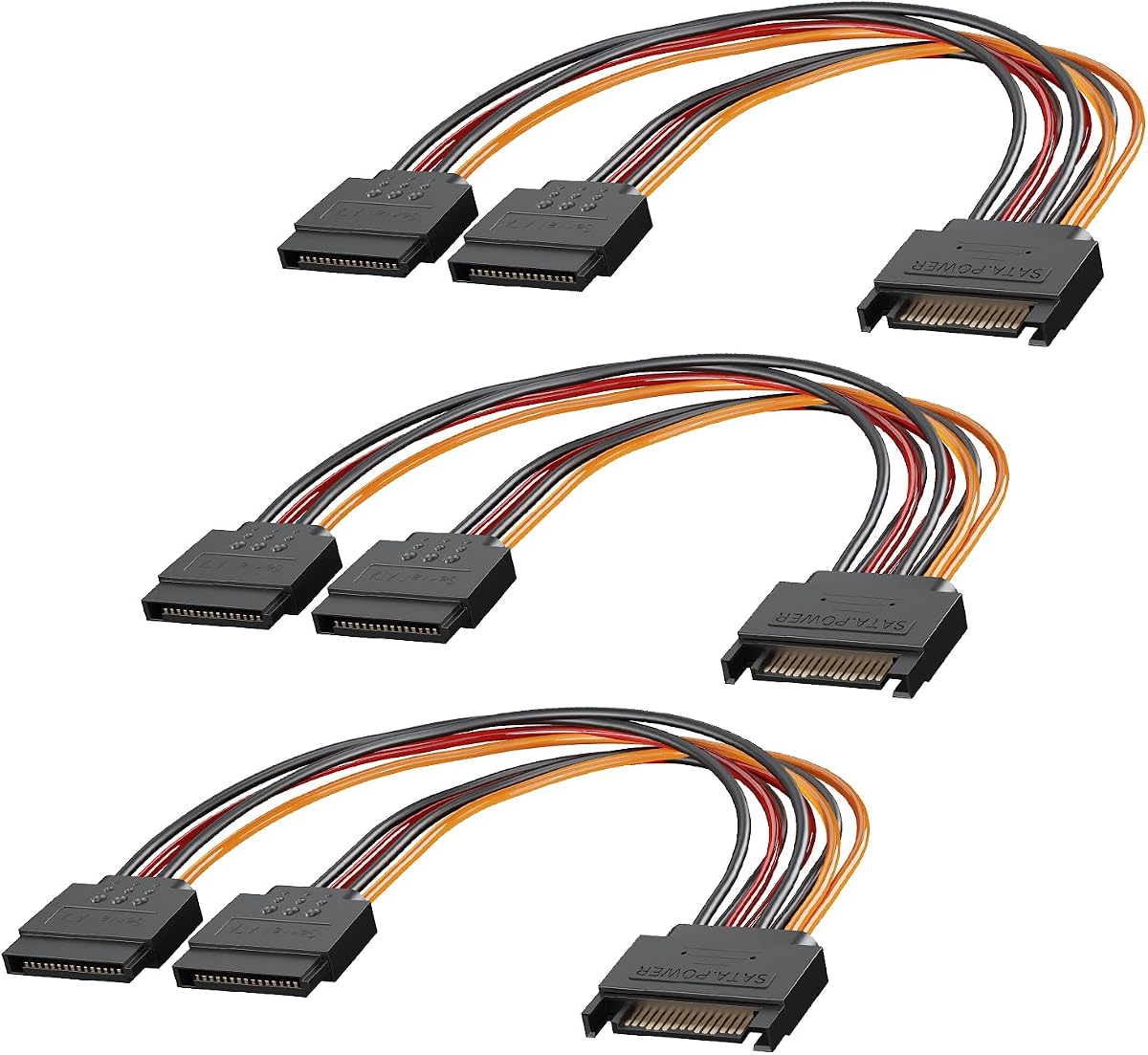


This three-pack divides one 15-pin SATA male connector into two 15-pin SATA female connectors, providing a straightforward way to power additional storage or optical devices. Its 4.7 rating reflects a generally favorable customer history, while the inclusion of three cables makes it especially practical for builders who need more than one expansion point or want replacement units available.
We may earn a commission when you buy through this link, at no additional cost to you.
The strongest feature is the combination of familiar SATA connectivity and broad device support. Each cable is described as compatible with hard disk drives, solid-state drives, and optical drives, so it can solve the common problem of a power supply having too few dedicated SATA connectors. The short eight-inch design is useful when devices sit near the relevant PSU cable, while the tool-free installation process reduces the work involved in a storage upgrade.
The main limitation is that each splitter adds only one usable drive connection, so a system with many drives could quickly exhaust the three included cables. The cable is also shorter than several extension-oriented alternatives, which means it may be less forgiving when drives are mounted farther from the power supply. As with any passive power accessory, correct connector orientation and a compatible 15-pin SATA input remain essential.
This is a sensible choice for a first storage expansion, a repair kit, or a compact desktop with two nearby SATA-powered devices. It is less appropriate when you need one large branch to feed five or six drives, or when extensive cable reach is required. For straightforward two-device expansion, however, the multipack format is convenient and the operation is refreshingly uncomplicated.
Having three identical splitters gives you more flexibility than a single Y-cable. You can deploy them in different areas of a case, retain one as a spare, or use separate branches for distinct storage groups without repeatedly rearranging the same adapter.
The eight-inch cable works best when hard drives, SSDs, or optical drives are mounted close to the PSU connections. That shorter run can reduce the visual and physical clutter associated with a much longer extension cable.
We may earn a commission when you buy through this link, at no additional cost to you.
This six-way SATA power splitter converts one 15-pin SATA connector into six separate SATA power outputs. It is the highest-output conventional splitter in this guide and is aimed at systems that need to power numerous HDDs, SSDs, or optical drives from a single PSU connection. Its 4.7 rating indicates solid customer reception, although the design requires careful planning around both wiring and power demands.
We may earn a commission when you buy through this link, at no additional cost to you.
The key benefit is obvious: one input can serve as many as six devices, reducing the number of direct connectors required from the power supply. This can be useful in a storage-heavy workstation or a compact chassis where every available PSU lead matters. The splitter is described as delivering stable power to each connected device, supporting the three standard device categories, and using a simple plug-and-play installation process.
Its trade-off is that a six-way branch concentrates multiple devices on one cable run. Users still need to consider whether the PSU and its SATA wiring can support the combined load, and the several outgoing leads may require careful routing around larger drives. A multi-output splitter also provides less placement flexibility than a collection of shorter Y-cables, particularly in a case where the drives are spread across different cages or trays.
Choose this splitter when the priority is minimizing the number of PSU connectors used and your drives have suitable nearby mounting positions. It is less appealing for a modest two-drive upgrade or a highly compact build where a dense bundle of six leads would be awkward. In a purpose-built multi-drive system, though, it delivers the most branching capacity in the group.
Turning one SATA source into six outputs can free the remaining PSU connectors for other internal components. That makes the cable most useful when the system already has several storage devices installed.
A larger branch provides capacity but also creates more wires to manage. Checking drive placement before installation helps prevent crossed leads, tight bends, or interference with airflow and moving components.
We may earn a commission when you buy through this link, at no additional cost to you.
This StarTech.com adapter splits one SATA power plug into four SATA power receptacles, placing it between the compact two-way options and the largest multi-drive branch. It measures 15.7 inches, or 400 millimeters, providing enough distance to reach storage devices in different parts of a case. The 4.7 rating supports its reputation as a practical, well-liked expansion accessory.
We may earn a commission when you buy through this link, at no additional cost to you.
Its most valuable trait is the balance between four-device capacity and manageable cable reach. A system builder can power several drives without choosing a minimal six-inch Y-cable or a sprawling six-way branch. The stated male-to-female configuration and durable construction make the intended connection path easy to understand: the male end joins the PSU, while the receptacles accept standard SATA-powered devices.
The trade-offs are that one cable still concentrates several loads on a single supply branch, and four outputs may be more than a simple desktop requires. The product listing emphasizes its core construction rather than detailed conductor specifications, so buyers needing very specific wire-gauge information should review the current listing. The 15.7-inch length also calls for deliberate routing to avoid unnecessary loops.
This is a strong option for a mid-size workstation, a home server, or a multi-bay enclosure with four SATA-powered devices grouped within reach of one PSU connector. It is particularly appealing when a four-drive branch is needed and the larger six-way design would be excessive. For such installations, it offers a focused and versatile middle ground.
Four outputs are enough for a substantial storage group without reproducing the cable density of a six-way branch. That middle position makes this model useful for system builders and drive-duplication applications that need several connections from one source.
At 15.7 inches, the adapter can span multiple internal mounting positions more effectively than a short Y-cable. Measuring the intended route first ensures the connectors reach without leaving excess cable in the chassis.
We may earn a commission when you buy through this link, at no additional cost to you.
This two-pack supplies two extension splitters, each taking one 15-pin SATA male input and providing five 15-pin SATA female outputs. Its 4.8 rating is among the strongest in this roundup, and the ability to power up to five SATA devices from a single connector makes it an attractive option for system builders, drive duplicators, and compact multi-drive installations.
We may earn a commission when you buy through this link, at no additional cost to you.
The 21-inch length is one of its most useful physical characteristics. It provides ample reach across a standard tower case or server chassis, reducing the need to force a short splitter toward a distant drive cage. The product information also describes high-quality wire, flexibility, toughness, wear resistance, and connectors designed for easy plugging and unplugging, all of which support regular installation and maintenance.
The caution in the listing is important: the connectors are designed specifically for 15-pin SATA devices and should not be forced into incompatible ports. In addition, a five-output branch is most useful in a system whose PSU can handle the intended load. A large bundle of outgoing cables can also make routing more demanding than a simple two-way Y-cable, so the extra reach should be managed rather than left in loose loops.
This product is a strong match for storage-heavy builds that need more flexibility than a two-device splitter provides but do not require six outputs. The two-pack also gives installers a spare or a second independent branch, making it a versatile value-oriented choice for PCs, duplication setups, and storage enclosures with compatible SATA power connections.
The 21-inch extension can bridge the distance from a power supply to a rear or mid-chassis drive area more comfortably than a short adapter. It also provides enough slack to route around a CPU cooler or cable-management bracket.
Two units allow the builder to divide devices across separate branches or keep a replacement on hand. They can also make it easier to group devices by function within a larger enclosure.
We may earn a commission when you buy through this link, at no additional cost to you.
CableCreation's two-pack provides two six-inch SATA power splitters, each with one 15-pin male connector and two 15-pin female outputs. It carries a 4.8 rating and is designed to power two Serial ATA hard drives, SSDs, optical drives, DVD burners, or compatible PCI cards from one computer power-supply connection. Its defining feature is the 90-degree connector arrangement.
We may earn a commission when you buy through this link, at no additional cost to you.
The right-angle approach can materially improve cable management in tight spaces. Instead of forcing a straight connector into a narrow gap or letting a cable project directly outward, the ninety-degree geometry can turn the connection sideways and preserve clearance around the drive or power supply. The short six-inch length reinforces that purpose by reducing excess wire when the two devices are close to the source.
Easy-grip treads on the connectors are another thoughtful detail, particularly when a splitter is installed in a crowded case and needs to be unplugged later. The product also includes a 24-month replacement policy and technical support according to its listing. On the other hand, the limited reach means the cable may not suit drives mounted far from the PSU, and two outputs will not satisfy a larger storage array by itself.
This is an excellent choice for adding a second SATA device beside an existing drive, particularly in a small desktop or compact form-factor system. Builders who repeatedly work inside a crowded case will appreciate the right-angle connectors and short, manageable runs. It is less appropriate for broad expansion, but for a two-device upgrade it delivers a focused solution with thoughtful handling features.
A ninety-degree connector can reduce the clearance needed directly in front of a drive bay or power supply. This is particularly helpful where a straight SATA plug would block access to another component or create an awkward bend.
At only six inches, the splitter is intended for devices located near the source connection. Keeping the run short supports a tidy interior and reduces the cable management required for a simple two-drive arrangement.
We may earn a commission when you buy through this link, at no additional cost to you.
The J&D two-pack offers two eight-inch SATA power Y splitters, each with a 15-pin male input and dual 15-pin female outputs. It has a 4.6 rating, slightly below the leaders in this guide, but its physical design is well suited to dependable two-device expansion. It is intended for SATA hard drives, disk drives, SSDs, and SATA optical drives.
We may earn a commission when you buy through this link, at no additional cost to you.
The use of 18 AWG tinned copper wire is the most technically notable feature, giving the cable a substantial conductor specification suited to power delivery. A flexible PVC jacket allows the cable to bend around internal obstacles, while the locking connector design helps prevent accidental disconnection. These attributes are meaningful in a working PC where vibration, airflow, and regular maintenance can place stress on loose connections.
As a two-way splitter, it cannot replace a multi-output solution for a densely populated system. Its eight-inch length also requires the drives to be reasonably close to the PSU. In return, the two-pack gives the installer multiple Y-cables that can be placed independently, which is often better than one long, crowded branching harness when only two devices are involved.
Choose this model when you need two SATA devices, want a locking connection, and prefer a moderate cable length over a very short or extended adapter. It is especially suitable for a desktop or workstation upgrade that needs additional power without replacing the PSU. The two included units and secure connector treatment make it a dependable, purpose-built choice.
The locking design helps a connected device remain attached during routine handling. That is useful in systems that may be moved or serviced and where a loose SATA power plug would be inconvenient.
The stated 18 AWG tinned copper construction and PVC jacket combine electrical substance with routing flexibility. The pair provides useful redundancy for installation or a spare for future maintenance.
We may earn a commission when you buy through this link, at no additional cost to you.
This six-inch StarTech Y splitter adds an extra SATA power outlet to a PC power supply. It is a compact male-to-female adapter with a latching design and a 4.6 rating. Rather than serving as a multi-drive distribution hub, it addresses the common situation in which a user adds one HDD or SSD but finds that the power supply has no spare dedicated SATA connector.
We may earn a commission when you buy through this link, at no additional cost to you.
Its strongest feature is the latching connector. The latch helps the connection remain secure, which can be valuable inside a chassis with active cooling or where a drive may be moved during servicing. At the same time, the six-inch cable keeps the entire assembly short, making it practical for a drive mounted immediately beside a PSU or in another compact location.
The compromise is limited reach and just two outputs. If the target drive is farther away, the short cable may not reach comfortably, and a longer extension-style splitter would be more practical. Users with several storage devices should also consider whether repeatedly branching additional adapters from a single lead is appropriate for the intended PSU configuration rather than relying on one compact Y-cable.
This splitter is best for a quick, focused upgrade involving one additional nearby SATA device. It is especially compelling in a small computer where space is at a premium and a locking connection adds confidence. For multi-bay expansion or long routing distances, a longer and higher-output alternative is the better fit.
The latching interface helps prevent accidental unplugging while remaining compact. This is a useful combination for a tightly packed mini desktop or a nearby secondary drive.
Six inches is ideal when the new device sits close to the existing SATA power source. It avoids the excess loops that could otherwise remain inside a small chassis.
We may earn a commission when you buy through this link, at no additional cost to you.
This SATA power extension converts one 15-pin male connector into three 15-pin female connectors, giving it a versatile balance of output count and reach. Its 5.0 rating is the highest numerical rating among the listed products. The 16.5-inch extension format makes it relevant to home computers, workstations, NAS systems, and servers that need multiple drives connected across a larger chassis.
We may earn a commission when you buy through this link, at no additional cost to you.
The listing provides unusually specific electrical information. It states that the SATA port provides 3.3V, 5V, and 12V rails, each listed as capable of delivering up to 3.5 amperes, and highlights 18 AWG side-by-side wiring for low-impedance power transmission. The extension length also gives an installer enough distance to reach several drive positions while supporting flexible routing and reduced cable clutter.
The key trade-off is that three devices draw from the same source branch. The low-impedance cable specification and stated rail capabilities are positive, but they do not remove the need to evaluate the power supply and the combined requirements of the connected devices. The 16.5-inch length also demands deliberate cable management, especially in a server or workstation where airflow and serviceability are important.
This is an excellent all-around choice for a builder adding two or three drives in a PC or NAS, particularly when the installation area extends beyond the reach of a short Y-cable. It avoids both the limitations of a two-output adapter and the bulk of a six-way branch. For flexible placement, substantial stated wiring, and a strong customer rating, it is the most balanced recommendation in the guide.
A three-way branch fits common upgrades that require one or two additional drives. It offers useful capacity without placing five or six outgoing leads into the same installation area.
The 16.5-inch extension can reach drive positions that are too distant for a short Y-cable. Side-by-side cable construction also gives the installer more control over how the individual leads are separated and routed.
The stated support for 3.3V, 5V, and 12V rails matches the power arrangement used by compatible SATA devices. That clear specification is helpful for installers comparing cables for varied storage equipment.
We may earn a commission when you buy through this link, at no additional cost to you.
This four-pack is more than a single SATA power splitter: it combines four SATA III data cables with two different power-splitter adapters. One adapter converts a 4-pin LP4 Molex connection to dual 15-pin SATA outputs, while the other expands one 15-pin SATA connector into two SATA connectors. The 4.7 rating reflects a broadly favorable view of this versatile upgrade bundle.
We may earn a commission when you buy through this link, at no additional cost to you.
Its standout advantage is completeness. The kit includes two straight SATA 3.0 data cables and two right-angle SATA 3.0 cables, giving builders options for drive placement in a small-form-factor chassis. Pure copper conductors are described as supporting stable signal transmission, and the kit is stated to work with SATA I, II, and III devices including HDDs, SSDs, DVDs, and Blu-ray optical drives.
Latching connectors on the data cables are designed to help prevent loose disconnections. The two power adapters also cover both older LP4-style PSU connections and newer systems with dedicated SATA leads. The trade-off is that the bundle may be more than a shopper needs for a single drive upgrade, and buyers seeking only a compact power Y-cable may prefer a more focused product.
This kit is a good choice for a fresh storage installation, a system builder assembling several drives, or anyone who wants data and power connections in one package. It is especially helpful in a small PC where right-angle data cables can simplify access. For a basic one-device installation, though, a simple splitter is likely to be the more economical and less cluttered solution.
A storage upgrade requires both a data connection and suitable power. Including both types of cable reduces the need to source unrelated components separately and gives the installer a more complete set of compatible connections.
The mixture of straight and 90-degree SATA data cables supports different drive-bay orientations. Angled leads can preserve access and reduce stress in compact cases where the connector has little room behind a drive.
The LP4-to-dual-SATA adapter accommodates an older style of power connection, while the SATA-to-dual-SATA splitter supports modern dedicated PSU leads. This makes the kit adaptable across a wider range of storage builds.
We may earn a commission when you buy through this link, at no additional cost to you.
This pack contains two flat SATA power Y splitters, each with a 15-pin male input and two 15-pin female outputs. The 20-centimeter extension adds just enough reach to reposition a connection while remaining compact. Its 5.0 rating places it alongside the highest-rated products in the guide, and the pair gives users two units for separate installations or future use.
We may earn a commission when you buy through this link, at no additional cost to you.
Its standout feature is the flat cable format. Flat conductors can lie more neatly beneath drive cages or alongside a PSU, helping reduce visual clutter and making it easier to find a clean route through the chassis. The listing states support for 3.3V, 5V, and 12V outputs and compatibility with hard drives, optical drives, DVD drives, compatible PCI SSDs, HDDs, and PCI cards.
The cable is described as using an 18 AWG pure copper core with a flexible PVC jacket. That combination is intended to provide a dependable connection, resist corrosion and oxidation, and support stable operation. The flat profile and short 20-centimeter length offer practical benefits, but they also mean the splitter is best for devices located nearby rather than across a large server chassis.
Choose this product for a tidy two-device expansion in a standard desktop or compact computer, particularly when a small amount of extra reach is needed. It is less suitable for a multi-bay system requiring long runs or many outputs. For a quick upgrade, the two included flat splitters and strong rating make it an appealing, focused option.
The low-profile construction can fit into narrow spaces where a round cable would create an unnecessary bulge. It also lies more easily beneath a drive tray and can be folded into a neater route.
Twenty centimeters is enough to move a connection away from a crowded PSU area without introducing a long excess. This makes the pair useful for small adjustments in desktop layouts.
Two splitters provide flexibility for separate device groups and reduce the chance of an immediate second purchase. They are also convenient for repairs, temporary testing, or keeping one unit in reserve.
We may earn a commission when you buy through this link, at no additional cost to you.
The right SATA power splitter depends on the number of devices, their physical locations, the connectors available from your power supply, and the amount of cable space inside the chassis.
Begin by counting the SATA-powered devices that need to operate from the same source. A two-way Y-cable is sufficient for one original and one added drive, while three-, four-, five-, and six-way splitters support progressively larger storage groups. Do not select based only on the total device count: every connected HDD, SSD, or optical drive should receive a dedicated 15-pin SATA power connector through the branch.
Choose the smallest splitter that meets the need. Unused outputs add unnecessary cable bulk, while a splitter with too few branches can force a cumbersome chain of adapters. Systems with a small number of closely grouped drives will usually work best with a two-way splitter, whereas a NAS, workstation, or drive-duplication setup may benefit from a larger dedicated branch.
Measure the distance from the PSU connector to the intended device locations before choosing a splitter. Six- and eight-inch models suit nearby drives, while 15- to 21-inch extensions can span larger desktop and server interiors. A cable that is too short may force sharp bends or leave a device poorly positioned; one that is much too long creates loops that consume space and interfere with airflow.
Also consider the path rather than only the straight-line distance. Cables may need to pass around drive cages, CPU coolers, fans, and cable-management brackets. A moderate extension often offers the best balance, while a flat or right-angle design can negotiate tight clearances more effectively than a round, rigid cable.
A splitter makes a power connection available, but it does not increase the power-supply unit's total output. The combined demands of the attached drives must remain within the capability of the PSU and its SATA power wiring. High-capacity mechanical HDDs, multiple optical devices, and power-hungry expansion cards can place greater demands on a branch than a single solid-state drive.
Review your PSU model and the requirements of every connected device. Pay particular attention when several HDDs start simultaneously, because startup demand can be more significant than steady-state consumption. For heavily loaded systems, a native PSU connection for each device or a professionally planned modular supply may be more appropriate than relying on a single crowded branch.
A standard SATA power splitter uses a 15-pin male input and 15-pin female outputs. Confirm that the PSU provides the matching connector and that the devices use conventional SATA power sockets. The kit in this guide also includes an LP4-style adapter for compatibility with an older connection format, but most modern power supplies use dedicated SATA leads.
Latching connectors can improve retention in systems that are moved, serviced, or exposed to vibration. They are especially helpful in compact cases where a straight plug might be easy to knock loose. Always compare the connector shape and latch position with the device socket, and never force a connector that does not fit because doing so can damage expensive storage hardware.
The best splitter is one that can be installed without blocking fans, drive trays, expansion cards, or access panels. Short cables reduce excess loops, while flat cables can fit into narrow gaps and right-angle connectors can turn a plug away from a confined area. Larger multi-output splitters require more attention because several branches emerge from one junction.
Before purchasing a long or high-capacity model, inspect the drive positions and intended PSU route. A cable that reaches every drive but crosses a fan or prevents tool-free access may be less practical than two short Y-cables. Proper routing also supports serviceability and leaves room for airflow around high-temperature storage components.
Several products in this guide specify 18 AWG wire, tinned copper, or pure copper conductors. A suitable conductor size and flexible jacket help the cable deliver power reliably while tolerating the bends required inside a computer case. Flexible construction is especially valuable for larger branch cables because each output may need to travel in a different direction.
Material specifications should be considered alongside fit, length, and power planning rather than in isolation. A well-described cable can be easier to trust and route, but it still must connect to the correct devices and operate within the PSU's limits. Inspect the finished installation for crushed insulation, exposed conductors, sharp bends, or connectors under strain.
SATA power splitters are commonly used with hard disk drives, solid-state drives, DVD or CD drives, and Blu-ray optical drives. The listed products vary in their stated compatibility and also mention compatible PCI cards or PCI SSDs. A device with a different physical connector may require an appropriate adapter and should never be connected by forcing it into a 15-pin SATA socket.
For a standard desktop, the most important categories are the HDD and SSD already being installed. Optical drive support is useful for legacy and media-oriented systems. In a NAS or server, verify the exact drive connections and any manufacturer-specific requirements before using a splitter, particularly when several high-capacity devices share a branch.
Multipacks are useful when a build requires more than one branch, when drives occupy separate zones, or when the installer values having a spare connector nearby. Two- and three-packs provide flexibility without the complexity of a very large branch. A single splitter is generally more focused for a modest two-device upgrade.
Pack size also affects cable management. Separate short splitters may produce cleaner routing than a single harness with many branches, especially in a compact case. Conversely, one long extension can be easier when all devices share one distant power source. The best choice depends on whether you value replacement availability, independent placement, or the simplest possible installation.
Before installing a splitter, shut down the computer, switch off the PSU, and disconnect the power cord. Confirm the splitter's male connector matches the available 15-pin SATA power lead, then compare the female receptacles with the sockets on each hard drive, SSD, or optical drive. Plan the cable route before connecting anything, especially when multiple outputs will run to different bays.
Connect the male input to the intended SATA power connector while the system is fully powered off. Attach each female output firmly to its matching device, keeping the connector key aligned rather than forcing it. Bundle excess cable with appropriate ties, but avoid crushing the wire beneath sharp metal edges or beneath drives. Never connect or remove a SATA power plug while the computer is operating.
After wiring, inspect every connection from both sides and verify that no cable is pinched. Reconnect the PSU, start the system, and confirm that all intended devices are recognized. For routine care, keep the splitter away from moisture, excessive heat, and moving fans. Replace it if a connector becomes loose, the jacket is damaged, or the cable no longer bends normally.
A SATA power splitter divides one 15-pin SATA power connector into multiple female connectors. It is commonly used to add an HDD, SSD, or optical drive when a power supply does not have enough native SATA power leads. The splitter carries power only, so each device still requires its own SATA data cable.
Yes, provided you use a splitter with at least two female SATA outputs and the PSU can handle the combined power requirements. Each hard drive needs its own data connection, and both power plugs must be fully seated. For several high-capacity drives, verify startup and sustained power needs before relying on one branch.
A power splitter does not carry SATA data signals, so it should not reduce data transfer speed. Transfer performance depends on the separate SATA data cable, the drive, the controller, and the system's configuration. Using the correct data cable for each device remains important even when a power splitter is used.
Yes. The listed splitters are designed for compatible SATA-powered devices, including 2.5-inch and 3.5-inch solid-state drives where the connector form and power requirements are appropriate. Match the 15-pin interface carefully and confirm that the PSU can provide enough power for the connected devices.
They can be. A right-angle connector may fit more easily into a narrow gap and can reduce the clearance needed directly in front of a drive or PSU. It is not automatically better in every case, however, so compare the available space and connector orientation before choosing between a right-angle, flat, and standard round cable.
Choose the shortest length that comfortably reaches the intended devices and allows the cable to be routed without sharp bends. Six- to eight-inch splitters work well for nearby drives, while 15- to 21-inch models suit larger cases or distant drive cages. Measure the actual path rather than relying only on straight-line distance.
It may physically work when the connector arrangements permit it, but it can concentrate several devices on one PSU branch and create unnecessary cable complexity. A native PSU connection, a properly sized single splitter, or separate PSU leads is generally preferable when available. Always check the PSU's capacity and the devices' combined power requirements.
Look for a 15-pin SATA male input and matching 15-pin female outputs for standard SATA power connections. Check the drive or card socket, the PSU connector, and the required voltage arrangement before installation. Never force a connector into an incompatible port, because doing so can burn or damage the device.
The three-way SATA extension splitter stands out as the most versatile overall recommendation, combining a 5.0 rating, three outputs, a 16.5-inch reach, and detailed 18 AWG multi-rail construction information. The two-pack five-way splitter offers strong capacity and value, while the StarTech four-way model provides a polished option for builders seeking a balanced multi-drive branch.
For simpler needs, a two-way splitter is usually the right form factor. The CableCreation model is particularly useful where right-angle routing matters, the J&D version emphasizes locking connectors and substantial wiring, and the flat twenty-centimeter pair is attractive for compact, tidy installations. Always prioritize connector fit, available PSU capacity, measured cable reach, and clear device compatibility over output count alone.
Ratings, seller information, and prices can change, so check the current listing before ordering. Confirm the number and type of drives, inspect the PSU connections, and verify the splitter's dimensions against the available chassis space. With those checks complete, the right SATA power splitter can add drive capacity without complicating installation or wasting internal room.