
7 Color Backlight Detachable Keyboard Cover
4.5Editor score
Seven-color backlight keyboard
Magnetic detachable design
Multi-angle folio stand
Rechargeable USB-C keyboard
Looking for a keyboard case for Fire Max 11? This guide compares 10 compatible options for typing, touchpads, backlights, stands, protection, and connectivity.
A keyboard case can transform an Amazon Fire Max 11 from a convenient reading tablet into a more practical productivity device. The best options combine a comfortable keyboard, a protective folio, adjustable viewing positions, reliable attachment, and convenient access to the tablet’s controls and ports.
We compared all ten products by examining their Fire Max 11 compatibility, keyboard layout, touchpad or mouse support, backlighting, viewing-angle options, charging method, protective construction, stylus storage, and included accessories. The list covers magnetic and pogo-pin designs, Bluetooth keyboards, and cases intended for typing, media use, reading, drawing, and travel.
Each pick reveals which use case it serves best, from a value-focused illuminated keyboard to premium cases with integrated trackpads and no separate keyboard charging. Ratings reflect the supplied product information, while availability, bundle contents, and prices can change, so readers should verify current listing details before purchasing.
4.5Editor score

4.6Editor score
4.6Editor score
The comparison below highlights the defining differences among these Fire Max 11 keyboard cases, including input methods, backlighting, stand flexibility, charging requirements, protection, and bundled accessories.
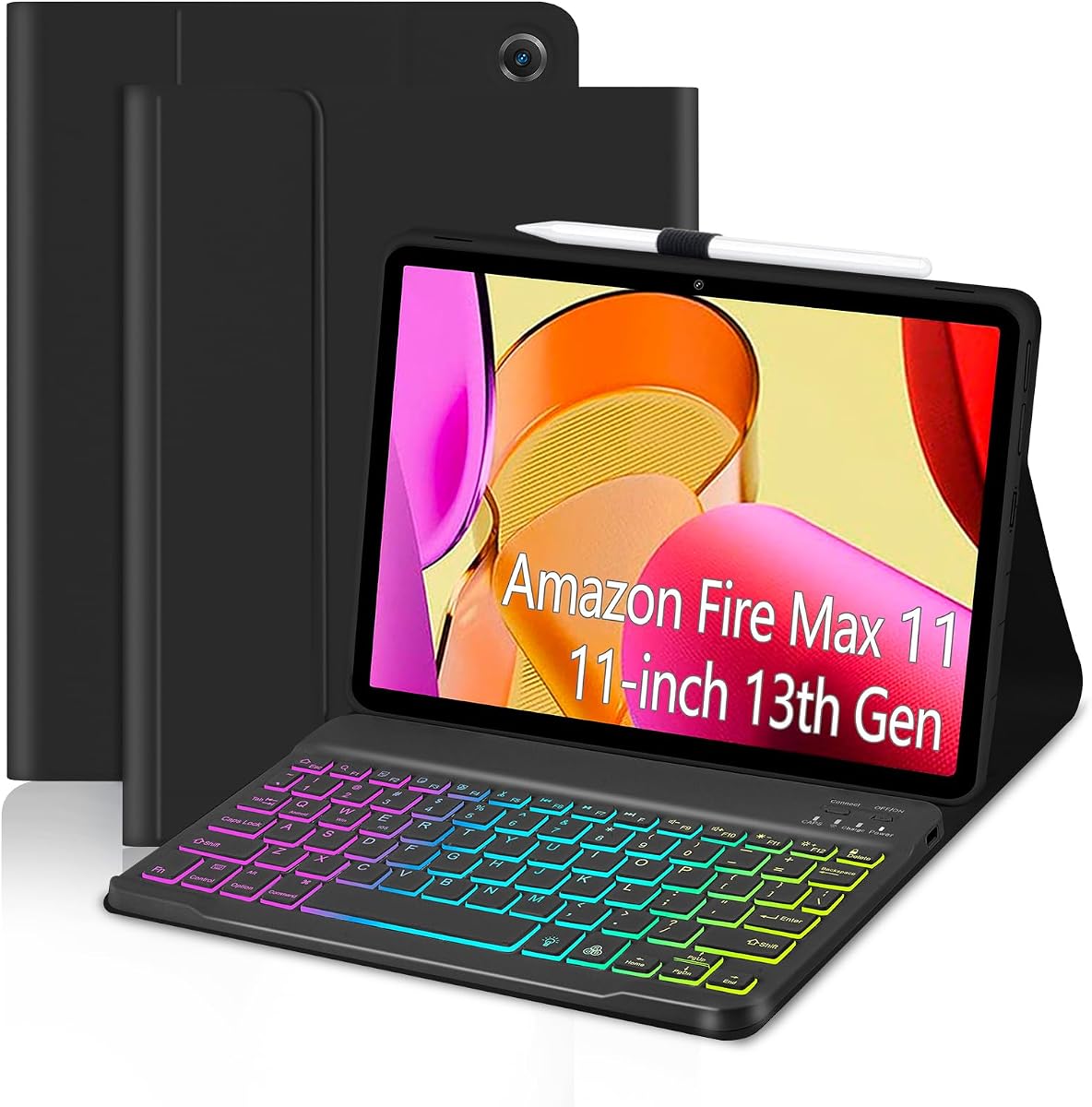
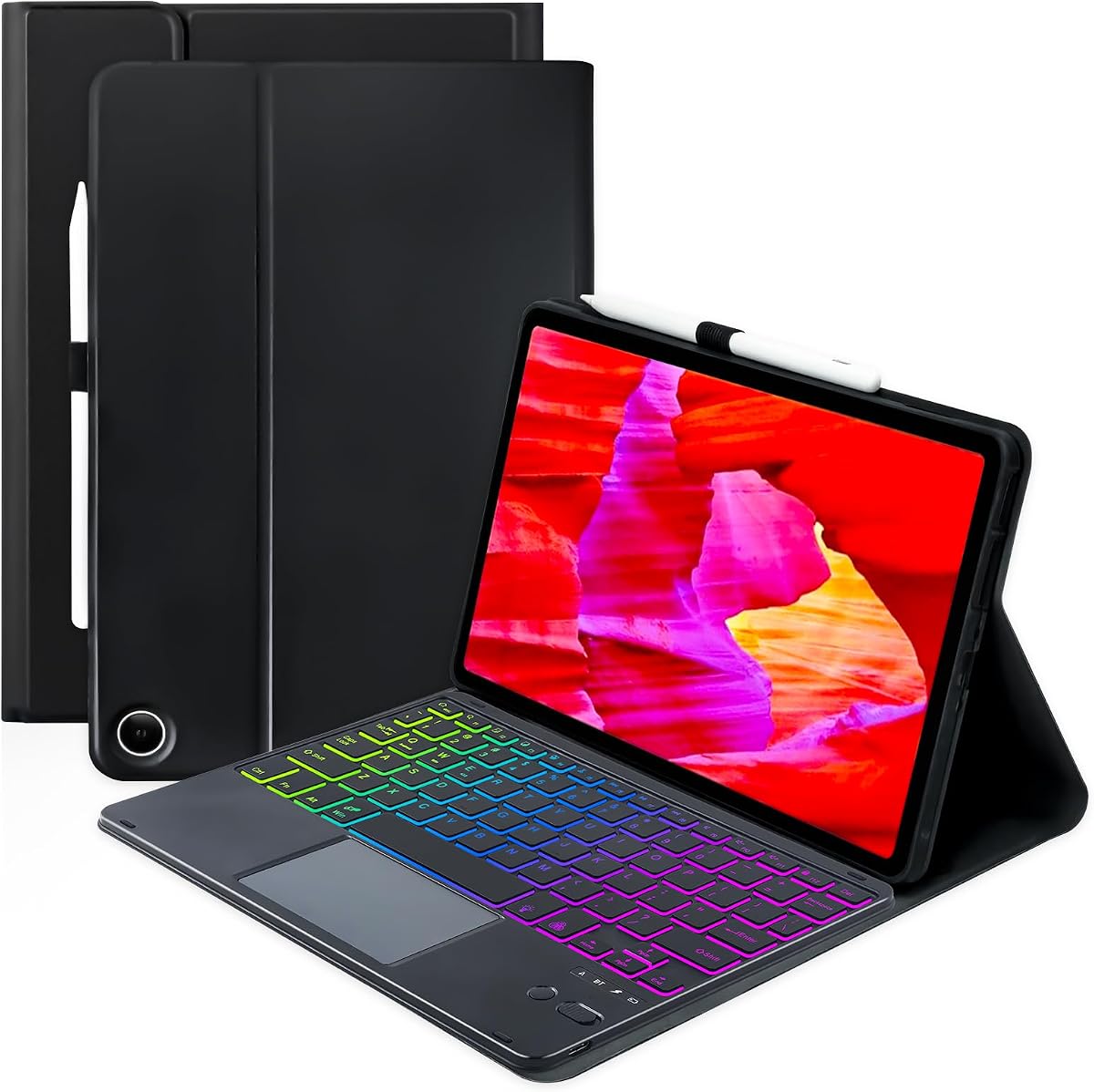


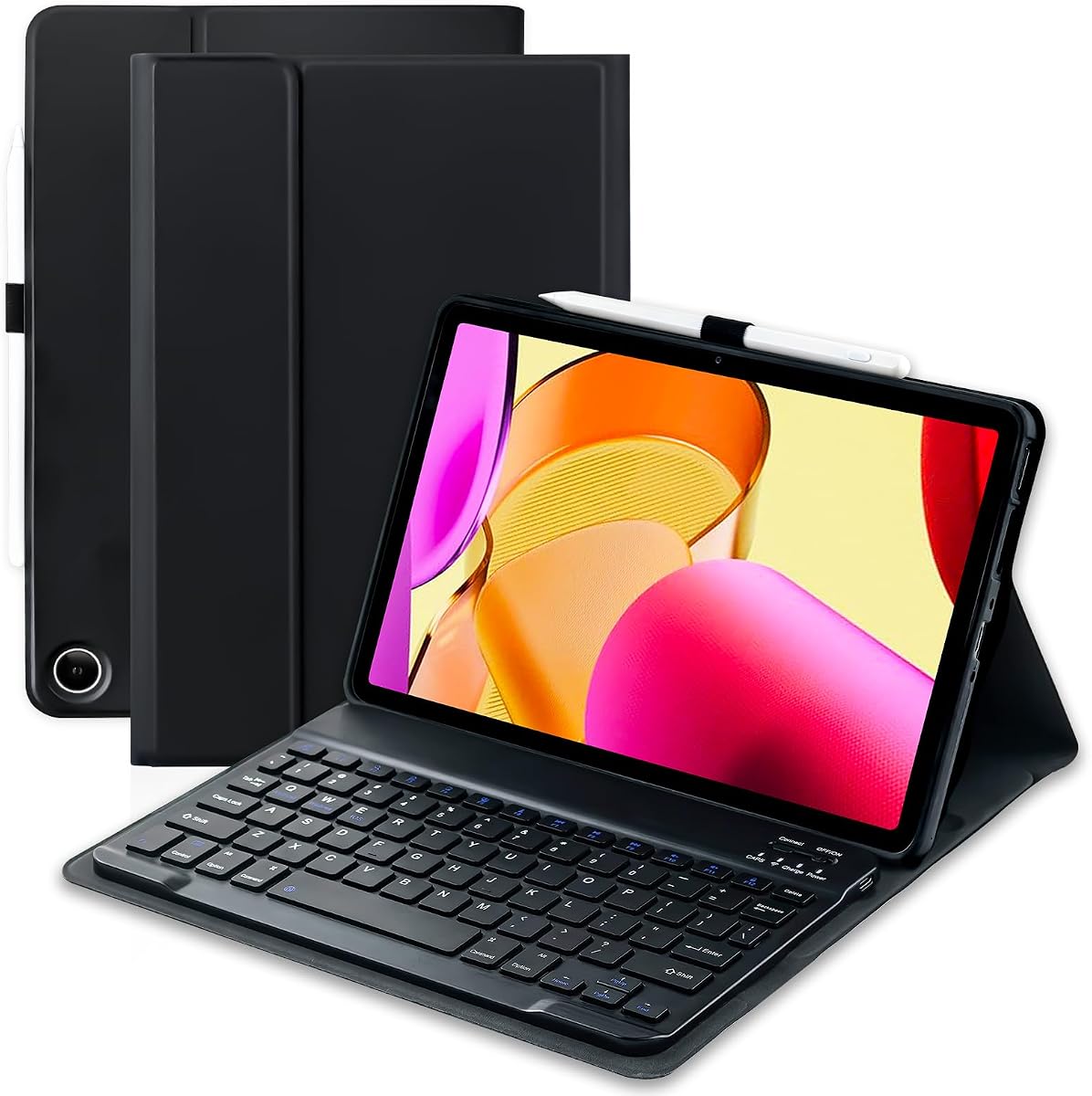


The EAMPANG Rainbow Keyboard Case earns a 4.5 rating by combining a full folio case with a detachable, illuminated keyboard. It is designed specifically for the 11-inch Amazon Fire Max 11 from the 2023 release, so buyers should confirm their tablet model before ordering. Its strongest visual feature is the seven-color RGB backlight, which can be switched and adjusted for different lighting conditions.
We may earn a commission when you buy through this link, at no additional cost to you.
The keyboard includes shortcut controls for common tasks such as editing documents, browsing applications, and creating presentations. Its magnetic connection allows the keyboard to be removed while retaining the tablet in a protected cover, making the setup more versatile than a permanently attached keyboard. The soft TPU inner shell uses a honeycomb design intended to improve heat dissipation, while accurately positioned cutouts preserve access to the tablet’s functions.
The outer shell is made from PU leather and provides coverage intended to resist scratches, dust, and everyday knocks. A built-in pen holder keeps a compatible stylus close at hand, although neither the tablet nor a stylus is included. The main trade-off is model specificity: this case is not designed for other Fire tablet models, and its lighting and rechargeable keyboard add more complexity than a basic folio.
This is a strong choice for students, casual users, and anyone who often types in dim rooms. It offers a particularly attractive balance of protection, detachable usability, shortcut access, and colorful backlighting. For shoppers who want a flexible Fire Max 11 case without moving beyond the model-specific 13th-generation format, it is a well-rounded recommendation.
Seven selectable RGB colors, automatic breathing-light mode, adjustable brightness, and the ability to switch the backlight off make the keyboard adaptable to dim rooms, nighttime use, or a more understated appearance during the day.
The PU leather exterior and flexible TPU inner shell surround the tablet, while molded cutouts keep ports and controls accessible. The honeycomb lining adds a cooling-oriented design element that is especially relevant when a keyboard and protective shell are used together.
We may earn a commission when you buy through this link, at no additional cost to you.
The MePadKey Touchpad Keyboard Case has a 4.2 rating and is built for Fire Max 11 owners who want more than a conventional typing keyboard. Its defining feature is the touchpad, which supports multi-finger gestures and can perform tasks normally associated with a mouse. That makes it a practical choice for navigating documents, webpages, applications, and on-screen controls.
We may earn a commission when you buy through this link, at no additional cost to you.
The detachable keyboard has seven rainbow backlight colors and uses a rechargeable lithium battery, removing the need for disposable batteries or a keyboard cable during everyday use. Buyers can position the keyboard where it feels most comfortable or detach it entirely for reading and viewing. The case also supports multi-angle adjustment, allowing the tablet to be repositioned for different work environments.
Anti-slip grooves inside the cover help keep the tablet from sliding or tipping, while precisely cut openings help each control align with its intended position. The PU leather exterior and non-slip lining add protection against scratches. As with many model-specific accessories, the strict Fire Max 11 compatibility limit and lack of included tablet or stylus are important considerations.
Overall, this case makes sense for users who regularly navigate a Fire Max 11 with a pointer and who value flexible positioning. It combines illumination, touchpad control, and a rechargeable detachable keyboard without requiring a separate mouse. It is less suitable for buyers whose primary need is a minimalist keyboard with the fewest possible wireless accessories.
The integrated touchpad provides an alternative to repeated on-screen taps and supports multi-finger navigation. That can streamline document review, web browsing, media controls, and other tasks that benefit from a conventional pointer.
Because the keyboard detaches and contains a rechargeable battery, users can move it independently from the folio. Adjustable angles and anti-slip grooves then provide stable tablet positioning for typing, viewing, or hands-free use.
We may earn a commission when you buy through this link, at no additional cost to you.
The TUNKARMOR Keyboard and Mouse Case carries a 4.3 rating and stands out for offering a complete wireless workstation setup. It includes both a rechargeable Bluetooth mouse and a magnetic detachable Bluetooth charging keyboard. The keyboard attaches firmly to the case, helping it hold the tablet upright and convert the Fire Max 11 into a compact laptop-style arrangement.
We may earn a commission when you buy through this link, at no additional cost to you.
Three viewing positions support writing, reading, viewing, and drawing, while anti-slip slots help the tablet remain stable. The magnetic keyboard can be moved and adjusted according to the user’s preferred position. A built-in pen holder provides storage for a compatible stylus, though the stylus itself is not included. Opening or closing the lid automatically wakes or sleeps the tablet, helping preserve battery life during short work sessions.
Full edge coverage and a honeycomb-grid inner layer are designed to protect against scratches, bumps, dents, and heat buildup. The stated protection and cooling features make the folio feel more substantial than a simple tablet sleeve. The trade-off is that both wireless accessories are rechargeable and therefore must be managed separately from the tablet, even though the keyboard is magnetic and charging is handled through its connection.
This bundle is ideal for buyers who want traditional mouse control and a portable keyboard without assembling several unrelated accessories. It is especially useful for travel, commuting, and temporary workspaces where carrying a separate mouse and keyboard would be inconvenient. Those who prefer a trackpad or a keyboard powered directly by the tablet may favor a different option.
The included mouse removes the need to carry a separate pointing device, while the magnetic keyboard completes a familiar laptop-style layout. Together, they give the Fire Max 11 a more conventional computer feel for office-style tasks.
Three viewing angles and anti-slip slots accommodate different working postures. The automatic sleep and wake function complements those positions by activating the screen when the folio opens and putting it to sleep when closed.
We may earn a commission when you buy through this link, at no additional cost to you.
The Amazon Fire Max 11 Keyboard Case receives a 4.6 rating and offers one of the most cohesive designs in this roundup. It is intended exclusively for the 13th-generation Fire Max 11 released in 2023. Rather than relying on a separate trackpad or mouse, it integrates a precision trackpad directly into the keyboard, creating a compact laptop-like setup with fewer accessories.
We may earn a commission when you buy through this link, at no additional cost to you.
The magnetic keyboard installs in seconds, and the screen wakes when the cover opens. A pogo-pin connection draws power from the tablet, so the keyboard never requires independent charging. The trackpad includes adjustable pointer speed, an enable and disable shortcut, pinch-to-zoom, two-finger scrolling, and task-switching gestures. Its spacious layout is supplemented by 15 shortcut keys and two customizable shortcuts.
The detachable back cover has an integrated stand with multiple positions. Removing the keyboard leaves the tablet in a useful hands-free configuration for video, video calls, reading, or viewing. The supplied information also notes that the case contains 35% post-consumer recycled plastics and that its packaging is recyclable, excluding shipping packaging. One point to understand is the linked Microsoft 365 trial requires sign-up and converts to a paid monthly plan after the trial under the stated terms.
This is the most complete general-purpose option for buyers who want an integrated keyboard, trackpad, stand, and simple connection process. It avoids separate accessory charging and provides a clean transition between typing and media viewing. For a compatible 13th-generation Fire Max 11, it is the strongest all-around recommendation in the guide.
The integrated trackpad supports familiar gestures such as pinch-to-zoom, two-finger scrolling, and task switching. Adjustable pointer speed and the ability to disable the trackpad make it adaptable to different workflows.
Pogo pins power the keyboard from the Fire Max 11, eliminating an extra charging routine. Magnetic attachment also makes it easy to remove the keyboard and use the integrated stand independently.
We may earn a commission when you buy through this link, at no additional cost to you.
The SAMTUNK Rainbow Keyboard Case has a 4.4 rating and combines a magnetic keyboard, protective folio, and rechargeable Bluetooth mouse. It is designed for the 11-inch Fire Max 11 from the 2023 release. The magnetic keyboard attaches to the case and helps it function as a compact upright workstation, while the included mouse provides precise pointer control.
We may earn a commission when you buy through this link, at no additional cost to you.
The keyboard offers seven selectable rainbow backlight colors, making it easier to type in dark environments while adding a distinctive visual element. Users can detach and reposition the keyboard to suit their preferred arrangement. The case supports three viewing angles and includes anti-slip slots for writing, viewing, reading, and drawing. A built-in pencil holder helps keep a compatible stylus available.
Opening the folio wakes the tablet and closing it puts the screen to sleep. Full edge coverage and a honeycomb-grid inner layer are intended to protect against everyday drops, bumps, scratches, and overheating. The package contains a protective case, Bluetooth keyboard, Bluetooth mouse, Type-C charging cable, and product manual. The tablet and pencil are not included.
This is a good match for users who value the feel of a separate mouse more than an integrated touchpad. It also combines colorful lighting with a broad accessory bundle. The main inconvenience is the need to keep both the keyboard and mouse charged, and the model-specific fit means the buyer should verify the tablet’s generation before purchase.
Seven rainbow colors improve visibility in low light while allowing the owner to personalize the setup. The rechargeable mouse adds familiar mouse navigation, which can be helpful for small interface elements and document editing.
The case, keyboard, mouse, charging cable, and manual arrive as one coordinated set. Three viewing positions and the magnetic keyboard placement allow the tablet to shift between laptop-style work, reading, and hands-free viewing.
We may earn a commission when you buy through this link, at no additional cost to you.
The 7 Color Backlight Detachable Keyboard Cover combines a protective case with a magnetic Bluetooth keyboard and earns a 4.5 rating. It is made specifically for the 11-inch Fire Max 11 from the 2023 release, with clear warnings that it will not fit other Kindle or Fire tablets. The magnetic design allows the keyboard to be attached for typing or removed for reading, drawing, and media viewing.
We may earn a commission when you buy through this link, at no additional cost to you.
Seven backlight colors improve visibility in low light and add a visual accent to the setup. The keyboard contains a 420mAh rechargeable battery, uses a Type-C charging connection, and is stated to work for up to 90 hours under normal use. It also enters a sleep state during prolonged inactivity and reconnects when a key is pressed.
The folio provides multiple viewing angles, while a soft TPU exterior and flexible inner shell are designed to resist drops, scratches, and slippery handling. A honeycomb lining supports heat dissipation. The lid can wake and sleep the screen when the case is used in its case-only configuration. A stylus holder is included, but the stylus itself is not.
This is the strongest value-oriented pick in the roundup because it brings together illumination, long stated battery life, magnetic detachment, multi-angle positioning, and a protective shell. The trade-off is that the wireless keyboard must be charged separately, unlike a pogo-pin-powered design. Subject to that limitation, it offers a broad feature set for a broad range of Fire Max 11 users.
The 420mAh battery is stated to provide up to 90 hours of normal use, making it well suited to extended work sessions. Type-C charging provides a familiar and broadly compatible way to replenish the keyboard.
The magnetic keyboard can remain attached for a laptop-style experience or be stored separately. That flexibility makes the cover useful for reading, chatting, sketching, and watching video without forcing every activity into a fixed keyboard position.
We may earn a commission when you buy through this link, at no additional cost to you.
This Amazon Fire Max 11 Keyboard Case also holds a 4.6 rating and is a premium alternative to the closely related model-specific keyboard case. It combines a lightweight, portable design with an integrated trackpad, a spacious key layout, 15 shortcut keys, and two customizable shortcuts. Its streamlined setup is intended to make the Fire Max 11 feel productive without adding a separate mouse or charging another accessory.
We may earn a commission when you buy through this link, at no additional cost to you.
The trackpad supports adjustable pointer speed, an enable and disable shortcut, pinch-to-zoom, two-finger scrolling, and task switching. Magnetic attachment allows the keyboard to be installed in seconds, and opening the cover wakes the screen. Most importantly for everyday convenience, the keyboard receives power through a pogo-pin connection from the tablet, eliminating the need to charge it independently.
The detachable back cover incorporates a multi-position stand for video viewing and calls. The supplied information states that this version uses 31% post-consumer recycled plastics and that the product packaging is recyclable, excluding shipping packaging. The linked Microsoft 365 offer is tied to a trial that requires sign-up and converts to a paid monthly subscription under the listed terms.
This version is best for buyers seeking a polished, integrated tablet-computer experience with minimal accessory management. The detachable stand and gesture trackpad make it particularly adaptable for office work, browsing, communication, and hands-free viewing. The strict Fire Max 11 compatibility requirement remains the main caveat, while the recurring trial terms deserve attention before installation.
A spacious key layout, 15 shortcut keys, two customizable shortcuts, and a gesture trackpad provide multiple ways to move through documents, websites, email, and applications. The result feels closer to a compact computer setup.
The keyboard attaches in seconds and receives power from the tablet through pogo pins. Removing it exposes the integrated stand, giving users a simple transition between active typing and hands-free use.
We may earn a commission when you buy through this link, at no additional cost to you.
The EAMPANG Magnetic Keyboard Case offers a 4.4 rating and a focused set of features for people who want a conventional keyboard with a flexible folio. Built for the 11-inch Fire Max 11 from the 2023 release, it combines a magnetic detachable keyboard, a PU leather exterior, and a stylus holder. The keyboard uses a rechargeable battery and a Type-C charging port.
We may earn a commission when you buy through this link, at no additional cost to you.
Three anti-slip grooves allow the tablet to be placed at different angles for work, video, drawing, reading, and chatting. Built-in magnets hold the keyboard firmly to the case, while the 360-degree design is intended to protect the device from drops, shocks, and scratches. A honeycomb interior supports heat dissipation, while precise cutouts align the openings with the tablet’s controls and ports.
The first keyboard row contains multifunction controls for actions such as returning to the main interface, selecting all, copying, pasting, adjusting volume, and controlling media playback. The rechargeable battery takes approximately two to three hours to charge and is stated to provide about 50 hours of use. Unlike illuminated alternatives, it does not list a backlight, touchpad, or bundled mouse.
This case is a sound choice for buyers who prioritize stable angles, useful shortcuts, and straightforward magnetic attachment over illuminated keys or integrated pointer controls. It remains model-specific and the keyboard has to be charged independently, but the result is a balanced, practical case for everyday productivity and entertainment.
The multifunction row gives direct access to frequently used actions such as copy, paste, select all, volume, media playback, and the home interface. These shortcuts can reduce repeated on-screen navigation.
Anti-slip grooves support several tablet angles while helping prevent unwanted sliding. The folio can accommodate typing, viewing, sketching, reading, and chatting without relying on a single fixed posture.
We may earn a commission when you buy through this link, at no additional cost to you.
The EAMPANG Blue Rainbow Keyboard Case has a 3.7 rating and shares the core design strengths of the other EAMPANG illuminated case: seven RGB colors, a detachable magnetic keyboard, Type-C charging, shortcut keys, and a pen holder. It is intended for the 13th-generation Fire Max 11 and should not be considered for other Fire tablet sizes.
We may earn a commission when you buy through this link, at no additional cost to you.
Its backlight can be switched among seven colors, displayed in an automatic breathing mode, adjusted in brightness, or turned off. The Fn plus light key provides direct control, and the shortcut row supports tasks such as editing documents, browsing applications, and creating presentations. The keyboard detaches from the case, giving the user freedom to use the tablet as a standalone device.
Protection comes from a PU leather outer shell and a flexible TPU inner structure designed to cover the tablet and resist scratches and drops. The molded layout preserves access to tablet functions, while the honeycomb interior supports heat dissipation. A built-in slot stores a compatible capacitive pen, although neither the tablet nor the stylus is included.
The principal drawback is its lower customer rating relative to the rest of the field. Still, the feature set remains appealing for buyers who specifically want colorful lighting and a magnetic detachable design. It is best considered a style-focused alternative to the similarly equipped black EAMPANG option, with the same need to confirm compatibility and charge the keyboard separately.
Seven colors, a breathing effect, adjustable brightness, and an off setting let users tailor the keyboard to different environments. The lighting is especially useful for nighttime typing without requiring a separate illuminated keyboard.
The magnetic keyboard separates from the folio for reading or media use. Meanwhile, the PU leather exterior, flexible TPU liner, and full-coverage design protect the tablet from everyday scratches, dust, and knocks.
We may earn a commission when you buy through this link, at no additional cost to you.
The Smart Folio Bluetooth Keyboard Case has a 4.5 rating and emphasizes flexibility across four use modes. It is designed for the 11-inch Fire Max 11 from the 2023 release and cannot be used with other Kindle or Fire tablets. The magnetic keyboard detaches from a premium vegan-leather folio, allowing the tablet to be placed on the lap for reading, video, or drawing.
We may earn a commission when you buy through this link, at no additional cost to you.
Multiple viewing angles create four versatile arrangements for typing, sketching, viewing, and reading. The exterior is intended to protect the front and back of the tablet from scratches, while a shockproof TPU inner layer adds support around the device. The keyboard uses a fast Bluetooth connection, has quiet comfortable keys, and charges through a Type-C interface.
The stated battery duration is up to 70 hours under normal use, and a power-saving mode allows the keyboard to enter hibernation after prolonged inactivity. A complete shortcut row provides access to brightness, media, volume, copy, paste, and other controls. When the case is used without the keyboard attached, opening or closing the lid locks or unlocks the screen to conserve tablet battery life.
This is a versatile option for readers and light productivity users who want one folio to cover several activities. Its four angles, detachable keyboard, quiet keys, and automatic screen control make it especially adaptable. The trade-off is separate Bluetooth charging and strict model compatibility, but the overall design is balanced for everyday travel, reading, and typing.
The folio supports typing, sketching, viewing, and reading in different positions. Removing the keyboard when it is not needed also makes it easier to use the tablet in a more relaxed handheld or lap-based arrangement.
Quiet, comfortable keys support everyday writing, while the shortcut row adjusts brightness, media, volume, copy, and paste. The rechargeable keyboard is stated to last up to 70 hours and enters hibernation when unused.
We may earn a commission when you buy through this link, at no additional cost to you.
The most important starting point is exact tablet compatibility, followed by the kind of input experience and physical protection you need. Comparing keyboard attachment, pointer controls, lighting, viewing positions, charging, and bundled accessories helps prevent an otherwise attractive case from being unsuitable.
Check the model information in the tablet’s settings and compare it with the product listing before buying. Compatibility is the one factor that cannot be compensated for by another feature.
Choose a trackpad for portability, choose a bundled mouse for conventional pointer control, and prioritize the keyboard itself when your work is predominantly text-based.
For the fewest accessories, favor a tablet-powered pogo-pin keyboard. For maximum repositioning, choose a rechargeable detachable keyboard with a stated battery duration that suits your use.
Select an illuminated model if you often type in low light. Otherwise, prioritize layout, trackpad quality, stand adjustment, or protection over decorative lighting.
More angles are useful for mixed-use setups, but stability and the ability to hold the selected position matter more than the raw number of positions.
Look for edge coverage, a resilient inner liner, accurate openings, and a heat-dissipation pattern rather than relying on exterior material alone.
Confirm whether you need to buy a tablet, stylus, mouse, or charging cable separately, and compare those requirements before choosing the most convenient bundle.
Use ratings to identify consistently well-received options, then select the design whose features match your workflow and portability needs.
Before attaching the keyboard, confirm that the Fire Max 11 model and generation match the case instructions. Charge a rechargeable keyboard fully using its specified Type-C or other supplied connection, then pair the Bluetooth device according to the manual. For a magnetic or pogo-pin design, align the keyboard with the attachment area and let the magnets or pins make contact before applying pressure. Opening the case should activate the automatic wake function when that feature is supported.
Use the case within its intended range of positions. For typing, place the tablet at a comfortable angle and keep the keyboard aligned with the screen. For reading or drawing, detach the keyboard if the design allows it and use the folio as a stand. Bluetooth keyboards may disconnect after the tablet has been inactive; pressing a keyboard key should wake and reconnect the device. Avoid placing heavy or sharp objects on the keyboard or pressing hard on the touchpad and shortcut keys.
Care for the case by keeping the inner lining free of dust, grit, and sticky residue, since particles can scratch the tablet or interfere with magnetic attachment. Clean the exterior with a soft, lightly dampened cloth and avoid soaking the material. Do not charge the keyboard while liquid is present, and keep charging ports clear. Remove the keyboard before washing or using excessive moisture, and store the tablet in a dry, dust-free place with the cover closed when it is not in use.
No. All ten products listed here are intended for the 11-inch Amazon Fire Max 11 from the 2023 release, also described as the 13th generation. They are not compatible with other Fire or Kindle tablet models. Confirm the model in the tablet’s settings before ordering, as similarly named devices can have different dimensions and port arrangements.
No. The Fire Max 11 tablet and compatible stylus are not included with any of the cases in this guide. Some packages include a keyboard, mouse, charging cable, and manual, but the accessories vary by listing. Review the package contents carefully if you already own the tablet and stylus.
The two Amazon Fire Max 11 Keyboard Case options are attractive for travel because their pogo-pin keyboards receive power from the tablet and require no separate charging. They also detach quickly and include a trackpad, reducing the number of accessories that must be carried. A rechargeable Bluetooth model offers more keyboard-placement freedom, but it adds another item to charge.
It depends on where and when you type. Seven-color backlights make low-light use easier and add a personalized appearance. For daytime work or whenever a full-size keyboard in a dark room would be inconvenient, a non-backlit case may be preferable. Keyboard layout, trackpad support, viewing angles, and protection are often more important to long-term satisfaction.
A touchpad is built into the keyboard and supports gestures such as pinch-to-zoom, two-finger scrolling, and task switching, while keeping the package compact. A separate mouse offers conventional pointing control but takes up more space and must be charged in the bundles listed here. The Amazon cases favor the trackpad approach, while the TUNKARMOR and SAMTUNK options include mice.
Yes, with products that feature a detachable keyboard or separate back cover. Removing the keyboard generally leaves the folio functioning as a tablet stand for reading, drawing, watching video, or joining calls. The exact viewing positions and whether the screen sleeps with the lid depend on the model, so the included instructions should be followed.
Different angles suit different activities. A lower or more upright position can help with typing, while a shallower angle may suit reading or viewing, and another position may support handwriting or drawing. Cases with three grooves or four modes are intended to make it easier to switch among those activities without repositioning the tablet by hand.
The listings specifically state compatibility with the 13th-generation Fire Max 11 released in 2023 and warn that other models are not supported. Even if another Fire tablet appears similar in size, button and port placement may differ. Verify the model number through the tablet’s settings and compare it with the listing before purchasing.
The Amazon Fire Max 11 Keyboard Case is the strongest all-around option for 13th-generation owners, while the related premium listing provides another refined version with the same core strengths. Both use an integrated gesture trackpad, a tablet-powered pogo-pin connection, magnetic attachment, and a detachable multi-position stand. The 7 Color Backlight Detachable Keyboard Cover is the best value pick, combining seven lighting choices, a rechargeable keyboard, magnetic detachment, and protective construction.
Prioritize exact model compatibility first, then choose the input method and power system that suit your routine. A trackpad minimizes accessories, a bundled mouse provides familiar pointer control, illuminated keys help in low light, and multiple viewing angles support reading, writing, drawing, and media use. Protection, precise cutouts, stylus storage, and thermal-conscious lining should also influence the decision, especially for frequent travelers.
Ratings and product details provide a useful starting point, but current prices, availability, and bundle contents can change. Before buying, confirm the tablet generation, read the latest package list, and check whether the seller includes the keyboard, mouse, cable, manual, tablet, or stylus. Those final checks help ensure the selected keyboard case meets both your workflow and your expectations.