
Logitech K120
4.6Editor score
Reliable full-size layout
Simple USB plug-and-play
Spill-resistant construction
This guide compares 10 keyboards with arrow keys across layout, connectivity, switches, backlighting, comfort, gaming features, and everyday usefulness.
A keyboard with arrow keys should make navigation intuitive without forcing you to sacrifice the number pad or constantly reaching for an alternate key combination. The right choice depends on layout, connection, switch feel, backlighting, dimensions, and the balance between typing, gaming, and productivity tasks.
This guide compares ten wired, wireless, mechanical, membrane, and scissor-switch keyboards with dedicated arrow-key access. The evaluation considers physical layout, input approach, lighting, key construction, comfort features, compatibility, and practical extras such as media controls, anti-ghosting, programmability, and spill resistance.
Each selection highlights a different way to satisfy the core requirement: compact travel-friendly layouts, familiar full-size designs, quiet operation, dedicated mechanical switches, RGB effects, or wireless freedom. The ordering reflects the supplied product rankings and available customer ratings, while current prices and availability can change over time.
4.6Editor score

4.6Editor score

4.4Editor score
The comparison below places all ten keyboards side by side, emphasizing layout, connection, switch approach, lighting, and key everyday advantages. It is designed to make it easier to identify the model that matches your desk, operating system, and preferred typing or gaming style.




The Redragon K628 Pollux combines a 75% footprint with a 78-key layout that preserves separate arrow keys and a number row. Its 4.6 rating reflects a strong balance of useful features, and the board stands out for its hot-swappable mechanical construction, RGB lighting, and quiet red switches. It is a particularly compelling option for buyers who refuse to trade away arrow-key convenience for an ultra-compact design.
We may earn a commission when you buy through this link, at no additional cost to you.
The keyboard's defining feature is its true hot-swap socket system, allowing compatible mechanical switches to be removed and replaced without soldering. It also uses a free-mod plate-mounted PCB and a wired 78-key arrangement that gives users both dedicated arrow keys and number keys. The included quiet basic linear switches offer a smooth feel, while upgraded socket construction is intended to make installation and modification easier.
Lighting is another major strength. The K628 offers numerous preset backlighting modes, onboard brightness and flowing-speed adjustment, and a music-sync effect. Redragon's software expands the options with custom modes, macros, keybindings, and shortcuts. The board's grey-and-white styling and extra keycap set also make it easier to integrate the keyboard visually with an existing setup rather than treating it as purely utilitarian office equipment.
Its wired cable is the main compromise, since the K628 is not designed for the same cable-free portability as a compact wireless model. Some users may also need to spend time configuring the supporting software to get the most from its programmable features. Even so, the combination of dedicated arrow keys, hot swapping, quiet switches, and rich lighting makes this the strongest all-around recommendation for the category.
The 75% design reduces visual and physical bulk while retaining the arrow cluster and complete number row. That makes the K628 a sensible middle ground for desks that cannot accommodate a full-size keyboard but still benefit from dedicated navigation keys.
Hot-swappable sockets let compatible switches be changed according to personal preference. The free-mod plate-mounted PCB adds further flexibility for users who want to modify the keyboard rather than accept its factory configuration permanently.
We may earn a commission when you buy through this link, at no additional cost to you.
The Logitech K270 is a straightforward full-size wireless keyboard designed around familiar deep-profile keys, a number pad, and a dedicated arrow-key cluster. Its 4.3 rating makes it a dependable option for everyday office use, particularly for Windows users who want a conventional layout without a cable running across the desk. The keyboard prioritizes comfort, convenience, and simple setup over gaming-oriented customization.
We may earn a commission when you buy through this link, at no additional cost to you.
Setup requires only inserting the small USB receiver into a compatible computer. Once connected, the keyboard can operate without software installation, and the stated 2.4 GHz connection offers a range of up to 33 feet, subject to environmental and computing conditions. The advertised 24-month battery life is based on an estimated two million keystrokes per year in an office environment, so actual results will depend on use.
Eight multimedia hotkeys provide quick access to functions such as the internet, email, play and pause, and volume. The full-size arrangement includes F-keys, the number pad, and separate arrow keys, while the deep-profile key shape offers a familiar typing experience. Logitech also notes that the K270 includes post-consumer recycled plastic in its plastic components and can be paired through a Unifying receiver with compatible devices.
The primary limitation is its focus on Windows systems, which makes it less universally suitable for Mac-focused workflows. It also does not offer mechanical switches, RGB effects, or extensive programmability. For a buyer who values a full-size arrow-key layout, wireless convenience, and minimal setup, though, the K270 remains a practical and approachable choice.
The K270 removes the cable while preserving the complete standard layout. That combination is useful for shared offices and home workspaces where a conventional number pad and separate arrow keys remain important, but desk flexibility matters too.
Dedicated hotkeys reduce the need to open applications for common media actions. Their placement at the top of the keyboard makes volume and playback controls easy to reach without changing the primary typing layout.
We may earn a commission when you buy through this link, at no additional cost to you.
The Arteck Backlit USB Wired Full Size Keyboard combines a familiar full-size layout with low-profile scissor-switch keys, dedicated arrow keys, a number pad, and adjustable LED illumination. Its 4.4 rating reflects a well-rounded package for office, study, and general computer use. The keyboard is especially appealing to people who want backlighting without moving into the visual intensity of an RGB gaming board.
We may earn a commission when you buy through this link, at no additional cost to you.
The backlight offers seven colors and three brightness levels, allowing the appearance to suit different rooms or tasks. A 1.2-meter USB cable provides direct plug-and-play operation, while the scissor X structure and low-profile keys are designed for quiet, comfortable typing. Despite being full-size, the listed dimensions of 16.7 by 4.5 by 0.24 inches and weight of 17.4 ounces keep the keyboard relatively slim and light.
Its full-size design includes arrow keys, a number pad, and shortcut keys, so users are not forced to use layered commands for basic navigation. The package includes the keyboard, a welcome guide, a 24-month warranty, and customer service support. This makes it a straightforward option for users who do not need mechanical switches, macro programming, or a wireless receiver.
The wired connection is restrictive compared with a wireless full-size model, particularly when rearranging a shared desk. Arteck also does not describe a software suite for custom key mappings or lighting effects, so customization is limited to the onboard controls. For users seeking a thin, quiet, backlit, full-size keyboard with clearly accessible arrow keys, the Arteck remains a versatile choice.
Seven backlight colors and three brightness levels offer enough variation for different working conditions. The feature helps in dim rooms without introducing the more animated effects associated with RGB-focused mechanical keyboards.
Scissor-switch construction and low-profile keys create a quieter, lower-travel alternative to full mechanical boards. The slim design can also reclaim vertical desk space compared with many thicker keyboards.
We may earn a commission when you buy through this link, at no additional cost to you.
The GEODMAER 104 Keys Gaming Keyboard is a full-size LED-backlit board designed to transition between gaming and office work. Its 4.4 rating and conventional 104-key layout make it attractive to users who want dedicated arrow keys, a number pad, function keys, and multimedia controls in one package. The membrane construction and anti-ghosting support distinguish it from basic office keyboards without requiring the complexity of a mechanical model.
We may earn a commission when you buy through this link, at no additional cost to you.
A 1.5-meter wired connection is intended to provide stable input with low latency, while 19-key anti-ghosting helps prevent incorrect commands during multi-key actions. The Windows keys can be locked using FN plus Win, reducing the chance of accidental interruptions. Twelve multimedia keys, an adjustable ergonomic keycap height, and quieter operation than many mechanical keyboards also make the board relevant beyond games.
The transparent-luminescent key characters improve visibility in dark conditions. Users can turn the backlight off or on, choose a constant or breathing mode, adjust brightness through FN plus Page Up or Page Down, and alter breathing frequency with the minus and equals keys. The listed lifetime of more than 10 million keystrokes and UV treatment intended to resist fading add to the board's practical longevity features.
The most important trade-off is its membrane switch design, which will not satisfy buyers seeking the sharper feedback or deeper customization of mechanical switches. There is also no indication of dedicated macro software beyond onboard shortcuts and lock functions. Even so, the GEODMAER is a capable entry-level gaming keyboard for users who prioritize a complete full-size layout, anti-ghosting, and illumination.
The board focuses on immediate functions such as media controls, Windows-key locking, and lighting shortcuts. That keeps setup simple while covering many of the adjustments a user is most likely to want during a gaming session.
Nineteen-key anti-ghosting is designed to improve command accuracy when several keys are pressed together. The wired connection further supports a straightforward setup on PC and laptop systems without driver installation.
We may earn a commission when you buy through this link, at no additional cost to you.
The Lenovo 300 USB Keyboard is a conventional full-size wired option focused on stable everyday typing. Its 4.4 rating reflects a useful combination of a separate number pad, dedicated arrow keys, spill-resistant construction, and adjustable tilt. It is designed for users who value uncomplicated USB operation and a familiar desktop form more than RGB effects or gaming macros.
We may earn a commission when you buy through this link, at no additional cost to you.
The island-style key design uses concave keycaps shaped to fit the fingertips, while the adjustable tilt lets users change the keyboard's angle for comfort. Spill-resistant keys and a board drain help protect the keyboard from accidental liquid exposure. These features make the Lenovo 300 well suited to office, school, and shared-computer environments where robustness matters.
The keyboard works with laptops, desktops, and other computers with a USB port, and the supplied information identifies compatibility with Windows 7, 8, and 10. Its operating-system-independent USB approach also makes it less specialized than a keyboard tied to a particular wireless receiver or proprietary desktop bundle. The full-size format preserves familiar navigation and data-entry habits.
There is no backlight, so use in dim environments is less comfortable than with the Arteck or Redragon options. It also has no wireless capability, which means it cannot be repositioned as freely as the Arteck 2.4G model. For buyers seeking a dependable, tiltable, spill-resistant full-size keyboard with clearly separated arrow keys, the Lenovo 300 remains a sensible fit.
The adjustable tilt provides a simple way to match the keyboard's position to personal preference. It can make long document entry or repeated navigation more comfortable without requiring specialized wrist supports.
Spill-resistant keys and an integrated board drain add protection against accidental liquid entry. That practical focus makes the keyboard suitable for busy work areas, although the protection should not be treated as permission to leave liquid on the keys.
We may earn a commission when you buy through this link, at no additional cost to you.
The Logitech K120 is a straightforward full-size wired keyboard that provides dedicated arrow keys, a number pad, and F-keys without unnecessary complexity. Its 4.6 rating makes it one of the strongest basic choices in the roundup. The keyboard is built around deep-profile keys, plug-and-play USB operation, and a durable design intended for regular home or office use.
We may earn a commission when you buy through this link, at no additional cost to you.
Connecting the keyboard requires nothing more than plugging its cable into a USB port on a desktop or laptop. It is compatible with Windows 7, 8, 10, or later, and no software installation is required. The standard layout gives users immediate access to the arrow cluster, making document navigation, spreadsheet work, and general command selection uncomplicated.
Durability features include a spill-resistant design, anti-fade keys, and sturdy tilt legs with adjustable height. The casing also includes 51% certified post-consumer recycled plastic according to Logitech's stated product information. These qualities make the K120 a sensible choice for high-traffic workspaces, home offices, and users who want a dependable peripheral that simply works when connected.
Its limitations are equally clear. There is no backlight, wireless receiver, media-key row, or advanced key programming. People who work often in dim conditions or want more visual and media controls may prefer the Arteck Backlit USB or Logitech K270. Even with those omissions, the K120's 4.6 rating, comfortable familiar layout, and simple reliability make it the best budget recommendation.
The K120 avoids software, wireless pairing, and special configuration. That makes setup immediate and troubleshooting simple, which is valuable for shared computers, beginner setups, and offices that standardize around Windows.
Deep-profile keys and adjustable sturdy tilt legs create a conventional typing experience. The full-size layout also includes the number pad and arrow cluster, preserving all core navigation positions.
We may earn a commission when you buy through this link, at no additional cost to you.
The Arteck 2.4G USB Wireless Keyboard combines a complete full-size layout, dedicated arrow keys, a number pad, and a rechargeable battery in a slim design. Its 4.4 rating reflects a strong balance of wireless convenience, understated construction, and everyday comfort. It is the premium pick here because it adds cable-free flexibility without sacrificing the navigation keys or numeric keypad.
We may earn a commission when you buy through this link, at no additional cost to you.
The included nano USB receiver connects the keyboard to a compatible computer, while the supplied USB charging cable replenishes the rechargeable lithium battery. Based on two hours of non-stop use per day, the stated battery life is six months per charge. Low-profile scissor keys are designed for quiet, comfortable typing, and the stainless-steel upper surface gives the board a sturdier feel.
Despite its full-size key set, the listed measurements are 16.9 by 4.9 by 0.6 inches and the weight is 14.9 ounces. That makes it more compact and lighter than many traditional full-size models. Dedicated arrow keys and shortcut keys remain available, so reducing desk footprint does not mean giving up essential navigation controls.
The nano receiver occupies one USB port and must be stored or carried with the keyboard when the computer moves. Scissor switches also do not provide the tactile character of mechanical blue or red switches. Nevertheless, the rechargeable battery, slim wireless design, and full arrow-key layout make this a refined and practical choice for a clean, cable-free desk.
The rechargeable battery is stated to last six months when usage averages two hours per day. Actual runtime will vary with activity and settings, but the design removes the need for routine disposable battery replacement.
The keyboard preserves the number pad, arrow cluster, and shortcut keys while remaining relatively thin and light. It is a useful middle ground for users who want a smaller footprint without moving to a 60% or 65% layout.
We may earn a commission when you buy through this link, at no additional cost to you.
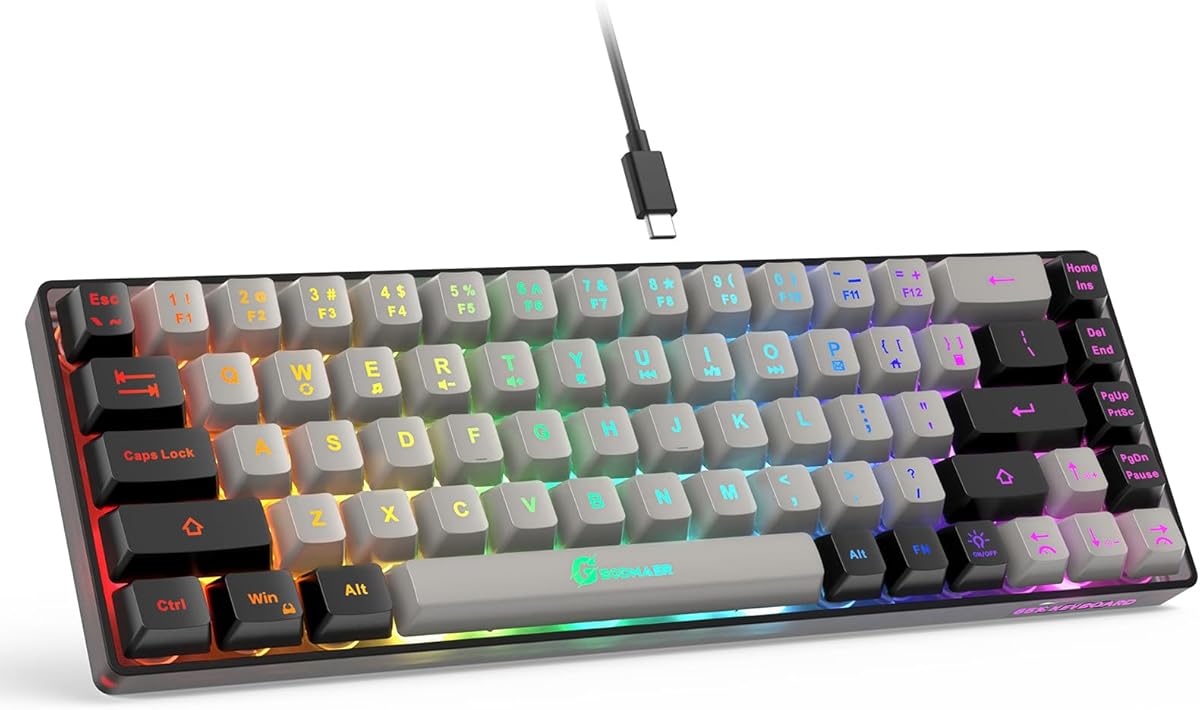
The GEODMAER 65% Gaming Keyboard is a compact 68-key board that keeps the arrow keys separate while removing the number pad. Its 4.3 rating makes it a practical choice for users who want more desk space than a full-size keyboard allows but still value dedicated navigation. The black and silver-gray design also fits a gaming setup without relying on conspicuous RGB effects.
We may earn a commission when you buy through this link, at no additional cost to you.
A detachable Type-C cable provides a stable wired connection and supports easy packing or replacement. The keyboard has 26-key no-conflict behavior, and the Windows keys can be locked with FN plus Win to prevent accidental activation during games. The listed working life of more than 10 million keystrokes and UV-treated keycaps are intended to support regular long-term use.
Backlighting includes always-on and breathing modes, brightness controls through FN plus the up and down arrows, and breathing-frequency adjustment through the left and right arrows. The transparent-luminescent key characters improve visibility in low light. Eleven media buttons add convenient control without taking up a full-size row of dedicated multimedia controls.
As a membrane-style board with imitation mechanical feel, it will not meet the expectations of users seeking genuine mechanical switch travel or tactile feedback. The 65% layout also compresses the function row, and removing the number pad can inconvenience spreadsheet and accounting workflows. For gamers and general users who prefer a compact footprint and quiet operation, however, the dedicated arrow cluster is a major strength.
The separate arrow-key cluster preserves direct navigation in a layout that omits the number pad. This makes the board more practical for gaming and navigation than ultra-compact designs that require layered key combinations.
The Type-C cable can be removed for easier storage or swapped when needed. Locking the Windows keys reduces accidental interruptions, while no-conflict operation supports simultaneous inputs during active play.
We may earn a commission when you buy through this link, at no additional cost to you.
The Redragon K633CGO-RGB is a 60% mechanical keyboard with 68 keys, including a separate arrow-key cluster. Its 4.6 rating reflects a strong combination of compact dimensions, hot-swappable red switches, RGB lighting, and programmable functions. It is a fitting choice for users who want a highly portable board that still provides direct arrow-key access rather than an abbreviated navigation layer.
We may earn a commission when you buy through this link, at no additional cost to you.
All 68 keys support no-conflict input, and the included red mechanical switches provide linear travel with a relatively smooth top-to-bottom feel that requires less force. Hot-swappable sockets allow compatible switch changes, making the keyboard easier to tailor. The distinctive black, white, and orange styling gives the board a more expressive appearance than many conventional office keyboards.
Multiple lighting effects, adjustable brightness, breathing speed, customized colors, and software-controlled backlight options are supported. Redragon's software also allows users to create modes, effects, macros, and custom keybindings for work or gaming. The included 2-in-1 USB-C cable has a USB-A adapter dongle, providing an efficient wired connection with minimal delay.
The principal compromise is the lack of a number pad, which may rule the keyboard out for heavy data entry. The programmable driver also cannot be used with Mac OS, although basic keyboard operation can be considered separately from software support. For Windows-oriented gamers and travelers who prioritize switches, RGB, programmability, and a compact 60% design, the K633CGO is a strong contender.
Hot-swappable sockets make it possible to change compatible mechanical switches without soldering. Combined with the small footprint, this gives mobile users a board that can be configured for personal feel rather than locked into one factory setup.
Redragon software expands the keyboard beyond its built-in lighting choices with custom effects, macros, and alternate bindings. The result is better suited to personalized gaming and productivity setups than a fixed-function membrane keyboard.
We may earn a commission when you buy through this link, at no additional cost to you.
The TMKB T68SE is a compact 68-key mechanical keyboard designed around blue tactile switches, a white 60% layout, and dedicated arrow and control keys. Its 4.4 rating makes it a strong choice for people who want pronounced feedback and a crisp sound in a portable gaming or typing board. The layout saves space without disguising the arrow keys behind secondary functions.
We may earn a commission when you buy through this link, at no additional cost to you.
The blue switches deliver a distinct tactile bump and audible click. That feedback can make each keystroke feel deliberate and satisfying, particularly for personal typing and gaming. Full key anti-ghosting is included to support smooth multi-key input, while the stepped keycap design is intended to improve comfort and reduce wrist strain over extended use.
The keyboard provides fixed-color LED illumination with 19 built-in modes and shortcut-based brightness and speed adjustments. Its transparent keycap lettering can produce either a mixed or single visible light effect depending on the received unit. The included power cord supports plug-and-play use, and the compact body makes the board easy to carry between home, school, or gaming setups.
Clicky blue switches produce more sound than quiet linear red switches or low-profile scissor keys, so they may not suit shared offices or late-night use. Compatibility is strongest on Windows, while Mac OS, Vista, and Linux are described as suitable for typing and office tasks. The one-year warranty and stated customer-support response provide additional reassurance, making the T68SE a compelling tactile mechanical option.
The blue tactile switches provide a clear bump during actuation and a crisp clicking sound. This makes the board particularly appealing to users who want a mechanical keyboard's feedback rather than the softer travel of a membrane or scissor model.
Dedicated arrow and control keys keep navigation visible in the 60% format. Users can move through documents, menus, and games without relying on a separate navigation pad or constantly invoking layered shortcuts.
We may earn a commission when you buy through this link, at no additional cost to you.
The most important decision is how the keyboard integrates arrow keys with the rest of its layout. Beyond that, connection type, switch behavior, lighting, size, and operating-system support will determine whether a model fits your daily work and gaming habits.
Full-size keyboards include a number pad, function row, navigation section, and separate arrow keys. A 75% layout removes some surrounding keys while usually retaining both the number row and arrows, making it a practical option for desks that need more function than a compact board can provide. A 65% design saves additional space and usually keeps separate arrows, while a 60% model is more portable but compresses the function row and omits the number pad. Buyers should examine the actual key arrangement rather than relying on the layout percentage alone.
Wired keyboards connect through USB and generally offer a straightforward setup with no battery management or receiver pairing. They are well suited to fixed desks and gaming setups, although the cable can limit how freely the keyboard is positioned. Wireless models offer a cleaner workspace and greater portability, but they require battery attention, occupy a USB port with a receiver, and may introduce a small degree of environmental variability. The Logitech K270 and Arteck 2.4G models are the wireless selections here, while the remaining choices use wired connections.
Mechanical switches provide more pronounced travel and individual key character. The Redragon options use quiet linear red switches, while the TMKB uses clicky blue tactile switches. Membrane and imitation mechanical designs generally operate quietly and require less force, making them approachable for office and shared-space use. Scissor-switch keyboards, such as the Logitech K120 and Arteck models, deliver low-profile, familiar laptop-style typing. The right choice depends on whether you value feedback, sound level, key height, or a familiar feel.
Backlighting improves key visibility in dim environments and can also contribute to a gaming aesthetic. The Arteck Backlit USB model offers seven colors and three brightness levels, the GEODMAER 104 includes constant and breathing modes, and the Redragon models support more elaborate RGB effects. The TMKB provides 19 lighting modes but a fixed color. Buyers who only need visibility should avoid paying attention to animated effects, while enthusiasts may prioritize per-zone or software-controlled customization.
Programmable functions can remap keys, create shortcuts, or automate repetitive tasks. The Redragon K628 and K633CGO support macro and lighting customization through their supporting software. The GEODMAER models take a simpler approach with onboard media controls, anti-ghosting behavior, and Windows-key locking. Anti-ghosting is especially relevant during gaming because it helps the keyboard register several simultaneous commands correctly. If macros are essential, verify operating-system support before buying, since the K633CGO's programmable driver does not support Mac OS.
Comfort is affected by key height, switch travel, keycap shape, and the angle of the keyboard. The Lenovo 300 has adjustable tilt, while the Arteck and Logitech models use low-profile keys that keep the typing surface close to the desk. Redragon and TMKB mechanical boards provide more conventional travel and can suit users who prefer a pronounced keystroke. Try to maintain a neutral wrist position and avoid placing a compact keyboard too close to the edge of the desk, especially if you use the arrow cluster frequently.
A keyboard used daily should be sturdy enough for regular transport and long work sessions. The Logitech K120 and Lenovo 300 include spill-resistant designs, while the Arteck 2.4G model uses a stainless-steel upper surface for a heavier feel. Mechanical boards may use more robust switch sockets, and the Redragon K628 allows compatible switches to be replaced. Spill resistance is useful insurance in busy offices, but no keyboard should be treated as waterproof. Always disconnect and clean the device if liquid reaches it.
Basic typing layouts are broadly compatible, but wireless receivers and advanced software can be platform-specific. The Logitech K270 is explicitly designed for Windows, and the Redragon K633CGO's programmable software does not support Mac OS. The Arteck 2.4G keyboard is described for Windows systems and compatible devices such as PCs, laptops, and smart TVs. The TMKB is primarily intended for Windows, with Mac, Vista, and Linux support described for typing and office tasks. Check both your operating system and the features you expect to use, not just whether the keyboard can send basic keystrokes.
Begin by placing the keyboard directly in front of the monitor with the arrow keys under your right hand. For compact layouts, keep the entire board close enough to reach the arrow cluster without stretching your shoulders. Adjust the tilt feet or rear support to maintain neutral wrist alignment, and avoid placing the keyboard on a soft surface that can block ventilation or contribute to accidental spills.
For wired models, connect the USB cable directly to the computer and wait for the system to recognize the keyboard. Wireless models require their receiver to be inserted into a compatible USB port, after which the keyboard can be paired according to its supplied instructions. If you plan to use backlighting, macros, media shortcuts, or anti-ghosting modes, install the relevant software and set the options before starting an important work or gaming session.
Keep the keyboard dry and clean, using a soft microfiber cloth for the surface and a soft brush between the keys. Avoid spraying cleaner directly onto the keyboard, and do not pull the cable sharply from the USB port. Mechanical users should keep the board in its case or on a stable surface when changing hot-swappable switches. Recharge wireless models according to the manufacturer's guidance, and remove batteries or the charging connection for long periods of storage.
A full-size layout offers the most surrounding function because it includes a number pad, navigation section, and separate arrow cluster. A 75% board is a strong compromise because it usually retains both the number row and arrows. A 65% layout can also preserve dedicated arrows while reducing bulk, whereas 60% boards offer the greatest portability but compress or remove more keys.
Yes, some 60% keyboards include separate arrow keys, as the Redragon K633CGO and TMKB T68SE do in this roundup. The arrow cluster is simply integrated more closely with the lower-right edge of the compact layout. Verify the key arrangement in the product image, because some 60% models replace arrows with alternate functions.
Mechanical keyboards can be advantageous for gaming because they offer distinct switch feedback, consistent construction, and sometimes hot-swappable sockets. The best choice depends on switch type, since clicky blue switches produce more noise while quiet linear red switches are often preferred for shared or late-night environments. Membrane options can still work well when reliable anti-ghosting and straightforward controls are the priority.
A wired keyboard is usually simpler for a fixed desk because it needs no battery charging or receiver management. Wireless models provide a cleaner workspace and are easier to reposition, although they occupy a USB port with their receiver and depend on battery life. Gaming users may favor wired operation, while office users may appreciate the freedom to move the keyboard around.
Hot-swappable keyboards use sockets that let compatible mechanical switches be removed and replaced without soldering. This makes it easier to change the feel or sound of individual keys and to replace a damaged switch. It is most relevant to mechanical keyboard owners who expect to customize or maintain their board over time.
Yes, many membrane and scissor-switch keyboards include a separate arrow cluster just like mechanical models. The GEODMAER 65% Gaming Keyboard, Logitech K120, Lenovo 300, and Arteck models in this guide all provide dedicated arrow keys. Their switch action differs from mechanical keyboards, but the physical navigation layout is just as direct.
Backlighting is not necessary for arrow-key access, but it makes the key positions easier to identify in dim rooms. It can be particularly useful during gaming or late-night work. If lighting is important, compare simple brightness controls, multiple colors, breathing effects, and full RGB software rather than assuming every backlit keyboard offers the same level of customization.
Keep the keyboard in a stable position and use the arrow cluster deliberately rather than resting your palm on it. Some gaming keyboards, including the GEODMAER models, offer a Windows-key lock that can reduce accidental interruptions, but that feature does not disable the arrow keys. Proper hand placement and a clean key area remain the most effective protections.
The Redragon K628 Pollux is the strongest overall option because it combines dedicated arrow keys, a useful 75% layout, quiet mechanical switches, hot-swappable sockets, and extensive RGB customization. The Logitech K120 is the best budget and simplicity choice, while the Arteck 2.4G Wireless stands out as the premium pick for a slim full-size layout, rechargeable battery, and cable-free operation.
Your priorities should determine the remaining choice. Select the Logitech K270 for long-battery wireless convenience, the Arteck Backlit USB for adjustable office lighting, the GEODMAER 104 Keys for full-size gaming controls, or the Lenovo 300 for adjustable tilt and spill resistance. Compact buyers can consider the GEODMAER 65%, Redragon K633CGO, or TMKB T68SE, depending on whether they prefer membrane behavior, RGB programmability, or clicky mechanical feedback.
Before ordering, confirm the physical layout, operating-system support, switch type, connection method, and lighting features against your actual needs. Amazon listings, ratings, availability, and prices can change, so check the current product page and recent customer feedback at the time of purchase to make the most informed final choice.