
HP Chromebook 14 x360 Plus
4.2Editor score
Flexible 360-degree convertible design
Crisp 1920 by 1200 touchscreen
Modern Wi-Fi 6 connectivity
MacBook alternatives have become an increasingly practical choice for students, families, travelers, and professionals who want capable laptops without committing to Apple's ecosystem. The strongest alternatives balance portability, battery life, keyboard quality, display clarity, and enough processing power for everyday work.
We compared ten options spanning ChromeOS and Windows, including traditional clamshell laptops, touch-screen convertibles, and premium systems for demanding users. The evaluation focuses on processor capability, memory, storage, screen specifications, connectivity, portability, and the features that distinguish each device in real daily use.
Each review shows where a model excels, which compromises deserve attention, and whom it is best suited for. The list includes affordable Chromebooks, full Windows laptops, renewed premium machines, and even a current MacBook for buyers whose priority is Apple's software experience rather than a different platform. Prices can change.
4.2Editor score

4.4Editor score

4.4Editor score
As an Amazon Associate we earn from qualifying purchases.
The table below compares all ten featured laptops across processor, memory, storage, display, operating system, and major feature differences. It is designed to make platform differences and configuration trade-offs clear before deeper individual reviews.


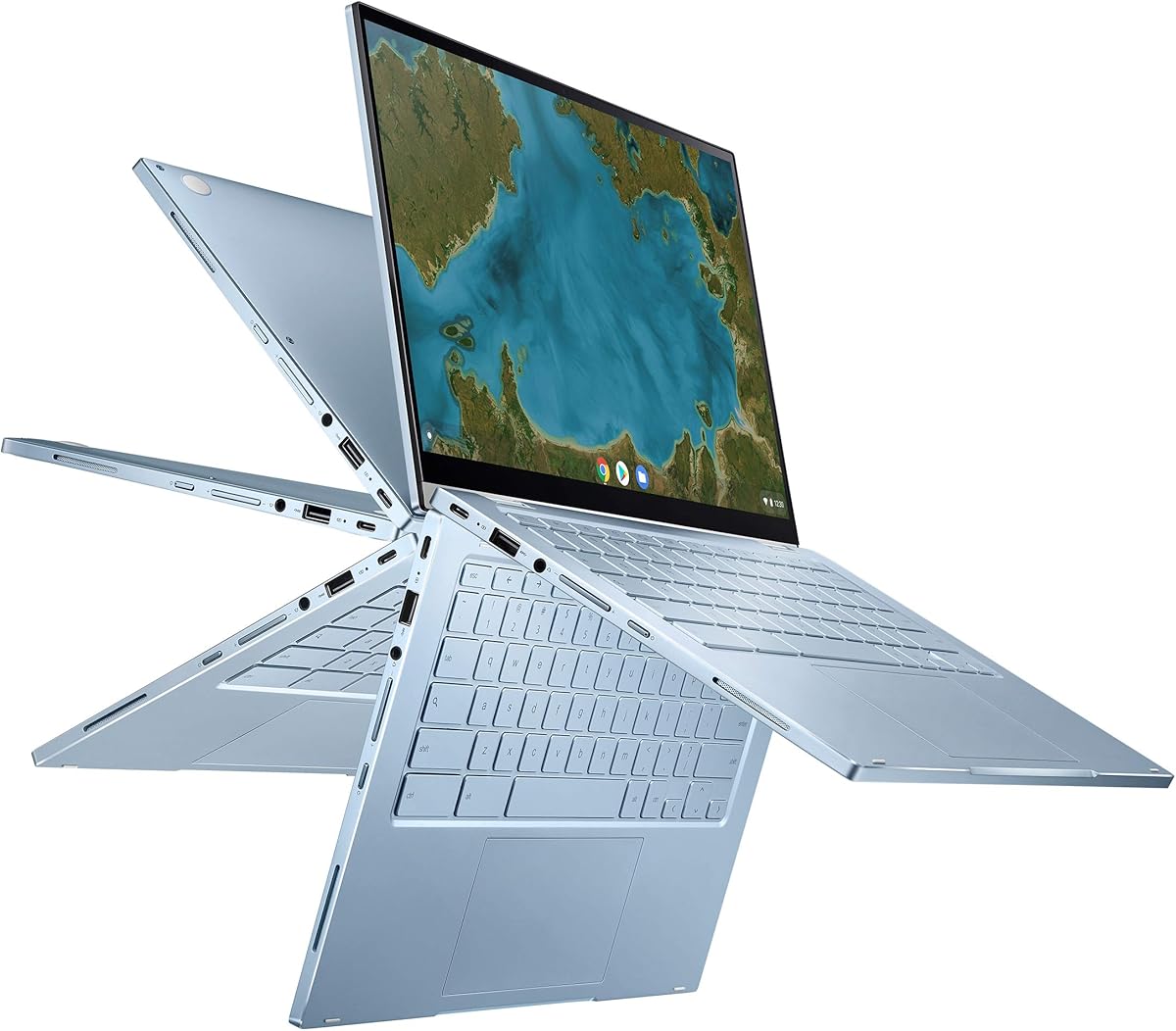


The HP Chromebook 14 x360 Plus earns a 4.2 rating and stands out as a flexible, approachable alternative to a conventional MacBook. Its main attraction is the 360-degree hinge, which changes a standard laptop into tent, stand, or tablet configurations. That versatility makes it useful for classes, browsing, streaming, video calls, reading, and light creative work.
We may earn a commission when you buy through this link, at no additional cost to you.
The 14-inch WUXGA touch display offers a 1920 by 1200 resolution, narrow bezels, 300-nit brightness, and an anti-glare coating. That combination is particularly sensible for students and home users who may use the computer near windows or for long reading sessions. Inside, the Intel N150, 4GB of LPDDR5 memory, 128GB of UFS storage, and Intel UHD Graphics target everyday rather than intensive computing.
Connectivity is stronger than the entry-level specifications might initially suggest. The notebook includes USB-C, USB-A, a combined audio jack, Wi-Fi 6, and Bluetooth 5.4. Its FHD camera uses temporal noise reduction for video calls. The principal compromises are the modest 4GB memory and 128GB local storage, which leave less headroom for intensive applications or a large offline media library.
This is a strong recommendation for students, families, travelers, and anyone seeking a durable touchscreen laptop without paying for a high-performance Windows system. It is less appropriate for advanced software, demanding games, or heavy multitasking. Buyers should also note the disclosure that the computer was resealed to upgrade its system and includes a one-year HP warranty on remaining components.
The rotating hinge lets the display become a tent for presentations, a stand for watching, or a tablet for touch interaction. This makes the machine more versatile than a basic ChromeOS laptop without adding substantial bulk.
ChromeOS, cloud backup, Google Assistant, and automatic updates suit users who spend most of their time in browsers, Google Workspace, streaming services, and other cloud-connected applications.
We may earn a commission when you buy through this link, at no additional cost to you.
The ASUS Chromebook Flip CX1 carries a 4.3 rating and offers a balanced mix of screen quality, memory, portability, and conversion. Its Intel Celeron N4500 is intended for everyday productivity rather than demanding software, but the inclusion of 8GB RAM gives it more breathing room than many similarly positioned Chromebooks. It is a sensible middle ground for web-heavy users.
We may earn a commission when you buy through this link, at no additional cost to you.
The 14-inch 1920 by 1080 NanoEdge display is crisp and supports 360-degree conversion into clamshell, tent, stand, and tablet modes. At 3.59 pounds, the laptop is light enough for regular transport, while a MIL-STD 810H-rated construction adds confidence for school and travel. The advertised battery life reaches up to 11 hours depending on working conditions.
Port selection is another strength. Two USB 3.2 Gen 1 Type-C ports, two Type-A ports, a microSD reader, and audio connections cover common accessories. Wi-Fi 6 and Bluetooth 5.2 handle wireless connections, while ChromeOS includes automatic updates and the ability to work with Microsoft Office files through Google applications. The bundle also includes a limited Google One AI Premium plan.
Choose the CX1 if you want a full-HD convertible, a generous 8GB memory configuration, and a long-lasting ChromeOS device for school or work. It may not satisfy power users who routinely run intensive desktop applications, and the 128GB eMMC is limited for storing large files locally. The included subscription benefit is temporary rather than permanent.
The 8GB of RAM is one of the CX1's most important advantages. It supports smoother browser use and light multitasking when compared with systems equipped with only 4GB.
The mix of Type-C, Type-A, audio, and microSD connections reduces the need to carry adapters for common peripherals, storage cards, displays, and charging.
We may earn a commission when you buy through this link, at no additional cost to you.
The Samsung Galaxy Book4 earns a 4.4 rating and is the strongest all-around Windows option in this guide. Unlike a Chromebook, it can run a broad range of desktop applications within Windows 11 Home. The 10-core Intel Core 7 150U processor, 16GB of memory, and 512GB NVMe SSD provide a much more substantial foundation for multitasking and mixed workloads.
We may earn a commission when you buy through this link, at no additional cost to you.
Its 15.6-inch 1920 by 1080 IPS panel delivers 300 nits, 100% sRGB color coverage, an anti-glare finish, thin bezels, and a standard 60Hz refresh rate. That makes it useful for document work, presentations, media consumption, and color-sensitive tasks. A backlit keyboard, fingerprint reader, numeric keypad, webcam, speakers, and digital microphone make the laptop particularly business-friendly.
The interface is well equipped for a work device. It includes Wi-Fi 6E, Bluetooth 5.1, gigabit Ethernet, HDMI, USB-A, USB-C, a memory-card reader, a combo audio jack, and a separate power connection. It weighs 3.46 pounds and includes a 54.4Wh battery rated for up to 12 hours in non-gaming use. The upgrade to 16GB DDR4 and 512GB storage makes it especially appealing to buyers who need more than a basic web machine.
The Galaxy Book4 is our recommendation for professionals, students, and families who want MacBook-like build quality and display polish with full Windows flexibility. The trade-off is its larger 15.6-inch footprint, and the 60Hz panel will not satisfy buyers seeking a very smooth high-refresh display. Even so, its combination of processing power, memory, storage, and connectivity is excellent.
The principal advantage over a Chromebook is compatibility with conventional Windows software. That matters for specialized business tools, creative utilities, and users who depend on a familiar desktop workflow.
With 16GB of RAM and a 512GB NVMe drive, the system provides much more capacity for open applications, browser tabs, project files, and software that does not depend on cloud-only access.
We may earn a commission when you buy through this link, at no additional cost to you.
The Google Pixelbook Go has a 4.2 rating and remains an attractive choice for buyers who prioritize portability above cutting-edge performance. It weighs barely 1 kilogram and measures only 13 millimeters thick, making it one of the easiest laptops in the guide to carry between classes, offices, meetings, and coffee shops.
We may earn a commission when you buy through this link, at no additional cost to you.
The supplied information highlights up to 12 hours of battery life and up to two hours of use after a 20-minute charge. An eighth-generation Intel Core processor supports ChromeOS applications, while automatic system updates, built-in antivirus protection, and a Titan C security chip reinforce the platform's straightforward and secure design. The keyboard is backlit, and the Hush Keys reduce typing noise.
Its fanless construction can remain cool during use and is particularly comfortable on a lap. The 13.3-inch touch display offers up to 8.3 million pixels, while dual stereo speakers cover music, video, and calls. A spacious, accurate touchpad adds polish to a laptop whose central advantage is easy portability. The conventional clamshell design, however, means it cannot rotate into tablet, tent, or stand modes.
The Pixelbook Go is best for travelers, students, and readers who need a light ChromeOS device for browsing, writing, streaming, and video communication. Its age is the main concern: the eighth-generation processor may feel less capable beside newer systems, especially for many simultaneous tabs. Buyers comfortable with the platform and focused on mobility will still find the combination of weight and battery life difficult to beat.
A weight of barely 1 kilogram and a 13-millimeter thickness reduce the physical burden of carrying the device. This is a major advantage over larger Windows alternatives in the list.
Automatic updates and integrated security tools reduce the need for manual system administration. The result is a predictable platform centered on browser-based work.
We may earn a commission when you buy through this link, at no additional cost to you.
The Lenovo Flex 14 carries a 4.4 rating and offers a compelling mix of Windows flexibility, convertible design, and useful accessories. Its 14-inch 1920 by 1080 touchscreen can serve as a laptop, tablet, or display-oriented device, making it a more versatile choice for students and creative users than a standard clamshell notebook.
We may earn a commission when you buy through this link, at no additional cost to you.
The AMD Ryzen 5 3500U processor and Radeon Vega 8 graphics support work, streaming, gaming, and photo or video editing, while 12GB of DDR4 memory provides better multitasking headroom than most entry-level Chromebooks. A 256GB NVMe SSD offers a useful balance of capacity and speed. The included active pen allows direct drawing and note-taking on the touch display.
Privacy receives thoughtful attention through a physical block that closes the webcam. The system also includes HDMI, USB-C, and USB 3.1 inputs, along with Windows 10 protection against viruses, malware, and ransomware. Battery life is advertised at up to 10 hours, with recharge technology able to bring the computer to 80% in one hour.
The Flex 14 is a good fit for students, note-takers, and home users who want Windows software without giving up a touchscreen. It is less attractive for buyers who need the newest Windows release, the most advanced mobile processor, or large local storage. Its major advantage is the combination of an included pen, privacy shutter, and capable 12GB memory configuration.
The bundled active pen makes the touch display more practical for handwritten notes, sketches, and annotation. It adds value for users who frequently review documents or study from printed material.
A physical webcam shutter provides straightforward control over the camera, while the convertible chassis allows several viewing arrangements for work and entertainment.
We may earn a commission when you buy through this link, at no additional cost to you.
The ASUS Chromebook Flip C433 has a 4.3 rating and is a compact 2-in-1 for buyers who want a full-HD touch display in a relatively portable enclosure. Its 14-inch 1920 by 1080 NanoEdge screen uses exceptionally thin bezels, allowing the larger display to fit within a body closer to a 13-inch laptop.
We may earn a commission when you buy through this link, at no additional cost to you.
A durable 360-degree hinge supports tent, stand, and tablet positions in addition to normal laptop use. The Intel Core m3-8100Y processor is promoted for responsive everyday performance, while 8GB of LPDPR3 memory is useful for numerous browser tabs and lightweight app use. ChromeOS adds quick startup, automatic updates, and built-in virus protection.
Connectivity is intentionally streamlined but adequate. There are two USB Type-C ports and one USB Type-A port, while a backlit chiclet keyboard makes the system easier to use in dim conditions. Storage is the clearest limitation: 64GB of eMMC is modest, especially for users who want large media libraries or offline project files available without relying on cloud storage.
The C433 is best for students, travelers, and web-focused users who prioritize a sharp touchscreen, convertible flexibility, and a small footprint. It is less suitable for those needing substantial local storage or more demanding software. Its 8GB memory helps it remain a capable everyday Chromebook, but a larger storage option would make it more versatile.
The five-millimeter side bezels make the 14-inch screen appear larger while helping the chassis remain portable. That balance is particularly useful for students carrying a computer between classes.
The durable hinge allows the screen to rotate into several positions. This makes the C433 useful for typing, touch interaction, presentations, media viewing, and propped-up use.
We may earn a commission when you buy through this link, at no additional cost to you.
The Lenovo Flagship Chromebook has a 4.2 rating and focuses on portability, a sharp display, and online-learning features. At 2.86 pounds, it is among the lighter full-size options here, while the 14-inch 1920 by 1080 IPS touchscreen provides clear visuals and wide viewing angles for shared study spaces.
We may earn a commission when you buy through this link, at no additional cost to you.
Its MediaTek Kompanio 520 processor is described as an eight-core chip with four performance-oriented and four efficiency-oriented cores. The combination is designed to balance everyday responsiveness with battery-conscious operation. Paired with ChromeOS, 4GB of RAM, and 64GB of eMMC storage, it is best suited to browsing, Google Classroom, video calls, documentation, and streaming.
The webcam includes a physical privacy shutter and a dual-array microphone. Connectivity consists of one USB-A port, one USB-C port, a microSD card reader, and a headphone-microphone combination jack, with Wi-Fi 6 and Bluetooth 5.1 for wireless use. The Abyss Blue finish gives the slim enclosure a distinctive appearance, although 4GB of memory limits heavy multitasking headroom.
This Chromebook is a sensible recommendation for students, remote learners, and families seeking a light computer for classes and everyday browsing. It is not the right choice for users with large offline libraries or demanding desktop applications. Buyers who can accept cloud-centered storage will find it particularly easy to carry and use.
The listed support for online classes, Google Classroom, remote learning, and Zoom-style communication makes the design especially relevant to students. Its light weight also reduces fatigue during long school days.
The physical webcam shutter provides a simple way to prevent unwanted camera capture. IPS technology also makes the display more practical for collaborative viewing from different angles.
We may earn a commission when you buy through this link, at no additional cost to you.
The Apple MacBook Neo has the highest rating in the guide at 4.6 and provides a compact, current alternative for buyers who want the macOS experience without choosing a larger premium MacBook Pro. Although it is an Apple product rather than a conventional third-party alternative, it deserves inclusion because many people searching for alternatives still prefer Apple's software integration.
We may earn a commission when you buy through this link, at no additional cost to you.
The A18 Pro chip, Apple Intelligence features, 8GB of unified memory, and 256GB SSD form a modern configuration for everyday assignments, browsing, presentations, media, and general creative work. The supplied information emphasizes running common macOS applications quickly, along with tools for summarizing notes, writing, and expressing ideas. These capabilities make the laptop particularly relevant to students already invested in the Apple ecosystem.
Its 13-inch Liquid Retina display supports one billion colors, and the system includes a 1080p FaceTime HD camera, dual-microphone array, and side-firing speakers. The aluminum enclosure is advertised as durable and contains 60 percent recycled material by weight. Battery life reaches up to 16 hours under stated conditions, making the compact design attractive for long school or work sessions.
The MacBook Neo is best for users who prioritize Apple Intelligence, iPhone integration, macOS, and portability. Its 8GB memory and 256GB storage are modest for buyers planning demanding software or large local project libraries. It is therefore more compelling for general productivity than intensive professional workloads. For anyone seeking a true non-Apple alternative, the Galaxy Book4 or Flex 14 is the more relevant choice.
The system is built around Apple Intelligence and integration with iPhone, including continuity features for messages, calls, photos, and moving work between devices. These benefits are most meaningful within Apple's ecosystem.
The compact aluminum body and advertised battery life of up to 16 hours make the notebook practical for commuters and students. It offers the convenience of a smaller device without giving up a high-resolution display.
We may earn a commission when you buy through this link, at no additional cost to you.
The renewed 14-inch MacBook Pro with M1 Max earns a 4.4 rating and represents the premium choice in this guide. Its 64GB of unified memory and 2TB SSD are unusually generous specifications, while the M1 Max chip provides the processing and graphics foundation for demanding creative work, complex multitasking, and large professional workflows.
We may earn a commission when you buy through this link, at no additional cost to you.
The combination is particularly compelling for users who routinely work with high-resolution media, large project files, multiple applications, or virtualized workloads. The 14-inch form factor is larger and more substantial than the ultraportable models in the list, but it provides a more premium working environment for extended sessions. This is a performance-oriented alternative for buyers who need professional capability rather than merely a different operating system.
As a renewed product, it has been professionally inspected, tested, and cleaned by Amazon-qualified suppliers. The listing says there should be no visible cosmetic imperfections when viewed from arm's length, the battery should retain more than 80% of its original capacity, and accessories may be compatible but not original. It may arrive in generic packaging and is eligible for replacement or refund within 90 days of receipt.
The MacBook Pro M1 Max is recommended for demanding creatives, developers, professionals, and well-funded users who prioritize memory, storage, and processing power. Renewed-condition variability is the principal concern, so careful review of the seller's condition details and return terms is essential. For lighter work, the much more affordable MacBook Neo or Samsung Galaxy Book4 will be more proportionate choices.
The 64GB unified memory configuration can support demanding applications and serious multitasking without relying on the tight limits associated with entry-level laptops. The 2TB SSD provides ample room for large project libraries and local media.
Professional inspection and testing add confidence, while the stated battery-capacity and cosmetic standards make the condition more transparent. Buyers should still review the return policy, included accessories, and warranty information before purchasing.
We may earn a commission when you buy through this link, at no additional cost to you.
The renewed 15-inch MacBook Pro with a 2.6GHz Intel Core i7 has a 3.7 rating, making it the lowest-rated product in the list. It nevertheless offers a recognizable combination of a large traditional MacBook Pro form factor, 16GB of memory, and 512GB of storage, which may appeal to buyers seeking a familiar Apple design without a premium M1 Max configuration.
We may earn a commission when you buy through this link, at no additional cost to you.
Its Intel Core i7 processor provides a familiar platform for compatible macOS applications, while the 16GB memory configuration is more generous than the entry-level alternatives included here. The 512GB drive offers useful capacity for documents, media, and locally installed software. Its larger body is better suited to desk-based use, extended document work, and users who prefer more screen space than ultraportables provide.
The supplied product information contains an inconsistency: the product title identifies a 15-inch MacBook Pro, while the only supplied display feature refers to a 13.3-inch Retina display. Buyers should therefore verify the actual screen size and resolution with the seller before purchasing. The listing also marks the computer as renewed, which means condition, battery health, included accessories, and warranty coverage should be confirmed carefully.
This model makes the most sense for an Apple loyalist who values a large screen, 16GB of memory, and local storage but does not need M1 Max-level performance. Its lower rating and older processor generation make it less attractive as a first choice. Verify the display discrepancy and renewed condition, and compare it carefully with modern Windows alternatives that offer newer hardware.
The traditional MacBook Pro shape provides a large workspace and a familiar keyboard-and-trackpad arrangement. It is likely to appeal to users accustomed to Apple's desktop conventions.
The title and supplied display feature do not agree on screen size. Confirming the actual panel, along with battery and cosmetic condition, is especially important for a renewed computer.
We may earn a commission when you buy through this link, at no additional cost to you.
The most suitable alternative depends on software needs, portability, display quality, memory, and the type of work you perform. Consider the complete workflow rather than comparing processor specifications alone.
Choose the platform that already supports your required applications. Avoid choosing solely by operating-system reputation if specialized software is central to your work.
Use a mainstream processor for ordinary office and study work. Choose a more powerful one for heavy multitasking, specialized applications, large files, or sustained creative workloads.
Prefer at least 8GB for regular multitasking, and choose sufficient local storage for files that must remain available offline. Extra memory matters most on Windows and macOS systems.
Prioritize a sharp, comfortable display for daily work. Add a convertible hinge only when its alternate positions will genuinely improve your workflow.
Consider both weight and real-world endurance together. A large battery cannot fully compensate for a chassis you dislike carrying, while a highly portable computer is more useful when it can last through the day.
Inventory the peripherals you already own before buying. Full-size USB-A and HDMI can prevent adapter clutter, while a single-port design may be acceptable for users who already travel with a docking solution.
Look for automatic protections, convenient privacy controls, and understandable support terms. A renewed purchase should be evaluated as carefully as its specifications.
Start by signing into the operating system, connecting to Wi-Fi, and confirming that system updates are enabled. On a Chromebook, confirm that the Google account intended for school or work is active and that important files are synchronized to the appropriate cloud account. On Windows and macOS, complete the operating system's setup screens, review privacy settings, and make sure the backup destination is correct before storing important files.
For a convertible model, use the included pen only when the manufacturer lists it as compatible, and gently clean the touch surface with a soft microfiber cloth. Avoid placing pressure against a rotated display or using sharp objects on the panel. Keep liquids away from the keyboard, ports, and touchscreen, and use a padded sleeve or protective case when transporting the computer. Closed notebooks should not be placed inside a tightly packed bag without protection.
For battery health, reduce unnecessary background activity, use a reasonable screen brightness, and avoid leaving the computer exposed to excessive heat. Charge with the intended adapter and follow the manufacturer's guidance for storage when the device will remain unused. For renewed machines, photograph the condition and accessories on arrival, test the camera, keyboard, touchpad, display, ports, and battery behavior, and save the relevant warranty and return information before the return window closes.
The best alternative depends on whether you prioritize value, Windows compatibility, portability, or Apple's ecosystem. The HP Chromebook 14 x360 Plus is a flexible option for web-centered work, while the Samsung Galaxy Book4 is stronger for conventional Windows applications. The MacBook Neo is the most relevant choice for buyers who still want macOS and Apple Intelligence.
Yes, when your work is primarily browser-based. Chromebooks support Google applications, streaming, video calls, research, writing, and many cloud-connected services with automatic updates and integrated security. They are less suitable when you depend on specialist Windows or macOS applications, intensive creative software, or large libraries of locally stored files.
Eight gigabytes is a sensible minimum for regular browser use and light multitasking, especially in ChromeOS. Sixteen gigabytes provides more comfort in Windows or macOS when you keep many applications, large documents, communication tools, and background services open. Choose the larger amount when software demands or your workflow consistently involve heavy multitasking.
A renewed MacBook Pro can provide strong specifications at a lower cost when the condition and return terms are clear. In this guide, the M1 Max model has been professionally inspected and tested, with a stated battery capacity above 80% and a 90-day replacement or refund option. You should still verify cosmetics, accessories, screen condition, battery behavior, and warranty coverage.
It depends on where and how you use the computer. Battery life and portability dominate for travel, classes, and remote work, while processor power matters more for complex applications, large files, and sustained multitasking. A good compromise is a modern efficient processor, at least 8GB of memory, and a display and chassis you will be comfortable carrying.
Not if you mostly type documents, browse, or use conventional desktop applications. A convertible becomes more valuable for handwritten notes, drawing, presentations, media viewing, and flexible screen positioning. If those features will be used regularly, the hinge and included stylus can justify the design; otherwise, a lighter clamshell may be more practical.
The ASUS Chromebook Flip CX1 listing specifically states that Microsoft Office files can be edited, downloaded, and converted through Google Docs, Sheets, and Slides. As with any cloud-based workflow, internet access and account settings affect the experience, so keep local copies of critical documents and verify compatibility before relying on a particular editing feature.
The 64GB models in this guide are best for users who keep most files in the cloud, while 128GB offers a little more freedom. A 256GB drive is more comfortable for applications, media, and offline documents, and 512GB suits professional workflows. You should also consider whether the platform and your storage habits make upgrading practical before purchasing.
The HP Chromebook 14 x360 Plus is the top budget recommendation because it combines a flexible 360-degree hinge, a sharp anti-glare touch display, and modern wireless connectivity. The Samsung Galaxy Book4 is the Editor's Choice for buyers who want full Windows software, a capable 10-core processor, 16GB of memory, and a 512GB SSD in a polished business laptop.
For premium requirements, the renewed MacBook Pro with M1 Max offers exceptional memory and storage, while the MacBook Neo provides a more compact path into the Apple ecosystem. Before choosing, prioritize the software you need, the amount of multitasking you perform, and how much you value portability. A larger display or faster processor is only worthwhile when your regular tasks benefit from it.
Finally, check current prices and availability before purchasing, because promotions and configurations can change. Review the product details, upgraded specifications, seller information, warranty, and return terms carefully, especially for renewed machines. The right MacBook alternative is the one that fits your workflow, stays comfortable to use, and offers the features you will actually rely on each day.